You are looking for CapCut alternatives for a very specific reason, and it is almost never the quality of the editing. A feature you used without thinking now shows a little crown. An export asks for a paid account. Or you opened the terms of service page and wondered whether your client footage really belonged there. The trigger is a disappointment, never a feature table.
This article does not claim to have benchmarked nine tools under conditions nobody could reproduce. It is a map of use: for each tool, who it suits, what it really does, and above all what it asks you to accept in return. That last column is the one rankings forget, and it is the one that decides whether you are still using the tool in three months. If you first want to know what the original editor is still worth, our detailed CapCut review answers that separately.
The short answer
There is no single best CapCut alternative. There are two families of tools, and your choice is settled before you compare a single feature. If you already film, any serious editor will do the job, and the real criteria become caption accuracy, timeline precision and export terms. If you do not film, switching editors fixes nothing: your problem is not editing, it is having nothing to edit. You then need a studio that creates the shots before assembling them, which is what the EasyVids creation studio does. The nine tools below are sorted along that line.
The question that decides, before any comparison
Every tool listed here belongs to one of two families, and the border does not sit where comparisons usually draw it. On one side, editors. They transform material you bring in: a shoot, photos, a screen recording, an audio track. Cutting, snapping to the beat, captioning, removing a background, reframing, cleaning up sound. Every one of those actions applies to a file you already own.
On the other side, creation studios. They build that material from a text, then let you edit it. That second aisle splits further, and our map of the seven families of AI video generators spells out what each one actually delivers, from a single shot to a finished video. The two families have borrowed heavily from each other in recent years, which is exactly what muddles the comparisons you read. An editor that adds assisted background removal is still an editor: it will never produce the shot you did not film.
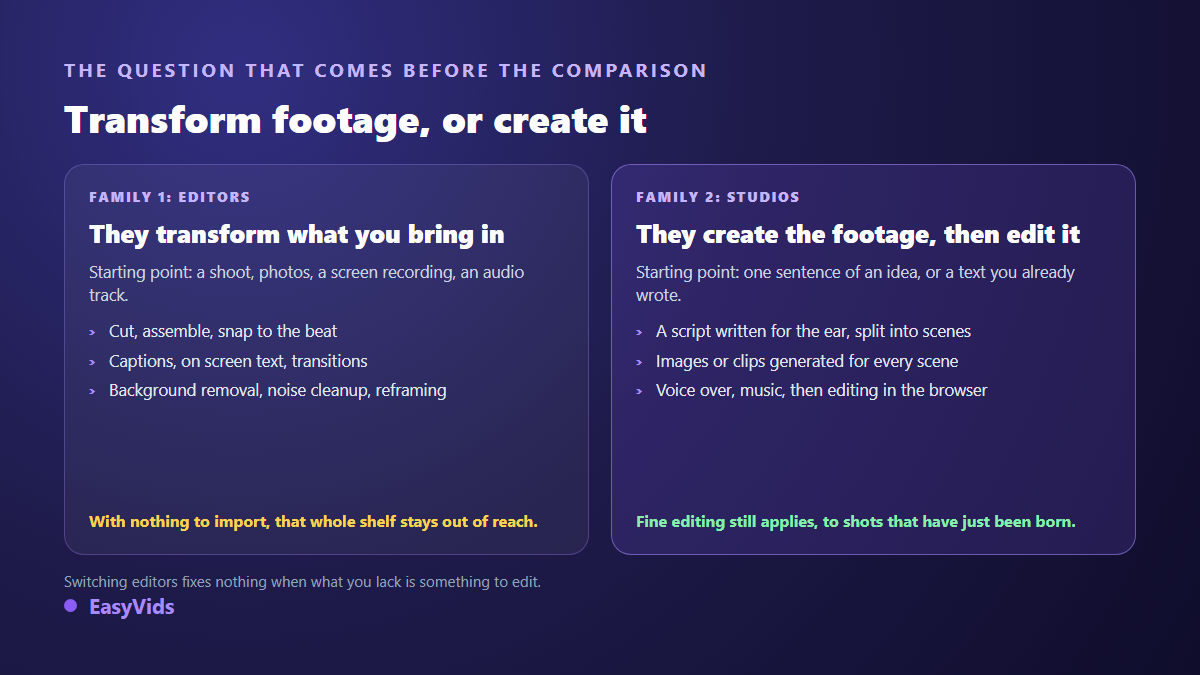
So ask the question in this order. Does your video already exist somewhere, in pieces, on a memory card or in a phone camera roll? Or does it have to be brought into existence? Many people trying to leave CapCut pick the wrong shelf because of this confusion. They end up with one more editor, and the thing that made them leave is still there.
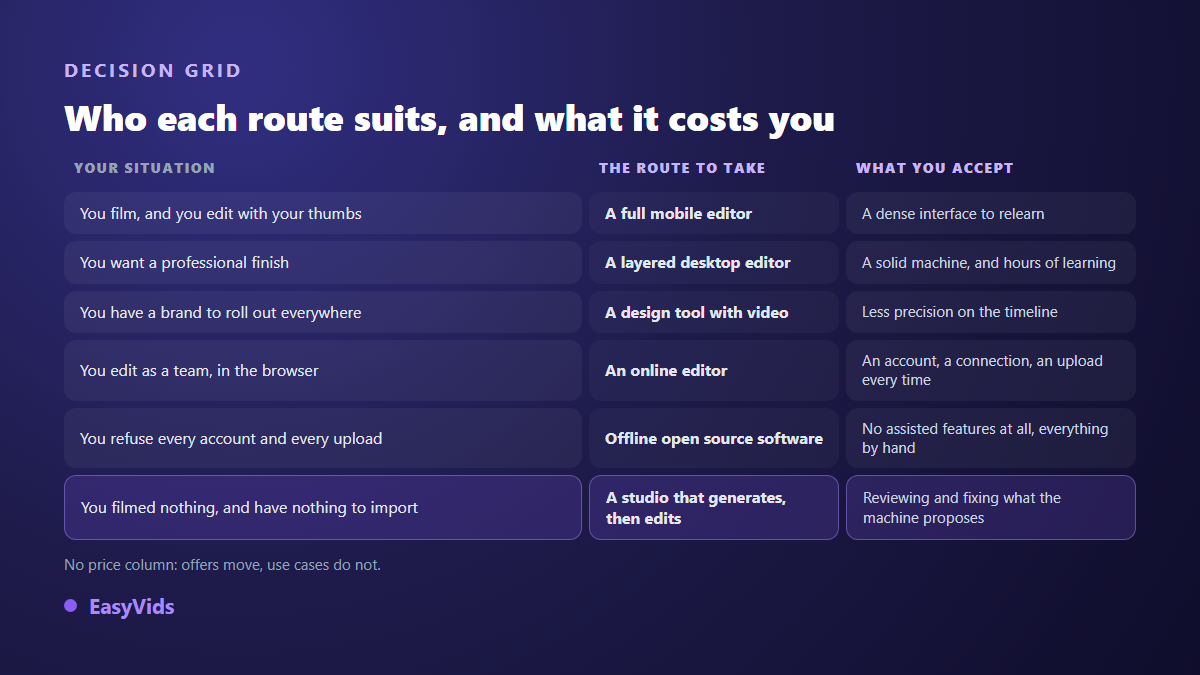
The nine CapCut alternatives, and who each one is for
One note on method, because it changes the value of what follows. You will find no score out of ten here and no render time measured with a stopwatch. Those numbers expire within one update cycle, and nobody can reproduce them at home. What follows describes the nature of each tool, its starting point and its operating model, all of which move far more slowly than feature lists.
A word on free and paid, too. That border moves at every consumer editor, several times a year, and it is not identical across operating systems, app versions and account countries. No article can give you an exact picture, this one included. The only document that counts is the plan comparison each vendor publishes on its own site, on the day you sign up. What follows is structural, not commercial.
1. EasyVids: when the video does not exist yet
Who it suits. You start from an idea, a text, a product sheet or a script, with no footage and no stock library. That is the situation of faceless channels, training videos, product presentations and illustrated stories. The studio writes the script for the ear, splits it into scenes, generates an image or an animated shot per scene, adds a voice over and music, then assembles everything. The editor that follows lives in the browser, with tracks, on screen text, transitions, stickers and SRT caption import, so you can redo one scene without rerunning the whole film. What you accept: review time. A generation is never right everywhere on the first pass, and most of the work goes into reading it back rather than into compute.
2. DaVinci Resolve: a professional finish with no subscription
Who it suits. You want to learn a real tool, grade the image, work the sound track by track, and a tabbed interface does not scare you. Published by Blackmagic Design, it is used in actual production, and the vendor's official product page separates a free version from a paid Studio version. What you accept: a decent machine, a fast drive and several evenings of learning. This is not the tool you open to publish a vertical clip in ten minutes, and nobody should sell it to you that way.
3. Clipchamp: the editor already on the machine
Who it suits. You work on Windows and you edit screen recordings, internal videos, software demos. Clipchamp is published by Microsoft and ships with the system on recent Windows versions, as the vendor's official support page documents. What you accept: an account and the ecosystem around it, plus a careful read of what the free tier covers before you commit to a client deliverable. The tool aims at simplicity rather than precision, so speed curves and pixel level keyframes will feel cramped.
4. Canva: when the brand matters more than the cut
Who it suits. You produce many formats around one identity: thumbnails, posts, stories, decks, with video in the middle. Templates and a brand library save a real amount of time for a team with no designer on hand. What you accept: a deliberately simple timeline. Landing a cut on a musical beat to the tenth of a second is not what this tool is trying to do, and holding that against it is judging a screwdriver on how it drives a nail.
5. VEED: editing together inside one tab
Who it suits. You edit as a team, on different machines, sometimes on modest hardware, and you want the project to live in one place for everyone. Browser editors have improved a lot on transcription and caption styling, which is often their strongest card. What you accept: a stable connection, an upload every session, and your files hosted by a third party. Check the export terms of the free tier before delivering to a client.
6. VN Video Editor: a real timeline on a phone
Who it suits. You edit with your thumbs, you film a lot, and you want desktop editing gestures on mobile: multiple tracks, keyframes, curves, fine speed control. It is the most direct route for anyone who wants to keep their working habits while changing apps. What you accept: a dense interface that guides you far less than the one you are leaving. Allow one or two sessions to find your reflexes, and open the export settings to check the end card added by default before you publish.
7. Filmora: consumer desktop editing, effects included
Who it suits. You want a desktop editor that is not intimidating, with a library of effects, animated titles and ready to drop transitions. Published by Wondershare, it sits between the consumer app and the production suite. What you accept: the trial version marks exports, as the vendor's official product page states, and the full version is paid. Check that point before spending three hours on an edit, because the surprise always lands at delivery time.
8. Kdenlive: free software, offline, no account
Who it suits. You refuse on principle to send your files to somebody else's servers, or you work on material that must not leave your machine. Kdenlive is free software developed by the KDE community and distributed under the GNU General Public Licence, which means nobody can close the door behind you. What you accept: an interface that makes no effort to charm you, and assisted features that arrive later than in commercial editors, often at the cost of an extra install.
9. Descript: editing by correcting a text
Who it suits. You record speech: podcasts, interviews, narrated tutorials, training modules. The tool transcribes the track, and you edit by deleting words from the text, which cuts the video at the same point. On an hour long interview to trim, the logic is remarkably efficient. What you accept: an interface and documentation in English, and a workflow that assumes a spoken track as input. On a fast cut edit with no dialogue, none of that mechanism helps you.
What you leave behind, and should know about first
An honest comparison has to say what does not travel with you. Five things never transfer between editors, and they explain most of the reversals that happen two weeks in.
- Your open projects. No editor opens another one's project format. Finish what you started before switching, or export each edit as a finished file while you still can.
- Downloaded assets. Music, sound effects, fonts and templates supplied by a tool belong to that tool, and the rights attached do not follow you elsewhere.
- Your muscle memory. Shortcuts and button positions live in your fingers. Expect to be slower for two or three edits: that is normal, and it passes.
- Trend templates. That is the real strength of an editor backed by a social network: formats updated constantly, tuned to what works this week. Few tools compete there.
- One tap publishing to the sharing app, where it existed. Elsewhere you export, then you upload.
The six criteria that actually decide this
Once the family is settled, the comparison shrinks to six questions. They hold up from one year to the next, which feature lists never do.
- Your starting material. Footage, photos, or nothing at all: this one question removes two thirds of the list.
- Fixing captions, not generating them. Transcription is never perfect anywhere. What matters is how easily you can repair a word or a drift without breaking the timing of every line after it.
- The output. Vertical, square and horizontal without destructive cropping, available resolution, and any branding stamped on the file.
- Language. A tool built for your language writes better scripts, pronounces voices better and transcribes with fewer errors than one translated afterwards.
- Rights. What you grant on the files you upload, and what you may do with the assets provided. That is read in the terms of service, never in a comparison article.
- Control. Being able to redo one scene, one caption, one shot, without starting over.
Budget comes last on purpose. Offers change several times a year, use cases rarely do, and a tool picked on price is always paid for in wasted time. We give no figures here: our pricing page stays current, and the trial needs no bank card.
The one hour test before you switch
Never judge an editor on its home page, or on a comparison article, this one included. Take a real project of your own and run the sequence below in order. It teaches you in an hour what a month of subscription would eventually teach you, at far less cost in frustration.
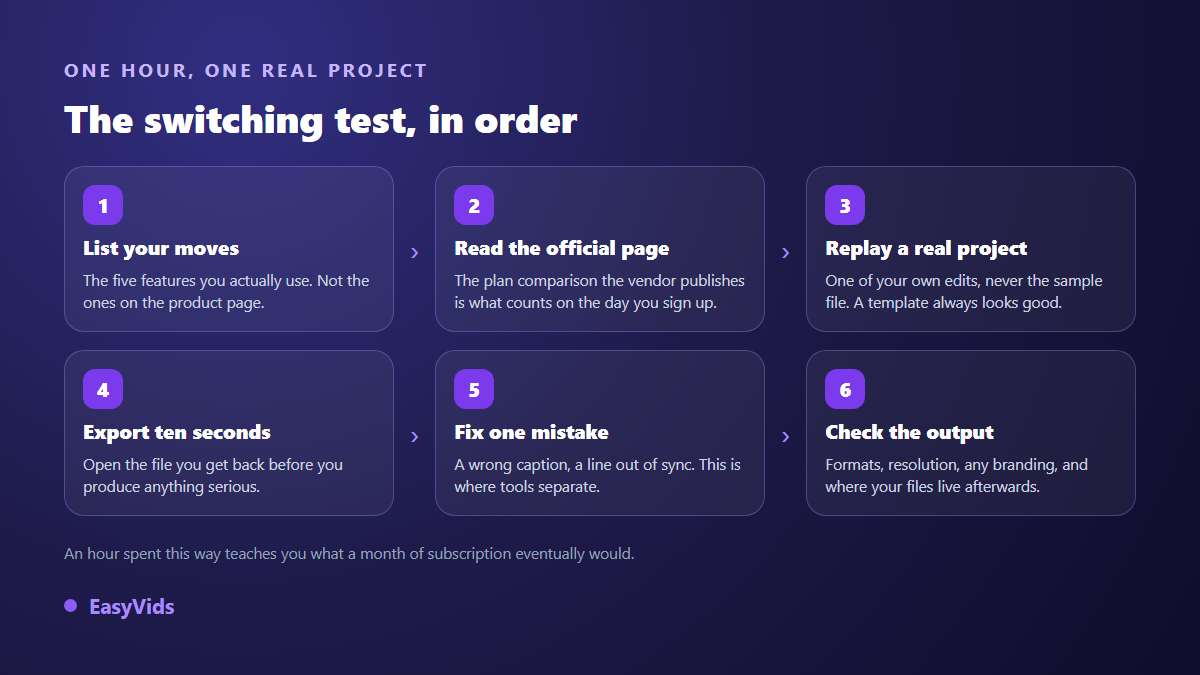
Step 5 is the one everyone skips, and the most revealing. Producing a caption has become ordinary everywhere. Fixing a mistranscribed proper noun without shifting the twenty lines after it, on the other hand, separates tools sharply. Run the test with a word the machine is bound to miss: a brand name, an acronym, an unusual first name.
Frequently asked questions
Is there a genuinely free CapCut alternative?
Yes, several, but the word free never describes a whole application: it describes a zone inside one. Free software such as Kdenlive is free unconditionally because its licence requires it. Commercial tools offer a zone that moves, and sometimes narrows. For each of them, the only reliable answer sits on the vendor's own plan comparison page, on the date you read it.
Which CapCut alternative works best on a phone?
A mobile editor that offers real tracks rather than a chain of templates: that is the only way to keep your working habits. VN Video Editor comes closest to a desktop editor on that ground. If your need is not to cut but to create the shots, a studio that runs in the browser works just as well from a phone, since the computing happens on servers.
Can I get automatic captions elsewhere?
Yes, the feature has become ordinary, free tools included. The difference no longer lies in transcription itself but in three things: how proper nouns and acronyms are handled, how easily you can correct them, and whether you can export a reusable SRT file. Test those three points with your own audio, never with the sample the tool provides.
Do I need a powerful computer to switch editors?
It depends on the family. A layered desktop editor wants a decent machine, and memory above all. A browser tool only has to display the interface, since the heavy work happens on servers. On a modest machine, the classic answer is to edit with lower resolution files, then export at the quality you want.
What if my real problem is not the editor?
That is the most common case, and the most often misdiagnosed. If you spend more time hunting for images, clips and a voice than you spend editing, no change of editor will relieve that: the gap is upstream. You need a tool that writes, illustrates, speaks and assembles, then hands control back to you for the finish.
The right CapCut alternative is not the most complete one, it is the one that matches your starting point. Do you film? Take an editor, and judge it on caption correction and export terms. Do you start from an idea and nothing else? No editor will fill that gap, and you will do better in a studio that creates the shots before editing them. Creating an account is enough to run a full project and see which side of the line your real need sits on.