Your video is done. The edit holds, the voice is clean, the topic is worth the time. Then, on the last second, you say the line everyone says: « don't forget to like, comment and subscribe ». Nobody moves. The video is rarely the problem. The problem is the call to action: asked too late, stacked four requests deep, and phrased like a favour.
A call to action is not a closing courtesy. It is a line of script, written with the same care as the hook, placed at a chosen moment and pointed at what the viewer gains. Below are 21 examples you can copy, sorted by the action you want, with the right place for each and the real platform rules. If your text is not written yet, our complete guide to writing a video script builds the frame these lines slot into.
The short answer
A video call to action works when it asks for one single action, at a moment when the viewer has just received something, with a stated reason and a named gesture. Four pieces are enough: the reason, the verb, the benefit for them, the gesture. « Subscribe » does nothing. « If that part unblocked you, subscribe: the next one lands Thursday, the button is right under the video » does something. Every example below is a variation on that mechanism.
Why the usual line stopped working
The generic line has one fatal flaw: it says nothing about this particular video. Viewers have heard it a thousand times, from channels that had nothing in common. It has become background noise, like an intro jingle. Worse, it signals a template: whoever says it is applying a recipe learned elsewhere, not talking to you.
The second flaw is arithmetic. Asking for four actions in one sentence asks the viewer to choose, so to think, so to do nothing. The third is placement. The end of a video is the worst place for a demanding request: attention is falling, the hand is already on the next thumbnail, and part of the audience left before the final line.
Anatomy of a call to action: four pieces, always in this order
Take any call to action that worked on a channel you follow. You will find the same parts in the same order. The reason comes first, because it justifies the request before it is made. The verb stands alone, because it names the single action. The benefit follows, because it answers the viewer's silent question. The gesture closes the line, because an intention with no gesture evaporates in two seconds.
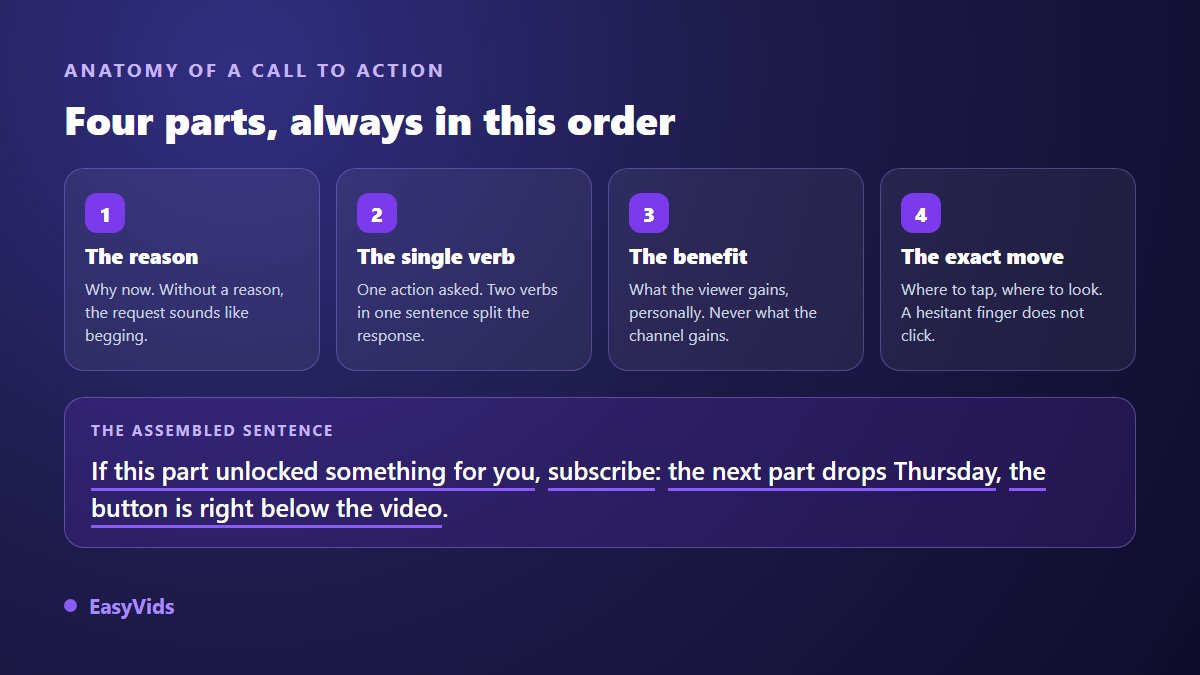
The piece everyone skips is the third one. Plenty of creators explain very well why they need a subscription, and never why the viewer would want to give one. Flip the sentence: what they get is an appointment, a reminder, a sequel, a reply to their comment. As long as the benefit sits on the channel side, the request sounds like a collection plate.
21 call to action examples, sorted by objective
Copy these as they are, then rewrite them in your own voice. They run from the cheapest ask to the most demanding one. One rule before you pick: one line per moment of the video. Two of them back to back cancel each other out.
Getting comments, the cheapest ask
A comment is the cheapest action for a viewer and the one that feeds the conversation under the video. Phrase it as a question they can answer in five words.
- « Tell me in the comments which of the three you are testing this week. »
- « If you have been through this, just write same here in the comments. »
- « Disagree with that point? That is what the comments are for, I am replying to everyone today. »
- « I am missing one example for part 4: give me yours, I will use it in the next video. »
- « Rate this step from 1 to 10 for difficulty, it helps me calibrate the follow up. »
Getting subscribers without begging
Ask once, never twice, and never before you have given something. Each of these carries a reason the viewer can check within the minute.
- « If that part unblocked you, subscribe: the rest of the series lands Thursday. »
- « I publish one method a week, always tested before it is filmed. Subscribe if that is what you are after. »
- « You made it this far, so the format works for you: the button is right below. »
- « Subscribe only if you want to hear about it on release day. Otherwise, skip it, no hard feelings. »
- « Part 2 lands Monday and it only makes sense if you have seen this one. Subscribe so you do not miss it. »
Sending viewers to another video
This is the most profitable call to action and the most neglected. It turns a view into a session, and it belongs exactly where a question forms in the viewer's head. Our step by step guide to producing a YouTube video with AI shows where these hand offs get prepared, at the writing stage.
- « The question you are asking right now, I answer it in full in the video on screen. »
- « I do not have room to cover step 3 here: it has its own video, showing now. »
- « If you are starting from zero, watch that one before the next one. »
- « You have the method. What you are missing is the mistakes to avoid: that is the video on the right. »
Driving clicks to a link or an offer
An outbound click is the most demanding request. It is paid for in trust, so it needs preparation: name the exact spot, leave the choice open, and do not bury the description under ten competing links.
- « The template I am using on screen is free to grab, first link in the description. »
- « If you would rather have the ready to fill version than rebuild it, it is in the description. »
- « Two things in the description: the summary sheet, and nothing else. »
- « You can rebuild all of this by hand with what I just showed. If you would rather save your evening, the link is below. »
Getting shares and saves
Shares are asked for by naming a recipient, never into the void. Saves are asked for by promising future usefulness, for the moment the viewer wants to redo this without you.
- « Send this to the person on your team who needs it most. »
- « Save it: you will not remember all seven settings on the first pass. »
- « If you share one moment, share the one at minute four, that is the one that changes everything. »
Where to place a call to action
Placement outweighs phrasing. An average line at the right moment beats a brilliant line over the credits. Three moments stand out, and each one takes a different kind of request.
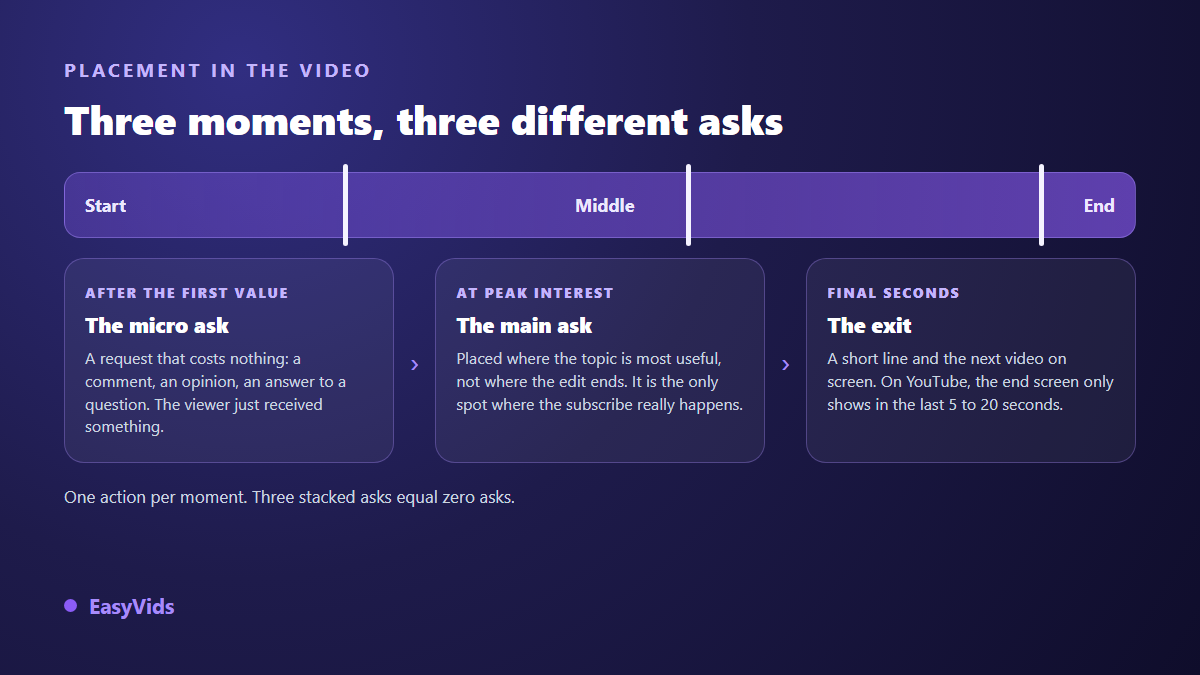
The first moment comes right after the first genuinely useful point. The viewer has just received something and is willing to give a little. That is where the comment belongs. The second is peak interest, where your topic is at its most concrete: that is where subscriptions are won. The third is the exit, very short, one line and a visual hand off to the next video.
What the platforms actually allow
Many failed calls to action fail for a technical reason rather than an editorial one: the line asks for a gesture the platform does not offer there. According to the YouTube Help Centre, end screens only appear during the last 5 to 20 seconds of a video, and the video must run at least 25 seconds to carry one. The same help centre states that a video accepts up to five cards, placed anywhere in its duration, and that a clickable branding watermark can run for the whole playback from the channel customisation settings.
Short form deserves its own check. The YouTube Help Centre specifies that cards and end screens do not appear in the Shorts player, so « the video is showing on the right » lands nowhere. On the Instagram side, the help documentation notes that addresses typed into a caption are not clickable, which leaves the profile and in app navigation as the reliable route for most accounts. Check this before writing the line, not after the edit.
The visual call to action
A large share of the audience watches with the sound off, especially in feeds. A spoken only request never reaches them. Double every ask with something on screen: a word, an arrow, a box, shown exactly during the line and removed after. The reflex is the same one behind captioning, covered in our guide to automatic subtitles. One rule closes the subject: on screen text does not repeat the voice, it condenses it.
Writing calls to action with AI without getting the generic line
A script generator produces by default what every script generator produces: the one size fits all line. How a tool handles that closing line says a lot about the rest of its work, which the seven sign grid for choosing a script generator goes through point by point. In the EasyVids studio, a script starts from an idea, a tone and a length set in words or minutes, and a dedicated checkbox asks for a closing call to action. On its own, that box gives the warm but standard version, the one inviting viewers to like, comment, share and subscribe. How that assisted writing works, down to preparing a week of content in a single session, is covered in our guide to the AI script generator.
The real lever sits in the personal instructions field saved to your account. Paste the formula you want, taken from the 21 above, and it replaces the default in every draft. The principle is the one described in our five block method for writing a video prompt: a precise instruction returns a precise result. For a sales video, a dedicated mode writes a purchase oriented closing line from the angle you pick, from problem and solution to testimonial. Several writing tiers exist, from economical to the most refined, and the detail sits on the pricing page.
Mistakes that push viewers away
The same faults show up from one channel to the next, and none of them comes from a lack of talent. They come from habits inherited from a video format that no longer exists.
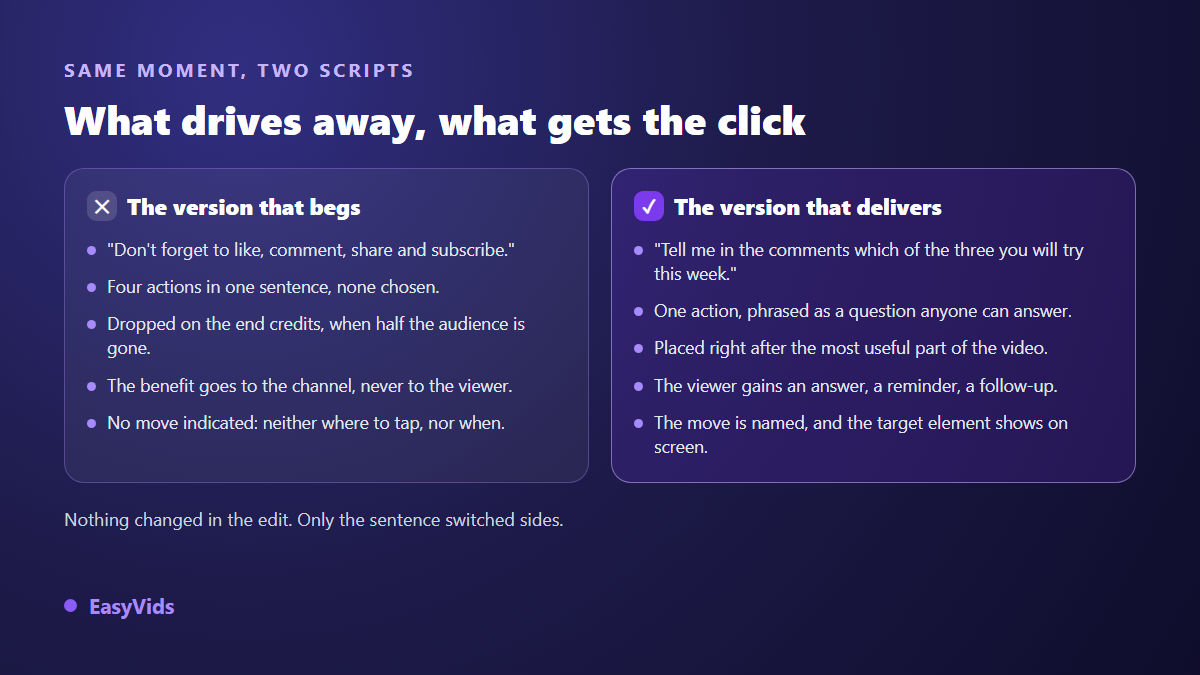
- Stacking four requests in one sentence: the viewer picks none of them.
- Asking before giving: the first minute has earned you nothing yet.
- Dropping the request over the credits, once the player has moved on.
- Talking about the channel's benefit instead of the viewer's.
- Promising something in the description that is not there: trust never comes back.
- Reusing the same line in every video until it becomes a recognisable tic.
Frequently asked questions
How many calls to action should a video have?
One on a short, two or three on a long video, with a different action each time. The constraint is not the total, it is the number per moment: a single request per time you speak up. Two simultaneous asks always return less than one.
Should a call to action open the video?
Not a real request. The viewer has received nothing yet, and an immediate ask gives them a reason to leave. What works there is a content promise such as « stay until the third method », which steers attention without demanding anything.
Does a call to action hurt retention?
A long generic interruption loses people, mechanically. A short line woven into the point, placed after a useful passage, goes almost unnoticed. The difference is not the presence of the call to action but its length and its place in the rhythm.
Which call to action suits a Short or a Reel?
One request, very short, doubled on screen, and never a hand off to a clickable element those players do not show. Comments and shares outperform subscriptions on these formats, because they happen without leaving the video.
A call to action is not bolted onto a finished script, it is written with it. Pick one action per video, give a reason the viewer can verify, name the gesture, and show it on screen while you say it. To try these lines on your next script, creating an account opens writing, voice over and editing in one place, and the EasyVids studio keeps your personal instructions from one draft to the next.