Every December brings the same problem: what do you give someone who already owns everything they need. A personalized Christmas song answers that question in a way no object can. Their name lands in the chorus, a memory from the past year fills a verse, and the style is the one they actually listen to. Nobody else on earth owns that track.
Not long ago this meant a musician friend, a studio and several weeks of waiting. Today a composition engine writes the lyrics from your brief, sings them, and hands back an audio file in minutes. The quality of the result depends almost entirely on what you put into the brief, which is what most of this article is about. If these tools are new to you, our complete guide to AI music generation covers the ground floor first.
The short answer
To create a personalized Christmas song with AI: open the Music Studio, describe the occasion in one sentence, add the recipient's name and one specific memory, pick a style and a mood, have the lyrics written, read them out loud and fix whatever sounds wrong, then run the composition. Expect one to four minutes of compute, and around half an hour in total if you take the time to edit the text. You get a downloadable audio file, ready to give as it is or to drop under a greetings video.
Why a song lands where an object slides off
A physical gift invites comparison. The recipient roughly knows what it cost, may have seen it elsewhere, and forgets it in a drawer by spring. A song written for them compares to nothing. It carries details only someone close could supply: the nickname the family uses, the joke from last year's dinner, the city they moved to in June. That precision is what triggers the emotion, not the musical performance.
The second advantage is practical. A song travels. Families spread across several countries rarely share a physical gift on Christmas Eve, but they can all play the same file at the same moment. Two minutes of audio cross borders with no shipping and no customs. For a grandparent living abroad, the effect often beats a parcel that arrived three days early.
The brief: five fields, and one nobody else can fill
The Music Studio opens on a list of ready made occasions: birthday, wedding, dedication, love declaration, new baby, tribute, praise, achievement, party. Christmas is not one of the preset buttons, which is fine: pick Custom and write your own occasion in the free field. "Christmas at home, the first one since the move" beats the single word "Christmas" by a mile, because the writing engine no longer has to guess the setting.
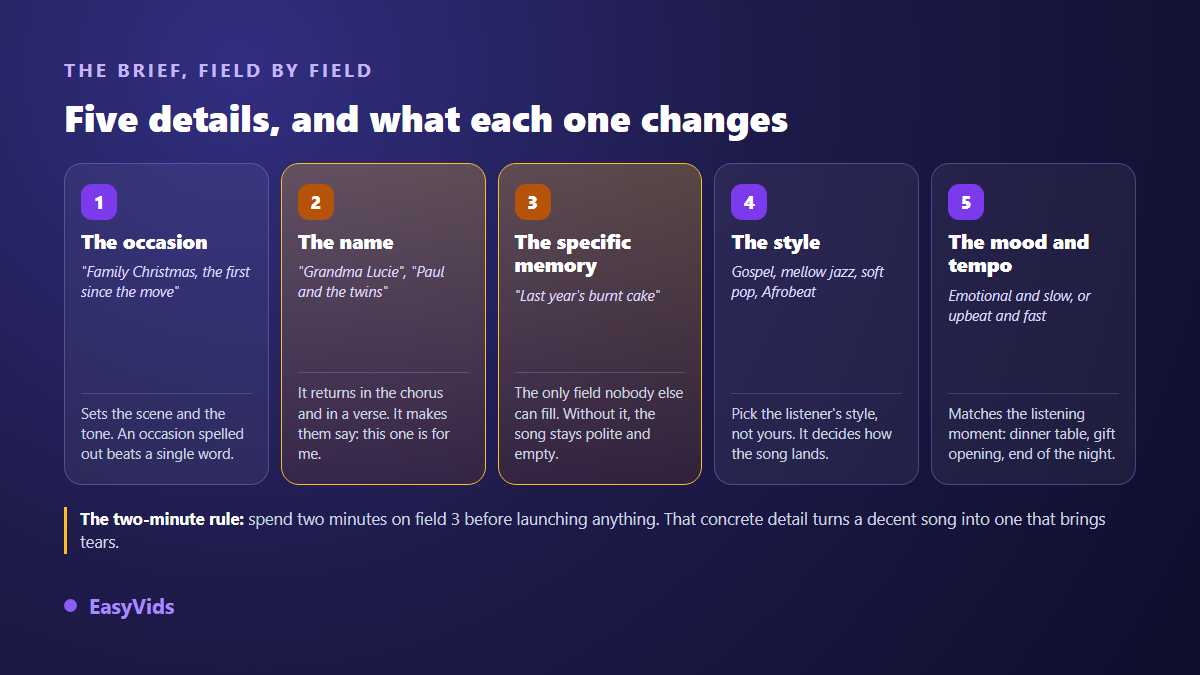
Two fields follow the occasion. One takes the name, or names: "Grandma Lucie", "Paul and the twins". The other takes a message or an anecdote, and that one decides everything. A song built on "he loves Christmas" stays polite and interchangeable. A song built on "he burns the turkey every year and refuses to admit it" gets the whole table laughing. Spend two minutes on that field before you launch anything.
Here is what is worth collecting before you sit down. Take raw notes on your phone during the week, with no attempt at writing: shaping the text is not your job.
- The exact spelling of the name, plus the nickname the family uses.
- Two concrete memories from the year: one funny, one moving.
- A sentence that person repeats all the time.
- What changed for them this year: a move, a graduation, a birth, a new job.
- The music they actually play at home, not the music you wish they liked.
- The moment in the evening when the song will be played, because it sets the tempo.
Style: pick theirs, not yours
The studio offers clickable styles, from gospel and jazz to pop, acoustic, RnB, reggae, afrobeat and zouk, and the field stays free: you can type crooner, children's choir or anything else. The most common mistake is picking your own taste. An aunt who plays gospel all year will not be moved by an excellent rap track, even with her name in it.
Two settings finish the job. Mood sets the colour: joyful, moving, danceable, romantic, solemn or epic. Tempo depends on the moment. A slow track carries the meal or the opening of presents, a fast one restarts the evening after dessert. The same brief logic applies all year round, and we walked through another popular case in our guide to the custom birthday song.
Lyrics: have them written, then rewrite them
One button drafts the lyrics from your brief. The text comes back structured like a real song, with a first verse, a chorus, a second verse and a bridge, for roughly one and a half to three minutes of singing. When a name is supplied, it appears in the chorus and in at least one verse, which is exactly where the ear expects it. A title comes with it.
Never treat that draft as final. Read it out loud, it is the only test that matters. Lines that trip you up while reading will trip the sung voice too. Replace generic phrases with your own words, cut an image that does not sound like you, add the detail you forgot in the brief. Lyrics stay fully editable before composition, and previous drafts reload from the page history at no extra charge.
Composition, and what happens while you wait
Two engines are available. The first composes a full song, vocals and music, from your lyrics, with a checkbox for an instrumental version of the same track. The second handles short instrumentals only, handy as background audio. It is also the engine behind the pieces you reuse all year, starting with the few seconds of music that open a YouTube channel. For a gift you want the first one: the voice is what says the name, and the name is what makes the gift.
Composition takes one to four minutes. You can close the tab meanwhile: production continues on the server and the track is waiting when you return to the page. The title you typed names the downloaded file and the history entry, which saves you from digging through ten attempts on Christmas Eve. The file downloads in a common audio format, playable on a phone or a speaker.
A December schedule, not a marathon
The song itself takes one evening. What takes time is the raw material: good memories do not arrive on demand, they surface over days. Spread the preparation across three weeks, in four short sessions rather than one panicked night on the 23rd.
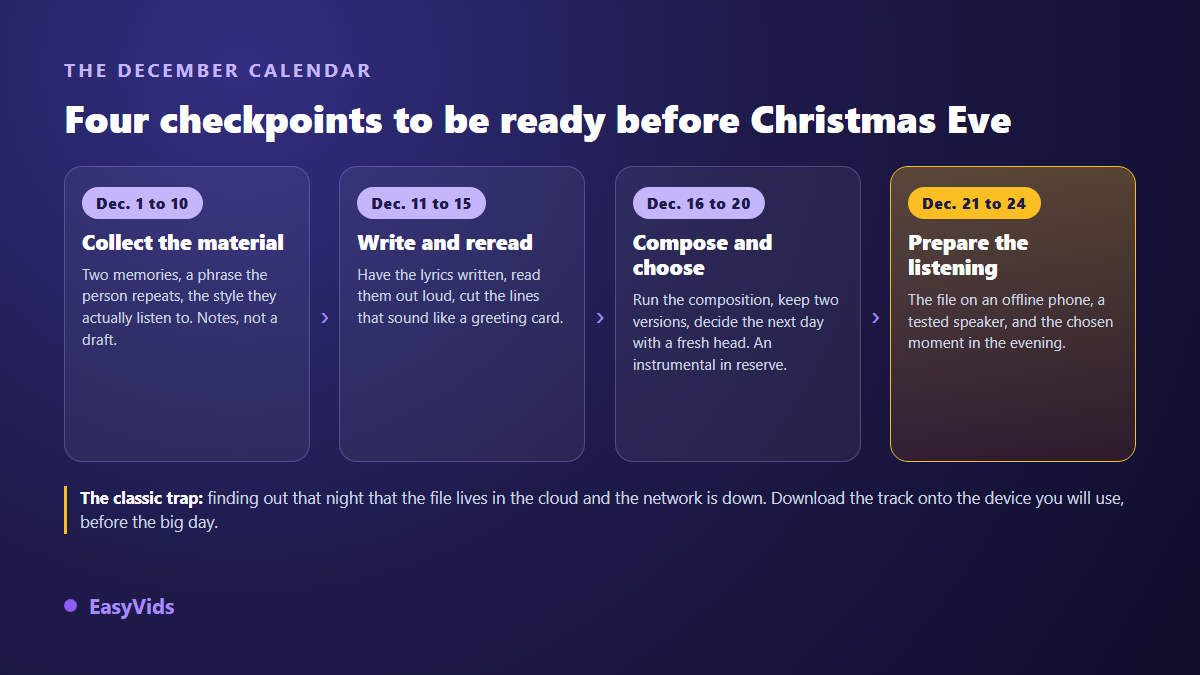
One precaution is worth repeating, because it fails every year. Download the file onto the device that will play it, and check that it starts with no connection. A track that lives only in an online space goes silent the moment the network weakens, and the network always weakens when fifteen people are waiting quietly.
Covering a classic, or writing something of your own
The tempting move is to ask for a cover of a famous Christmas hit with new lyrics. That is the one path with a real problem. A song written in the twentieth century stays protected long after its authors die: the Berne Convention for the Protection of Literary and Artistic Works sets a minimum of fifty years after the author's death in its article 7, and many countries, including European Union members and the United States, apply seventy. Rewriting the words does not clear the rights on the melody.
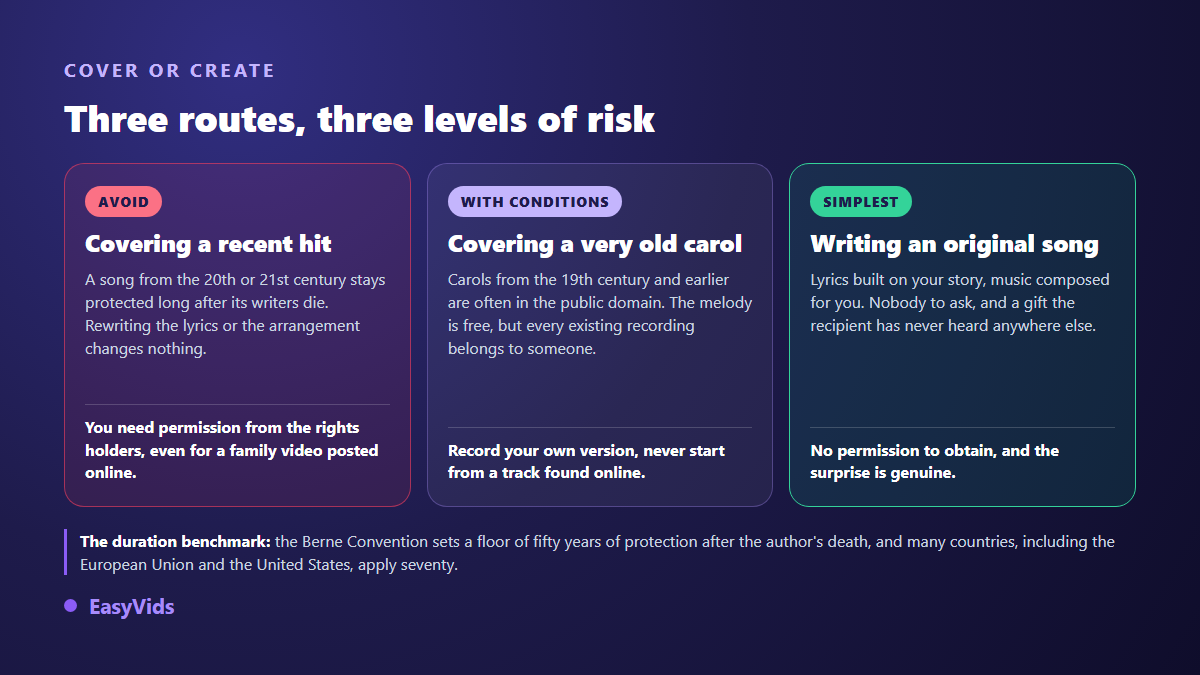
Very old carols are often in the public domain as compositions, which covers the early nineteenth century and before. One nuance catches everyone out: the melody may be free, but every existing recording belongs to whoever produced it. So compose your own version, and never start from a file found online. We covered the whole question in our article on AI music and copyright.
Giving the song: five ways that work
An audio file sent by message drowns in the flood of greetings on the morning of the 25th. Presentation matters almost as much as the song itself.
- The room playback: start the track on the living room speaker with no warning and watch the face when the name arrives.
- The video card: the song becomes the soundtrack of a photo montage from the year, sent on Christmas Eve.
- The printed code: a small square glued inside a paper card that opens the track on their phone.
- The Christmas morning alarm: the file set as the wake up sound for children who rise before everyone else.
- The video call: share your screen for relatives abroad so everyone listens at the same moment.
The second idea lands hardest. A song carried by images of the past year becomes something to watch again, not just to hear, and the montage takes about an hour: our guide to the photo slideshow with music covers the full method.
The business version: end of year greetings
The same mechanism works for companies and is badly underused. A shop, a practice or an association can commission a short end of year song that names the team, recalls a highlight of the past twelve months and thanks its customers. Posted as a video or sent by email, it gets through where a written greeting card goes straight to the bin.
Two pieces of advice for that use. Keep it under a minute, since attention is low in December. And if the video goes to a public platform, keep ownership in mind: according to the YouTube Help Centre, Content ID compares every upload against a database of reference files supplied by rights holders, then applies the rule those holders chose. A song composed for you has no original to match against, which removes the most common cause of claims, and the edge cases are covered in our article on AI music and YouTube monetisation. How the studio credits work is explained on the pricing page.
Frequently asked questions
Can I put any name into a personalized Christmas song?
Yes, the field is free and accepts a first name, a family nickname or two names side by side. One caution: write the name the way it sounds if its spelling is misleading, otherwise the sung voice will deliver it literally.
How long does a personalized Christmas song take?
Composition takes one to four minutes of compute. In practice, allow around half an hour in total: filling the brief, drafting the lyrics, reading them out loud and running two versions. Gathering the memories is better spread over a few days.
Can I choose a male or a female voice?
The music studio has no voice selector: the timbre follows the style and mood you request. A gospel track and an acoustic ballad do not call for the same delivery. The most effective approach is to run another composition with a more precise style, then keep the version you prefer.
Can I get an instrumental version of the song?
Yes. A checkbox composes the track without vocals, which gives you background audio for the meal, for a greetings video or for a photo slideshow. Keep both files: the sung version for the gift moment, the instrumental for the rest of the evening.
Do I need to write or sing to get a good result?
No, and that is the point. Your job is to supply the right details and to review the draft, not to find rhymes or hold a note. Someone who has never written a line gets a better result than an experienced lyricist filling the brief carelessly.
On Christmas Eve, it is neither the mix nor the pitch that silences the room. It is the moment someone hears their own name followed by a detail only the people around the table know. Collect those details this week, keep one December evening for the rest, and you will have the gift people still mention next year. Create your account to open the Music Studio, or explore the rest of the EasyVids creation studio first.