You want your videos narrated by your own voice, without a studio microphone and without a budget. So you search for ai voice cloning free, and you land on dozens of pages promising exactly that. You record a clip, you upload it, you play the preview, and the wall appears at download time: an audio watermark, a blocked export, a card requested, or a voice that vanishes when the trial ends.
Free cloning does exist, and it produces usable results. The trouble lies elsewhere: the word covers three very different things, and almost no page tells you which one it is giving away. This guide separates those three, compares the routes that really work without paying, and lists the traps that cost a working day. If your first question is how long the sample has to be, our reference on the amount of audio required covers that point on its own.
The short answer
Yes, cloning your voice without paying is possible, and three routes lead there: the starting credits of a full studio, a speech model installed on your own machine, or the free tier of an online service. The first asks for a sign up and nothing else. The second asks for time, a decent computer and some patience. The third asks you to read the terms before uploading anything. In all three cases, the part that is genuinely free is the voice build itself, not the minutes of speech you generate afterwards.
Three kinds of free that are not the same thing
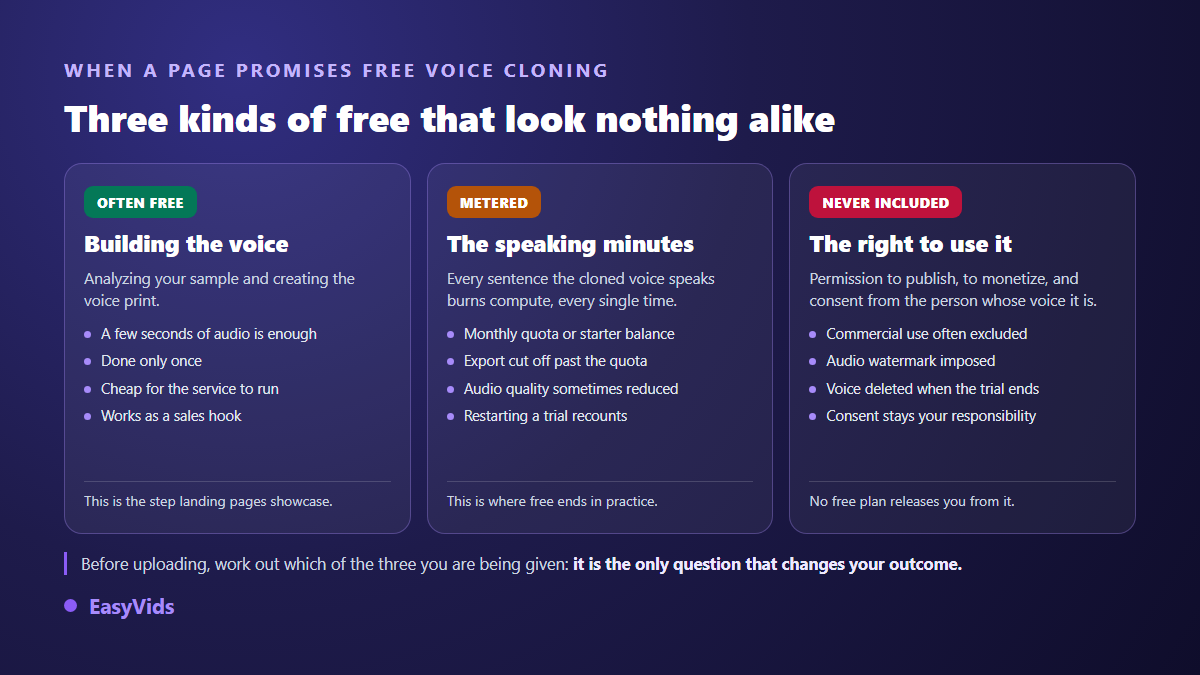
A service advertising free voice cloning is talking about one of three stages, rarely all three. The first is building the voice print: your sample is analysed, a voice appears in your list, and you can make it speak. That happens once, it costs the provider very little, and it is the stage every landing page puts forward.
The second stage is generation, meaning every sentence the voice speaks afterwards. It burns compute on each attempt, including the takes you throw away, so it is metered everywhere: in minutes, in characters, or in a starting balance. The third stage is the right to use the result, meaning publishing, monetising, and above all holding the consent of the person whose voice it is. Nobody gives that third stage away.
Route 1: the starting credits of a full studio
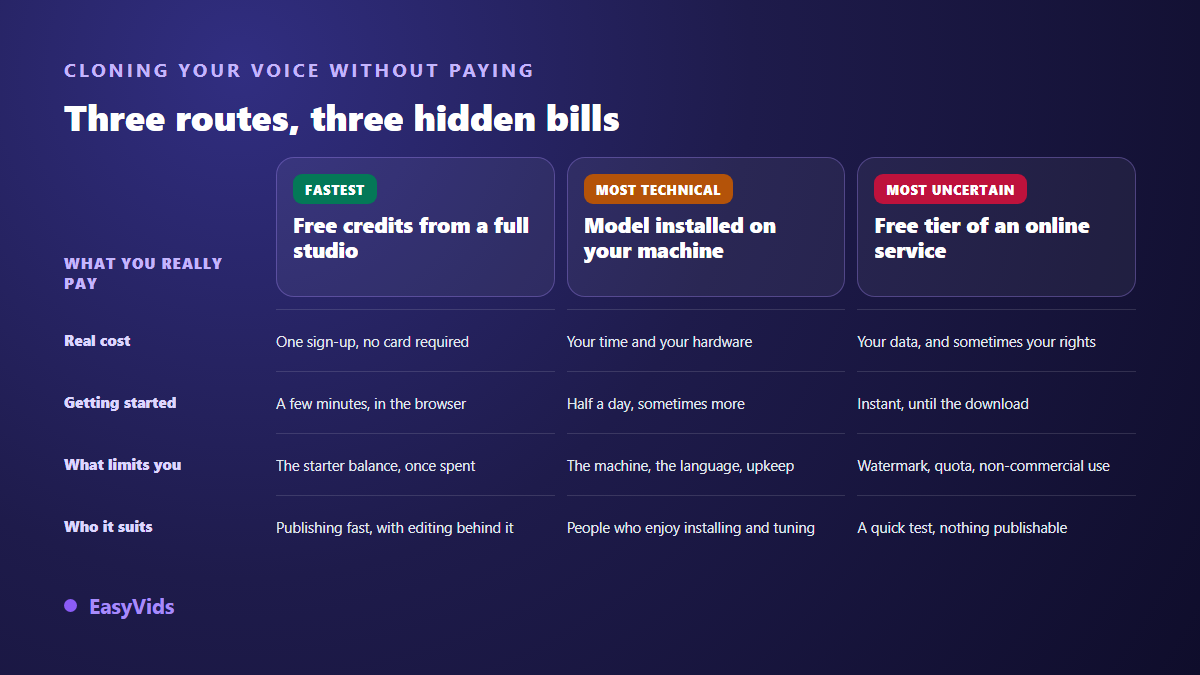
This is the fastest route, and often the most honest one. An online studio grants a starting balance at sign up, and that balance covers one voice clone plus your first minutes of narration. You pay nothing, you enter no card, and you get an exportable file with no audio watermark, ready to drop into an edit. The limit is stated upfront: once the balance is spent, you top it up.
The value of this route goes beyond the clone. A voice alone is not a video: you still need a script written for the ear, a scene breakdown, visuals and an edit that matches the pictures to the narration. A full studio chains those steps in one place, which saves you from taping five free tools together and losing audio quality at every intermediate export. The same workshop does more than narration: turning an existing text into a song rests on the same preparation, short lines cut for the ear before any generation at all. Before signing up, check the service's pricing grid to confirm that cloning is actually part of what the starting offer covers.
Route 2: a model installed on your own machine
Several speech models are published openly and install on a personal computer. There, cloning costs nothing in money: no subscription, no credits, no quota. You generate as many minutes as you like, and your samples never leave your drive. For a personal voice, that privacy argument is the strongest thing this route has, and no online service can match it.
The bill lands elsewhere. You install a technical environment, download heavy files, need a decent graphics card to avoid waiting minutes per sentence, and start again at every update. Output in a language other than English usually needs more tuning, and quality varies widely between models. Budget half a day before the first genuinely convincing sentence, and accept that you are your own technical support.
Route 3: the free tier of an online service
This is the most visible route in search results, and the least predictable. Cloning takes three clicks, the preview often sounds impressive, and the difficulty only shows up at download. Three blockers come back again and again: an audio watermark added to the export, a licence that rules out commercial use, and a maximum length that suits a demo but not a published video.
One legitimate use remains: testing. If you only want to know whether your voice clones well, whether your sample is usable, or what your timbre sounds like once synthesised, these offers answer in minutes. Just do not build a publishing routine on top of them, and check what happens to your sample and your voice print once the trial period is over.
Recording a free sample that holds up
The most decisive part costs nothing, and it is your recording. A recent phone held about a foot from your mouth, in a furnished room, beats an expensive microphone in an empty echoing one. Reverb is the one flaw no cloning engine repairs: the model reads it as a feature of your voice and reproduces it in every sentence it speaks.
- Record at least fifteen seconds of continuous speech, the minimum most tools recommend, and one to two minutes for a voice that holds up on long scripts.
- Pick a room with curtains, a rug or a sofa, because soft surfaces soak up the echo the microphone would otherwise capture.
- Switch off ventilation, the fridge and every notification before you hit record.
- Read a varied, neutral text mixing long and short sentences rather than a list of isolated words.
- Keep the tone you will actually use in your videos: a declaimed sample gives you a clone that declaims forever.
- Do not treat the recording with effects, compression or aggressive noise reduction.
- Export as MP3 or WAV, the two formats most cloning tools accept.
One last free habit: listen to your sample on headphones before you send it. If you hear a constant hiss, a room ringing, or a breath glued to the microphone, the clone will reproduce all of it faithfully. Recording again takes two minutes. Repairing a badly cloned voice afterwards takes far longer, and the result stays average.
Six traps in free voice cloning
The unpleasant surprises look alike from one service to the next. They are not hidden either: they are written down, simply not on the page that brought you in. Spotting them takes five minutes of reading and saves you from redoing the whole job.
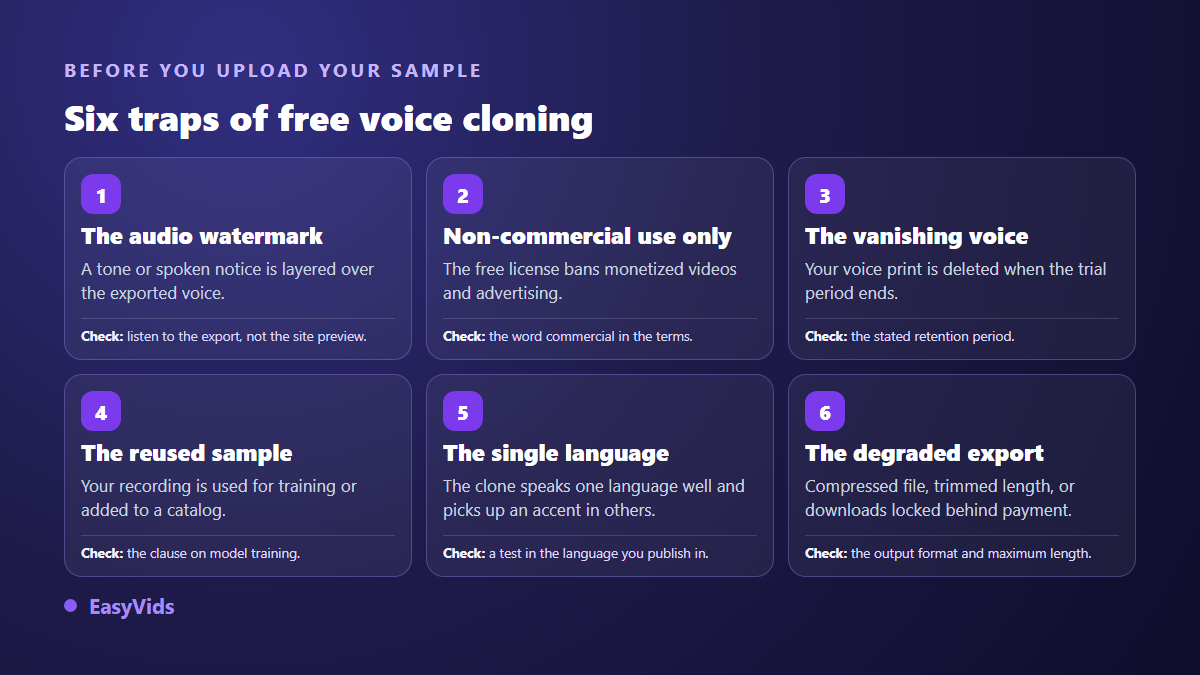
The costliest trap is not the watermark, it is the training clause. Some services reserve the right to use uploaded files to improve their models. For a voice, that deserves ten seconds of careful reading: you are uploading data that identifies you personally, not a holiday photo. The second most common trap is the voice disappearing when the trial ends, forcing you to clone again elsewhere with a slightly different timbre from one video to the next.
Free does not mean permission granted
Price changes nothing about rights. A voice identifies a person, and once it is processed by technical means meant to identify someone uniquely, it falls into the biometric data category, the most sensitive one under the General Data Protection Regulation. The European artificial intelligence regulation adopted in 2024 also requires anyone publishing generated or manipulated audio or video that imitates a real person to make the artificial nature of the content clear to the audience.
On the platform side, the YouTube Help Centre asks creators to flag realistic generated or altered content at upload time, using the altered content setting. The practical rule fits in one sentence: clone your own voice, or the voice of someone who gave you explicit, dated, written consent. Reputable services draw exactly that line in their terms, often with a certification box to tick at every clone. The full legal picture is covered in our article on the legality of voice cloning.
Frequently asked questions
Can I clone my voice for free without giving a card?
Yes. Studios that grant a starting balance at sign up ask for no payment method to use it, and a model installed on your machine obviously asks for none. Be wary of so called free trials that demand a card before the first export: they roll over into a subscription on the due date, often without a reminder.
How much audio does a free clone need?
Fifteen seconds of clear speech is enough for a recognisable voice, and one to two minutes gives a more stable result on long scripts. Beyond that, the gains fade fast. Recording cleanliness matters more than length: a short, clean take beats half an hour captured in a room that rings.
Can a freely cloned voice be used on a YouTube channel?
It depends on the licence of the service, and that is the thing to check before publishing. Many free tiers exclude commercial use, which covers a monetised channel. Check for an audio watermark too, then fill in the altered content setting YouTube asks for when a video is realistic and generated or modified.
What happens to my audio sample after cloning?
That depends entirely on the terms of the service, and it is the clause to look for before any upload. A reputable service keeps a cloned voice private to the account that created it, lets you request deletion at any time, and describes in its privacy policy how voice samples are handled. Its terms usually also make clear that you remain responsible for the voices you clone.
Cloning your voice without paying is no sleight of hand: work out which of the three kinds of free you are being offered, take care of the sample, and read the usage clause before exporting rather than after. And if you want narration ready straight away, without recording your own voice, our studio offers ready to use AI voice-overs and chains the script, the visuals and the edit into a publishable video.