You already know how long the video should run. Three minutes for a tutorial, thirty seconds for an ad, ten minutes for a long form piece. What stalls the writing is the next question: how many words per minute when speaking, and therefore how long should the script be? Guess it, and you end up with a text that overruns by half, a voice over you have to rush, and an edit to recut once everything is recorded.
The benchmark exists. It fits in one number, then you adjust it to your voice, your language and the rhythm of your shots. This article gives the maths in both directions, the conversion table from thirty seconds to ten minutes, and the corrections that matter. If your outline is not written yet, our complete guide to video scripts covers structure; this one is only about length.
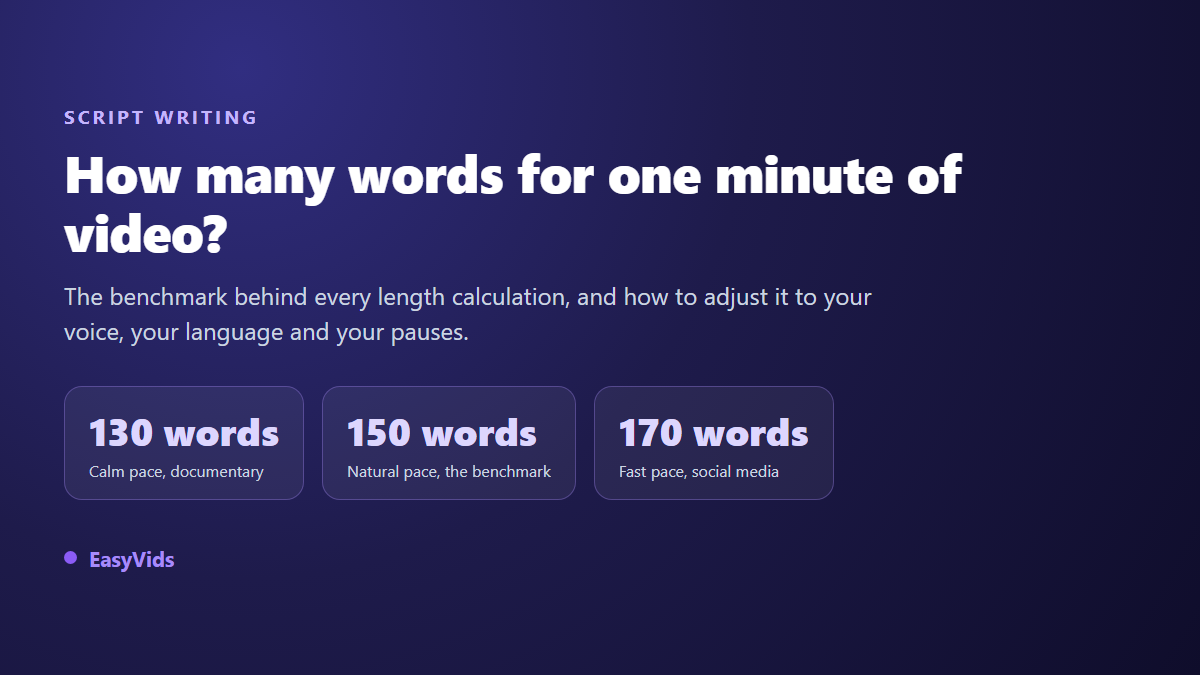
The short answer: 150 words per minute
Count 150 words for one minute of voice over. That is the pace of a well handled narration, neither rushed nor dragging. A three minute video needs roughly 450 words, a ten minute video roughly 1,500. The useful range runs from 130 words per minute for a measured tone to 170 for a punchy one. That 150 figure is what our script generator applies when you set a duration in minutes instead of a word count: the page converts it and shows the target length in words and characters straight away.
The maths, both ways
The formula is one line: word count = minutes multiplied by the speaking rate. Four minutes at 150 words per minute gives 600 words. The reverse matters just as much: divide your word count by the rate and you get the duration. A 320 word script read at 150 words per minute runs 2.13 minutes.
Watch the conversion trap: 2.13 minutes is not 2 minutes and 13 seconds, it is 2 minutes and 8 seconds. The decimal part gets multiplied by 60, it is not read as seconds. On a short video timed to the second, that single confusion is enough to blow the edit.
The conversion table, 30 seconds to 10 minutes
Here are the lengths to aim for by duration and speaking rate. Treat them as a ceiling rather than an exact target: a slightly shorter text leaves room for the edit, while a long one always forces a cut in the wrong place.
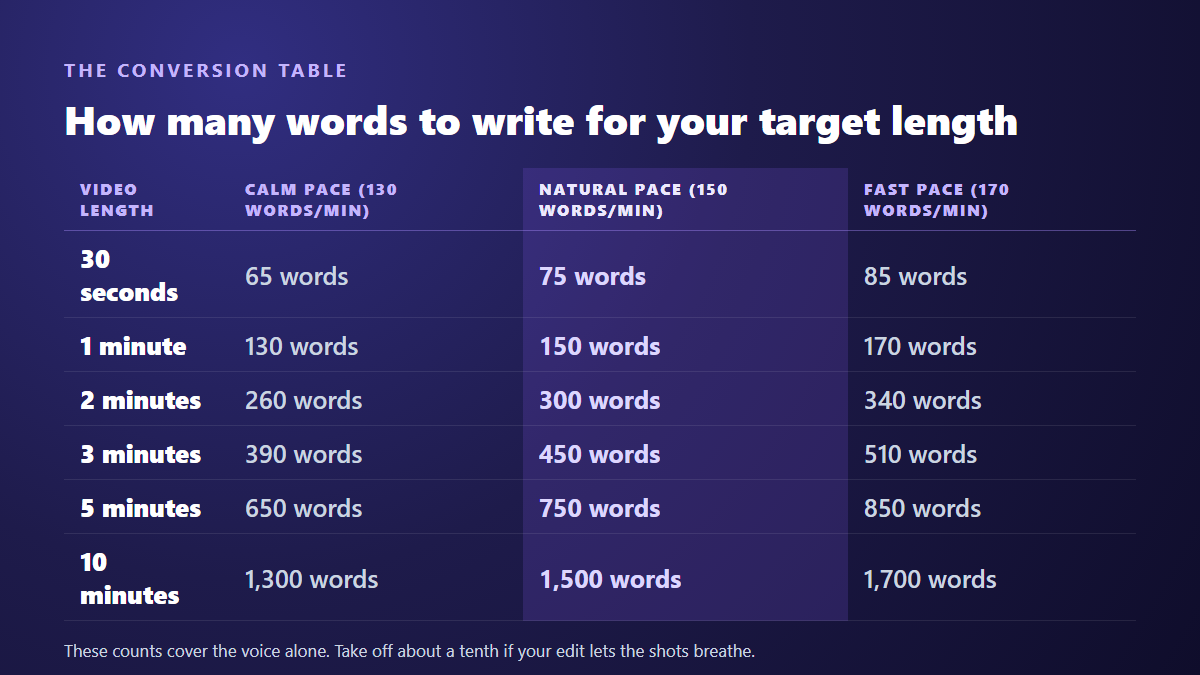
Two caveats. The table counts the voice alone, with no title sequence and no silent opening shot. And it assumes continuous delivery: as soon as you let the shots breathe, the finished video runs longer than the maths suggests.
Three rates, and how to pick yours
Speaking rate is not a technical setting, it is a writing decision. It follows from the subject, the audience and the amount of information you have to carry. A story that needs to build atmosphere cannot be read at the speed of a promotional announcement.
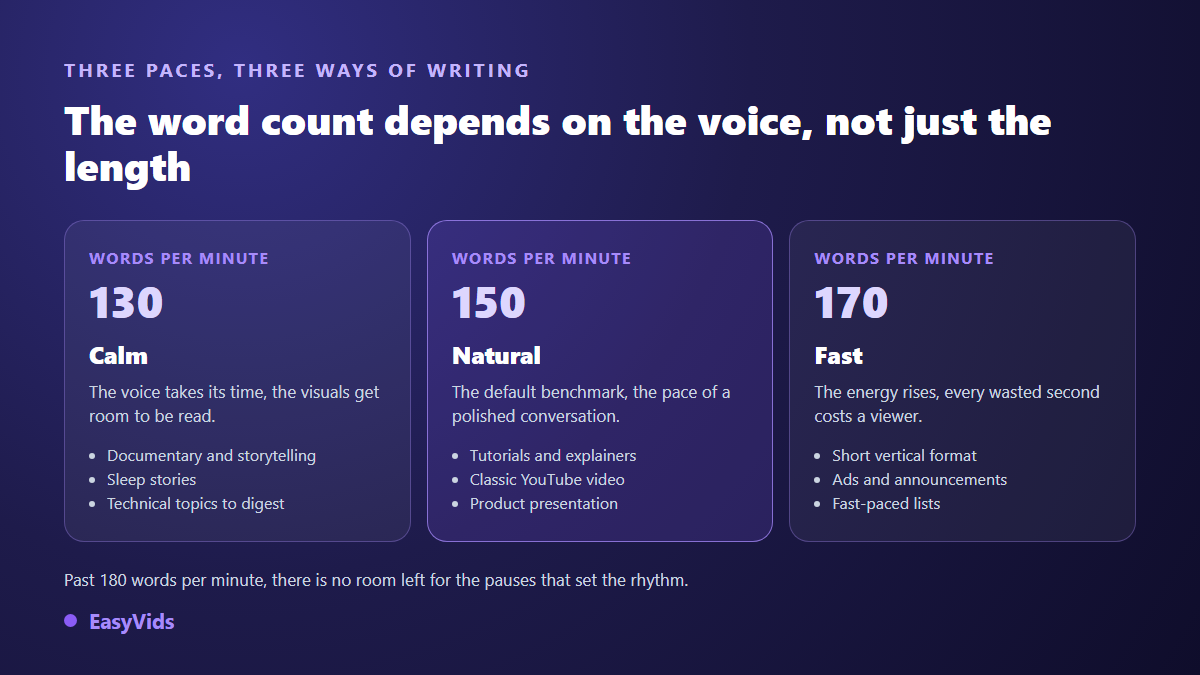
One principle holds throughout: the more attention the image demands, the slower the voice has to go. An explanation backed by a diagram the viewer must decode does not survive 170 words per minute, because they are reading and listening at once. On a run of illustrative shots, a fast rate works well, as long as the sentences stay short and each carries a single idea.
A minute of video does not hold a minute of speech
This is the mistake that throws off the most scripts. You budget 150 words for a minute, you write them, and the finished video runs a minute and twenty. The cause has nothing to do with delivery speed: between the opening shot, the silences between scenes and the musical outro, a good share of the runtime carries no words at all.
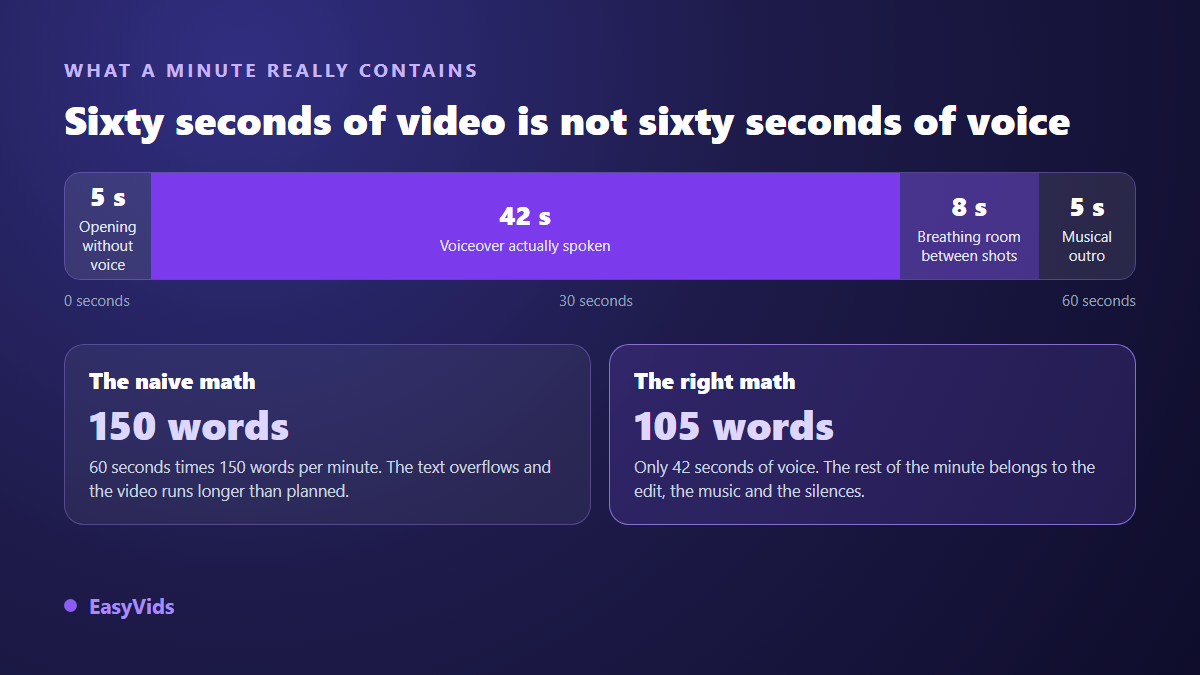
The fix is simple: cut roughly a tenth off your word count as soon as the edit lets shots breathe, and more if the video opens on a visual sequence. The rest happens at recording, where punctuation counts as much as wording, because synthesis engines read it as performance direction.
Language changes the count
The same content does not weigh the same number of words from one language to the next. French uses more words, and longer ones, than English to say the same thing. A translated script gains volume mechanically, and the video stretches if you keep the same edit. Never reuse a word count across languages: go back to the target duration and recalculate.
Down to the scene level
Per minute counting frames a whole script. When you split it into shots, another unit takes over: words per shot. Our own production benchmark, measured on our edits, is that 110 characters of voice over run about 6 seconds, roughly 17 words. That pace looks faster than the 150 words per minute rule, and it should: it measures speech alone, without the pause between two shots. Add those pauses back across a full minute and you land on the general benchmark again.
As a writing rule, a comfortable scene holds 15 to 40 words, or 5 to 15 seconds. Below that, the image is gone before the eye has read it. Above it, the shot drags. When a sentence runs well past the range, split it across two shots instead of speeding up the voice.
Short formats have their own arithmetic
On a thirty second vertical video, the maths gives 75 words at a natural rate, 85 at a fast one. That is very little, about one paragraph. The whole craft is fitting the hook, the idea and the call to action into that space without sounding rushed. Two habits help: write the closing line first, then work backwards, and accept that a short format carries exactly one idea. On a fifteen second ad you drop to around forty words, an exercise covered in our piece on finding the tone that sells in fifteen seconds.
Measure instead of estimating
All of these numbers are estimates. The only duration that counts is the audio file once the voice is generated. Get into the habit of producing the voice over before building the visuals: you then know the exact length shot by shot, and you adjust the text while it is still easy to change.
The final check often runs through captions, which make visible what the ear lets slide. Professional subtitling guides think in characters per second rather than words per minute: the timed text style guide published by Netflix sets 17 characters per second for adult programming, and 13 for children. If your captions scroll too fast to read, your voice is going too fast as well. Generating captions straight from the audio track gives you that diagnosis in seconds.
Write to the right length from the start
Rather than writing then cutting, set the target length at the order. Our script generator takes both inputs: a word count, or a duration in minutes that it converts itself. The preview shows the word count, the character count and the matching voice over duration before the writing even starts. A text written to length from the outset keeps a coherent rhythm, while a text trimmed afterwards carries the scars of the cuts. The EasyVids studio then chains writing, voice and editing in one place, so nothing has to be recounted at each step.
The most common counting mistakes
- Counting the whole document, headings and shot directions included: only spoken text enters the calculation.
- Forgetting the silences, when a video that breathes always runs longer than its text.
- Reading 2.5 minutes as 2 minutes 50 seconds: the decimal part is multiplied by 60.
- Applying one rate to every video on a channel, when a tutorial and a story do not read at the same pace.
- Reusing a word count from another language without recalculating it.
- Estimating instead of measuring, when the real audio duration is one generation away.
Frequently asked questions
How many words is a 5 minute video?
Around 750 words at a natural rate, 650 for a measured delivery, 850 for a fast one. Take off about fifty words if the edit includes a silent introduction or marked pauses between scenes.
How long does a 1,000 word script run?
About 6 minutes and 40 seconds at 150 words per minute, close to 7 minutes and 40 seconds at 130. The same text read silently takes far less time, which is a useful reminder that reading is much faster than speaking.
Does a synthetic voice read at the same pace as a human one?
Close enough that the same benchmarks apply. The difference is in the pauses: a synthetic voice follows punctuation to the letter, so a lightly punctuated text gets read in one breath, faster than planned. Punctuate generously and the expected duration comes back. Some voices also accept a plain language delivery note, such as read slowly, like a storyteller.
Do headings and stage directions count?
No. Only the spoken text enters the calculation. Shot descriptions, stage directions and editing notes never reach the audio track, and including them skews the estimate by tens of seconds on a longer script.
How do I make a video longer without adding words?
Give the images time: a silent opening shot, a pause after a strong line, a closing shot on the music. Those breaths add seconds without adding a single word, and they play better than a text padded to fill the runtime.
One number covers almost every case: 150 words for one minute, adjusted for your voice and your silences. The rest gets settled by listening to the first version, never in a spreadsheet. To get a script already calibrated to the duration you want, then hear it read by a voice over straight after, create your account and run a first draft.