You have the material, or most of it. What stops everyone at the same point is the file itself. How to create an ebook that looks like a book, and not like a word processor document exported in a hurry, is a layout question far more than a writing question. On your machine it opens perfectly. On your reader's phone the font has changed, the images are soft, the table of contents leads nowhere.
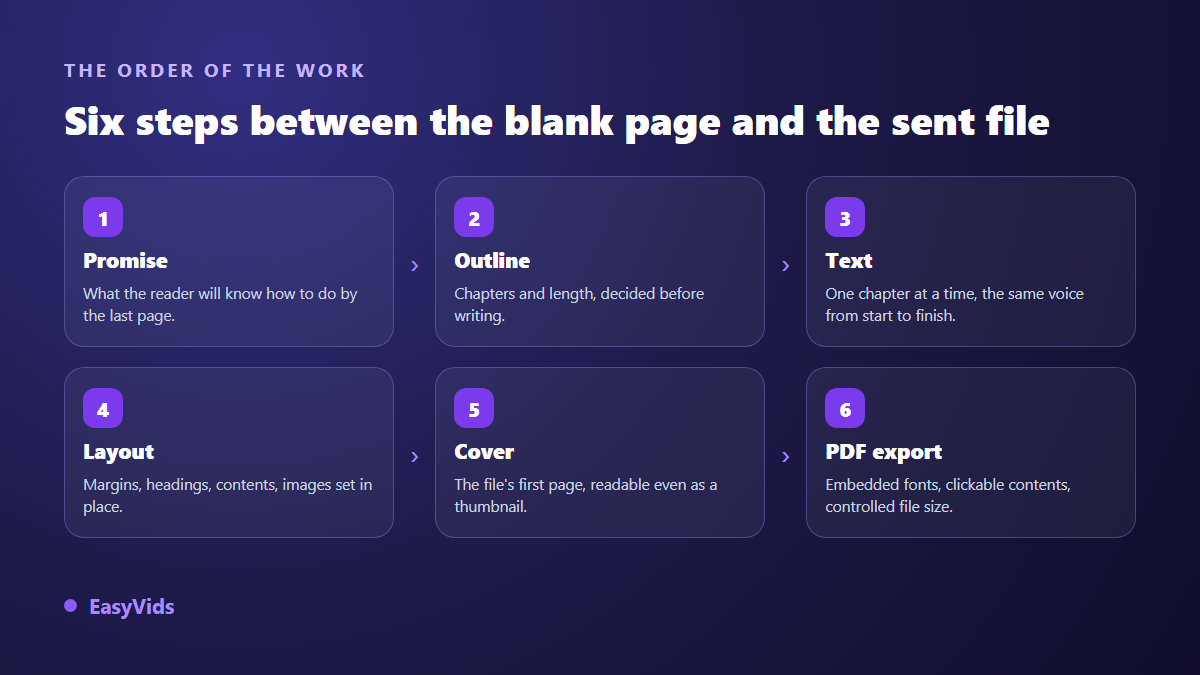
All of that is fixed before the export, never after. This tutorial follows the real order of the work: promise, outline, text, layout, cover, then the file. If you want the wider journey all the way to a first sale, our guide to building an ebook with AI covers the same chain from topic to customer. Here we stay on the file.
The short answer
Write the promise of the book in one sentence, build a chapter outline, draft it, then lay it out in a tool that handles margins, heading styles and a generated table of contents. Export to PDF with embedded fonts and high resolution images. A word processor is enough for a short giveaway. For a book you intend to sell, a layout tool or a studio that composes the PDF for you saves a full day.
What PDF guarantees, and what it does not
The format has been described by the ISO 32000 standard since 2008, which explains its longevity. A PDF carries its layout with it: fonts are embedded in the file, every image sits where you placed it, and the page renders identically on a phone, a laptop or a printer. That is exactly what you want for a book you hand over directly.
In exchange, a PDF does not reflow. Text will not adapt to screen size the way a bookstore ebook does. A reader on a phone has to zoom if you composed a dense office sized page. That decision belongs at the start, not at export time: page size, body size and line length all depend on the device your book will really be read on.
Six steps from blank page to finished file
None of these steps can be skipped without paying for it later. Text written without an outline gets laid out three times. A layout decided afterwards forces you to rework every illustration.
Step 1: write the promise before the first sentence
Open an empty document and write one line: by the last page, the reader will be able to do this specific thing. That sentence drives everything else, title and cover included. A book promising everything about marketing has no possible ending. A book promising ten welcome messages a subscriber will actually read has an obvious outline, an obvious length and an obvious buyer.
Step 2: outline and length, decided now
List your chapters, each with the question it answers. Read the list in order: if a chapter depends on one that comes later, swap them. Fixing an outline takes five minutes. Fixing a finished manuscript takes a week. Set the length at the same time, in words rather than pages, since pages only reflect font, margins and images. Our reference on ebook length gives the useful ranges per use case.
Step 3: draft one chapter at a time
Finish a chapter before moving to the next, and keep the same voice throughout. Sliding from I to we, or from a warm tone to a formal one, is the clearest sign a book was assembled in pieces on different days. Two habits protect the reading: cut any paragraph longer than ten lines, and close each chapter with a short boxed summary that tells the reader they made progress.
Step 4: layout, where a document becomes a book
Pick the page size first. The ISO 216 standard defines A4 as 210 by 297 millimetres, comfortable on screen and on a home printer. Letter, 8.5 by 11 inches, remains the North American reference. For a book meant to be read on a phone, a smaller page with larger type beats a shrunken A4 every time.
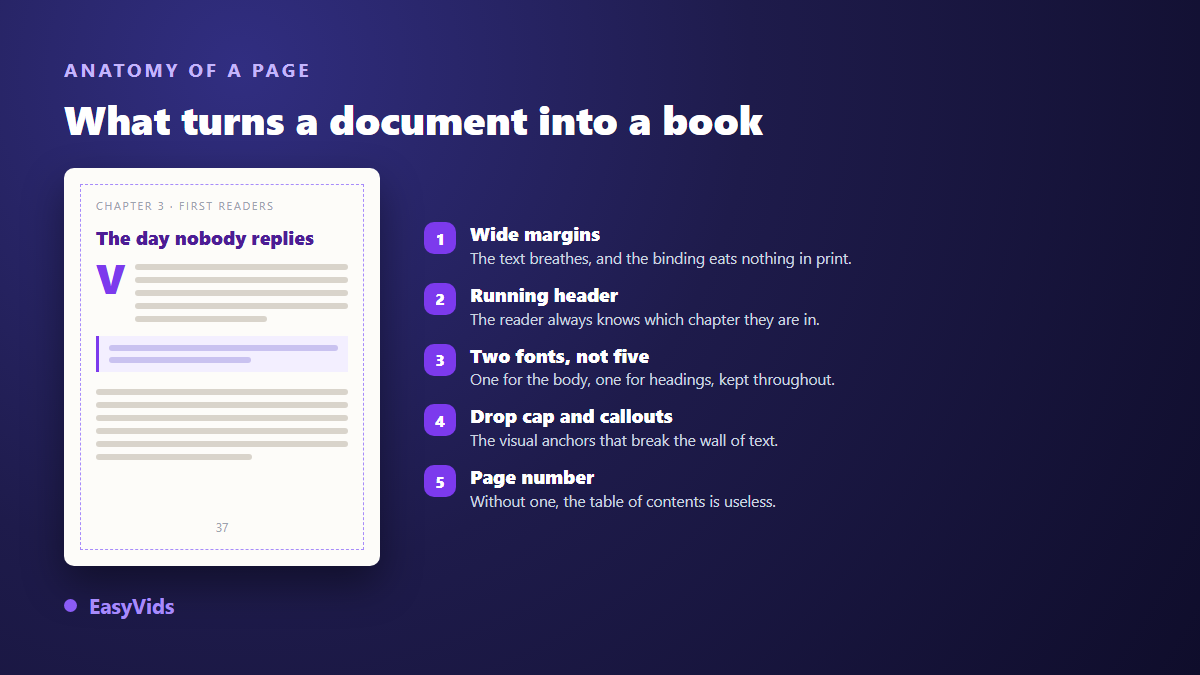
Then hold three settings across the whole document: one font for body text and one for headings, generous leading, wide margins. Add a clickable table of contents, a running head and page numbers. Those details, more than your prose, are what make a reader say it looks like a real book. Illustrations follow the same discipline, and our method for a fully illustrated AI ebook shows where to place them so they support the text instead of punching holes in it.
Step 5: the cover is the first page of the file
A PDF cover is not decoration. It is the thumbnail your reader sees in an inbox, on a sales page or in a library view. Shrink it to stamp size and look again. If the title still reads, it works. Short title, strong contrast, nothing else. Explanations belong on the sales page, not on the artwork.
Step 6: export without breaking the layout
From a word processor, use the export to PDF command rather than the print command, which sometimes drops internal links. From a page composed in HTML, the browser print dialog offers saving as PDF: that is a genuine export, not a screenshot, and the text stays selectable. Check three things afterwards. Fonts must be embedded, or your reader sees a substitute that shifts every line. Images must be high resolution if the book goes to print, since Kindle Direct Publishing guidance asks for 300 dots per inch on a printed interior. And the ISO 19005 standard defines PDF/A, a variant built for long term archiving.
The check that prevents a returned file
Open the exported PDF on a device that is not yours, ideally a phone. It is the only test that matters, because it exposes missing fonts and oversized images. Then run this list, in order.
- The cover fills the whole page, with no white band at the bottom.
- Every table of contents entry jumps to the right chapter.
- No chapter heading is stranded alone at the bottom of a page.
- Images stay sharp when enlarged, and keep their proportions.
- Text can be selected with the cursor, proving it was not flattened into an image.
- Any link inside the book opens and points to a live address.
- The file name carries the book title, never a working version number.
PDF, EPUB or print: which one to choose
The format depends on the channel, not on taste. According to the Kindle Direct Publishing help centre, a digital book is best uploaded as EPUB, a format that lets text reflow to the screen, while the interior of a paperback is submitted as a PDF at the exact trim size chosen. Disclosure rules for AI assisted books are covered in our page on Amazon KDP and generated books.
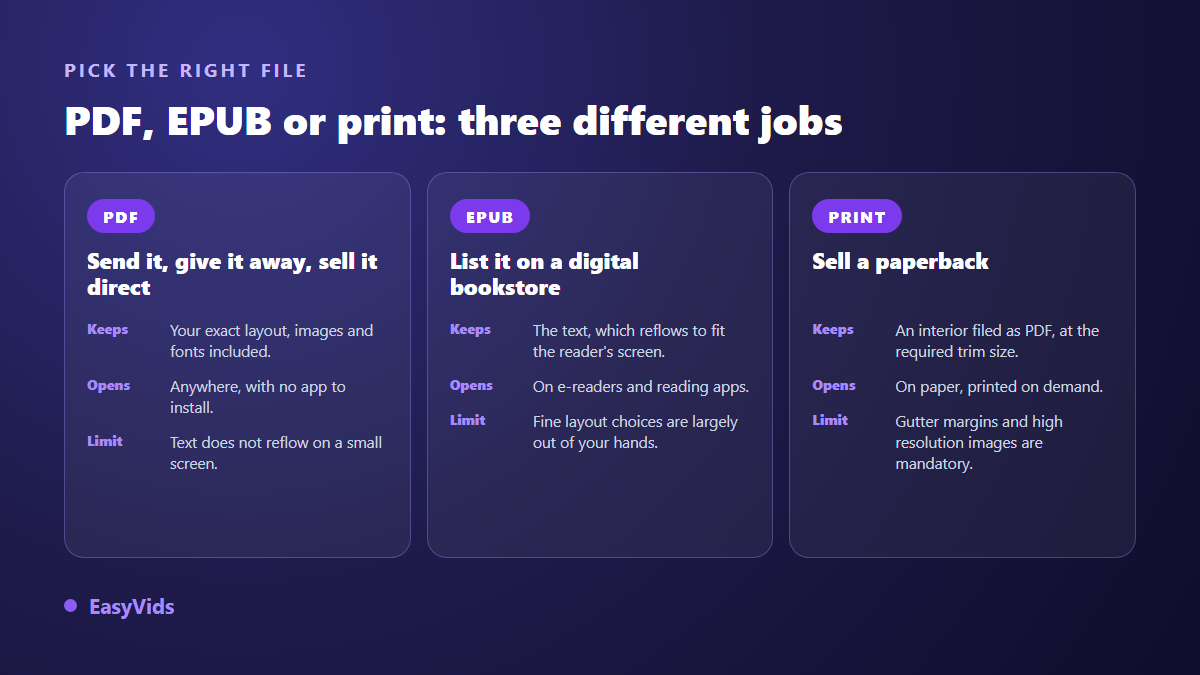
For a direct sale, an email delivery or a signup gift, PDF stays the simplest option: it opens anywhere, with nothing to install, and you keep full control of the appearance. Weight becomes the limiting factor once the book carries images. The Gmail help centre puts the attachment limit at 25 MB, and most mail providers sit in the same range, so switch to a download link as soon as the file grows. Our options for selling an ebook without a website cover taking payment and delivering the file automatically.
Having the PDF composed end to end
These steps depend on each other, which is exactly what a studio automates. On EasyVids you describe the topic, the audience and the length in words, then choose a language, a writing register and how many images each chapter gets. The outline is proposed before any writing: you rename chapters, add the ones you miss, and approve. The book is then drafted chapter by chapter, reviewed, illustrated and assembled with its cover, clickable contents and page numbers, and one button composes the final PDF. The EasyVids studio keeps those steps in one place.
Two limits deserve to be stated plainly. Output is a PDF plus a self contained page you can open in a browser, so an EPUB submission needs a dedicated converter. And the delivered text is a first draft to review, especially on figures and examples. The credit system lets you set volume and illustration count book by book, and the plans are on the pricing page.
Frequently asked questions
Can you create an ebook PDF for free?
Yes. A free word processor exports a decent PDF, and any browser print dialog offers saving as PDF. Free tools show their limits on fine layout, clickable contents and custom illustrations, not on the export itself.
Which page size should an ebook PDF use?
A4, 210 by 297 millimetres, suits desktop reading and home printing. A smaller page closer to a paperback reads better on a phone. Decide by the device your reader will use, and keep that size identical across the whole document.
How do you add a clickable table of contents to a PDF?
Build it from the heading styles of your document, never by typing entries by hand. The layout tool then creates internal links that survive the export. A manually typed contents page stays dead text once converted.
Should you protect an ebook PDF against copying?
Passwords and copy restrictions mostly annoy honest readers, since they are trivial to bypass. A discreet footer with your name and the purchase address does more to discourage casual sharing, and it sends curious readers back to you.
How long does a complete ebook PDF take?
By hand, expect several days for a short book, most of the time going into writing and layout. With a studio that drafts and composes, production runs in the background and your real work becomes review, roughly one to two hours for a book of a few dozen pages.
A good ebook PDF is not a technical feat: a clear promise, an outline you hold to, a steady layout and a clean export are enough. Start with the promise sentence, it decides everything else. To see the whole chain applied to your own topic, create your account and launch one short book first.