You describe a scene in one line, you hit generate, and the shot that comes back looks nothing like the one in your head. The character does not move, the light is flat, the camera is bolted to the floor. You add three adjectives, you run it again, and the result changes without improving. The real question is not which generator to pick. It is how to write AI video prompts that leave the machine almost nothing to decide.
A prompt is not a magic phrase. It is a shot note: you build it, you reread it, and you fix one precise spot when the output drifts. This page teaches that construction rather than recipes. If you would rather copy ready made instructions and adapt them, our annotated library of video prompts does that job.
The short answer
A useful video prompt runs three to five sentences and answers five questions, always in the same order: who or what, the subject described physically; what is happening, one ongoing action; where we watch from, framing and camera move; inside what, light and setting; how it renders, visual style and sound. Write it in English, in present continuous, describing what you want in frame rather than what you refuse. Between two attempts, change exactly one thing. The rest is vocabulary, and it takes an evening to learn.
The five blocks of a video prompt
Five blocks, because five is what you remember without a checklist in front of you. Each one answers a question the generator will face anyway. If you do not answer it, the model answers alone, and its answer changes on every run. That is what makes these tools feel unpredictable, when the text you sent was simply incomplete.
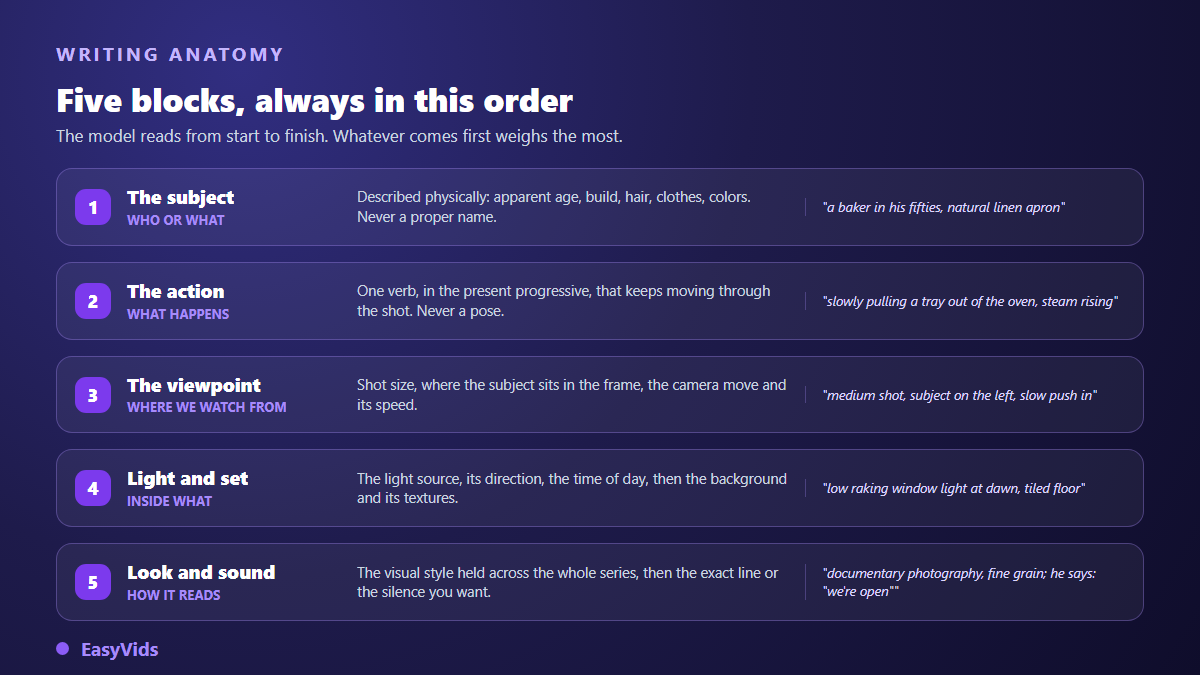
- Subject. Who or what, described physically: apparent age, build, hair, clothing, colours. Never a first name, never a proper noun.
- Action. One verb, present continuous, chosen because it progresses during the shot. « Pulling a tray out of the oven » beats « at work ».
- Point of view. Shot size, angle, where the subject sits in the frame, then the camera move and its speed. « Camera static » is an instruction, not the absence of one.
- Light and setting. A named source, its direction, the time of day, then the background, its materials and its depth.
- Style and sound. The visual look, decided once for the whole series, then the exact line in quotes if somebody speaks, or the ambience you expect.
These five blocks are a memory aid, not a rigid format. In a very detailed instruction they split further: framing separates from camera movement, setting separates from light, sound is handled on its own. The condensed version is the one you keep in mind while writing. To place this work inside the full chain from idea to finished file, our guide to the AI video generator gives the wider picture.
Why the order matters
A video model reads your text from start to finish, and what comes first weighs more than what comes last. As the instruction grows, the closing sentences dilute. Putting subject and action at the top is therefore not a stylistic choice: it is what guarantees that the heart of the shot survives even if the tail is partly ignored.
A stable order also keeps your prompts editable. Reading five instructions written in the same sequence, you spot at a glance the one missing its light block. When each is written differently, you have to read all of them again. Across twenty scenes that gap becomes real work, and the same regularity is what lets you copy a block unchanged from one scene to the next.
Block one: describe the subject, never name it
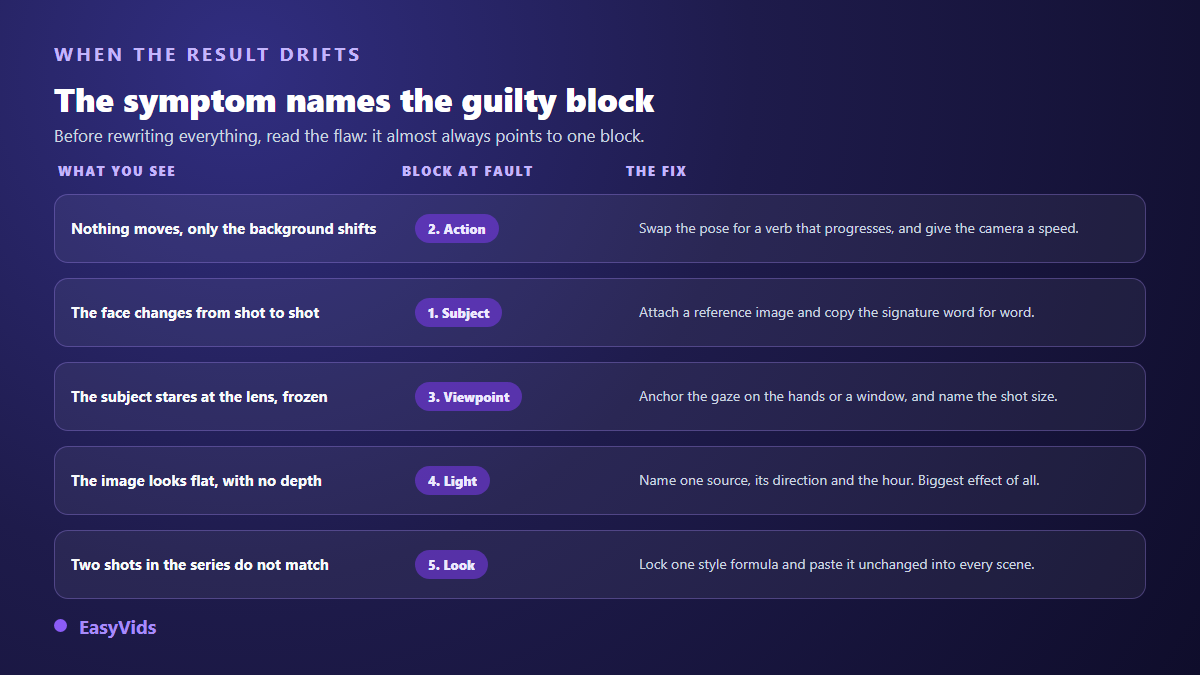
This is the most expensive mistake because it goes unnoticed. Naming your character inside the prompt achieves nothing: the generator does not know your heroine, and a proper noun pushes it towards faces it believes it recognises. Describe a silhouette instead: apparent age, build, hair length and texture, clothing and colours.
That description has a second job, and it matters more: it becomes the character's signature. Copied word for word between scenes, it slows face drift. Rephrased each time, even with the same ideas, it produces a convincing cousin. Our director mode follows that rule: hair and outfit are repeated identically in every scene, and a reference image is attached to the shot to confirm what the sentence describes.
Block two: an action that lasts, not a pose
An image freezes a moment, a video occupies a duration. A prompt describing a pose returns a frozen shot where only the background shivers. Write a verb that progresses across those seconds: someone pouring, pushing a door, turning around. Add one visible moving element, steam, dust or fabric, and it carries the motion when the subject cannot.
One action per shot, never two. Ask a model to open a door, cross a room and sit down, and you will get all three blended or only one of them. Two actions mean two shots, so two prompts. The rule also serves your edit: a viewer follows one intention at a time. That split is prepared upstream, when the text itself is written, and our guide to writing a video script shows how to keep one idea per shot.
Block three: point of view is decided, not inherited
Point of view is the block people forget most, and the one that instantly separates a written shot from an accidental one. It gathers three decisions you would make without thinking with a phone in your hand: how far you stand, how high you hold it, and whether you move.
- Shot size: close up, medium, wide. It decides what the viewer is allowed to see.
- Angle: eye level, high angle, low angle. A slight low angle grants authority, a high angle takes it away.
- Where the subject sits in the frame. Leaving one third empty reserves room for a title added in the edit.
- Camera move and speed: slow push in, pan, handheld. Slow moves break far less often than fast ones.
- Gaze anchoring. A subject who is not told where to look ends up staring into the lens: say they watch their hands, the window, or the person opposite.
That last point deserves emphasis, because it gives a generated shot away in one second. The stare into the lens is the most recognisable flaw of all. Our production instructions systematically add an anchor that prevents it, unless the scene explicitly asks the character to address the viewer. That is exactly what a closing shot does when it asks for an action, and that line is written before the prompt: our collection of call to action lines offers versions short enough to fit inside a single shot.
Blocks four and five: light does the work, style holds the series
Light gives you the best ratio between words written and change obtained. A named source, a direction and a time of day are enough: a desk lamp on the right, low raking window light at dawn, a fluorescent tube overhead. Then describe the setting through its materials rather than its label: raw concrete, worn tiles, pale wood.
Style, on the other hand, is not renegotiated per scene. Pick a short visual formula, keep it identical across the series, copy it unchanged. That is the only way to get shots that visibly belong to the same film. Sound follows the same logic: a line is copied word for word, because current video generators build picture and audio in one pass, and lip movement comes from the exact text you wrote. Since the model builds that voice alongside the picture, the question of imitating a real one comes up fast, and our article on the legality of voice cloning sets out what consent covers.
Why bans backfire
Many failing prompts are lists of refusals: no blur, no text, no deformed hands, no crowd. Most video generators have no separate field for exclusions, so your list travels inside the same sentence as everything else. The model then reads a precise description of what you did not want, and very little room is left to build what you did. Text deserves one exception: when your video genuinely has to show pages of a document, they are laid over the shot in the edit rather than described in the prompt, which is what our method for turning a PDF into a narrated video does.
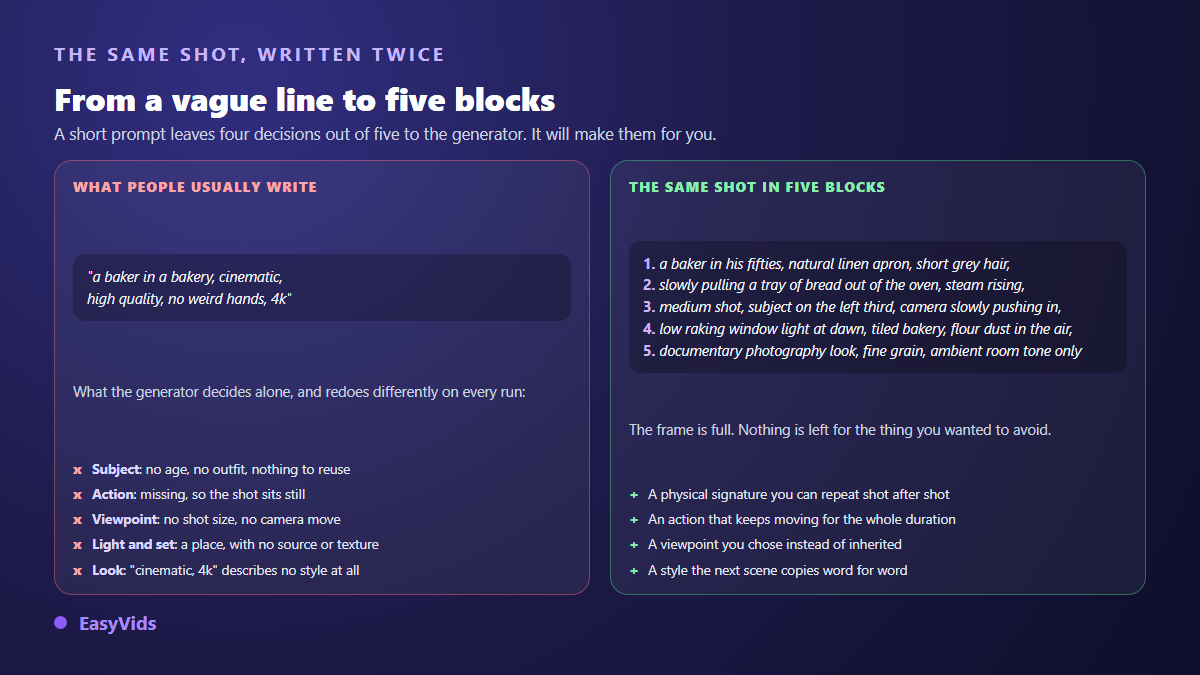
- « No crowd » becomes « alone in the room », « empty street », « empty workshop ».
- « No text » becomes « plain background », « bare wall », « unbranded packaging ».
- « No weird hands » becomes « hands flat on the table », or a framing that leaves them out.
- « Not looking at camera » becomes « looking at their bench », « turned towards the window ».
- « No sudden movement » becomes « slow push in » or « camera static ».
When the same exclusion returns on every video, stop retyping it. In the EasyVids studio two preference fields live on your account, one for what to avoid in images and one for videos. They are deliberately short, and they are appended server side when each scene instruction is written. You fill them once and forget them by scene thirty.
One variable at a time
This is the habit that separates people who improve from people who spin. When a shot disappoints, the temptation is to rewrite everything at once: new framing, new light, new style. The next result may be better, but you will not know why, and you will not reproduce it on the following scene.
- Write a complete base prompt with all five blocks, including the ones you feel sure about. A missing block is a block the generator fills for you.
- Change point of view alone and keep everything else. Note what the subject gains or loses.
- Return to the base, change light alone. It very often carried the problem.
- Return to the base, add or remove the camera move. A static shot fails less often than a fast track.
- Return to the base, change style last, because it commits the whole series rather than one scene.
- Keep a written trace of every version. A prompt that worked and was never saved is a prompt lost.
Four planned attempts teach you more than twenty random retries, and they use far fewer credits. Plans are listed on the pricing page, and a free trial is enough to rehearse the method before committing to a full series.
Reading a shot that drifted
A failed result is almost never a global failure: it is one missing block. Learn to read the flaw instead of enduring it, and the fix becomes a one line edit rather than a rewrite. The table below links the most common symptoms to the block responsible for them.
- Baked in text reads like an unknown alphabet: take the text out of the shot and add it in the edit. No generator is reliable past a few letters.
- The spoken line is cut mid sentence: it exceeds the shot length. Split it across two scenes rather than speeding up the delivery.
- The scene produces nothing at all: a term tripped a safety filter. Rephrase rather than insist, replacing the flagged word with a neutral description.
- The character changes outfit halfway through: the signature was not copied identically, or a reference image is missing on that scene.
- The shot is pretty but unreadable: too many elements for the available duration. Remove, do not add.
One remark saves a lot of frustration: two runs of the exact same text do not return the exact same shot. That variation is part of the process. Sharper blocks and reference images contain it, they do not cancel it. On a character who returns scene after scene, the description copied word for word is what limits that drift most, and our guide to describing a character who stays the same sets out which traits to lock first.
What the prompt does not decide
Several settings live next to the instruction and sometimes outweigh it. Duration is picked in the generation options, so writing « a ten second video » inside the prompt changes nothing. Aspect ratio is chosen the same way, and a model that cannot produce yours is filtered out of the list rather than returning a cropped image. Reference images outweigh ten lines of description and remain the most reliable way to keep the same character, product or setting across shots. Destination matters too: YouTube's official help page on Shorts states that a Short stays vertical, runs up to three minutes and uploads at 1080p at most. Other practical questions are grouped in our help centre.
Letting the machine write the first draft
Writing twenty instructions by hand for a twenty scene series is long and repetitive, and it is exactly the kind of task worth delegating. On a single generation, a button writes the prompt from a theme: give a style or an idea, a complete English instruction appears in the field, and you edit it before launching. In the workshop each scene carries its own image instruction and, if you want, a separate video one. What matters is not the automatic writing, it is that everything stays editable: an instruction you cannot correct is one you endure.
Frequently asked questions
Where do I start if I have never written a video prompt?
With subject and action, in that order, one sentence each. Run the shot with those two blocks alone to see what the generator adds by itself, and if no subject comes to mind for that test, seventy five video ideas sorted by niche will hand you one. Then add point of view, then light. Three attempts are enough to feel what each block changes, and the habit stays with you on every later scene.
How long should an AI video prompt be?
Three to five sentences, around sixty words. Shorter and blocks are missing, so the model invents. Longer and instructions start contradicting each other, with the last ones diluted. A prompt that keeps growing almost always hides two shots inside one instruction: split it.
Should AI video prompts be written in English?
Yes, even for a video in another language. English framing, lighting and movement vocabulary is what these models saw most during training, and stability improves. Your script, voice over and dialogue stay in the language of your video, as covered in our guide to natural AI voice over.
How do I fix a shot without losing what already worked?
Go back to the base prompt and touch a single block. Save the version you liked, restore the previous block before testing another, and keep your attempts in writing. Without a written trace, a good prompt is lost after three retries and you start from zero.
Why does the same prompt not give the same shot twice?
Because generation carries a deliberate amount of variation. Two identical runs return two close shots, never superimposable ones. Sharper blocks and attached reference images narrow the gap without closing it, and that residue is also what keeps a series alive.
Writing a good video instruction needs no special talent and no clever vocabulary. It needs five blocks, an order you do not disturb, bans translated into descriptions, and the patience to change one thing at a time. Take your last failed shot, reread it against the five questions, and you will see immediately which one had no answer. Creating an account opens the studio so you can test your base on one scene before committing to a whole series.