The script is ready, the visuals are ready, and the voice is missing. That is where a lot of videos stall. Knowing how to do a voice over that sounds neither wooden nor metallic, without a booth, a hired actor or a studio, is what stands between a finished file and a folder of unused footage.
Two routes lead to the same audio file: your own voice into a microphone, or a voice generated from your text. They share the same preparation, and that preparation decides the result long before any gear does. This guide walks the full method, the settings that matter and the flaws that give a beginner away. On the engines themselves, our complete guide to AI voice over goes deeper.
How to do a voice over: the short answer
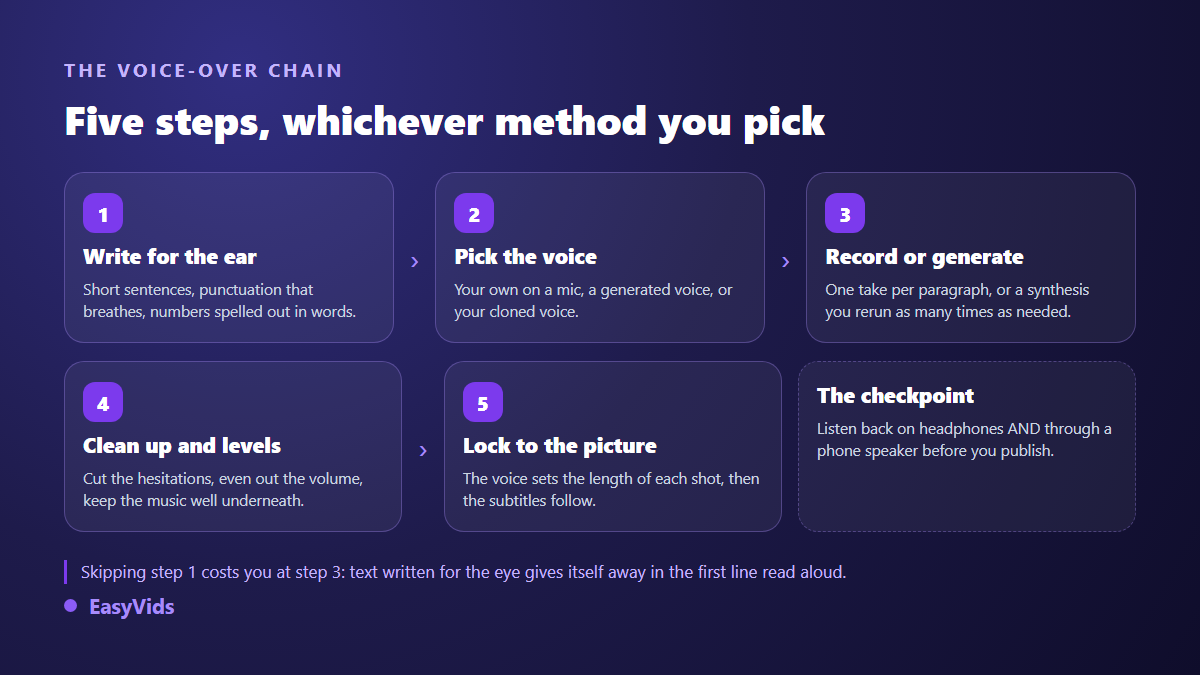
Write a text built for the ear. Pick your voice: your own on a mic, a generated voice, or a clone of your own. Record or generate paragraph by paragraph. Clean the hesitations, keep the level steady, sit the music well under the narration. Then lock the audio to the visuals and add captions. A useful yardstick while writing: around 150 words per minute of narration, a little under 1,000 characters.
Step 1: write for the ear, not for the eye
A text written for the eye is obvious on first listen. It stacks clauses, opens brackets, lines up acronyms. Spoken aloud, all of that turns into noise a listener abandons within seconds. The most reliable test takes one minute: read your script out loud. Every sentence that leaves you out of breath is a sentence to split in two.
Punctuation works like a musical score. A full stop makes a real pause, a comma a short lean, an ellipsis a hanging beat. A synthesis engine reads it the way an actor would, so punctuate for breathing rather than for grammar. Spell out numbers whenever pronunciation is in doubt, and check proper nouns, the one place where synthesis still slips.
- One idea per sentence, twenty words at most.
- Verb early: active voice is heard, passive voice is endured.
- No brackets, no long asides: nobody hears them.
- Numbers written out when the pronunciation matters.
- An opening line that states the stake before any introduction.
- A transition word at the top of each paragraph to signal the turn.
Step 2: your own voice, or a generated one
The decision is no longer about raw quality, since both hold up. It is about your publishing pace and the relationship you want with your audience. A human voice carries intentions no instruction fully replaces. A generated voice can be corrected endlessly without ever tiring, which changes everything once you publish several times a week or in several languages.
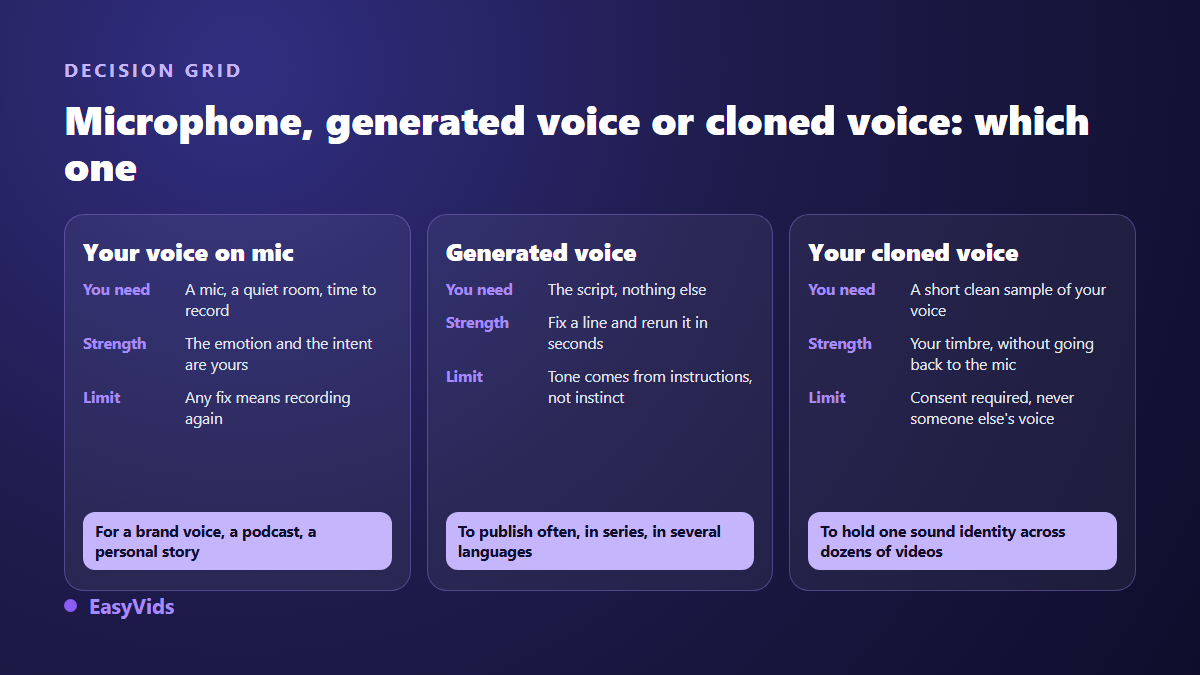
A third route exists, and it is less known. Cloning starts from a sample of your own voice: the engine reproduces your timbre, and you then generate every script without going back to the mic. That is the compromise that keeps one recognisable sound across a whole channel. When a result feels lifeless, the writing and the settings are almost always at fault, and the causes of a robotic sounding voice can be fixed one by one.
Recording on a mic: treat the room before buying gear
A decent microphone in a furnished room beats an expensive one in a bare room. Reverb is the main enemy, and it cannot be undone in the edit. Record in a bedroom rather than a tiled living room, curtains drawn, rug on the floor. The clothes wardrobe remains the most effective trick creators ever found: fabric absorbs what walls throw back.
Set the microphone about a hand's width from your mouth, slightly off axis. Head on, plosives push a blast of air that clips the take, and a pop filter saves a lot of retakes. Stand up if you can, the breath carries better. Leave three seconds of silence at the head of the file: your software will use it to learn the room noise and strip it out.
- Switch off ventilation, the fridge and every notification before the first take.
- Record a thirty second test and listen on headphones, never on speakers.
- Work paragraph by paragraph: a mistake then costs one paragraph.
- Drink room temperature water, and keep the bottle out of the mic field.
- Mark bad takes with two hand claps: they are instantly visible on the waveform.
Doing a voice over without a mic: how synthesis works in practice
A generated voice needs a script and nothing else. EasyVids offers three voice families. The first gives eighteen timbres steered by a reading instruction written in plain language. The second gathers French narration voices, from a steady narrator to a news anchor. The third holds English speaking voices. You pick the family, pick the voice, run the generation and get an MP3 file back.
One practical detail matters more than it looks: accepted length. A long script is split automatically at sentence boundaries, every chunk is generated at the same time as the others, and the parts are glued back into a single file. A full chapter goes through in one pass, with no manual slicing. And when a single sentence lands badly, you regenerate that sentence alone instead of the whole piece, which is what makes the method sustainable on long formats such as a series of podcast episodes.
The reading instruction: the setting that changes everything
This is the most underrated control. Instead of a row of sliders, one voice family accepts a written instruction: read like a captivating storyteller, in a warm and steady voice, or read like a TV news anchor, serious and brisk. The same sentence with two different instructions gives two recordings with nothing in common.
Two habits get the most out of it. Describe a situation rather than an emotion: like a confidence shared with a friend works better than warmly. And keep one instruction from start to finish, otherwise the tone jumps between scenes. The instruction is stored on your account and applied to every generation, so you never retype it. The other levers of a natural delivery are gathered in our tips for a genuinely natural AI voice over.
Cloning your voice to keep your own timbre
Cloning starts from a clean audio sample. A few seconds are enough for recent engines, but the quality of the extract weighs far more than its length: a crisp take in a quiet room beats a long noisy recording. We covered that point in how much audio it takes to clone a voice.
One guardrail applies: clone your own voice, or the voice of someone who gave explicit permission. That is why reputable services require a consent tick before any upload, and keep a cloned voice visible only to the account that created it. On the legal side, the European Union's artificial intelligence regulation carries transparency obligations that apply from 2 August 2026, requiring clear disclosure when audio content has been artificially generated or manipulated. The full picture is in our article on the legality of voice cloning.
Levels: voice in front, everything else behind
A good voice over holds a steady level. Your listener should never reach for the volume, neither between two sentences nor between two videos on the same channel. Record or generate first, even out the level next, and treat the voice as the reference for the whole mix.
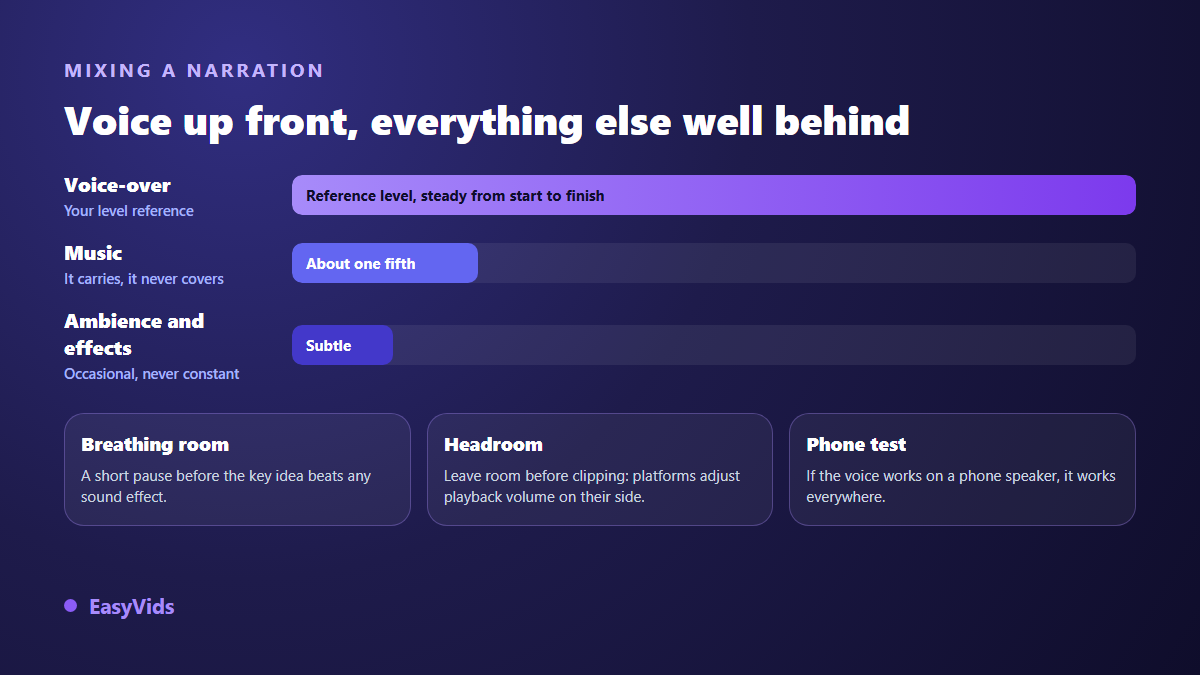
Music sits far below, around a fifth of the narration level. Keep headroom before clipping too: recommendation R 128 from the European Broadcasting Union established loudness measurement in LUFS, and the major distribution platforms normalise playback volume, which does not reward a file crushed to the ceiling. The final test is the most telling one: listen through a phone speaker, since that is where most of your audience will hear you.
Locking the voice to the visuals
The editing rule fits in one line: the length of the voice sets the length of the shot, never the reverse. You produce the narration, then each visual stretches or shortens to sit under its audio fragment. That is the principle behind turning a text into a narrated video, where the narration becomes the backbone of the edit.
Finish with captions. A large share of social video is watched with the sound off, and narration without on screen text loses that audience entirely. Automatic transcription does the heavy lifting, as our guide to automatic subtitles explains, and you only correct proper nouns and punctuation.
The mistakes that give an amateur voice over away
- A flat pace from start to finish: slow down on the key idea, speed up on the links.
- Breaths cut out in the edit: without them the voice stops sounding human.
- Music climbing back to narration level the moment a sentence ends.
- A level that shifts between paragraphs recorded on different days.
- Acronyms and proper nouns mispronounced and never checked before publishing.
- A script read too fast because it was too long: cut the words, not the pauses.
How long a voice over takes
On a microphone, budget roughly three times the final duration: a take, a retake, a cleanup. A three minute narration therefore eats a good part of an hour once review is included. With synthesis, generation is a matter of seconds and the time goes into writing and listening back. So the choice rarely comes down to quality, it comes down to the pace you have to hold. How plans and credits work is set out on the pricing page.
Frequently asked questions
Do I need an expensive microphone for a voice over?
No. An entry level mic in a furnished room beats a high end one in a bare room. Treat the room first, upgrade the gear later. A good headset mic already gives honest results for a training video, as long as you keep it slightly off axis and do not breathe straight into it.
How many words make one minute of voice over?
Around 150 words, a little under 1,000 characters, for a comfortable narration pace. A tight advert runs higher, a meditation runs far lower. Always think in minutes of finished video rather than in pages, because that is the only measure that saves you from cutting in the edit.
How do I record when the room echoes?
Add fabric: curtains, a duvet, a rug, hanging clothes. Move closer to the microphone and lower its gain, so the voice wins over the reverb. Avoid room corners and large bare walls behind you. No software treatment fully rescues a heavily reverberant take, so it is worth avoiding at the source.
Can a generated voice over be used commercially?
Yes: files produced on EasyVids are meant for your videos, adverts and training material. Two cautions apply. If you use a cloning tool, never clone someone else's voice without written permission. And disclose synthetic content where the platform asks for it: according to the YouTube help centre, the upload form invites creators to declare realistic altered or artificially generated content.
How do I fix a voice over that sounds robotic?
Rework the script first: shorter sentences, more generous punctuation, plainer words. Change voice next, rather than piling on settings. Then add a reading instruction that describes a concrete situation. Taken in that order, the problem usually clears before the third attempt.
A voice over rarely depends on gear. It depends on the script, on one tone chosen once and held, and on a level nobody needs to correct. Record if you enjoy the mic, generate if you have to publish fast, clone your timbre if you want both. To try the method on your own script with ready to use AI voice-overs, creating an account opens the full studio, and the EasyVids studio brings writing, voice, music and editing together in one place.