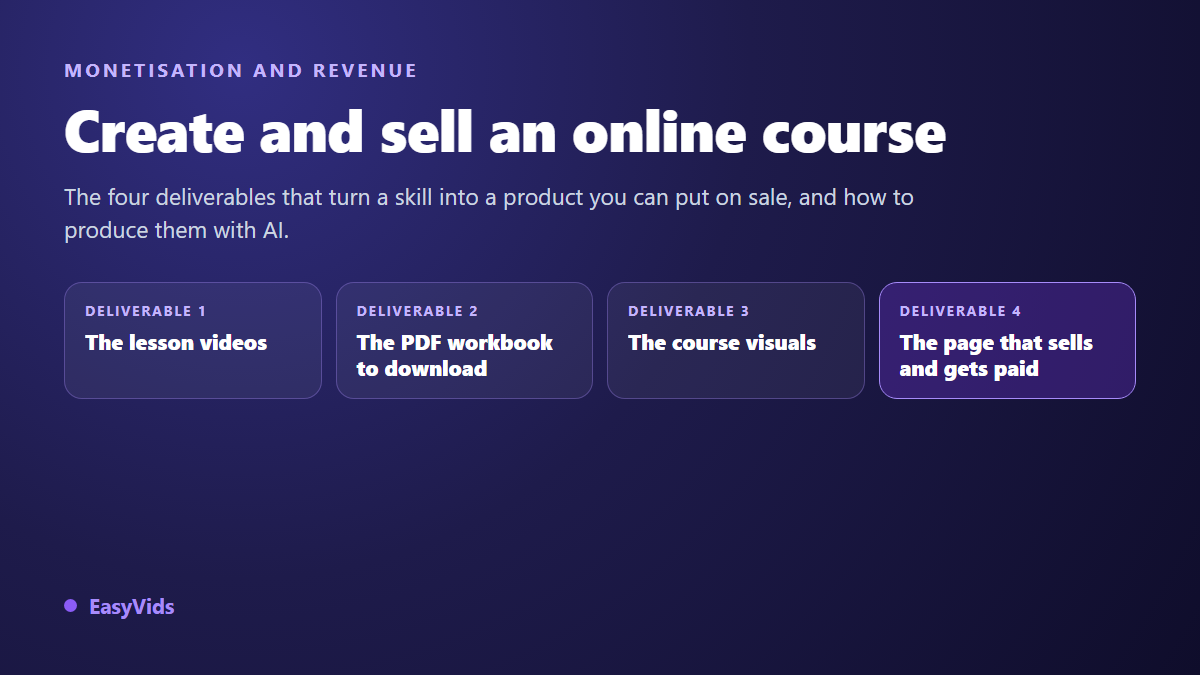
You know how to do something other people would pay to learn. That is rarely where things stall. The wall shows up later, at production time: to create and sell online courses you need videos, a downloadable workbook, visuals, a sales page and a way to take payments. Most first attempts die around lesson three, with an outline that has doubled in size and a recording that has to be redone.
The discouraging part is exactly the part AI handles best. Scripting, generating shots, laying down narration, formatting a workbook, producing thumbnails: all of it can be run in series. Your expertise stays irreplaceable. If you are still weighing this against other digital products, our roundup of serious ways to make money with AI puts a course next to the alternatives.
The short answer
An online course comes down to four deliverables and one decision. The deliverables: an outline built backwards from the promised result, the lesson videos, a PDF workbook that extends each video, and the visuals of the offer. The decision: where to host and where to get paid, between a course marketplace, a hosted course platform and direct file delivery. With the right tooling, production takes days. Validating the topic happens before that, and nobody can do it for you.
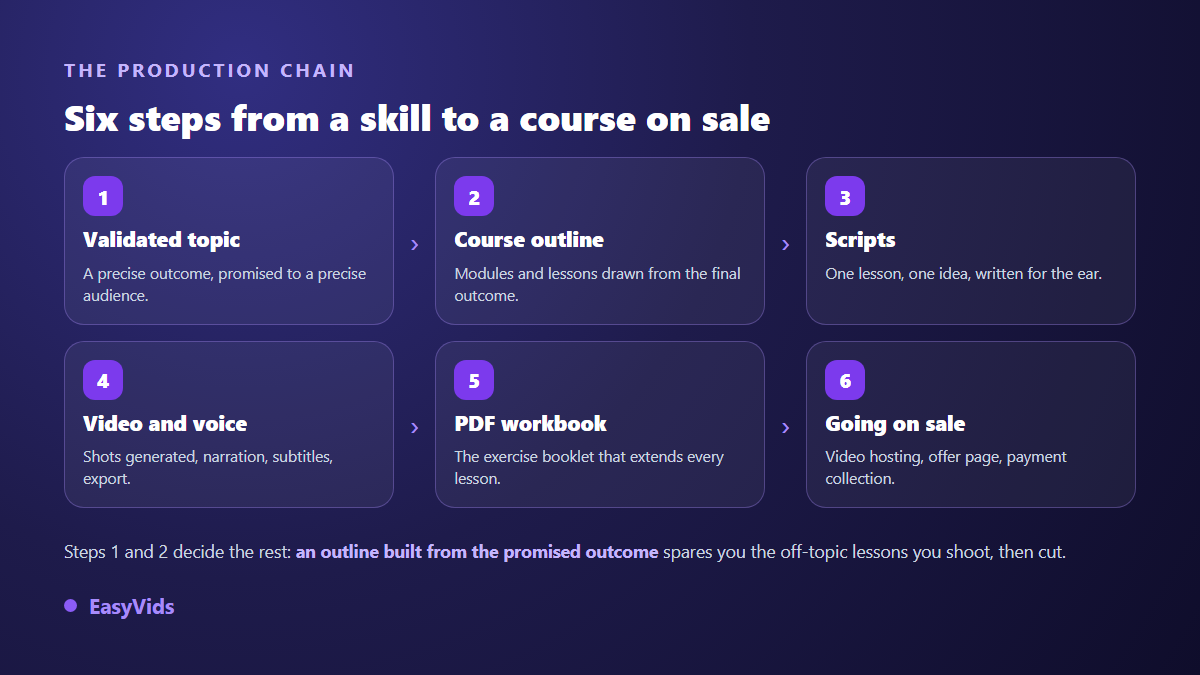
Step 1: validate the topic before you produce anything
A course does not sell on a theme, it sells on a transformation. Learn photography is not an offer. Shoot your own product photos with a phone for your online store is one: the audience is named, the outcome is checkable, and the buyer knows what they will be able to do at the end. Write that single line first and keep it in front of you through the whole build.
Two cheap tests save weeks. First, find the problem in the words your future students actually use, in comments, forums and the messages people already send you. If nobody phrases it, nobody pays for it. Second, announce the programme before producing it, with an opening date, and watch who joins the waiting list. A pre-sale that goes nowhere is valuable information collected before the effort.
Step 2: build the outline backwards
Start from the end. Write what the student must be able to do on the last day, then work backwards: which intermediate skills, in which order, with which exercise for each. You get modules, and inside each module, lessons. One lesson, one skill, one video. As soon as a lesson needs the word « and » to be described, it is two lessons and needs splitting.
The outline also protects you from scope creep, the classic flaw of a first course. The expert wants to hand over everything they know. The student wants a result. A short finished programme beats a complete one that never ships, and an advanced module can always be added later for people who already bought.
Step 3: script the lessons
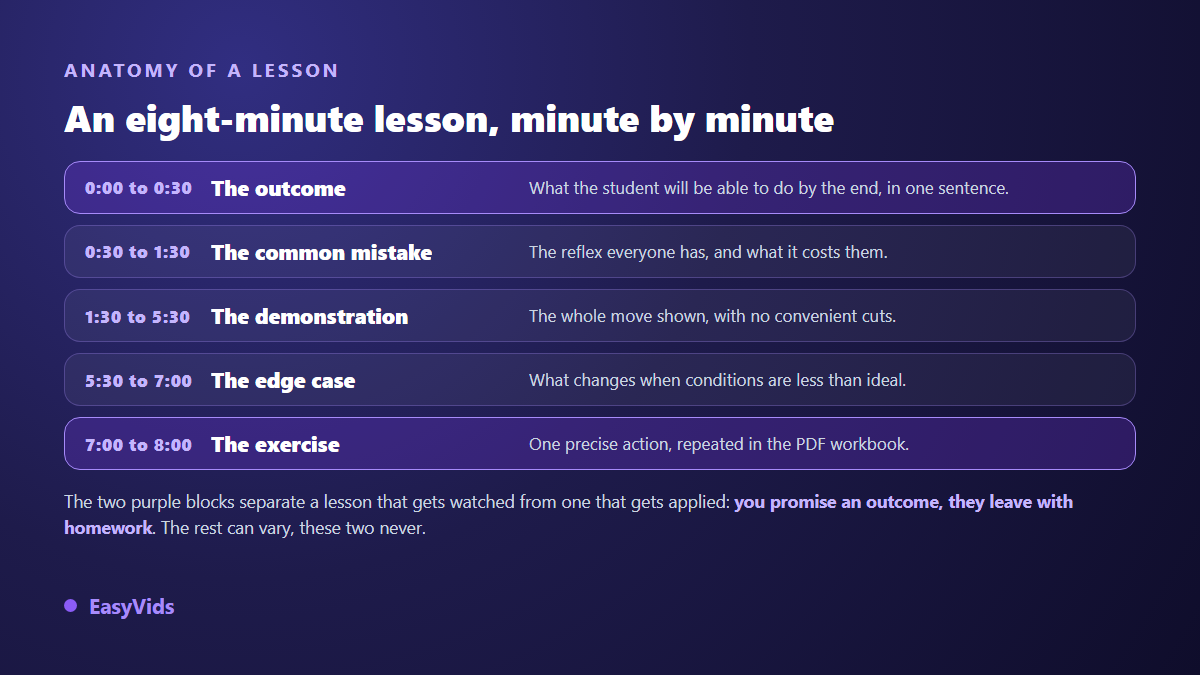
A lesson recorded without a script runs twice as long and says half as much. Write one script per lesson, and write for the ear: short sentences, one idea each, no three storey clauses. One minute of narration is roughly 150 words, so an eight minute lesson fits in about 1,200 words including the intro and the exercise. Across our own generations, that is the range where lessons get watched to the end.
Internal structure matters as much as length. State the outcome of the lesson in the first thirty seconds, name the common mistake, demonstrate the move in full, cover one edge case, close with a precise exercise. The same frame repeats lesson after lesson without tiring anyone, because the content changes, never the promise.
Step 4: produce the videos without a camera or a studio
Three lesson formats exist, and nothing forces you to keep one throughout. Talking head builds connection but requires filming. Narrated screen capture fits anything that happens on a computer. The illustrated lesson, where narration carries generated shots, covers the rest: theory, examples, scenarios. That third format is what AI produces best, and it often makes up half a programme.
The mechanics never change: the script is split into scenes, each scene gets a visual, then the narration sets the length of every shot. Inside the EasyVids studio, the Director handles longer lessons and cuts the story into consistent scenes, while the quick mode covers short sequences and reshoots. Pick the aspect ratio up front: 16:9 for a course platform, 9:16 for the clips you will post on social. Those vertical clips are the very object brands pay creators for, and what it takes to sell them as UGC work starts with three sample videos rather than an audience.
One detail drives how professional the course feels: visual consistency. Lock a direction, colours, framing and illustration style, then hold it across every lesson. If a narrator or a mascot appears, reuse visual references so the same face survives from module to module instead of drifting with every generation.
Step 5: the voice over carries half the credibility
Students forgive average visuals. They never forgive a painful voice, because they listen to it for hours. Record your own with a decent microphone in a furnished room, or generate the narration and treat punctuation as the score synthesis engines read. Voice cloning opens a third path: submit one sample, then every lesson speaks in your timbre, including the fixes you add six months later.
Step 6: the PDF workbook nobody remembers
A course that leaves nothing behind is finished and forgotten. A downloadable workbook changes that: students print it, fill it in and keep it. At minimum, one sheet per module with the key points, the exercise and room to write. It is also the fastest deliverable to produce, because it derives straight from your scripts. Our guide to creating an ebook with AI walks the full chain, from outline to a laid out file you download as a PDF.
Step 7: the visuals of the offer
Three families of visuals matter: the course cover, shown wherever your offer appears; the lesson thumbnails, which give the student area its structure; and the sales page images, which show the result rather than the contents. The legibility rules are the ones that apply to any video thumbnail: few words, strong contrast, one recognisable face or object at small size.
- The outline, with modules and lessons locked before the first generation.
- One script per lesson, calibrated to the target length.
- Videos exported in your platform's format, with no watermark.
- Narration that stays consistent from module to module.
- Captions, proofread on the technical terms.
- The PDF workbook, with one exercise per module.
- A cover, lesson thumbnails and two or three images for the sales page.
Captions: the comfort that gets a course finished
A student on a train, on a phone, in a second language or with a hearing difficulty: captions decide who can follow you. The W3C recommendation WCAG 2.1 places captions for prerecorded video at level A, the most basic of its three conformance levels. In practice, automatic transcription does the heavy lifting and you proofread the result, which is exactly what our guide to automatic captions covers.
Where to host the videos and where to get paid
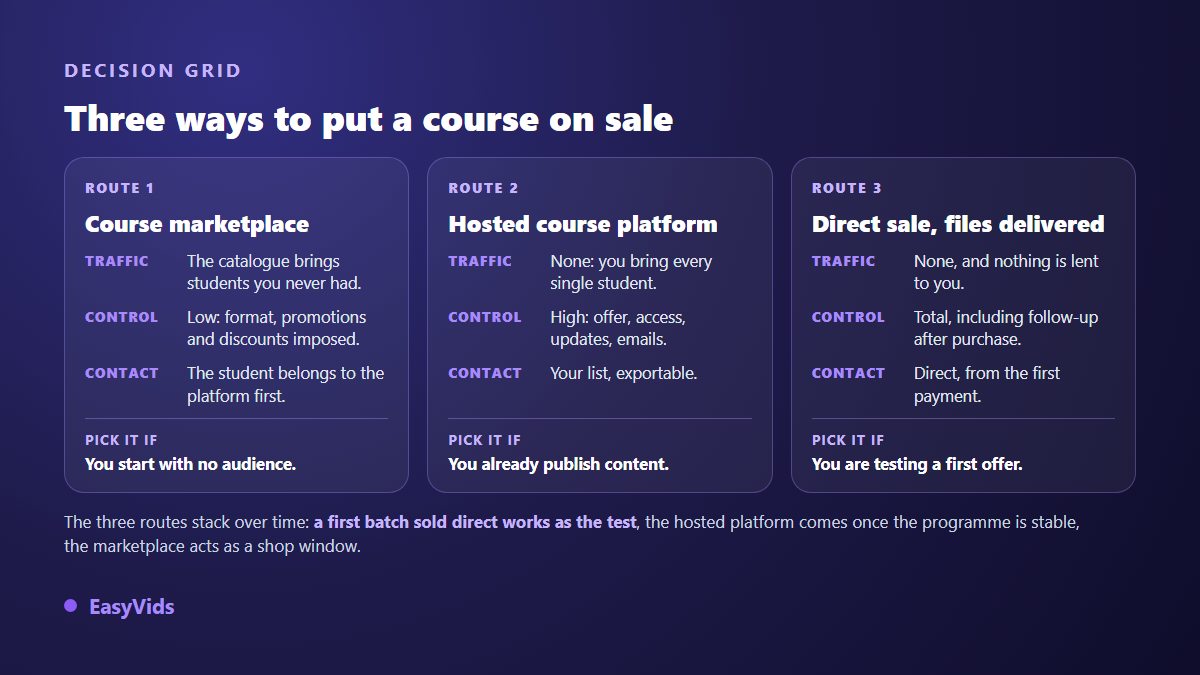
Three answers are valid. A course marketplace brings a catalogue and therefore traffic, at the cost of control: discounts, format and the student relationship partly escape you. A hosted course platform gives you a student area and billing, but brings nobody. Direct delivery hands over the files after payment, with no student area, and remains the fastest way to test a first offer.
One warning about video hosting, because the mistake is common. According to the YouTube Help Centre, an unlisted video does not appear in search results or on your channel, but stays viewable by anyone holding the link. That is discretion, not protection, and links get shared. For a paid course, prefer hosting that restricts playback to your domain, and accept that no protection is absolute. What keeps an honest student is the updates and the support, not the lock.
On price, one rule holds: set it on the result the student gets, never on hours of video. A short programme that solves an expensive problem outsells a pile of lessons. On the production side, the spend depends mostly on how many videos you generate and which model tier you pick, and the plans are laid out on the pricing page.
What a creation studio does, and what it does not
An AI creation studio produces the media of your course: lesson videos, narration, images, thumbnails, captions and the PDF workbook. It does not replace the platform hosting your students: no accounts, no payments, no certificates, no progress tracking. The two pieces are complementary, and knowing that before you pick your tools saves disappointment. The EasyVids studio covers production, your course platform covers distribution.
Finding your first students
A course with no audience sells to nobody, however good it is. The pattern that works most often has three beats: publish freely about the problem, collect emails with a useful freebie, then open sales for a short window. Public videos act as proof: they show how you explain things, which no sales page can demonstrate. They can also pay for themselves, since a channel carries seven distinct revenue streams alongside the sale of your programme. You do not need to appear on camera to do it, as our guide to running a YouTube channel without showing your face explains.
Frequently asked questions
Do I need to show my face to sell a course?
No. Voice, a clear outline and solid demonstrations weigh far more. Plenty of technical courses show nothing but screen captures and illustrations. A face helps build trust on the sales page and in the welcome lesson, but it is not required inside the lessons.
How many lessons does a first course need?
Fewer than you think. Three to five modules, with four to six short lessons each, is enough to deliver a measurable result. Aim at the promised transformation, not at a number of hours. A finished course that sells beats a perfect course still in production.
Can I sell a course produced with AI?
Yes, as long as the teaching is yours. AI builds the media: narration, images, layout, editing. What the student buys is your method, your sequence and your examples. Read the terms of the platform you publish on before you list it, since disclosure rules for generated content move quickly and belong on the official page, not in a forum thread.
How long does a complete course take to produce?
With a locked outline and written scripts, plan one production day for a module of five illustrated lessons, workbook included, when scenes are generated in parallel. Most of the time goes into review: checking a demonstration, fixing a mispronounced term, redoing a thumbnail. Validation and writing usually take longer than the build.
Do I need a website to sell an online course?
Not at the start. An offer page provided by your payment tool, access to the files or the student area, and an address for questions are enough to run a first cohort. A site becomes useful later, when you want search traffic and several offers in one place.
An online course succeeds because it keeps a precise promise and leaves something behind: short lessons, a workbook people fill in, a programme that gets updated. Production no longer has to cost you weeks. Pick a result, write the first module, produce it, sell it, then extend. To bring the videos, narration, visuals and workbook together in one place, create your account and start with a single lesson.