Your video works in your own language. Views are climbing, comments are coming in, and your analytics show a slice of viewers who miss half of what you say. AI dubbing answers exactly that problem: taking a video you already published and making it exist in another language, without filming again and without hiring a voice actor per country.
The word still worries people, because it brings to mind flat voices that sound like nobody. That is where the interesting part sits: keeping your timbre, your pace and your way of saying things, in a language you may not speak. The technique exists, it rests on voice cloning, and it needs a method. If speech synthesis is new ground for you, our complete guide to AI voice over covers the basics this article assumes.
The short answer
Dubbing a video with AI comes down to five moves: transcribe the original track with its timecodes, adapt the text into the target language while respecting the length of each shot, clone your voice from a sample, generate the new narration, then swap the audio in an editor. Expect around half an hour the first time, for a video of a few minutes. After that, every extra language mostly costs review time, because the clone of your voice is already made and can be reused indefinitely.
What AI dubbing really does, and what it does not
Automatic dubbing chains three parts. Speech recognition writes down what is said and when. Translation adapts that text. Speech synthesis says it out loud. When the output voice is a clone of the input voice, viewers hear your timbre speaking English or Spanish, with your intonation. That is the spectacular part, and the only genuinely automatic one.
What no tool does for you is the judgement. A sentence translated too closely sounds wrong when spoken. A brand name is pronounced differently. A joke lands flat. And above all, length changes. Dubbing almost always fails on duration, never on accent. Then there are lips: if somebody speaks to camera in your shot, replacing the sound does not change their mouth, and viewers spot it within seconds.
The five steps of a dub that holds
The order is not decorative. Each step locks the next one: a text translated with no duration constraint forces you to recut the edit shot by shot, and a voice generated before review has to be regenerated in full because of one clumsy sentence.
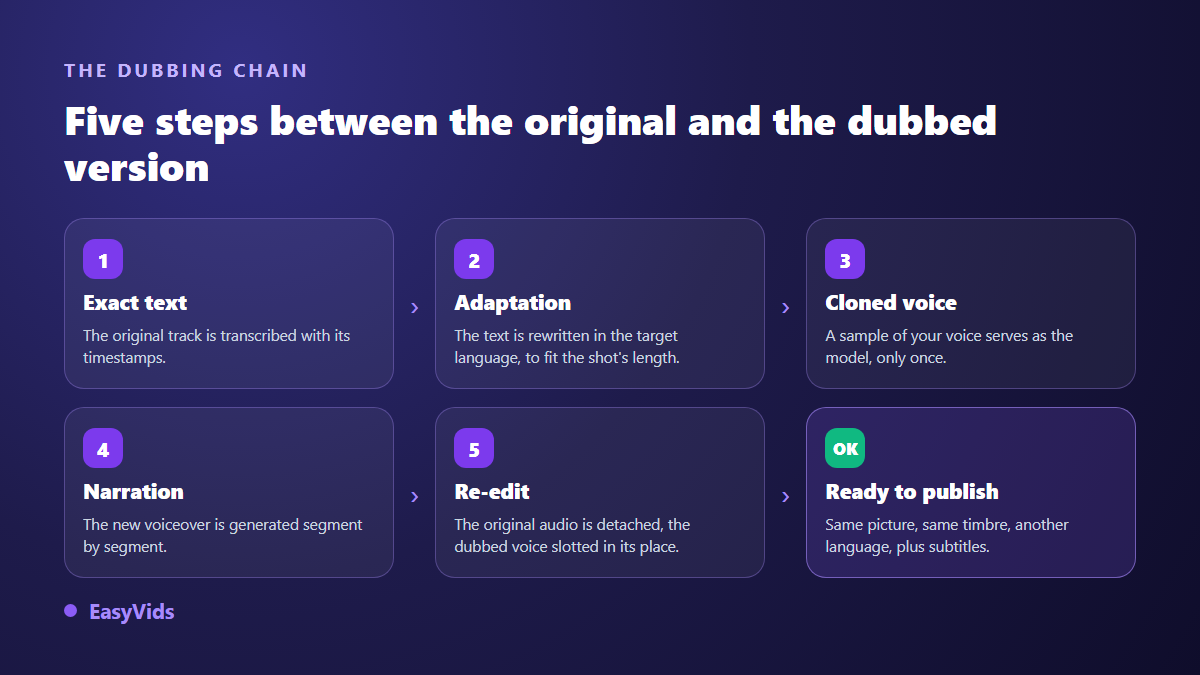
One thing is worth stating up front. A careful dub does not hide these steps behind a single button labelled dub. You run them yourself, with tools that pass files to each other. It takes longer to describe, and it is far safer, because you read every line before it is spoken.
Step 1: get the exact text, timecodes included
Everything starts from what is actually said, to the second. The caption panel of the online editor transcribes an audio track and returns an SRT file: numbered blocks, each with a start and an end time. You pick the language spoken in the recording, which avoids confusion on passages where the sound is weak or buried under music.
That file is your score for everything that follows. The timecodes say how many seconds each idea occupies, and that constraint drives the translation. Read the transcript before going further: proper nouns, brands and figures are the three places speech recognition slips, and a mistake left here travels into every language you produce.
Step 2: translate for duration, not word for word
This is the step everyone underestimates. The same idea does not take the same number of syllables from one language to the next, something localisation professionals call expansion. A French script tightens up in English, the same script stretches in Spanish. Keep the original cutting without touching length and the translated voice overruns its shot, bites into the next one, and your synchronisation collapses down the line.
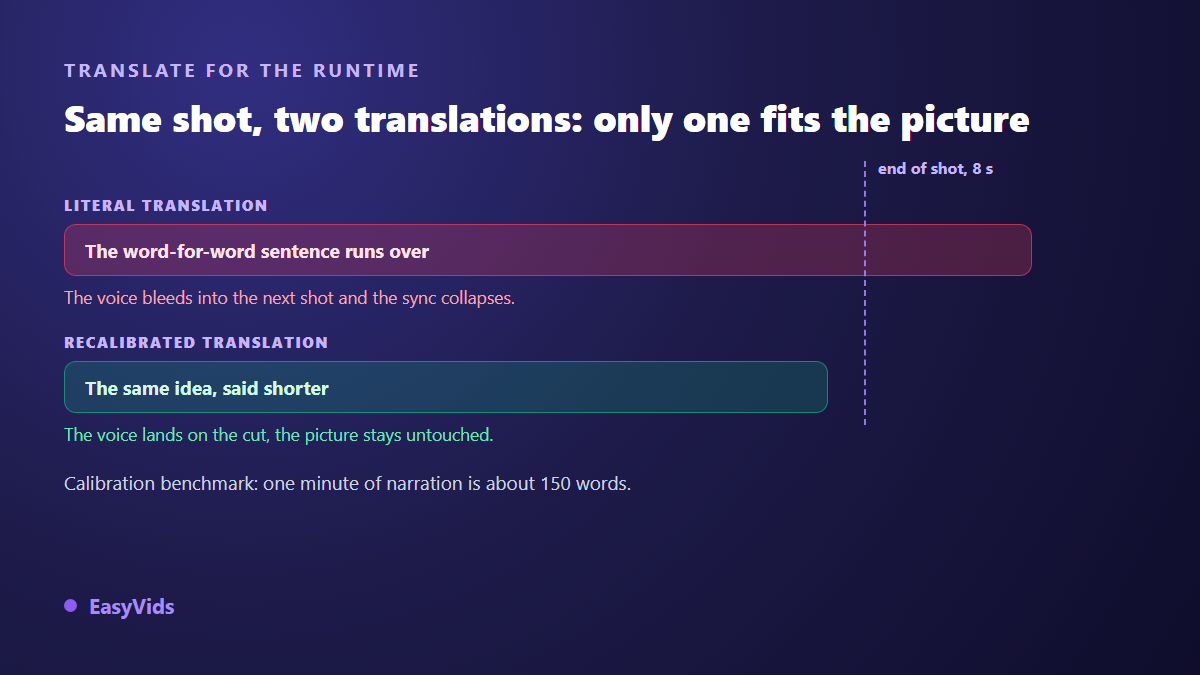
The method that works is to translate segment by segment, aiming for the same number of seconds rather than literal fidelity. One benchmark helps: a minute of narration is roughly 150 words. An eight second segment therefore takes about twenty words, no more. When the translated version runs long, do not speed it up, rewrite it shorter.
- Keep the original cuts as your frame and treat each segment on its own.
- Aim for duration, not exact wording: an idea preserved beats a full sentence that overruns.
- Cut pleasantries and repetitions, nobody misses them when spoken.
- Leave proper nouns as they are, and note the ones pronounced differently in the target language.
- Read it out loud with a stopwatch: the only test that never lies.
For the writing itself, the studio script generator works in French, English, Spanish and Portuguese. You can hand it your original text as a starting point, state the output language and the target length in words, and get an adapted version rather than a mechanical translation. That is exactly what spoken content needs. The review stays yours.
Step 3: clone your voice, once
Cloning turns a short sample into a model able to speak any text. Fifteen seconds of clean audio is enough to start, a few minutes give a steadier result, and beyond that the gain fades. What matters more than length is how clean the take is: no background music, no room reverb, no second voice in the distance. We covered that balance in our answer on how much audio cloning needs.
A reputable service asks for a certification before cloning: you confirm you hold the right to use that voice. The most rigorous ones ask for that box again at every cloning and never remember it. Once created, the voice sits in your own list next to the catalogue voices, visible to you alone. That is the voice you will pick for every language.
Step 4: generate the narration in the target language
Generation runs segment by segment, or in one block if your text is continuous. Long texts are split and reassembled automatically, so you never juggle a dozen files. One habit saves time: generate a single segment first, listen to it, then launch the rest. A setting you dislike shows up in ten seconds rather than ten minutes.
Two traps come up every time. Punctuation first: a synthesis engine reads commas and full stops the way an actor reads a score, and a translated text stripped of punctuation turns into a monotone block. Numbers and acronyms next, which are read differently across languages and are safer spelled out. The settings that separate a believable voice from a mechanical one are gathered in our fixes for robotic AI voices.
Step 5: rebuild the sound without touching the picture
In the online editor, import the original video and detach its audio track: it lands on its own line, which you can cut or silence without harming the picture. Drop the dubbed voice in, segment by segment, lining each piece up with its shot. A drift of a few frames is fixed by dragging the block, and the waveform shows you where speech actually starts.
Keep the music and the ambience from the original version: they need no translation and they tie your versions together. Set the new voice clearly above the background, as in the first version. Then export one video per language, with the language code in the file name. By the fourth version, that small discipline is what stops you publishing Spanish where Portuguese belongs.
Not every shot dubs the same way
Replacing the track is entirely convincing on voice over, screen recordings, product presentations and B roll. It becomes visible the moment a mouth moves on screen. Before you start, review your edit and sort your shots.
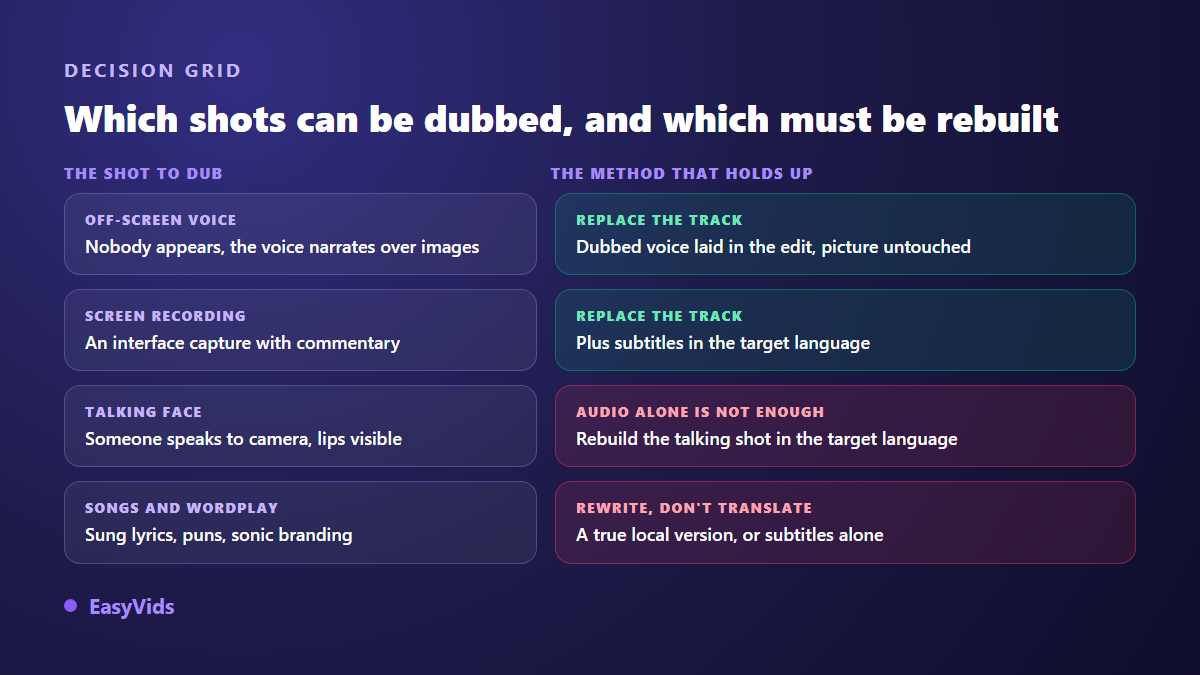
For shots where somebody speaks to camera, the honest answer is to rebuild the shot in the target language rather than lay a voice over it. When the character was generated, that means running the scene again with the translated line. When it is a real person on camera, accept the limit: keep the original voice on that shot and lean on captions.
Captions carry the other half
A dub without captions gives up half its audience. Many viewers watch with the sound off, and a synthetic voice in a foreign language asks slightly more listening effort than a native one. So produce captions in the language of the voice for each version, rather than leaving the original ones in place by accident. The full routine is in our guide to automatic captions.
Publishing several languages without extra channels
One question always comes up: do you need a channel per language? On YouTube, no. According to the YouTube Help Center, a single video can carry several audio tracks, and viewers pick theirs in the player settings, with the platform defaulting to the one matching their preferences. Your views, comments and history stay on one video, which beats three channels each starting from nothing. Remember to translate the title and description too, otherwise the right people never see the right track.
Consent, rights and disclosure
The rule fits in three sentences. Your voice is yours to clone. Someone else's voice needs explicit permission, ideally written, dated and stating the intended use. The voice of a public figure, an actor or a journalist is off limits, however harmless the use looks to you. The borderline cases, parody included, are examined in our article on the legality of voice cloning.
The legal ground has hardened fast. Tennessee made the voice a protected attribute with the ELVIS Act of 2024, which covers imitations and not only recordings. The European regulation on artificial intelligence requires, in its transparency obligations, that generated or manipulated audio and video be flagged as such. And according to the YouTube Help Center, creators must state at upload time when realistic content has been generated or digitally altered. A video dubbed with your own cloned voice is still synthetic content: disclose it, it costs nothing and it avoids a pointless strike.
What makes a dub cost more or less
Only three factors really weigh. Total speaking time, since synthesis is billed by volume of text. The number of languages, which multiplies that volume. And cloning, paid once per voice and never per generation, which is why the second language is far more economical than the first. For voice over and video, our current plans are on the pricing page, the only source that stays up to date.
Frequently asked questions
Does AI dubbing really keep my voice?
Yes, if you use a clone of your voice rather than a catalogue voice. The model reproduces your timbre and much of your delivery. It does not reproduce your native accent in the target language: your voice will speak clean English, not hesitant English. Most creators treat that as an advantage.
Can I dub into a language I do not speak?
Technically yes, and that is the main use. Still plan a review by someone who speaks the language, at least on your first video. An awkward turn of phrase or a false friend slips past your ear and jumps out at your audience. Test one short segment before generating the whole thing.
How long does a ten minute video take to dub?
Around an hour the first time, review included, and much less after that. Audio generation takes a few minutes, re-editing about twenty. Most of the time goes into adapting the text and checking durations, which is the human part.
Do the lips follow the new language?
No, not when you simply replace the audio track of an existing video: the picture does not change. On a shot where nobody speaks on camera it makes no difference. On a shot where a face is articulating, rebuild that shot with the translated line instead of laying a voice over it.
Can a dubbed AI video be monetised?
Yes, as long as the original video is yours and brings its own value. Translating your own work for a new audience is a legitimate, common use. What platforms penalise is mass reuse of someone else's content, dubbed or not. Just remember the synthetic content disclosure at upload.
AI dubbing does not replace a dubbing studio, it opens a door that was closed to independent creators: speaking to one more audience, in your own voice. Start with a single video, the one that already performs best, and a single language. One hour will tell you whether it is worth it for your audience. To write and narrate a first version with a ready to use AI voice over, creating an account opens the full studio, and EasyVids brings transcription, writing, voice and editing together in one place.