People look for a Fliki review at a very specific moment. You have a text, a published article or an idea written in one line, and you want a narrated video out of it without opening an editing suite. That is exactly what the tool promises. So the useful question is not whether it works, but how far it carries you, and at what point your kind of content starts to expose its ceiling.
This article walks through what the tool covers, brick by brick, based on its public pages and on the mechanics shared by every text to video service. No staged bench test, no invented ranking: when a claim comes from the vendor, the sentence says so. If you are weighing several options at once, our comparison of AI tools for content creators sorts the market by need rather than by brand.
The short answer
Fliki does one thing well: it turns a text into a narrated video, fast, across a wide range of languages. The voice over is its central argument, and the automatic edit is good enough to publish. The trade off sits in the visuals. Every scene is illustrated with a stock shot or a visual generated on the fly, which suits explanatory content and sits badly with a story, a series, or a brand that has to stay recognisable from shot to shot.
What the tool covers, according to its own pages
Fliki presents itself as a text to video service with AI voice over. According to the vendor documentation, the starting point can be a one line idea, an article already published, a script written in advance or a slide deck. The service takes or writes the text, splits it into scenes, assigns a visual to each one, reads the narration with a synthetic voice, then assembles a file ready to publish. Fliki also states on its site that its library holds more than a thousand voices across more than eighty languages, with voice cloning reserved for paid plans.
That feature list looks like almost every competitor, and for good reason: the whole category follows the same chain. Text becomes scenes, scenes get images, the voice sets the length of each shot. The sequence holds for any tool in this family, and we broke it down in our guide to turning text into narrated video.
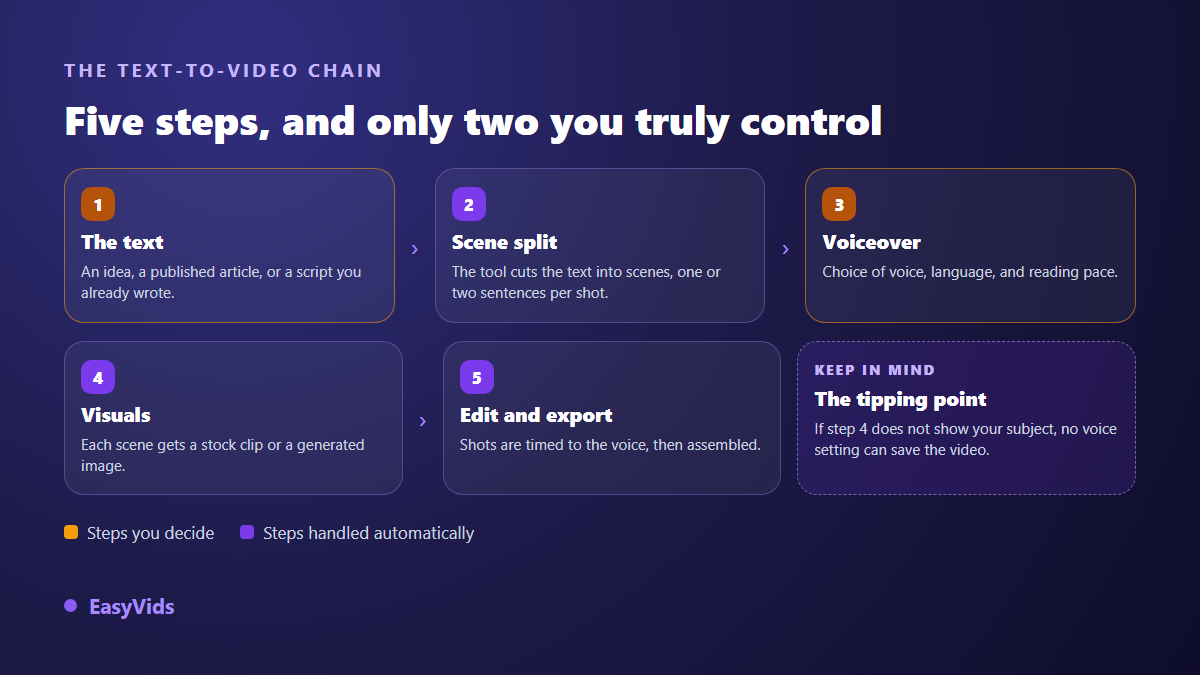
The diagram shows the real division of labour. You decide the source text and the voice. The splitting, the shot selection and the edit simply happen, unless the tool lets you reopen one specific scene. That single detail separates these services far more reliably than the size of their voice catalogue.
AI voices are the genuine strength here
This is where the category delivers. A decent synthetic voice is enough to make a text listenable, and broad language coverage opens the door to publishing in several markets without a studio or a voice actor. On a narration, the voice carries roughly half of the perceived quality. Beautiful footage read by a flat voice loses the listener in ten seconds. A well handled voice, on the other hand, forgives mediocre visuals.
Two settings do most of the work, whatever the brand. Punctuation first, because synthesis engines read commas and full stops as breathing. Speed second, usually too fast by default. The rest is writing: short sentences, one idea per sentence, no bare acronyms. Those settings sit in our complete AI voice over guide and apply to every engine. A useful yardstick from our own generations: one minute of narration runs to about 150 words.
Visuals are where the comparison is decided
A text to video tool has to find an image for every sentence. Two methods exist, and they do not produce the same kind of video at all. A stock library returns real footage instantly, picked by keywords pulled from your text. Generation builds a shot described to order, slower to produce, but showing the scene you are actually talking about.
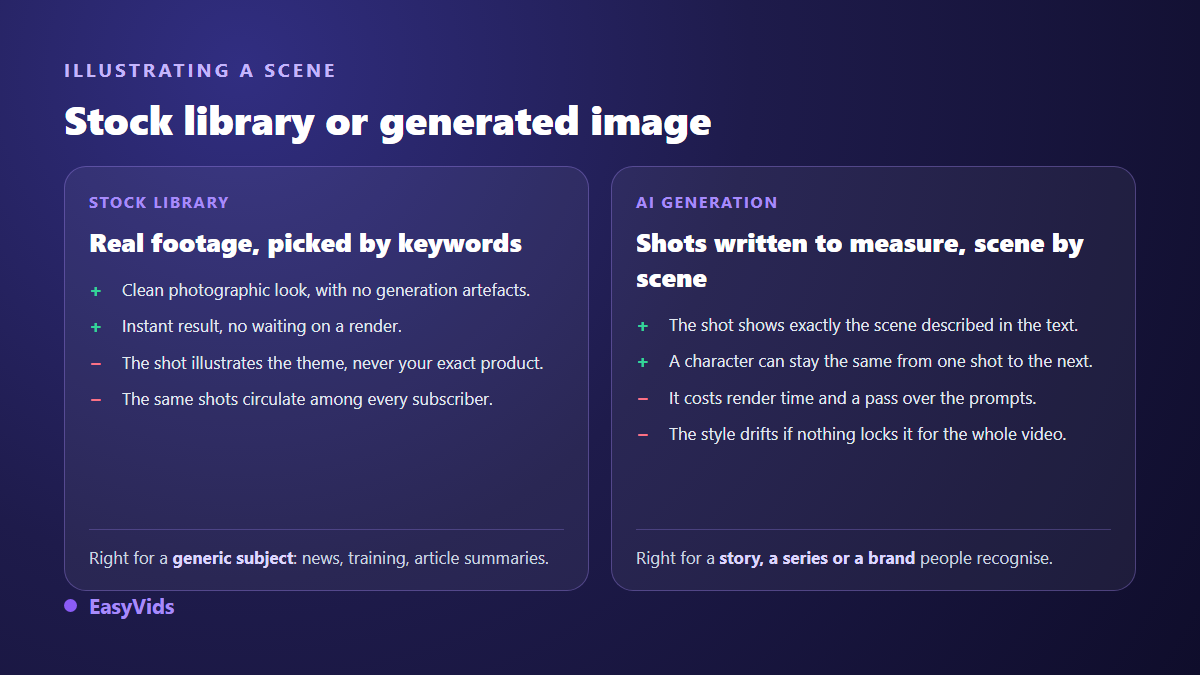
The choice follows the subject, never taste. A news recap, a tutorial or a training sheet works perfectly well with generic shots. A story, a product presentation or a series with a recurring character falls in the other camp. Viewers notice immediately that the image does not show what the voice describes, and that mismatch drains attention faster than any technical flaw.
What free actually covers
Fliki offers a free plan, and that is usually where the trial starts. According to the vendor public pages, the free plan stamps a watermark on exports and caps how much you can produce each month. The pattern goes well beyond this brand: in this market, free is a demonstration, not a production mode. Four points are worth checking before you spend an evening on it.
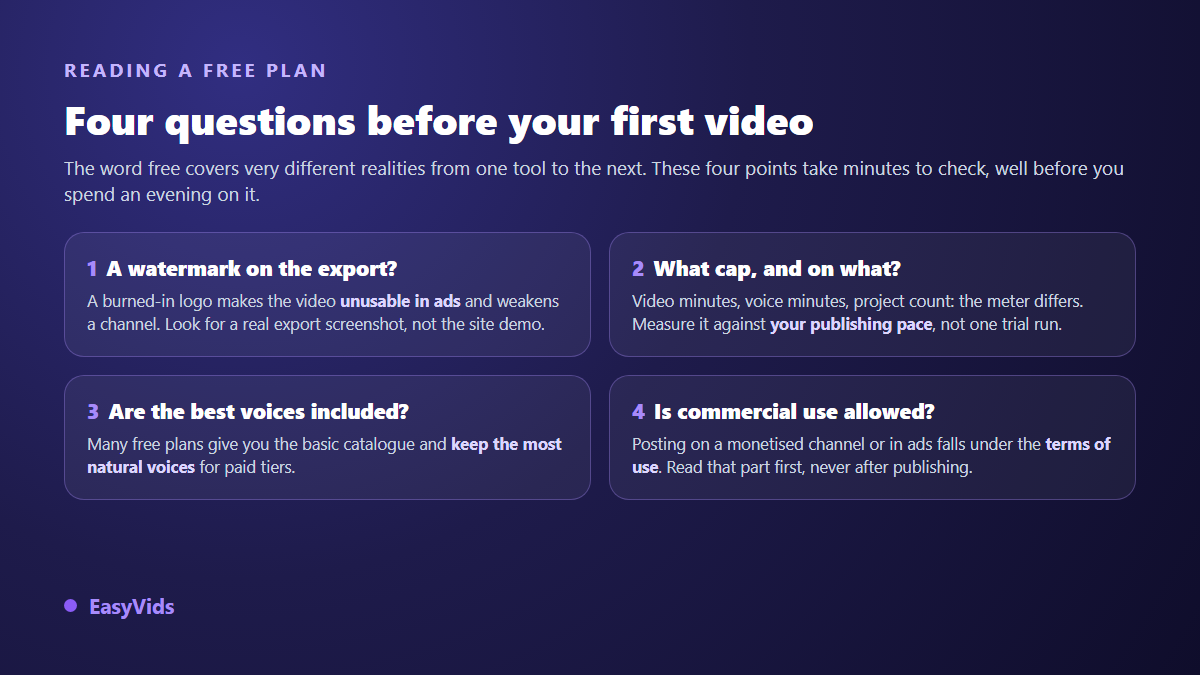
The watermark comes first, because it decides what you can do with the file. A stamped video runs neither as an ad nor on a channel you want to grow, and the question deserves an answer before you produce ten videos: our notes on watermark free exports set out what to look for. Amounts move too fast to belong in an article, for anyone; ours live on the pricing page.
Who this kind of tool suits
Most complaints about these services come from a mismatch between the tool and the job. These profiles gain real time from a text to video service with AI voices, from the first week.
- Bloggers who want a video version of every article, without rewriting it from scratch.
- Trainers turning a written handout into a module people listen to instead of read.
- Teams publishing the same message in several languages, where a credible voice matters most.
- News and explainer channels, where illustrative footage bothers nobody.
- Anyone testing a format before committing real production time to it.
The limits worth knowing before you commit
No tool in this category escapes the following points, and Fliki no more than the rest. Facing them early prevents the quiet abandon after three videos.
- Visual consistency: nothing guarantees that shot eight belongs to the same world as shot two, or that a character keeps their face.
- Control: regenerating one scene changes everything, while redoing a whole video for one bad shot wears you down fast.
- Generic output: when the same libraries feed the entire market, videos start to look alike.
- Aspect ratio: a video designed in landscape then cropped to vertical always loses part of what mattered.
- Usage rights: commercial publishing depends on the plan terms, not on how good the render looks.
How EasyVids approaches the same need
EasyVids starts from the other end. Instead of illustrating a text with footage that already exists, the Director first builds a world: characters described once, settings, a visual direction, then a scene by scene breakdown that frames the whole film. Every shot is then produced from that base, which is why the second shot visibly belongs to the same world as the first. The full chain is described in our AI video generator guide.
The rest follows the same idea of control. You pick the video or image model for your project, and that choice holds from start to finish. A failed scene regenerates on its own, and so does its voice, without relaunching the production. The three common formats, landscape, vertical and square, are decided before generation rather than at cropping time. On the narration side, three voice engines sit side by side, one of them accepting a reading instruction written in plain language, and their catalogue covers several languages. The online editor then takes over for captions, on screen text and the breathing between shots.
Choosing between the two, in one question
Ask yourself this: do my videos have to show something specific, or only accompany a point? In the second case, a text to video service with AI voices will serve you well, and you will publish faster than with any studio. In the first, you need a tool that builds shots from your script and keeps characters stable across scenes. Budget follows that decision more than it drives it, and our breakdown of what an AI video really costs compares the orders of magnitude between automatic production and a classic shoot.
Frequently asked questions
Is Fliki good enough for a faceless YouTube channel?
For formats where footage stays illustrative, yes: news, lists, explainers. For a story channel with recurring characters, visual consistency becomes the limiting factor, and stock shots run out of road quickly. Platforms do not penalise the use of AI itself, but repetitive mass produced content with no contribution of your own.
Is the free plan enough to publish?
Rarely. A free plan is there to let you judge the voice, the quality of the scene splitting and the production speed. The watermark and the monthly cap make it a trial, with Fliki as with everyone else. Check both before you spend a full evening on it.
Can you still hear that the voice is synthetic?
Less than before, and far less than you can hear the text behind it. A recent voice reads a short, properly punctuated sentence well. It stumbles on endless sentences, acronyms and unusual proper nouns. Most of the naturalness is won in the writing, not in the choice of voice.
Can I keep the same character across videos?
Not with a stock library, by construction: each shot is an independent take, filmed by someone else, in another place. You need a tool that works from visual references reused across scenes, described once then recalled every time. That is the condition for a series that holds together.
Do I need a computer for this kind of tool?
No, as long as the service runs in a browser: the computing happens on servers, your device only displays the interface. A phone is enough to write, launch a generation and publish. Fine editing stays more comfortable on a larger screen.
The right instinct is not to chase the best rated tool, but to describe honestly what your videos have to show. The answer names the tool almost by itself. To settle it with real material, create an account and run a first video from one of your own texts: a few minutes are enough to know whether your shots should be found or built. The EasyVids studio brings writing, voice, visuals and editing together in one place.