You have been publishing for months. Views creep up, subscribers trickle in, and the same question returns after every upload: when does this start paying? Learning how to make money on YouTube is not about finding one switch the platform flips the day you hit a number. A channel that eventually lives off YouTube stacks several revenue streams, and they arrive at different times, from different payers.
That is where the confusion starts. Most creators wait for ad revenue, the only stream anyone talks about, while three others need no threshold at all and could already be running. This guide walks through the seven ways a channel gets paid, what each one requires, and when it starts to matter. The entry thresholds themselves are covered in our guide to YouTube monetisation requirements.
The short answer: three payers, not one
A YouTube channel has seven revenue streams. Three are paid by YouTube: ads on long form videos, a share of the Shorts pool, and a share of Premium subscription revenue. All three require the Partner Program. A fourth comes from your viewers: memberships, paid thanks and paid live chat messages, which open earlier, at the program's early access tier according to the YouTube Help Centre. The last three come from somewhere else entirely: affiliate links, sponsorships, and your own products or services. Those have no YouTube threshold. They depend on the trust of an audience, however small.
The seven streams at a glance
Before the detail, look at the whole map. It explains why two channels of the same size can earn very differently: one relies on a single stream, the other runs four.
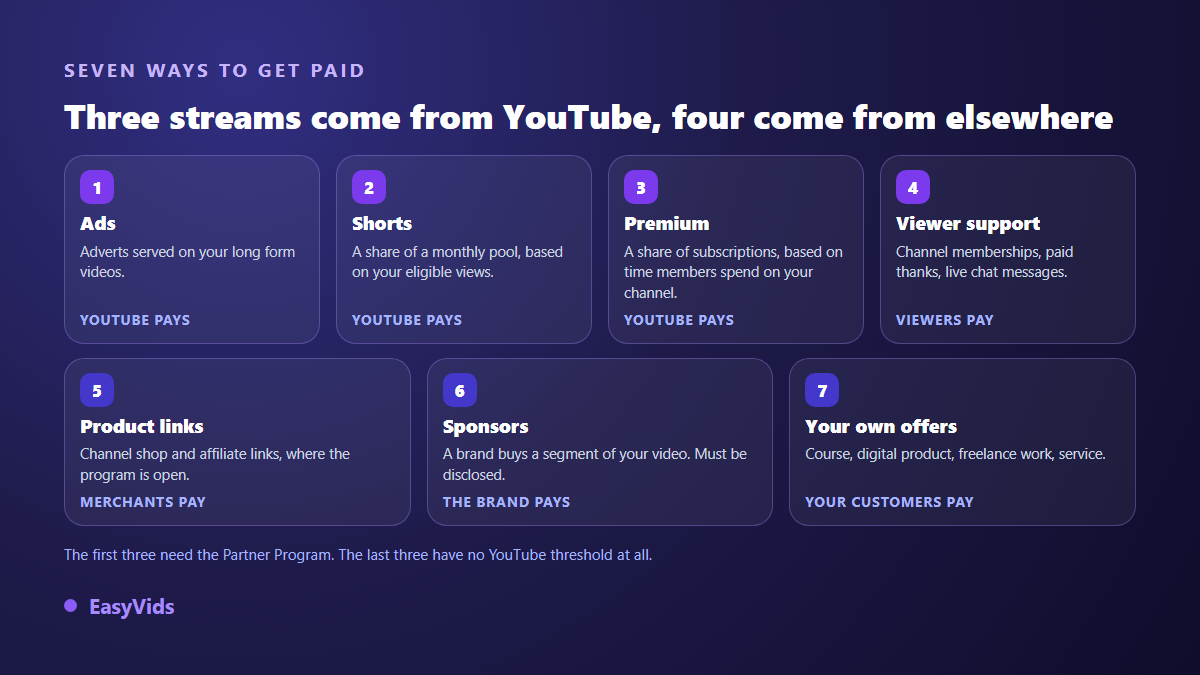
Remember the logic rather than the list. A stream paid by YouTube follows rules you do not negotiate. A stream paid by someone else follows a relationship you build. The first asks for patience, the second asks for sales work. They add up.
Stream 1: ads on long form videos
This is the one everybody pictures. Adverts run before, during or after your long videos, and the YouTube Help Centre states that the creator receives 55 % of the net revenue from those ads. Two things decide the rest: eligible views, and how much advertisers value your topic. The second explains why two channels with identical view counts earn differently, a gap we unpack in our article on RPM and the niches that pay most.
One warning saves a lot of frustration. Ads are the stream most exposed to the advertiser friendly guidelines. According to the YouTube Help Centre, a video can stay perfectly visible while its ads are limited or switched off, because its subject, wording or imagery falls outside what brands will fund. That is a classification, not a bug, and it can be reviewed inside YouTube Studio.
Stream 2: Shorts and the shared pool
Shorts are not paid like long videos, and that is the most common misunderstanding. According to the YouTube Help Centre, revenue from ads in the Shorts feed is gathered every month into a shared pool. Part of it covers music licensing, the rest is allocated across monetised channels by their share of eligible views, and the creator keeps 45 % of the amount allocated to them. A Short view is therefore not worth a fixed sum: it buys you a share of a monthly split. The full mechanism sits in our piece on Shorts monetisation.
The second thing to remember: Shorts views and watch hours are two separate counters. The YouTube Help Centre is explicit that time spent on your Shorts in the Shorts feed does not feed the watch hours used for Partner Program entry. A Shorts only channel is aiming at a different door.
Stream 3: your share of Premium subscriptions
Almost nobody mentions this one, and it is a real line in a monetised channel's earnings. When a paying YouTube subscriber watches you, they see no ads. The YouTube Help Centre states that a share of subscription revenue goes back to creators, allocated by the time those members spend on their content. Nothing to switch on: the share appears in your revenue table once you are in the Partner Program, and it rewards content watched long and watched through.
Stream 4: direct support from viewers
Here the money comes from your audience, not from an advertiser. Three formats coexist: channel memberships, a paid monthly subscription in exchange for badges, emoji and members only content; paid thanks, a one off gesture on a video; and highlighted messages during a live stream. According to the YouTube Help Centre, these open at the Partner Program's early access tier, in the countries where that tier is offered, so before the thresholds that unlock advertising.
This is the first stream a young channel can reach, and it obeys a different rule from volume. It runs on attachment. A small, loyal community produces more support than a large audience passing through. In practice it rewards channels that answer comments, keep a regular slot, and give a clear reason to chip in.
Stream 5: products you recommend
Two very different mechanisms hide behind the word affiliate. First, ordinary affiliate links in the description: no YouTube threshold applies, only the rules of the merchant programs that accept you. Second, the shop attached to your channel, with products tagged under the video. The YouTube Help Centre restricts that feature to Partner Program channels meeting extra conditions, and publishes availability country by country, because it varies widely by market.
In both cases, disclosure is not optional. The YouTube Help Centre asks you to flag paid promotion at upload, and local advertising law stacks on top of the platform's own rules. An honest, declared recommendation rarely damages an audience. A hidden one, discovered later, costs the trust every other stream depends on.
Stream 6: sponsorships and branded content
A brand buys a segment of your video, or the whole video. This is the most misjudged stream, because everyone assumes it is reserved for large channels. No YouTube threshold applies: what counts is a useful audience. A specialised channel speaking to one profession attracts an advertiser long before its counter looks impressive, because its viewers are exactly the customers being sought.
Two rules frame the work, and both come from YouTube. The paid promotion checkbox, ticked in the upload settings, whose use the Help Centre describes. And the advertiser friendly guidelines, which apply to the content itself whoever the sponsor is: a sponsored video can still see its own ads limited, which changes nothing in the contract you signed but does change your ad revenue that month.
Stream 7: your own products and services
A course, a template, an ebook, a preset, freelance work: this is the only stream whose price you set and whose margin you keep. It is also the only one that survives a rule change or a drop in reach, because it rests on a direct relationship. A modest channel selling one precise service to a few well targeted clients often does better than a much larger one relying on ads alone. The wider map of these outlets sits in our guide to monetising work made with AI.
What each stream really asks for
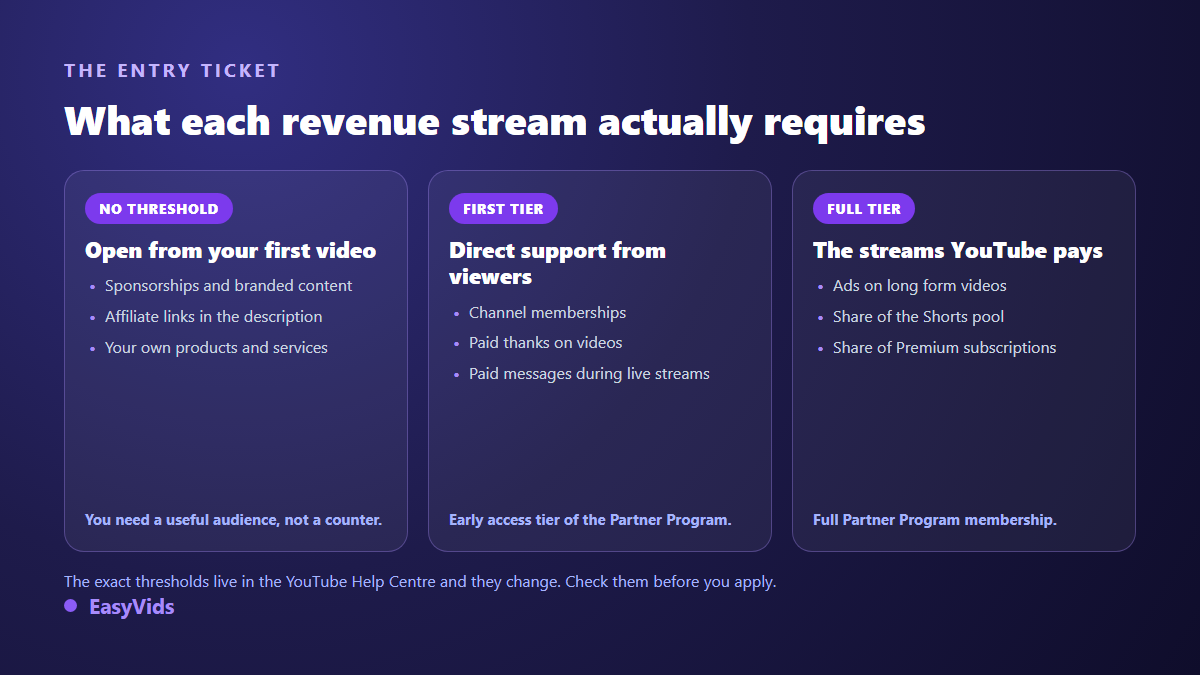
- Ads on long form: full Partner Program, plus advertiser friendly content.
- Shorts share: Partner Program, original Shorts, and eligible view volume.
- Premium share: nothing to activate, it follows paying members' watch time.
- Memberships and paid thanks: the early access tier where it is offered, and a community with a reason to support you.
- Affiliate links: no YouTube threshold, merchant approval, and paid promotion disclosure.
- Channel shop: Partner Program plus extra conditions that vary by country.
- Sponsorships: no threshold, an identifiable audience, a media kit and the disclosure checkbox.
- Your own offers: no threshold, a clear offer and a page to buy it on.
Which ones pay early, which ones pay late
The order of arrival matters as much as the list. Streams paid by YouTube need a threshold first, then volume month after month, so they weigh in last. Streams you sell yourself can produce a first result with a small audience, provided it is precise. In between sits viewer support, which opens at the program's first tier.
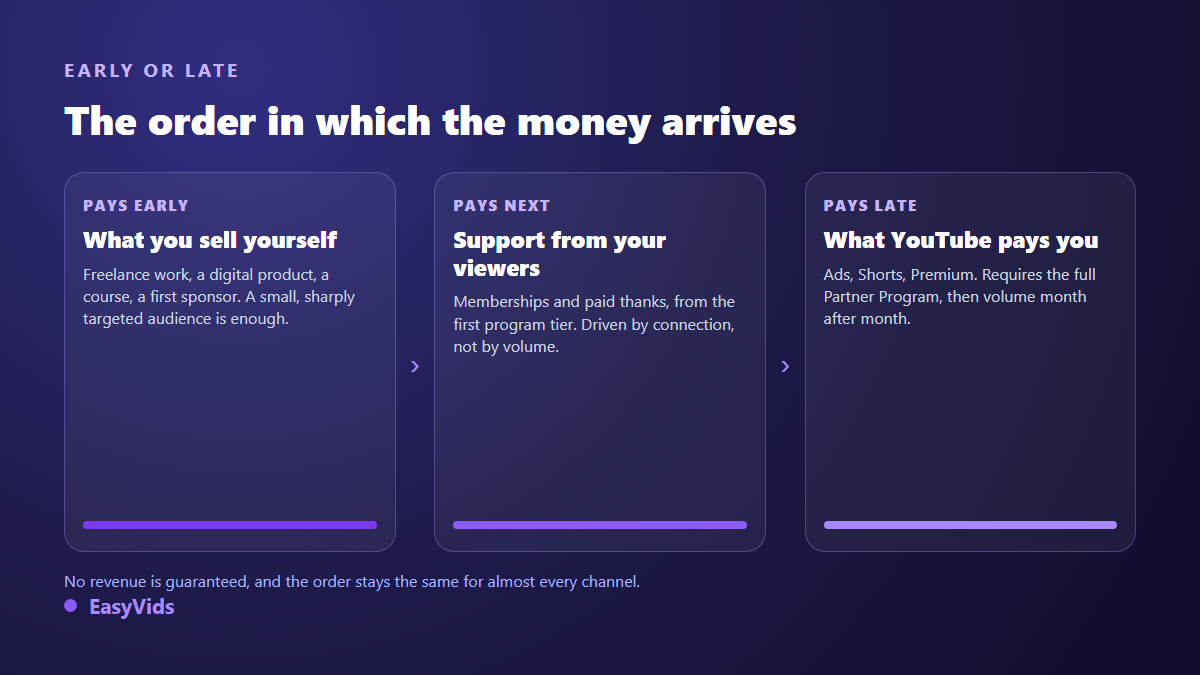
The practical consequence is blunt: building a channel while betting everything on ad revenue means months of work with nothing coming in, when an offer or a partnership could have funded production along the way. Many creators also run a short form account elsewhere, where the payment rules are entirely different, such as the TikTok rewards program.
The rules that decide whether you get paid
Every stream rests on one condition: a channel in good standing. According to the YouTube Help Centre, the policy that targeted repetitious content became the inauthentic content policy in July 2025. What gets penalised is not a tool or a technique, it is mass produced content with no contribution of your own and material lifted from elsewhere without transformation. Original commentary, a structure that is yours and a voice that explains stay inside the rules.
Three other points appear in rejected applications. Music, whose licence must cover monetised use, otherwise revenue goes to the rights holder. Disclosure of realistic content generated or altered by AI, which the YouTube Help Centre asks you to flag at upload. And activity: still according to the Help Centre, a channel left inactive for six months can lose monetisation.
What changes often, and how to check it yourself
This is the part of the article that does not expire. YouTube's monetisation rules change several times a year, and thresholds and country availability are exactly what moves most. Everything above describes the YouTube Help Centre as it stands in September 2026. Before building a plan on a number, read it yourself: the eligibility page for the thresholds, the advertiser friendly guidelines for ad status, and the Monetisation tab in YouTube Studio for your own actual situation.
Producing enough for these streams to exist
None of the seven streams fires without a catalogue. Ads need eligible views, the Shorts share needs volume, sponsors need videos to look at, and an offer does not sell without an audience. Production, not strategy, is the real bottleneck for most channels. That is where an AI studio changes the maths: writing the script, generating the visuals, laying a voice over and editing in one place turns a narrative video into a working session instead of a week. The EasyVids studio brings those steps together, with a free trial to test the pace, and the plans are listed on the pricing page.
Frequently asked questions
Can you make money on YouTube without the Partner Program?
Yes. Sponsorships, affiliate links and your own products or services depend on no platform threshold. They depend on your audience and on having something to offer. Only the streams YouTube pays, ads, the Shorts share and the Premium share, require program membership.
How much does one YouTube view pay?
There is no fixed value, and treat any figure quoted without a source with suspicion. Ad revenue depends on how many ads actually ran and on what your topic is worth to advertisers, while a Short view earns a share of a monthly split. Your own dashboard in YouTube Studio is the only reference that describes your channel.
Which revenue stream should you target first?
The one with no threshold that matches what your audience expects. For a channel that teaches something, an offer or a service comes before anything else. For an entertainment channel, viewer support and sponsorships arrive more naturally. Treat ad revenue as a bonus that stacks on later.
Can a channel made with AI tools be monetised?
Yes, provided you add something. According to the YouTube Help Centre, what gets penalised is inauthentic content, mass produced with no contribution or reused from elsewhere without transformation, whatever the technique. An original scenario, a considered narration and a deliberate edit stay within the rules, and realistic AI generated content must be disclosed at upload.
Can monetisation be lost once granted?
Yes. The YouTube Help Centre provides for removal when a channel stops following program rules, and for a channel left inactive for six months. That is one more reason not to depend on a single stream: an offer of your own keeps working even during a dispute with the platform.
Making money on YouTube is less about finding a trick than about patiently stacking streams that share neither payer nor timetable. Pick the one that waits for no threshold, start it this week, and let the platform paid streams arrive while the catalogue grows. To build that catalogue without losing your nights, creating an account opens the full studio, script, visuals, voice and editing included.