You search for an AI ebook generator and land on thirty identical promises: your book in five minutes, one click, no writing required. You try one. It hands back twelve pages, no illustrations, a default font, and three chapters restating the same idea. That is not a book, that is a draft.
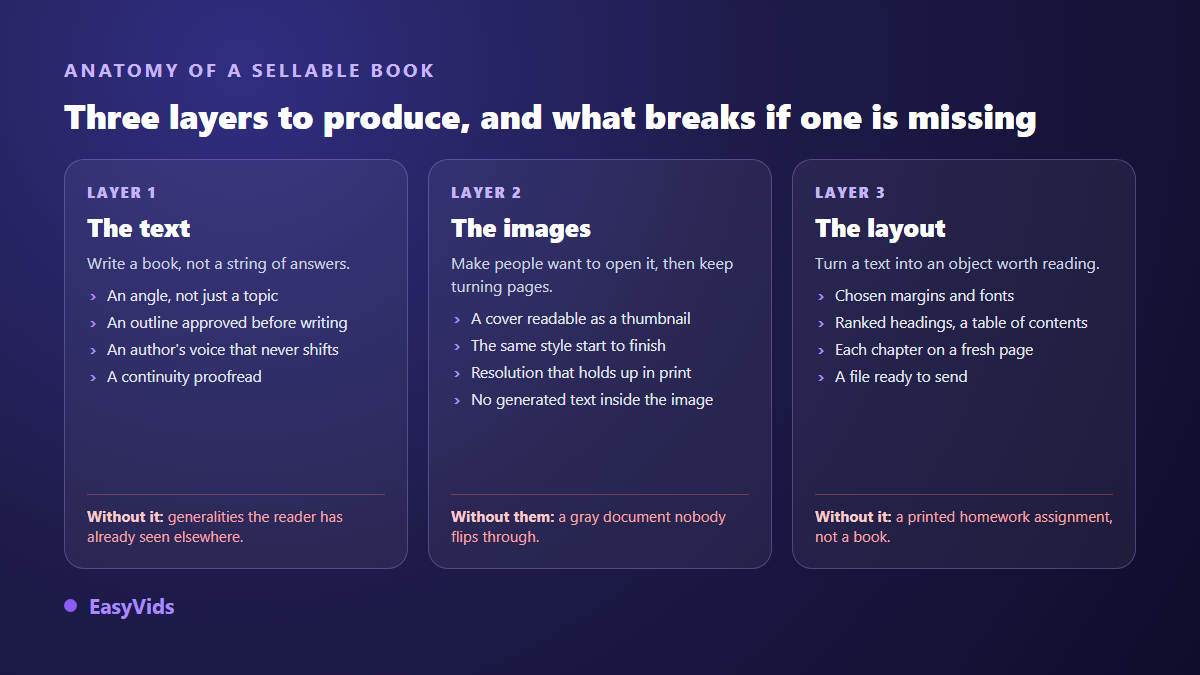
The gap has nothing to do with model power. It comes from what the tool actually covers. A sellable book is built in three layers: the text, the images, the layout. Most tools handle one, sometimes two, and let you finish the rest elsewhere without ever saying so. This comparison maps seven families of tools onto those three layers. If you want the method before the tool, our complete guide to creating an ebook with AI walks the whole path, from topic to first sale.
AI ebook generators: the short answer
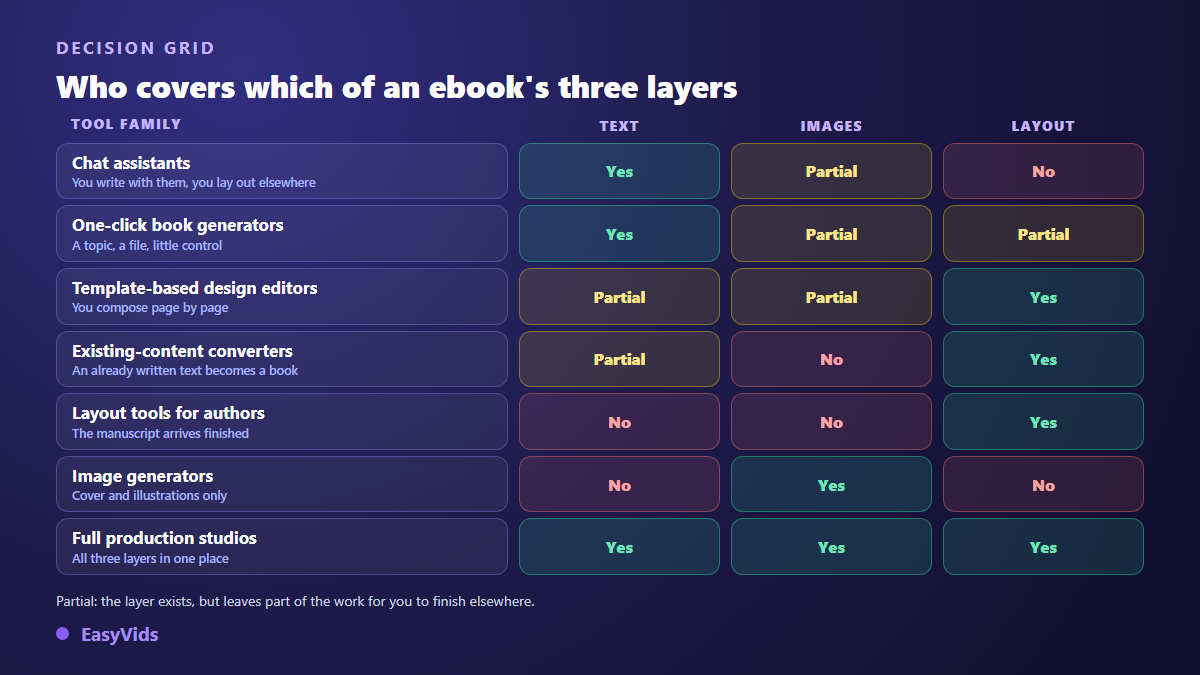
No single tool does everything well. Conversational assistants write the best text but compose nothing. Template based design tools lay out beautifully but barely write. One click book generators cover the chain, provided you accept their layout. The only criterion that matters when choosing is the list of steps you will have to redo by hand afterwards. Build that list first, look at a service's pricing page second, never the other way around.
How to read this comparison
This is not a blind scoring exercise. It starts from one brief, the brief of a book you could genuinely sell: a practical guide of around forty pages, illustrated, with a cover, a table of contents, chapters that start on a fresh page, and a file ready to send to a buyer. For every family, the question is identical. Which steps of that brief are covered, and which ones stay on your desk?
Two notes on honesty. These products change fast, sometimes month to month, so what follows describes each family's approach as its makers present it publicly, not a frozen feature list. And any number taken from our own production chain is announced as such, never dressed up as a market average.
The three layers of a sellable book
An ebook is not a long text. It is text, plus images, plus layout, and the three hold each other up. Excellent writing inside a badly composed file sells poorly, because buyers judge the cover and the first pages first. Careful layout on hollow writing ends in refund requests.
1. General purpose conversational assistants
ChatGPT, Claude, Gemini and their peers write the best text on this list by a wide margin. They hold an argument, adapt a tone, and let you argue about the outline before a single line is written. Their limit is not quality, it is form: they return text in a chat window. No cover, no pagination, no deliverable file. Long conversations also drift, and chapter 9 no longer remembers what chapter 2 promised.
For a book they remain an excellent writing machine, as long as you impose a chapter by chapter outline and reassemble everything yourself. Then budget for a layout tool and an image generator on top. Text: yes. Images: partly, through a sibling service. Layout: no.
2. One click book generators
This is the category that owns the search results: type a topic, get a whole book. The promise sometimes holds. The hidden variable is control. Many never show the outline before writing, so you discover the structure once twenty thousand words exist, and fixing it means running everything again.
One question separates them, and it has to be asked before you start: can I see and edit the outline before the first line is written? A tool that answers yes saves you hours, because that is the only moment when a correction is nearly free. Afterwards, every correction is paid for in rewritten chapters.
3. Template based design tools
Canva and its peers own the layout layer: hundreds of templates, pixel level control, a clean export. A writing assistant is built in, but it writes blocks, not books. It holds no narrative thread and no consistency from one chapter to the next. You compose page by page, which is reasonable for a short booklet and turns into several days of work past thirty pages.
It is the right pick when your text already exists, or when the book is highly visual: a workbook, a planner, a guide made of one page cards. For a book of substance, the writing layer will be missing. The page count you are aiming for often settles the question on its own.
4. Content repurposing tools
Designrr and comparable tools start from the opposite assumption: you have already written. A blog post, an email series, a course transcript. The tool pulls that material in and lays it out as a book, contents page included. Formidably efficient when the material exists, useless in front of a blank page.
Judge this family on two things: what it does with the images already inside your source content, often too small for a full page, and whether it can produce a cover at all. The rest is formatting, and formatting is quick to check with your own eyes.
5. Formatting tools for authors
Atticus, Vellum and their equivalents generate nothing. They are built for a finished manuscript and compose it to book standards: chapter styles, running heads, page breaks, table of contents, and above all the export formats that retail platforms expect. One runs in a browser, the other on Mac.
They would have no place in a comparison of generators, except that many authors reach them after discovering that their generator does not compose anything. It is the second purchase nobody saw coming, and it lands at the worst moment.
6. Image generators
Midjourney, Ideogram, Firefly and others build no book, but they build the one thing a buyer looks at before deciding: the cover. Two practical rules. Never ask the model to write the title inside the image, generated lettering comes out mangled about half the time, so add it on top as real text. And check resolution before composing, since an image that looks fine on screen turns to mush in print.
The real trap is consistency. Twenty illustrations generated one at a time give you twenty styles, and the book reads like a collage. The style is decided once, for the whole book, as our piece on fully illustrated AI ebooks explains.
7. Complete production studios
The last family covers platforms that chain the three layers in one place. That is where the EasyVids studio sits, so what follows describes our own chain rather than a score we handed ourselves. It runs through nine visible stages: angle, outline, chapters, introduction and conclusion, proofing, images, assembly, sales copy, then a closing report.
Four points matter for you there. The outline appears and can be edited before writing starts, and you can add chapters to it. The word count you ordered is spread across the chapters you approved. Illustrations follow one style chosen once, up to eight per chapter. The book comes out composed in A4, chapters on fresh pages, full page cover included. The closing report compares the words delivered with the words ordered and flags chapters that came out short, so nothing surfaces on selling day.
What the grid cannot show: your brief
Past a certain level the tools converge, and the brief decides. The same studio returns a flat book or a sharp one depending on six fields filled in two minutes. A topic alone is never enough: it produces exactly what the same topic would produce for your competitor, on the same day, with the same examples.
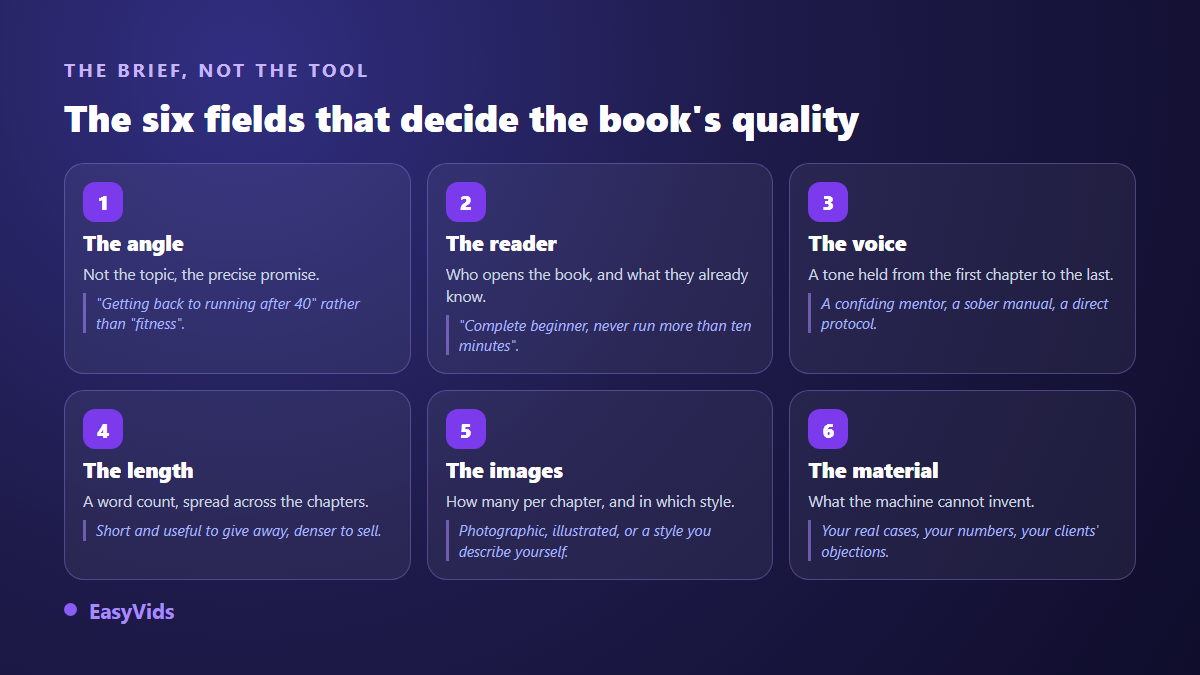
The sixth field is the one most people skip, and the only one a machine cannot fill for you: your own material. A real case, an objection you have heard ten times, a figure from your own activity. That is what separates one more book from a book people recommend.
Six questions to ask before you choose
The comparison gives you the families. Here is how to decide inside one, on criteria that owe nothing to marketing pages. Ask them during a free trial, they all get answered in a single session.
- Can you see the outline before the book is written, and edit it line by line?
- Do illustrations follow one style, or do you have to request them one at a time?
- Is the delivered file composed, cover and contents included, or does it need laying out elsewhere?
- What happens when a chapter fails mid production: retry, warning, or silence?
- Does the tool write natively in your language, or translate text conceived in English?
- Are commercial usage rights clear, illustrations included?
Publishing: what no generator settles for you
Two points sit outside every tool. The first is disclosure. According to the Kindle Direct Publishing help pages, publishers must state at upload whether their book content was generated by artificial intelligence, the platform drawing a line between AI generated and merely AI assisted content. Read the detail before you publish, and our notes on AI books and Amazon KDP summarise it.
The second is the output format. A page composed file is perfect for a book sold directly or given away for an email address. For an e-reader the text has to reflow, and Kindle Direct Publishing's help pages recommend EPUB for digital books. Check this before picking a tool, because a file composed for print does not always convert cleanly.
Frequently asked questions
Is there a free AI ebook generator?
Yes, nearly every family offers a free tier or a free trial. The limits rarely sit on the text: they sit on the number of illustrations, on the export, or on a watermark stamped into the file. Read what the free tier allows on the way out, that is where tools really differ.
How long does a complete book take?
On our chain, an illustrated book of around forty pages takes as long as writing the chapters one after another plus generating the images: tens of minutes rather than seconds, and the page can be closed meanwhile. Be wary of promises measured in seconds, they usually describe short text with no illustrations and no layout.
Can a book written with AI be sold legally?
In most countries yes, and major retail platforms accept it, provided you disclose it where they ask. The delicate question is not selling but protection: according to the guidance published by the United States Copyright Office on registering works containing AI generated material, protection assumes an identifiable human contribution. Your work on angle, outline and rewriting counts on that front too.
Do I need separate tools for text and images?
Not necessarily, but splitting them carries a hidden cost. You describe each illustration, generate it, resize it, then place it back in the right spot in the file. Across ten chapters that is the longest part of the job. A tool that does both does not improve image quality, it removes the carrying.
Can I create an ebook in another language?
Yes. Our studio writes in French, English, Spanish and Portuguese, and the language is chosen before launch rather than after. The nuance matters: a text translated afterwards keeps the syntax of its original language, while a book written directly in the target language reads right from the first page.
Choosing an AI ebook generator comes down to choosing how much of the work you accept to redo by hand. List the steps your book needs, tick the ones a tool genuinely covers, and the ranking sorts itself out. To see what a complete chain gives on your own topic, create an account and launch a first outline: within minutes you will know whether your angle holds.