Seven videos to publish this week, and an empty document in front of you. That is the exact moment people search for a free video script generator. The blank page does go away. What most of these tools hand back, though, reads like a blog post cut into paragraphs: fine on screen, impossible to say out loud without running out of breath.
The difference does not come from the model behind the button. It comes from what you feed it and the order you work in. One sentence of intent, a chosen tone, a target duration, and the text comes out already shaped for a voice over. The same tool, fed a vague paragraph, gives you polite mush. This guide lays out the method we use to produce a week of scripts in one hour, which settings matter and which do not. If you are starting cold, what makes a video script hold attention covers the groundwork first.
The short answer
A script generator turns a one sentence idea into narration calibrated for a specific length. Three moves account for almost the whole result: set the length in minutes of video rather than in words, pick the tone before generating instead of fixing it afterwards, and write your style rules once so they apply to every script that follows. On that basis, seven short scripts get written, reviewed and split into scenes inside an hour. The EasyVids studio keeps writing, scene splitting and production in one place, so nothing gets copied between services at every step.
Free: three different things behind one word
Free covers three very different offers, and the confusion costs hours. There is the no account tool that writes two hundred words and stops right where it got interesting. There is the time limited trial that asks for a card before the first line. And there is the free account with starter credits, which lets you produce real texts before committing to anything. At EasyVids, creating an account grants welcome credits once your address is confirmed, with no card required, and the plan details live on the pricing page rather than in this article, because a grid copied into a text ages badly.
The real question is not what one script costs, it is what you can do with it next. Can you get the text out in plain form, or is it locked inside an interface? Does the tool remember your settings from one session to the next, or do you retype everything every Monday? And can you move straight into video production without pasting the text into three other services? A free script that costs you twenty minutes of handling per video is not free.
What happens between your idea and the text
A serious script generator does not do one single thing. It chains steps, and each one shapes the next. Knowing that chain tells you where to intervene when a draft disappoints, instead of regenerating at random and hoping.
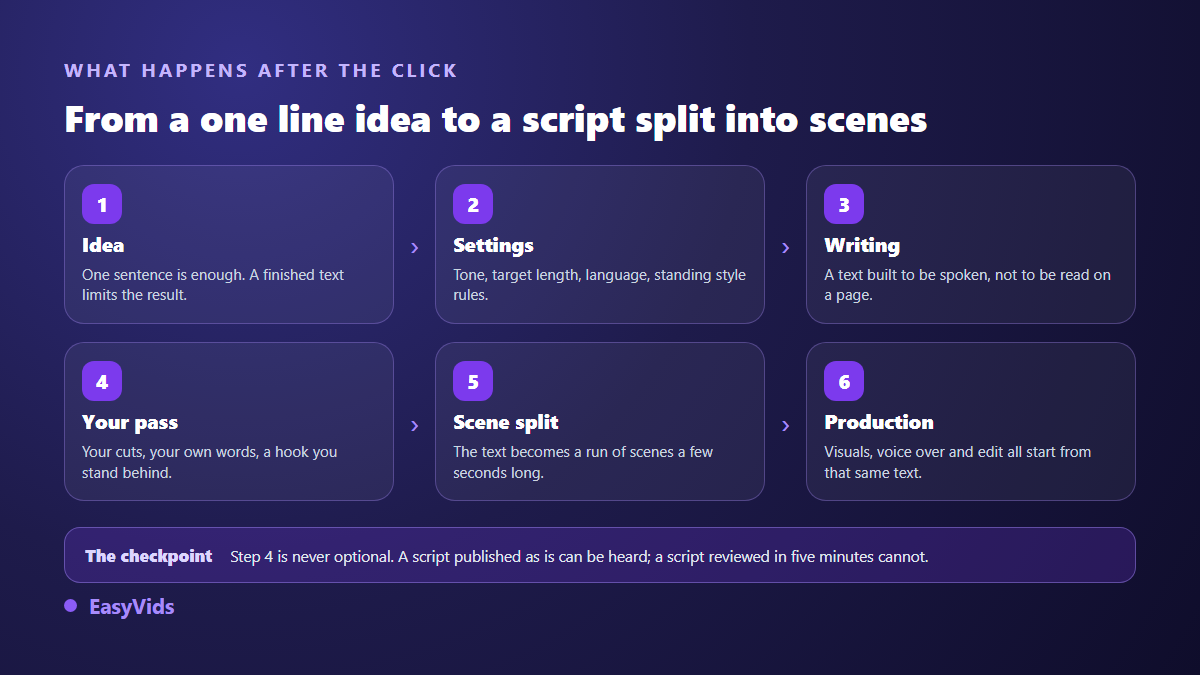
The most common mistake is arriving with a finished text and asking for formatting. The result is almost always weaker than a raw idea handed over, because a text written for the eye imposes its structure and blocks the rewrite for the ear. If you must start from existing content, reduce it to one guiding sentence and let the writing restart from there.
The six settings that decide the result
On the EasyVids writing page, a handful of controls sit before the button. They look minor. They are what separates a usable text from one you will redo.
- Tone. Narrative, dramatic, uplifting, light, documentary or suspense, plus an automatic mode that picks according to the idea. A tone set before writing beats ten corrections afterwards.
- Length, expressed in minutes. Short, medium or long, or a custom value in words or in minutes of voice. We count roughly 150 words per minute of narration, so thinking in duration avoids writing a text you then have to cut.
- Language. French, English, Spanish and Portuguese are available for writing. A script written directly in the language you publish in sounds better than one translated afterwards.
- Web research. Worth turning on for factual subjects: a biography, a dated event, a news item. Useless, even harmful, for fiction or a motivational piece.
- Closing call to action. An option that adds one final line about subscribing or commenting, at the very end, without polluting the body of the script.
- Standing instructions. A few lines of style saved on your account and applied to every later script: banned vocabulary, the shape of your hook, how you address the viewer.
That last setting pays off more than any other and gets skipped the most. Writing once that you want no rhetorical opening question, no superlatives and sentences under twenty words changes every future script without another keystroke. The logic mirrors visual work, where a precise description saves ten round trips, as our five block prompt method explains.
A week of content in one hour
Writing one script a day, five minutes before recording, gives five different voices on the same channel. Batching does the opposite: it holds the tone, it holds the publishing rhythm, and it takes one slot in your week. Here is how we split that hour.
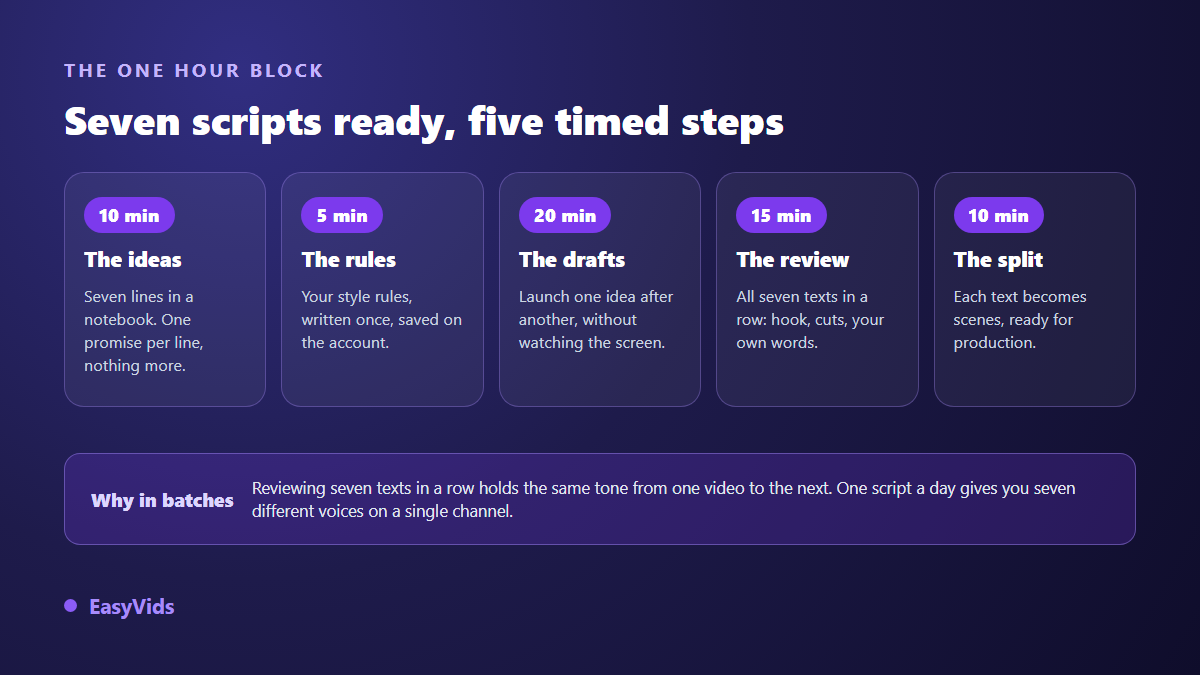
- Ten minutes on ideas. Seven lines, one promise per line. No outline, no polished title: a clear promise is enough to steer the writing.
- Five minutes on instructions. Your style rules, written once and stored on the account. This step disappears in the following weeks.
- Twenty minutes on drafting. Launch the first idea, move to the next. Writing runs server side, so you can close the tab and come back to find each text waiting in your history.
- Fifteen minutes on review. All seven in a row. You cut the opening line nine times out of ten, swap three phrases for your own, and check the promise is kept.
- Ten minutes on splitting. Each text becomes a sequence of short scenes, ready to receive visuals and a voice.
The pivot is the idea step. A blocked week is almost never a writing problem, it is a subject problem. When the list dries up, pull from a catalogue of proven formats rather than staring at the cursor: twenty seven video ideas that need no camera will fill several weeks of publishing.
Writing for the ear, the part no tool guesses for you
A text meant to be read and a text meant to be heard follow different rules. On a page, a long articulated sentence can be reread. Out loud it is lost, because a listener cannot scroll back. Stacked clauses, asides and impersonal turns pass unnoticed in print and become unbearable in headphones.
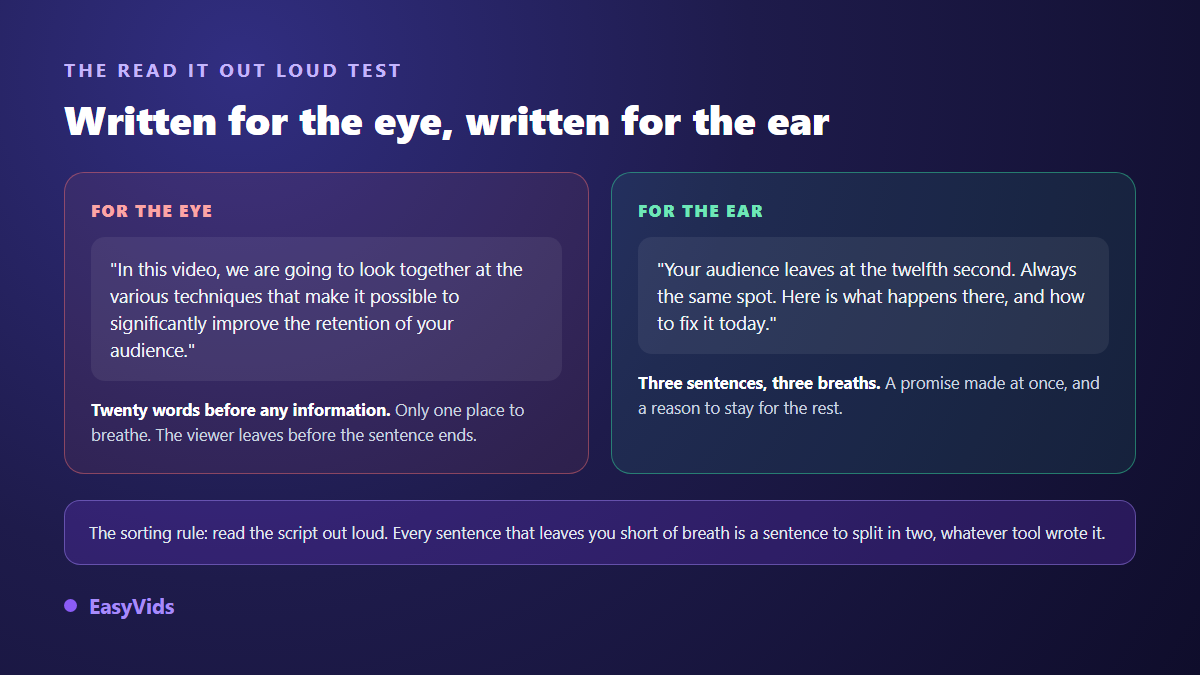
Sorting happens by reading aloud, and nothing replaces it. Every sentence where you run out of breath gets cut in two. Every word you never use when speaking gets replaced. A good generator already produces short sentences when asked, but your voice decides where the full stops breathe. It also makes the text easier to split afterwards, since punctuation becomes the boundary of the scenes.
Multi pass review for the scripts that matter
A first draft stays a first draft, whatever produced it. For pieces that really matter, EasyVids offers a multi pass write: first draft, critical review by a second reader, corrections, final check, last touches. The text comes back denser, with fewer repetitions and transitions that hold. It takes longer and costs more credits than a single pass, so keep it for pillar videos rather than for the seven posts of the week. A sales script belongs in that category: every beat clears one specific objection, and our seven step sales video script structure walks through the sequence.
One practical detail changes everything during a one hour block: a draft, once launched, keeps running on the server. You can close the tab, shut the laptop, come back from a phone. Your list of drafts keeps every text, running or finished, and reopens it in one click. That is what lets you fire off seven jobs instead of watching a progress bar.
From script to video without copy and paste
An approved script is worth nothing while it sleeps in a document. The next step splits it into scenes: you set a target length per shot, around six to ten seconds, and the text distributes into segments that each become one visual with its slice of voice over. From there, two routes. One sends the scenes straight into production, as described in our guide to turning a finished script into an edited video. The other builds a full production plan with recurring characters and settings, which pays off as soon as your videos form a series. Both rest on the same chain, laid out in the complete AI video generator guide.
What gives away a machine written script
Viewers do not recognise a language model. They recognise habits. The same ones show up almost every time, and one review pass removes them.
- The rhetorical opening: have you ever wondered. Delete the line, start on the next one.
- The table of contents: in this video, we are going to look at. Viewers want the promise, not the agenda.
- Decorative triplets: three adjectives in a row where one carried the meaning.
- A closing that summarises what was just said instead of opening onto an action.
- Vocabulary you never use out loud: if you do not say optimise in real life, do not leave it in your script.
Fixing those five points takes two minutes per text and changes how the whole thing lands. When a habit comes back in every draft, stop correcting it by hand: add it to your standing instructions and it disappears from every later script.
Frequently asked questions
Is a free script generator enough for a serious channel?
For testing a niche, writing your first videos and finding your tone, yes. The ceiling shows up with volume and with length: free tiers run out quickly, and long formats need more careful writing. Start with the welcome credits, measure what you actually consume across one week, then pick a plan knowing the numbers.
Should I give one sentence or a detailed paragraph?
A clear sentence beats a vague paragraph, and a clear sentence plus one constraint beats both. State who you are talking to and what the viewer should understand by the end. Everything else, the structure, the transitions, the closing, is handled by the tone and duration you set before generating.
Can a script written with AI be monetised on YouTube?
Yes, provided you add something. The YouTube Help Centre, in its July 2025 update on inauthentic content, states that mass produced repetitive content is not eligible for monetisation, without targeting the tool used to write it. A reviewed script carrying your angle and your voice sits inside the rules. A text published untouched and identical to a hundred other channels does not.
How long does a three minute script take?
Expect one to two minutes of drafting for roughly 450 words, and about as long again for a careful read on your side. Compute is never the bottleneck: your time goes into choosing ideas and cutting the sentences that do not earn their place.
Can I keep exactly the same style across videos?
That is precisely what the instructions saved on your account are for. They apply to every new draft whatever the subject, and you can edit them at any time. Add the words you ban and the way you open your videos: channel consistency is decided there, far more than in the choice of writing model.
The right way to use a script generator is not to wait for a perfect text on the first click. It is to block one hour, produce seven texts, read five of them aloud and accept throwing one away. Publishing rhythm matters more than the perfection of any single script. To try the method on your next week, create your account and launch your first draft straight away.