You have a song in mind for somebody's birthday, background music for your next video, or an instrumental to lay your own voice over. Without a studio, without musicians and without reading a note, that project used to stop at the idea stage. An AI music generator moves the starting line: you describe what you want to hear, and a finished audio file arrives a few minutes later.
You still need to know what to ask for. The gap between a forgettable track and one you play again almost never comes down to the engine behind it. It comes down to how precisely you describe the style, and how good the lyrics are. This guide walks the whole chain, from the brief to the downloaded file, including the limits nobody should hide from you.
What an AI music generator actually does
An AI music generator composes, performs and, if you ask, sings a track from text. You give it two things: a description of the style, and optionally the lyrics. It hands back a mixed audio file, ready to play and download. It is not a digital audio workstation: you get a finished mix, not separate stems you can rebalance. That is what makes it fast, and it is also its main constraint.
Two families of engines coexist and they do not serve the same purpose. Song engines produce vocals and music together, from lyrics or from a plain description. Instrumental engines never sing: they compose a mood, usually short, built to sit underneath something else. Picking the wrong family is the most common beginner mistake.
The six steps from an intention to an audio file
Generated music never comes from a single magic click, whatever the interface suggests. Six steps follow one another, and each one shapes the next. The good news fits in one sentence: the first three happen entirely at the keyboard. Quality is decided before a single note exists.
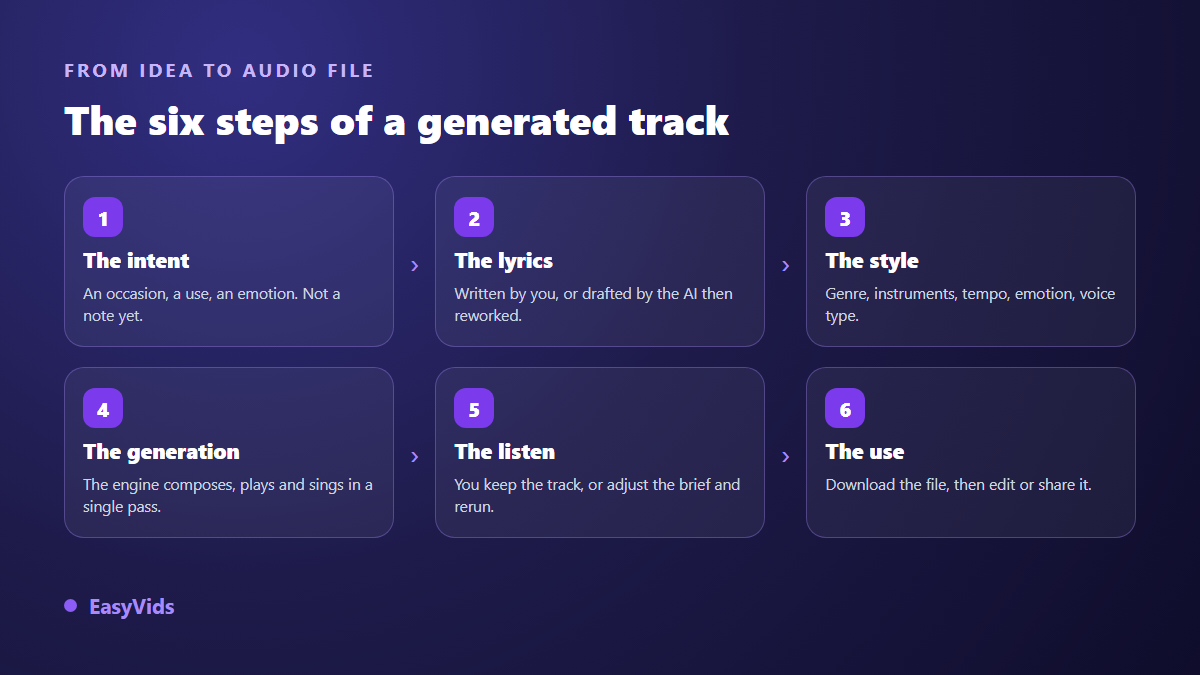
Generation itself usually takes one to four minutes. On a well built tool it continues server side, so you can close the tab and find the track waiting when you come back. That detail matters more than it sounds when you work from a phone on an unreliable connection.
Lyrics: written by you, or drafted then reworked
In a sung track, lyrics decide everything. You can write them yourself, or have them drafted from a very short brief: the occasion, the name of the person involved, a message or an anecdote, the target genre, the mood and the tempo. Drafting costs a fraction of what a full generation costs, so there is no reason to settle for the first attempt.
Usable lyrics carry a structure the engine can read. Tags such as [Verse 1], [Chorus], [Verse 2] and [Bridge] tell it where the repetitions belong. Two verses, a repeated chorus and a bridge represent roughly one and a half to three minutes of singing, which is the sweet spot for a track that holds together. Beyond that, the song tends to get rushed or cut.
A first name belongs in the chorus and in at least one verse: that is what makes someone recognise their own song on the first listen. Above all, reread before you generate. A drafted text is a starting point. Your anecdote, your one true detail, is what turns a correct text into a gift.
- The occasion in a single word: birthday, wedding, birth, tribute, graduation.
- The exact name, spelled the way it should be heard.
- A concrete anecdote rather than a general compliment.
- One dominant genre, never three stacked together.
- The target emotion in one adjective.
- The tempo, if you have a clear idea of the pace.
Describing a style: five building blocks are enough
This is the step almost everyone rushes. "A beautiful sad song" means nothing to an engine, because thousands of them exist. A usable description still fits in one sentence, as long as it covers five blocks and sticks to them.
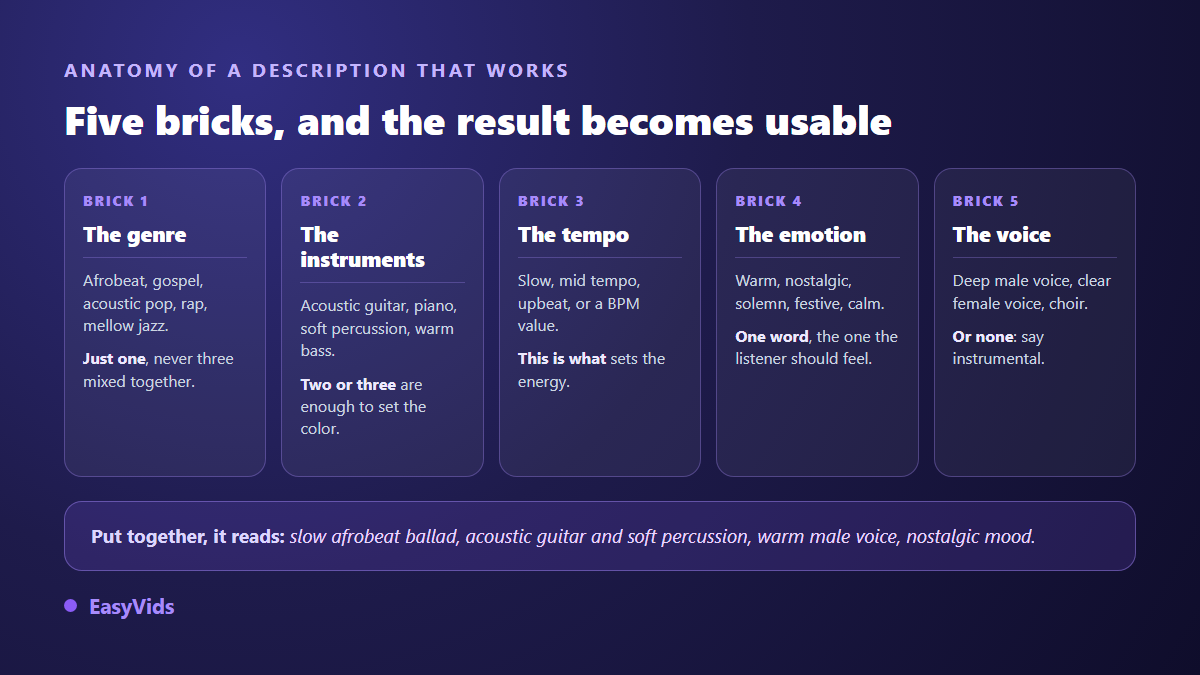
A classic trap is stacking genres to get the best of each. The result is almost always bland. Pick one dominant genre, then let the instruments carry the nuance. A subtler trap is naming a well known artist to borrow their style: those requests are often blocked, and when they go through they expose you legally for no gain.
Regional repertoires work better than most people expect. Afrobeat, gospel, zouk, rumba, reggae, hushed jazz: those words are understood and give far more character than a vague "international pop". Test, note the phrasing that worked, and reuse it. Three or four proven descriptions of your own will save you a great deal of time.
Song, instrumental and background music are three different things
These three words describe different deliverables, and mixing them up wastes generations. A song is listened to for itself. An instrumental waits for something to be laid on top, a voice, a text, a speech. When that voice is generated too, it is a craft of its own, with its own tone and pacing settings, which we go through in our AI voice over guide. Background music, on the other hand, is built not to be noticed.
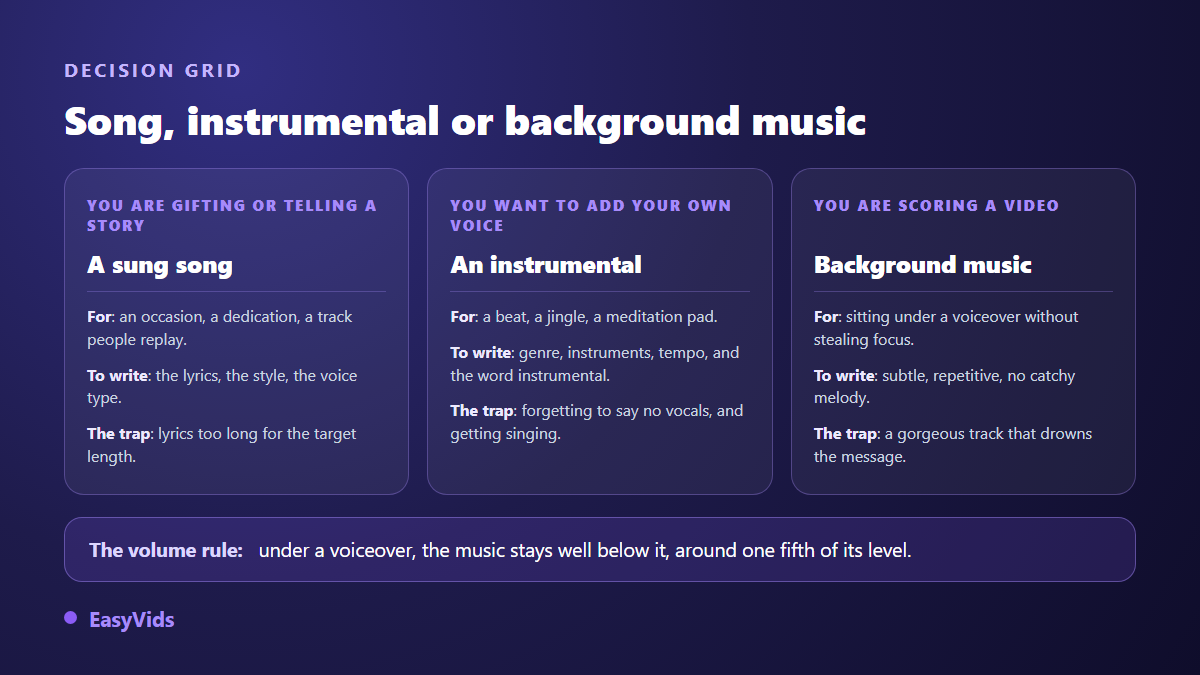
On a song engine, instrumental output is usually a checkbox: the same description then produces the track without vocals. On a purely instrumental engine the question does not arise, but the piece is short, in the range of thirty seconds. To score a video several minutes long you will generate several moods, or loop one and make sure the seam lands on a strong beat. One note when the video is carried by generated narration: settle the voice before you pick the music, because a flat read is never rescued by adding instruments, and the settings that pull an AI voice out of its robotic range are worth going through first.
Background music for video: three simple rules
Under a voice over, music is not there to be heard. It holds the space between sentences. The first rule is therefore a level setting: keep the music clearly under the voice, around a fifth of its level. If you catch yourself following the melody instead of the message, it is too loud.
The second rule concerns the track itself: ask for something repetitive, with no big melody and no spectacular breaks. What sounds gorgeous on its own becomes intrusive under commentary. The third rule is tone, and it is the easiest to get wrong. A calm pad for a tutorial, a steady pulse for a product demo, a low tension for a story, and sometimes nothing at all for the line that has to land. The same three rules hold outside video, since a podcast theme and its sound bed rest on that same quiet loop: our guide to AI voice for podcasts walks the whole chain, from the opening theme to full episodes.
One technical point to finish: keep the original file. An edit can be redone, but music regenerated from the same brief will never come back identical.
Custom songs for an occasion
This is the use that surprises newcomers most, and by far the most gifted one. Birthday, wedding, declaration, birth, graduation, tribute, thank you: the principle never changes. Start from the occasion, add the name, give one true detail, and let the song say what you could not phrase yourself.
What makes the difference is neither the genre nor the voice, it is the precision of the memory. A birthday song that names the city, the job or a habit gets an immediate reaction. The same song built on generic compliments reads like a greeting card. Give one detail, only one, but a real one.
Think about delivery too. The track downloads as an ordinary audio file: it can be sent in a message, played at a party, or placed under a photo slideshow. That is usually where it earns its value, far more than inside the interface that produced it.
Copyright: three questions people keep merging
The subject deserves a calm answer, because three unrelated questions get mixed into one.
- Who owns the track? That depends on the terms of the service you use. On our side, generated content belongs to its creator and may be used commercially, as stated on our frequently asked questions page.
- Is the track protected by copyright? A different question, with a far less comfortable answer. Several authorities, including the United States Copyright Office, consider that purely machine generated output is not protectable, while human contribution, lyrics you wrote for instance, can be.
- What may you do with it on a given platform? Every network and every distributor applies its own rules, they change fast, and they override everything else.
The practical consequence is simple: the more of yourself you put in, written lyrics, chosen structure, editing, a mix with your own voice, the stronger your position. A track obtained from three words of description is perfectly usable, but you will struggle to claim exclusivity against someone who generated something very close. A neighbouring question arrives the moment you want one specific person's voice on a track: that one is about consent, and we covered it in our look at the legality of AI voice cloning.
Monetising AI generated music
On a video platform, generated music is not a problem in itself. What gets penalised is repetitive mass produced content with no contribution, not the origin of the soundtrack. A video that is written, illustrated and edited with care sits well within the rules.
Two precautions are worth taking. Download your tracks as soon as they are ready and keep their date: that is your evidence against an automated claim, and it saves you from depending on a link. Then read your distributor's terms before aiming at music streaming platforms, since several of them now restrict bulk uploads of generated tracks, and the rejection often lands after the fact.
A credit system finally lets you match the spend to the stakes: a few quick attempts to find the right style, then one careful generation for the version you keep. The details are on our pricing page.
The limits, stated plainly
An honest tool is also judged on what it cannot do. Here is what to know before you start, so you avoid the disappointments that need not happen.
- You get a finished mix, not stems: you cannot lower only the drums or redo a single chorus.
- Length is not set with a stopwatch. It follows the length of the lyrics for a song, and stays short on an instrumental.
- Two generations from the same brief never give the same track. Download the version you like straight away, it will not come back.
- Vocals are described, not picked from a catalogue the way a voice over is.
- Rare names and words from under represented languages can be mispronounced. Adjust the spelling in the lyrics to guide the singing.
- Tempo is requested in words, not in an exact value: the result stays an interpretation.
Frequently asked questions
Do I need songwriting skills to use an AI music generator?
No. You describe the occasion and the style in a few words, have the lyrics drafted, then edit them before generating the music. You can also supply no lyrics at all and let the engine compose from your description alone.
Can I get music without vocals?
Yes. On a song engine, a dedicated option produces the instrumental version of the same description. There are also purely instrumental engines, shorter, designed for moods and video backgrounds.
How long does one track take to generate?
Expect one to four minutes in most cases. Production continues on the server, so you can close the page and collect the file when you return rather than waiting on a progress bar.
Which languages can an AI song be sung in?
Lyrics can be written in the language of your choice and the engine sings what you give it. Widely spoken languages give the safest pronunciation. For a less represented language, reread carefully and adjust the spelling to guide the singing.
Can AI generated music be used in an advertisement?
Yes, as long as the terms of the service you use allow commercial use, which is our case. Do check the rules of your industry and of the channel you broadcast on, which may add requirements of their own.
An AI music generator does not replace a composer, and that is not what it is for. It removes the entry barrier that stopped you from gifting a song, scoring a video or testing a chorus idea on a Sunday evening. The rest is on you: a precise brief, reread lyrics, a demanding ear when you choose. To compose your first track and hear it within minutes, create an account and start with an occasion you know by heart.