You paste your script, pick an avatar, and the preview looks great. Then you export, and the counter catches up with you: a watermark across the frame, free minutes already spent, resolution capped. That is usually the moment people start looking for HeyGen alternatives, only to find thirty tools promising the exact same thing.
The problem is not a shortage of options. It is that the word free means something different on every platform: a cumulative duration here, a watermark there, commercial rights locked behind a paid plan somewhere else. This page compares seven tools on the criteria that decide whether your video is actually publishable, and if avatars are new to you, our guide to AI avatars and UGC videos covers the groundwork first.
The short answer
No free alternative replicates HeyGen exactly, because a library of studio filmed presenters is expensive to build. Three routes do get you to a publishable video without paying upfront: generalist studios that hand out starter credits, talking photo tools that animate a portrait you supply, and complete studios that generate the presenter instead of licensing one. Your choice comes down to a single question: do you want a neutral stock face, or your own?
What free actually covers
A free plan on an avatar tool is rarely a smaller version of the product. It is a demo calibrated to carry you to the end of one video and then stop you at a specific wall. Finding that wall before you build a workflow saves you from starting over three weeks later, once the interface has become a habit.
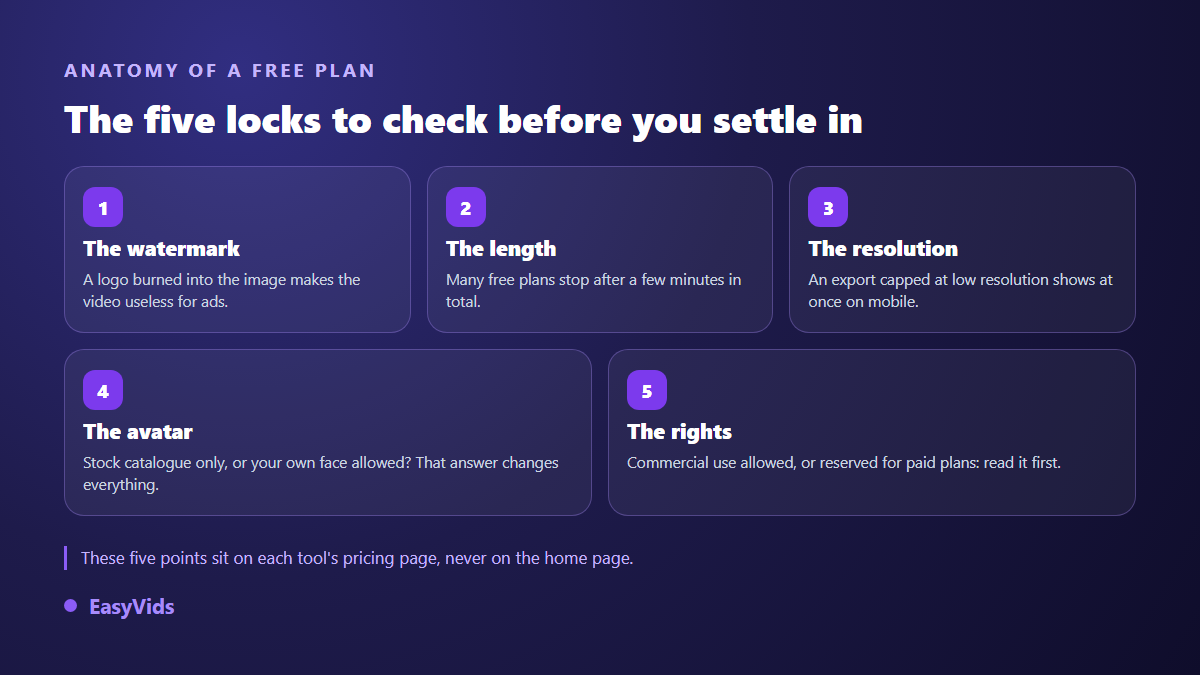
The watermark is the most visible lock, and the most expensive one: a video stamped with another company's logo cannot run as an ad, cannot sit on a product page, and undercuts any channel trying to look credible. Read the export terms before your first project, and our piece on exporting AI video without a watermark walks through the usual cases.
What you give up by leaving
Name what makes the market leader hard to replace before you compare anything. Three things, precisely. A library of studio filmed presenters, with wardrobe and framing variants, that reads as a real person. Very clean lip sync across a long list of languages. And a translation pipeline that replays an existing video in another language with the same face.
No free alternative ticks all three at once, so the honest move is to work out which one you actually use. If you publish creator content in one language for one audience, multilingual translation will never serve you, and a stock library works against you: viewers spot a face they have already seen on three other brands.
The grid we used, and what it deliberately ignores
The same grid was applied to all seven tools. It does not rank image quality, because that ranking flips with the next model release and would be stale within months. It describes what each tool lets you do, which stays true far longer. Exact free quotas are absent too: they move every quarter, and a page that copies them goes wrong quietly.
- Where the face comes from: a fixed library, a portrait you upload, or a character generated for you.
- The export: watermark or not, maximum resolution, genuinely native vertical output.
- The voice: convincing narration in your language, or translated English you can hear.
- The setting: a bust on a plain background, or a character moving through a real scene.
- Consistency: does the same face hold across ten shots in a row?
- Rights: commercial use allowed on the free plan, or reserved for paid tiers.
- The chain: script, voice, editing and captions in one place, or five services to stitch together.
Synthesia: the enterprise studio
Synthesia plays on the same field as HeyGen: studio filmed presenters, a very long language list, and an interface built for training, internal communication and product announcements. It is the most direct swap if you need a neutral face reading a script to camera in several languages. Its free tier behaves like a demo rather than a workbench, so check exactly what it allows on watermarks and commercial use before you commit. Our full Synthesia review goes through its strengths and its ceilings.
Vidnoz: the loudest free offer
Vidnoz built its reputation on the word free, with a broad library of avatars and templates available without paying. The usual trade off applies: queues at peak hours, capped export lengths, and advanced features pushed toward higher tiers. It works well as a test bench for understanding what a stock avatar can do, less well as the foundation of a regular publishing rhythm. Our Vidnoz analysis looks at what the free tier really covers.
D-ID: make an existing portrait speak
D-ID does not sell avatars, it animates the face you hand it. You supply a photo plus text or an audio file, and the tool syncs the lips and micro expressions. The output is a talking bust, tightly framed, with no set and no action. Excellent for a website welcome message, a personalised outreach clip or a support answer. Not enough as soon as the video has to show something other than a face, a product held in hand for instance.
Colossyan: avatars built for training
Colossyan targets teams producing learning modules. Its interface pushes toward instructional staging: several speakers in one shot, branching scenarios, multilingual versions of the same course. If you maintain a catalogue of internal videos, that specialisation beats a generalist tool. If you need a twenty second vertical ad, it gets in your way.
Hedra: expression over library
Hedra starts from an image and an audio track to produce a character that performs, with head movement and expressions more pronounced than most talking photo tools. It shines on short formats where emotion carries as much weight as the words. It also assumes you arrive with your audio and your visual already prepared, which means upstream work on voice and character design.
Arcads: ad creatives at volume
Arcads aims at a narrow audience, media buyers who split one message into dozens of variants performed by different characters. The promise is not to replace a studio but to produce testable volume quickly. Its model is not built around a free plan, which is worth knowing before it lands on a no cost shortlist. It is still useful to track, because it shows where avatar driven advertising is heading.
EasyVids: your own photo becomes the presenter
EasyVids approaches the problem from the other end. Instead of a licensed cast, its character mode takes the photo you upload and turns it into the presenter: your face, a colleague who agreed to it, or a creator generated for you if you upload nothing. You paste your script, choose a strict split of six, eight or ten seconds per segment, and the character delivers each segment to camera, word for word, in the language of your text.
Two staging modes are available. In action mode the character speaks while doing something: walking, cooking, handling an object. In illustration mode, pieces to camera alternate with shots of whatever is being described, the voice carrying over. You can also upload a product photo so the character genuinely holds it. Vertical is native, and face stability from shot to shot relies on the reference method described in our guide to keeping the same character across scenes.
Signing up opens trial credits with no bank card, and exports come out clean, without a watermark. Plan details live on the pricing page, which stays the only current source: a blog post ages badly on that subject, which is exactly why no figures appear here.
Four families, not seven rivals
Lined up side by side, these seven names are not fighting over the same ground. They fall into four families, and picking the right family matters more than picking the right name inside one.
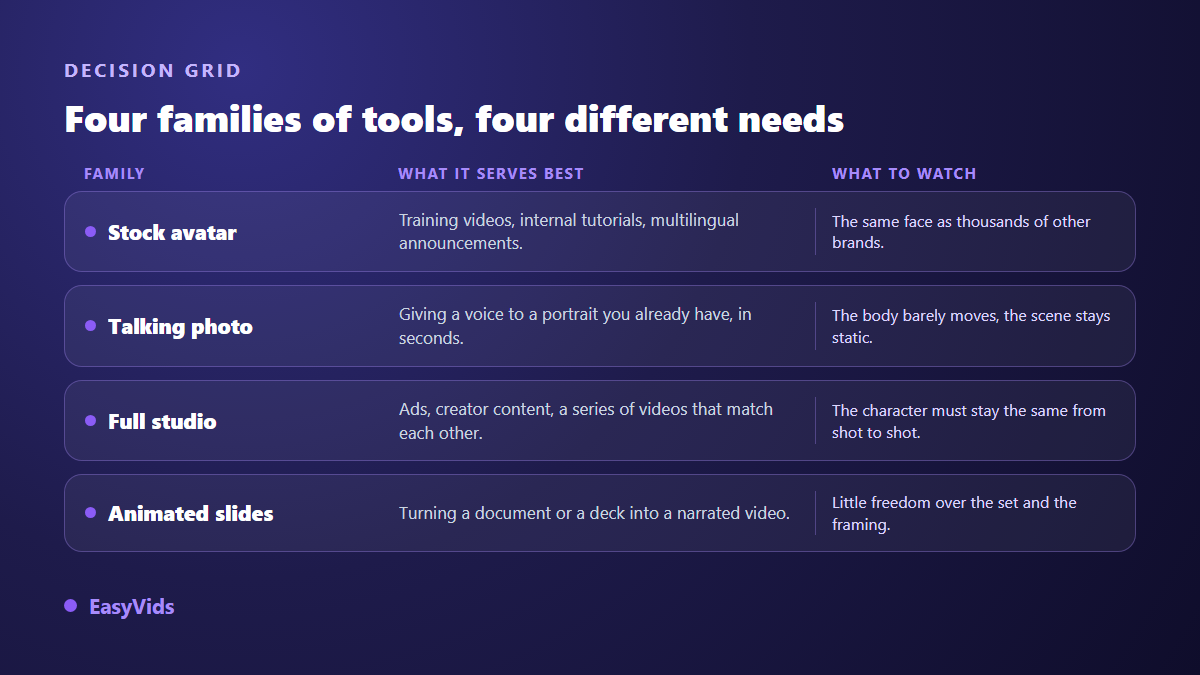
A common mistake is judging a training tool on its ability to ship a vertical ad, or the reverse. Start from the deliverable: a three minute video explaining a piece of software, or fifteen vertical seconds that have to stop the scroll? The answer removes half the candidates in one sentence.
Traps worth checking before you switch
Switching tools costs time, and a few checks made upfront prevent the unpleasant surprise of month three.
- Commercial use: some free plans exclude it outright, even when the export carries no watermark.
- Consent: uploading a real person's portrait requires their written agreement, and every serious tool restates that in its terms of service.
- Disclosure: the YouTube Help Centre has described, since 2024, a checkbox in Studio for flagging realistic synthetic or altered content.
- The voice: translated narration gives itself away within seconds, so always listen to a sample before committing.
- Framing: a video composed in 16:9 then cropped to 9:16 almost always cuts off the head or the product.
- Backups: pull your scripts and exports before closing an account, not every tool keeps them.
How to test an alternative in one afternoon
The fastest method is not to explore the tool but to make it redo a video you already know. Take a published script whose retention numbers you have, and carry it all the way to an exported file. A preview invites admiration, an export invites judgement.
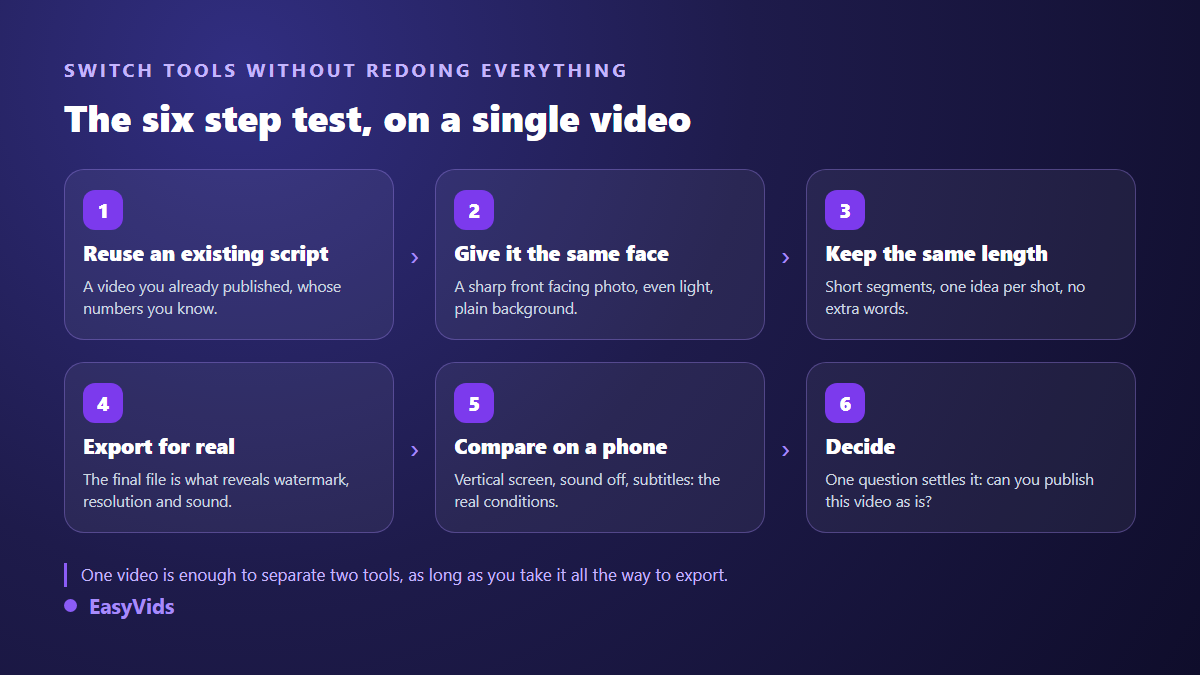
Then compare both files on a phone, sound off, in the conditions most of your audience will use. You will see straight away whether lips drift at the end of sentences, whether on screen text stays readable, whether the resolution holds. Lip sync is where these tools separate most clearly, and our article on talking AI avatars explains what makes it break.
Frequently asked questions
Is there a HeyGen alternative that is genuinely free and watermark free?
Yes, but rarely both at once on the same plan. Tools that drop the watermark on free tiers usually cap cumulative duration or output resolution instead. The useful question is not whether a free tier exists, but whether it is enough for the video you have in mind. Settle it with a real export, never with a preview.
Can I use my own face as the avatar?
Yes, on most tools, provided you supply a sharp photo taken head on in even light, and accept that it becomes the reference for every shot. For creator content it is also the most credible route: a stock face already seen on other brands is spotted quickly.
Are AI avatar videos allowed on YouTube and TikTok?
Yes. What these platforms penalise is repetitive mass produced content with no contribution of your own, not the technique used to make it. The YouTube Help Centre also asks creators to disclose realistic synthetic content at upload, through a checkbox in Studio.
Do I still need a separate voice over?
Not when the character delivers the text on screen. A separate voice over becomes useful again for illustration shots, the ones showing the subject rather than the speaker. Many videos gain rhythm by alternating the two, and that alternation is decided when you split the script, not in the edit.
How long does switching take?
One afternoon for a first comparable video, if you reuse an existing script instead of writing a new one. The real switch happens on consistency afterwards: a tool that saves a few minutes per video changes everything at five posts a week.
Hunting for a free HeyGen alternative is often hunting for the wrong thing. The avatar library does not decide how a video performs. The script does, the pacing does, and the credibility of the face doing the talking does. Take a video you already know, carry it to export on two tools, and judge the files. Creating an account is enough to run that test with your own photo, and the EasyVids studio keeps the script, the character, the voice and the edit in one place.