You are hunting for TikTok video ideas, and the thing stopping you is not a shortage of imagination. It is the camera. Filming yourself asks for a presentable room, decent light, a confident voice and about ten takes before thirty usable seconds come out. Plenty of accounts stall right there, with a notebook full of topics and nothing published.
The way out rests on a simple observation: most of what circulates on the platform does not depend on a face. It depends on a hook, a rhythm and information that holds up. Below are 45 ideas sorted by family, every one of them shootable without a camera, followed by the method that turns them into finished vertical videos. If your openings are the weak point, our 51 hooks sorted by niche work as a testing bench before you write anything else.
The short answer
A TikTok idea you can produce without filming almost always belongs to one of six families: explain, tell, show, rank, set a mood, spark a reaction. Pick a family, write a three second hook, hold thirty to sixty seconds of voice over, change the visual every three to five seconds. Everything else is production. The 45 ideas below sit inside those six families, from the fastest to make to the most demanding.
Why the face is not the point
TikTok opens every video full screen with the sound on. So the first sentence heard and the first frame seen decide the rest, not the presence of a person. Animated text, a product photo with a slow move on it, a map, a chart: all of it holds attention when the hook promises something specific. The faceless format has its own codes, and nine formats that work without showing your face covers them in context.
The second advantage is industrial. A video that does not depend on your availability or your mood can be produced in batches. You write five scripts in a row, generate five voice tracks, assemble five videos. On the day you are unwell, the queue keeps running.
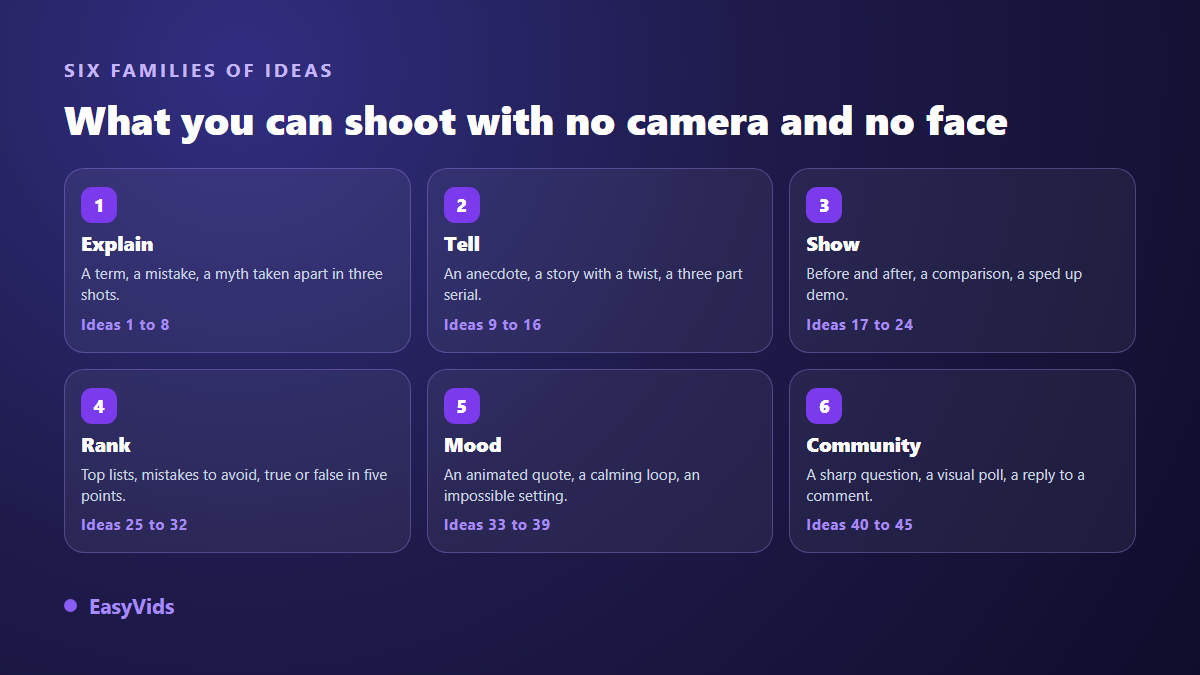
Family 1. Explain: eight ideas that deliver information
These are the easiest to write, because you already know the material. One rule only: one video, one piece of information. Trying to fit three in is the main cause of flat videos.
- The word everyone in your field uses wrongly, put straight in three shots.
- The beginner mistake you see every week, shown then corrected.
- One technical term per video, turning your glossary into a whole series.
- The question customers always ask, with the answer you actually give.
- An official figure from your sector, put back into context so it means something.
- The instructions for a tool you have mastered, cut down to three moves.
- A common belief taken apart, with the source named on screen.
- The difference between two notions people constantly mix up.
Family 2. Tell: eight story ideas
Story holds attention longest, because the viewer waits for an ending. It asks for more writing and forgives plainer visuals, since attention sits on the narrative.
- An anonymised customer anecdote that ends on a usable lesson.
- A little known historical fact told in sixty seconds.
- A legend or traditional tale illustrated shot by shot.
- The story of a personal failure and what it taught you.
- A short story with a twist, where the last line flips everything.
- A second person narrative in which the viewer becomes the character.
- The timeline of an event in five dates, one per shot.
- A serial in three episodes published on three consecutive days.
Family 3. Show: eight demonstration ideas
Showing does not mean showing yourself. An object, a screen, a transformation, a place: the frame can stay on the subject from start to finish. This family converts best when you sell something.
- A before and after in split screen, with no commentary on top.
- Three unexpected uses for an object everybody already owns.
- A product unboxing seen from above, hands out of frame.
- Two options compared side by side, criterion by criterion.
- A long transformation shown in fast motion.
- The detail nobody notices on an everyday product.
- One customer objection handled in thirty seconds flat.
- A tour of a place, a workshop or a shop in five shots.
Family 4. Rank: eight list and ranking ideas
Rankings work because they create instant disagreement. Viewers want to know whether their favourite made the cut, and head to the comments when it did not. Announce the number of items in the first second.
- Five references from your niche ranked from worst to best.
- Five mistakes to stop making, one per shot.
- Three free tools you genuinely use, and what they replace.
- True or false: five statements settled one after another.
- The three questions to ask before choosing a supplier.
- What to prepare this month in your field, in five points.
- The same subject seen by a beginner, an insider and a professional.
- The five stages of a process, one per video when the subject is dense.
Family 5. Set a mood: seven ideas
These videos do not inform, they aim to be watched twice. They are produced almost entirely from generated images and sound, and they scale endlessly once the style is set.
- A quote animated word by word over a generated backdrop.
- An impossible landscape on a seamless loop.
- A morning or evening routine illustrated with no face at all.
- An ambient scene, rain or a coffee shop, with a single line on screen.
- A satisfying sequence that restarts exactly where it ends.
- A countdown towards a release or a launch.
- A calm bedtime story carried by a steady voice.
Family 6. Spark a reaction: six ideas
The last family wakes a quiet account up. It needs almost no production, only a well aimed question and the nerve to hold a position.
- A sharply worded question dropped in the final second.
- A visual poll: two options on screen, the vote happens in the comments.
- A detailed answer to a comment you received last week.
- A myth from your sector put to your audience for judgment.
- A recap of the answers received on a previous question.
- A challenge thrown to your community, with the rule stated in one sentence.
From idea to script in four steps
A noted idea stays an idea. What turns it into a video is always the same sequence: one sentence, a script, a scene split, a production pass. Each step takes minutes and none of them needs equipment.
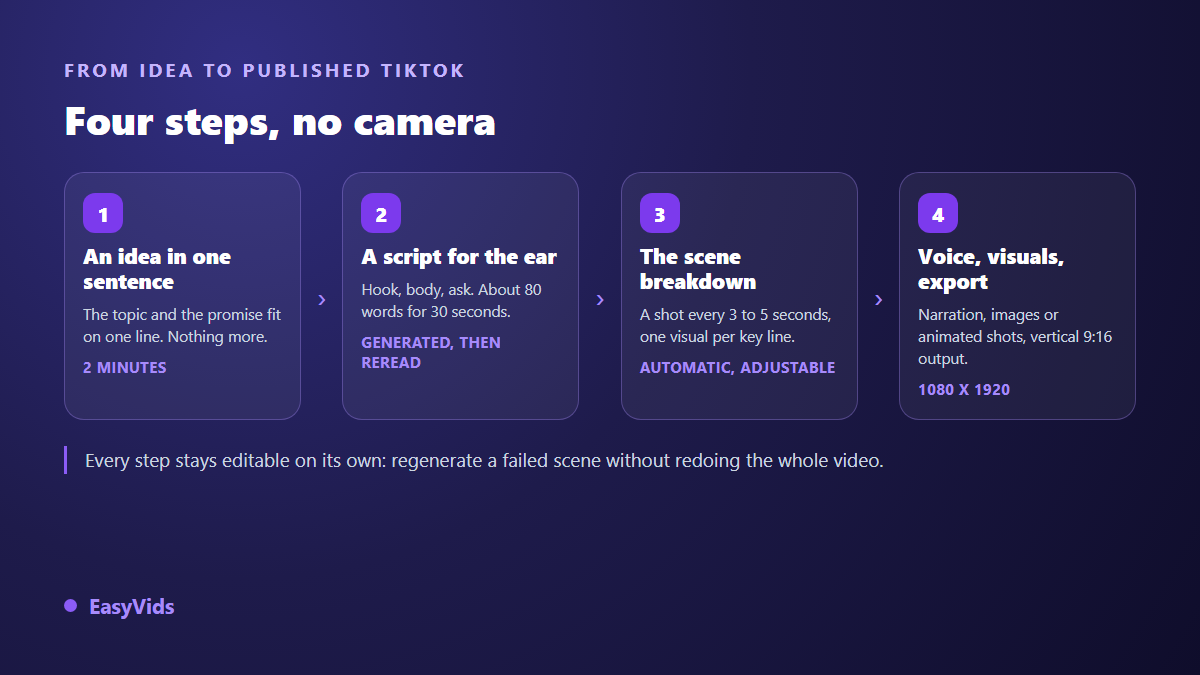
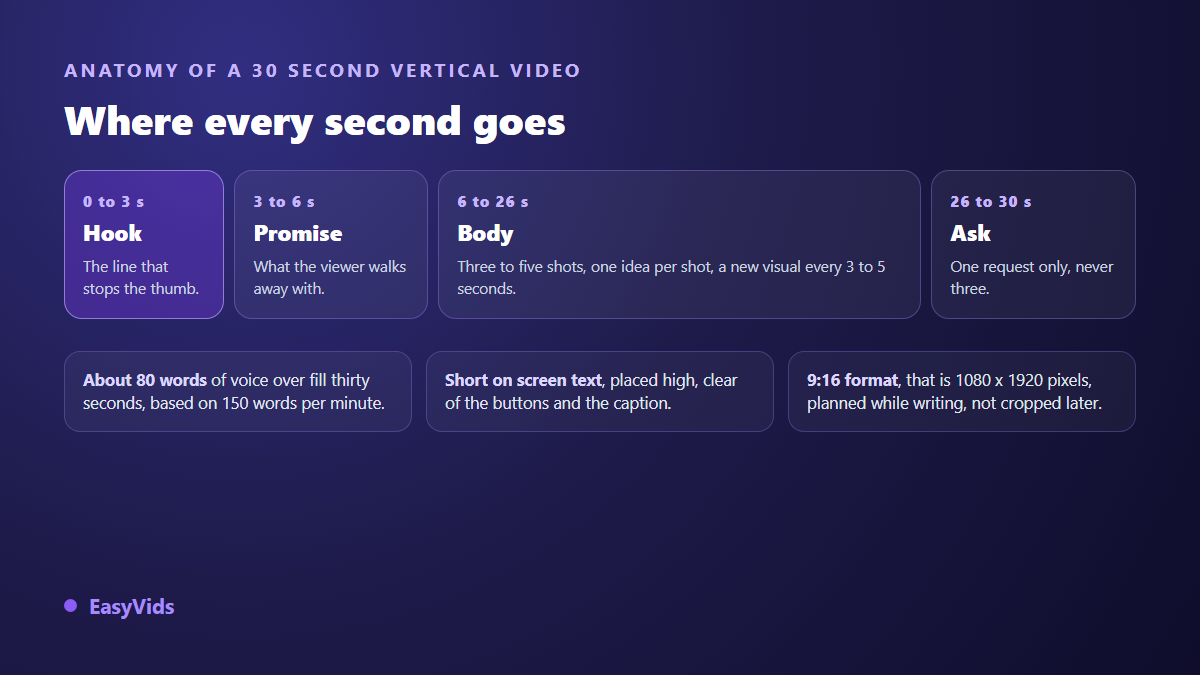
Writing is the step most people underestimate. A TikTok script is written for the ear, not the eye: short sentences, active verbs, no trailing clauses. Across our generations we calibrate texts at around 150 words per minute of voice over, which lands near 80 words for thirty seconds and 150 words for a minute. That calculation is what prevents an overlong script rushed at double speed. Our AI script generator starts from a one line idea, lets you set the tone and the target length in minutes, and returns text that is already splittable.
Then comes the split. The text is cut into scenes of three to five seconds, each paired with a visual and a fragment of voice. On a short format that grid matters as much as the content: a shot that drags loses viewers faster than an average sentence. The three part TikTok script formula sets out how to divide hook, body and closing line.
Format and length are decided before writing
A vertical video has to be conceived vertical from the first sentence. Cropping 16:9 down to 9:16 afterwards always cuts something that mattered, and it shows. Set the ratio to 9:16, meaning 1080 by 1920 pixels, before generating a single visual. The rest of the output settings sit in our TikTok video format sheet.
Length deserves an honest call. Fifteen to thirty second videos get watched in full more often, which helps distribution. But according to the TikTok help centre, the Creator Rewards Programme only counts original videos longer than one minute. If monetisation is part of your plan, write for that length from the start rather than padding a thirty second script. A subject that cannot fill a minute is still a good subject: publish it short and save the minute for stories and demonstrations.
One rule is worth settling before you produce in volume. TikTok community guidelines ask creators to label realistic content generated or altered by artificial intelligence, and the platform provides a dedicated switch at publishing time. TikTok also announced in 2024 that it had adopted Content Credentials from the C2PA standard, which attach that label automatically to some files. Animated text or stylised illustration raises no issue, while a realistic scene imitating real footage needs the label.
The mistakes that waste a good idea
A solid subject can be ruined in three seconds. These are the patterns we see most often on vertical videos that never take off, even when the starting idea was strong.
- A hook that announces the outline instead of intriguing: the first three seconds carry a promise, not a table of contents.
- A static shot held for fifteen seconds: change the visual every three to five seconds, even on a plain background.
- Three requests at the end. Pick one, and phrase it as an action.
- Text placed at the bottom of the frame, where the caption and the interface buttons cover it.
- A voice over sped up to rescue an overlong script: cut the text, never the pauses.
- The same format repeated forty times: rotate the six families until one fits you.
Holding a rhythm without losing your evenings
Publishing regularly beats publishing perfectly. The approach that survives contact with real life is batching: one writing session for ten ideas, one production session for ten videos, publication spread over two weeks. You never start from a blank page, and one bad day does not break the run. Our method for planning thirty days of videos in one afternoon describes that split in detail.
Frequently asked questions
Do you need to show your face to grow on TikTok?
No. A face helps build a bond, it does not drive distribution. What counts is retention over the first three seconds, then watch time. Well written animated text, a clean demonstration or a well told story meet both criteria with no camera at all.
How long should a faceless TikTok video be?
Thirty to sixty seconds for most subjects. Under thirty seconds a story has no room to work. Past a minute you need a real narrative or a detailed demonstration to hold attention. Set the length before writing, then calibrate the script at roughly 150 words per minute of voice over.
How do you find ideas when everything feels covered?
Change family rather than subject. A theme already handled as an explainer becomes new again as a story, a comparison or a question put to the audience. The six families above multiply your stock mechanically: ten subjects turn into sixty angles. Comments and direct messages are the second source, and the most reliable one.
Are AI generated videos allowed on TikTok?
Yes, and TikTok community guidelines ask you to label realistic content generated or altered by artificial intelligence, using the switch offered at publishing time. What gets penalised is misleading or repetitive mass produced content with no contribution, not the use of the tool. An original script, a considered voice and a deliberate edit stay well inside the rules.
How many videos a week make a difference?
Three to five posts a week give you a readable signal within a month. Below three you lack the data to tell which format works. Above seven, quality nearly always drops. Aim for a pace you can hold for three months, not for one sprint week.
Open a document, copy the five ideas on this page that fit your activity best, and write the first hook tonight. That is the only step that really costs anything. For the rest, creating an account opens the full studio, script, voice, visuals and vertical export in one place, and the EasyVids studio keeps those steps inside a single flow.