The invideo vs pictory question always shows up at the same moment: you have a text, you want a video, and two products promise the exact same outcome. Their landing pages look alike, their demo reels look alike, and neither company bothers comparing itself to the other. So you start both trials, spend an evening on them, and end up with two decent videos and no idea which subscription deserves your money. Our guide to turning text into video covers the vocabulary this comparison assumes you already have.
This comparison takes a different route. It does not rank two brands, it describes two machines: what each one really does with your text, where it finds the footage that illustrates it, and the kind of video it produces when you leave it alone.
Short answer: your raw material decides for you
Choose InVideo if you start from a short idea and want a polished promotional video you can then rework shot by shot inside a real editing interface. Choose Pictory if you start from long content you already wrote or already recorded, an article, a webinar, a course, and your actual problem is pulling short publishable videos out of it. The deciding factor is not quality, it is what sits on your desk before you begin. Both share the same illustration engine, and that engine sets the ceiling of your videos whichever one you pick.
Two tools born from two different problems
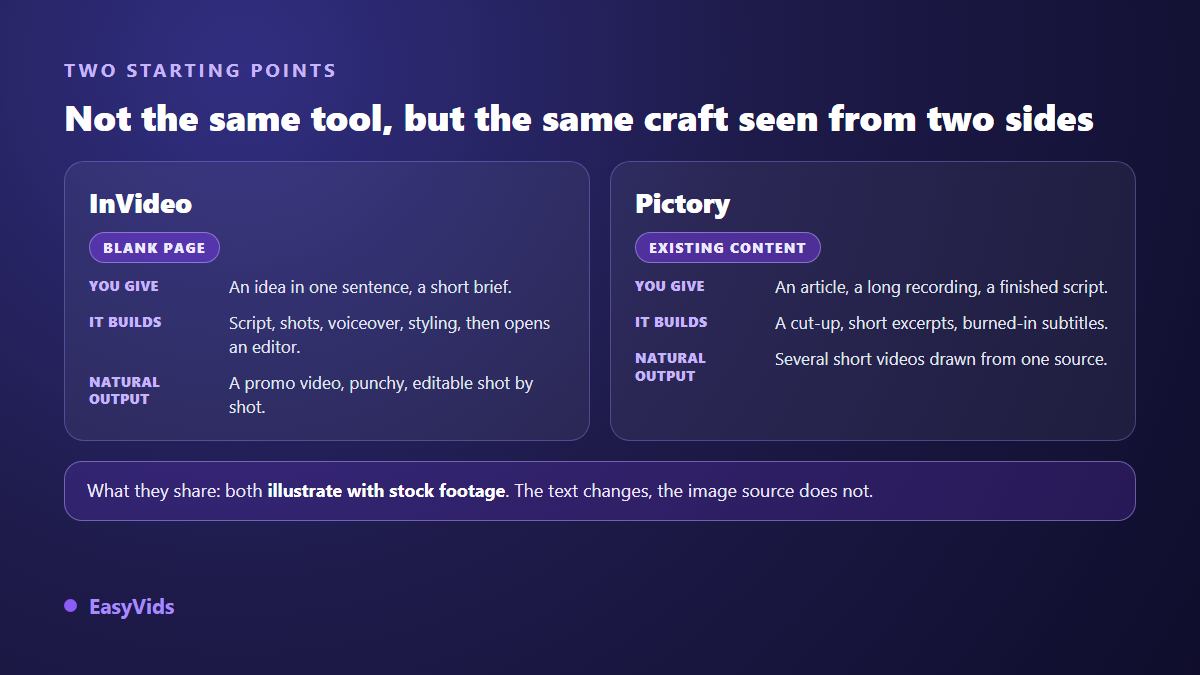
InVideo began as an online template based editor. Its original promise spoke to marketing teams who needed an ad, an announcement or a social clip out the door quickly, without opening editing software. A prompt driven entry point was grafted on later: you describe the video you want, the tool writes a script, picks shots, adds a voice over and on screen styling, then hands the project back to you inside the editor. Corrections can be requested in plain language too.
Pictory answers a different pain: the creator or company already producing plenty of long content with no time to cut it up. A blog post, a recorded call, a finished script go in one side; short captioned videos come out the other. Spotting the strong moments inside a long recording sits at the core of the product, whereas InVideo assumes you are starting from a blank page.
That lineage explains almost everything else, including the frustration each one causes. Asking Pictory for finely tuned advertising polish means asking for a job it never applied for. Expecting InVideo to carve up a one hour webinar is the same mistake in reverse. A large share of the negative reviews you will read about both tools are really casting errors.
What both do in exactly the same way
Under the interfaces, the chain is identical and it has five links. A language model writes or rewrites the text. That text is split into scenes. Each scene receives a shot pulled from a licensed media library. A synthetic voice reads the words. An automatic assembly step syncs the shots to the voice, burns in captions and exports to the requested aspect ratio, vertical included.
That shared foundation has one direct consequence no product page advertises: two users covering the same subject often receive the same shots. The libraries are huge, but automatic selection keys off the words in your text, and the same words return the same footage. On crowded themes, finance, fitness, wellbeing, productivity, you will eventually see your own shots on a competitor's channel. That is not a manufacturing defect, it is how the method works.
InVideo: an editing room with an assistant at the door
InVideo's strength is control after the fact. Once the first version exists, you stay inside an editor that behaves like editing software: layers, durations, on screen text, transitions, swapping one shot for another. For brand video, where the style guide matters as much as the message, that latitude changes the outcome. You are not stuck with what the assistant decided.
The downside shows up over length. A template based editor pushes naturally toward an advertising look: bold moves, punchy text, fast pacing. Excellent for a fifteen second announcement, much less so for an eight minute narration, where the same styling tires the eye. Our comparison of AI tools sorted by need maps that border between an editing tool and a narrative studio.
Pictory: a recycling line rather than a studio
Pictory is formidable at one precise job, and says so openly: giving a second life to what you already produced. An article becomes a two minute video, an hour long recording becomes several short cuts, a transcript becomes usable captions. For a company already publishing a blog or running webinars, the time saved is real and immediate. The same logic applied to your own posts is laid out in our method for turning an article into a video.
Artistic room, however, stays narrow. You pick a visual template, a voice, a music bed, and you replace shots one by one, but you do not build an aesthetic. That is a deliberate design choice: the tool optimises throughput, not signature. If your differentiation runs through the image, you will hit the ceiling within weeks.
The six criteria that actually decide
Skip the feature tables, they age in three months. Six questions are enough to settle it, and they apply to any tool in this family, not only to these two.
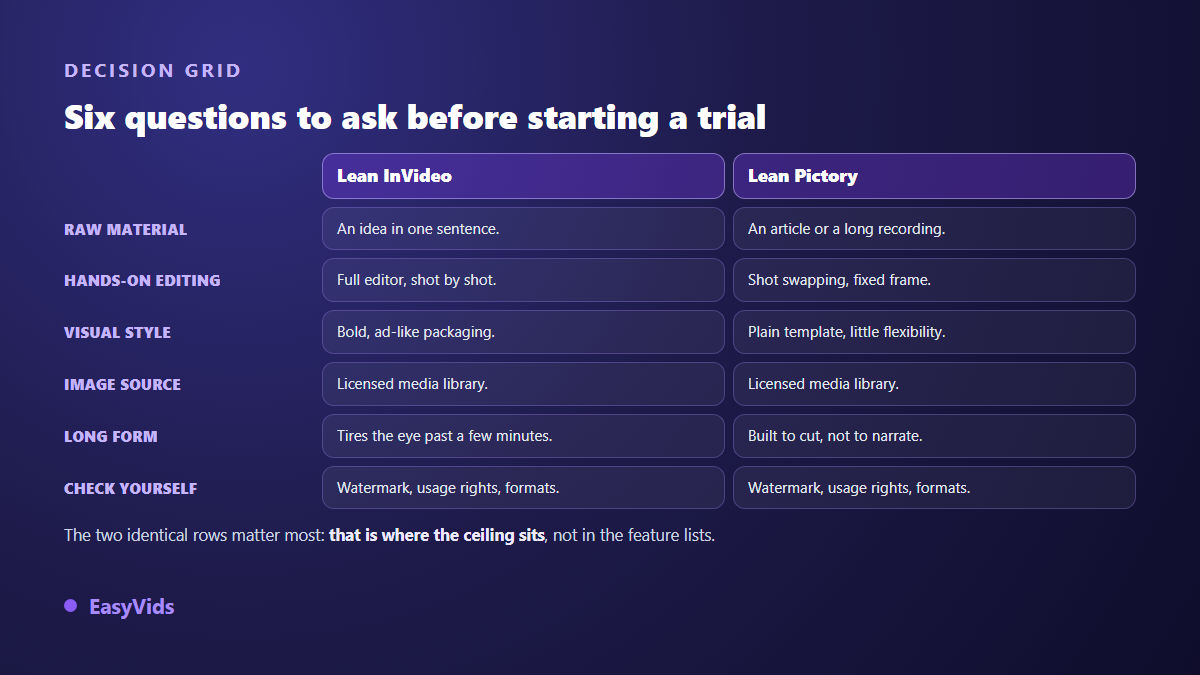
- Your raw material: a one sentence idea, or long content already produced? This is the only criterion that cleanly separates them.
- Control: can you fix a single scene without regenerating the whole video?
- Visual style: are you wearing a template, or directing the look yourself?
- Where the footage comes from: stock shared with everyone, or visuals made for your video?
- Usage rights: what may you publish, monetise, and on which platforms? Read the terms, not the home page.
- Watermark and output formats: check what the free tier exports before committing, and whether vertical is native or a crop.
The ceiling they share: your footage already belongs to someone else
This is the point worth the whole article. InVideo and Pictory do not make your images, they borrow them. Shots come from licensed libraries, the licence lets you use them, and everyone else gets the same access on the same terms. For utility video, an internal demo, a meeting recap, a process reminder, none of this matters. The moment you build an audience it surfaces: your channel has no visual identity, because its images are not its own.
A second, more concrete risk touches monetisation. According to the YouTube Help Centre, a channel that republishes third party content without meaningful contribution risks rejection under the reused content rule. Stacking stock shots over a synthetic voice, with no original commentary and no staging, lands you exactly in the area reviewers examine closely. Our article on reused content and monetisation refusals covers the criteria and the fixes.
The third route: making the images instead of borrowing them
Another approach exists, and it moves the problem rather than managing it. Instead of hunting for a shot that resembles your sentence, a generation studio builds the image of the scene from the scene itself. Nobody else owns that shot, because it did not exist before your project. The full chain, from script to exported file, is described in our guide to AI video generators.
That route also opens something stock libraries will never allow: a recurring character. In a video assembled from stock, the person on screen changes at every cut, and viewers notice before the first minute is out. With visuals generated from stable references, the same face carries the whole video, then the whole series. On EasyVids, the characters, sets and objects of a project are locked as references before the first image, then recalled in every scene that brings them back.
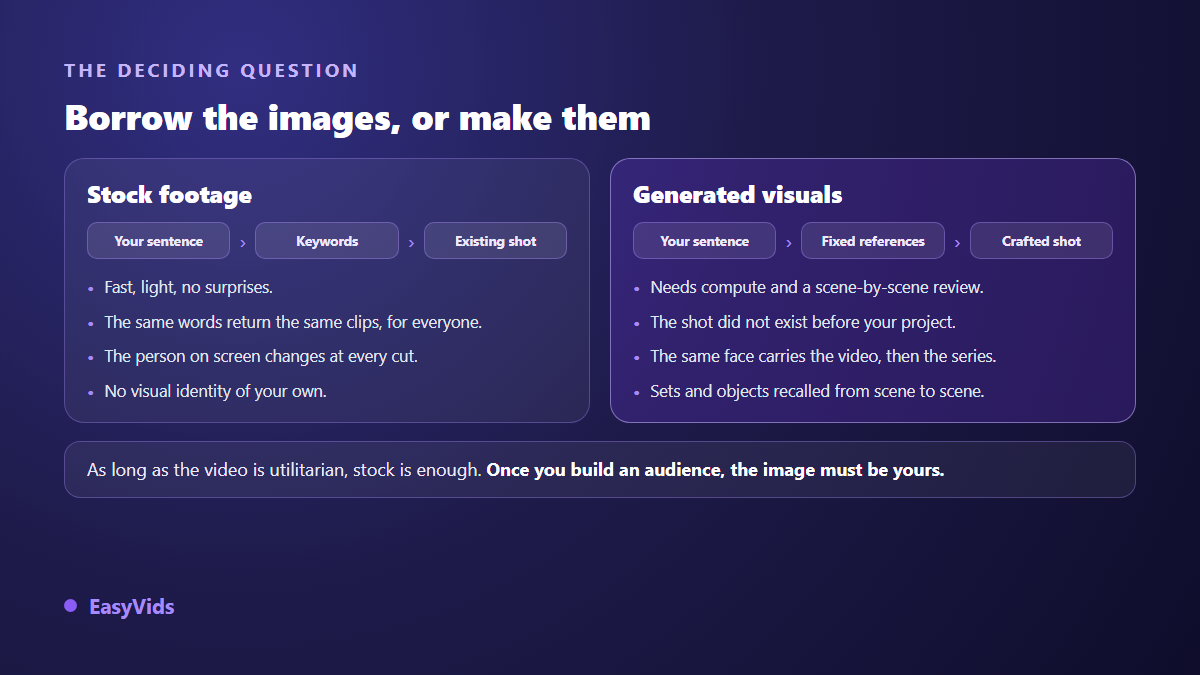
The trade off deserves saying plainly: generating takes compute, so more resources than pulling an existing clip, and a human still reviews scene by scene. Orders of magnitude for an AI production against a traditional one are laid out in our analysis of what a video really costs, and our current plans live on the pricing page, which moves too often to be copied here.
The thirty minute test that saves you a subscription
Do not compare demo reels, they all look good, that is their job. Compare the same subject, handled by both tools, using your own material. Here is the protocol we run on any tool in this family, our own included.
- Use your own text, never a sample supplied by the vendor: your latest article, or a note of two hundred words.
- Give both tools the same brief, change nothing, and export as is.
- Watch both videos on a phone with the sound off, the way your audience will actually see them.
- Count the shots that have nothing to do with the sentence they illustrate. That count tells you the most.
- Fix a single scene, then time the operation. A tool that forces a full regeneration will cost you hours every week.
- Finish with the watermark and the output format: those two points often settle the question on their own.
Frequently asked questions
InVideo or Pictory: which is simpler for a beginner?
Pictory asks for fewer decisions because it offers fewer settings: paste content, pick a visual template and a voice, the video comes out. InVideo takes a little more learning because of its editor, but it gives that latitude back the moment you want to leave the template. For a first video published the same day, Pictory gets there faster.
Can these tools keep the same character across scenes?
No, not in the sense of a recognisable character throughout a video. Both illustrate your scenes with stock footage, filmed by different people in different settings. Character consistency requires visuals generated from references reused from scene to scene, which belongs to a different family of tools.
Are the resulting videos monetisable on YouTube?
Yes, provided you contribute something of your own: a viewpoint, original commentary, deliberate staging. According to the YouTube Help Centre, what triggers a refusal is the absence of contribution and the republishing of third party material, not the use of an automated tool. Stock shots strung over a generic script sit on the wrong side of that line.
Do I need to pay to test them properly?
No. Both let you produce a few videos without paying, which is plenty for the protocol above. Pay attention to what the free tier does at export: maximum duration, watermark, image quality. Those limits change regularly, so each vendor's own plans page is the authority on the day you test.
Is there an alternative that covers both uses?
Yes, by changing category. A complete studio writes the script, builds the visuals, adds the voice, the music and the edit in one place, and accepts a one sentence idea as readily as a long text to rewrite. Your starting point stops dictating your tool, and your footage belongs to your project alone.
The useful reflex is not crowning a winner between these two platforms, but recognising which one fits your raw material, then checking whether its visual ceiling still suits you two years from now. If the answer is no, look toward studios that build their images instead of borrowing them. Creating an account is enough to measure the difference on your own text, and the EasyVids studio brings writing, visuals, voice and editing onto a single screen.