Your ebook is written, formatted and published. Part of your audience will still never open it, simply because they listen instead of reading: in the car, on a walk, while cooking. An audiobook AI voice lets you reach them from the text you already own, with no studio, no narrator and no equipment.
The idea sounds simple. Doing it well is not, because a synthetic voice reads everything you hand it: page numbers, image captions, abbreviations and cross references like « see figure 2 ». Most of the work happens before generation, in preparing the text, and after it, while listening. If speech synthesis is new to you, our complete guide to AI voice over covers the ground this article assumes.
Turning an ebook into an audiobook: the short answer
Export your text chapter by chapter, strip out everything that is not meant to be spoken, choose a single voice with a reading instruction, then generate one audio file per chapter. Generating a chapter takes minutes. Reviewing it takes the real listening time, and that is the budget people forget. If the book itself is still to be written, our method for creating an ebook with AI runs from the topic to the finished layout.
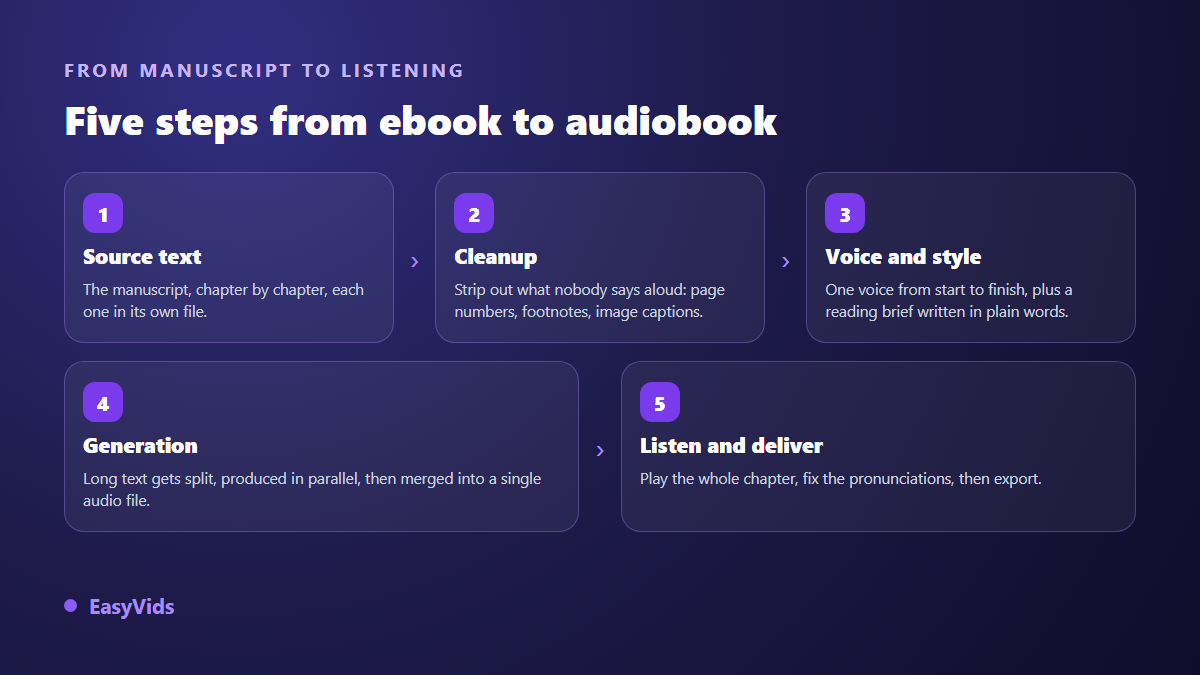
Five steps, from text file to finished chapter
An audiobook is not a text pushed through a machine, it is a chain of five moves. Skip the second one and nobody listens to the end. Skip the fifth and you ship a file with three mispronounced names, which is the first thing your readers will report.
Step 1: export the text, one file per chapter
Work chapter by chapter, never with the whole book in one block. Listeners navigate by chapter, a single mispronunciation then costs you one chapter rather than a hundred pages, and distributors expect that split anyway: according to the production requirements published by ACX, Audible's audio production platform, each delivered file must match one chapter or section of the book.
In our studio, an ebook is delivered as a readable online book plus a downloadable PDF, so you copy each chapter from there into the voice tool. To be straightforward about it: there is no single button that converts a whole book into audio. That step stays manual, and it is also what keeps you in control of what the voice receives.
Step 2: rewrite for the ear what was written for the eye
A written book leans on visual cues the ear never gets. Readers see a bold heading, a bullet, a table, a footnote. Listeners only get a stream of speech. Anything that only makes sense visually has to be removed or reworded before generation.
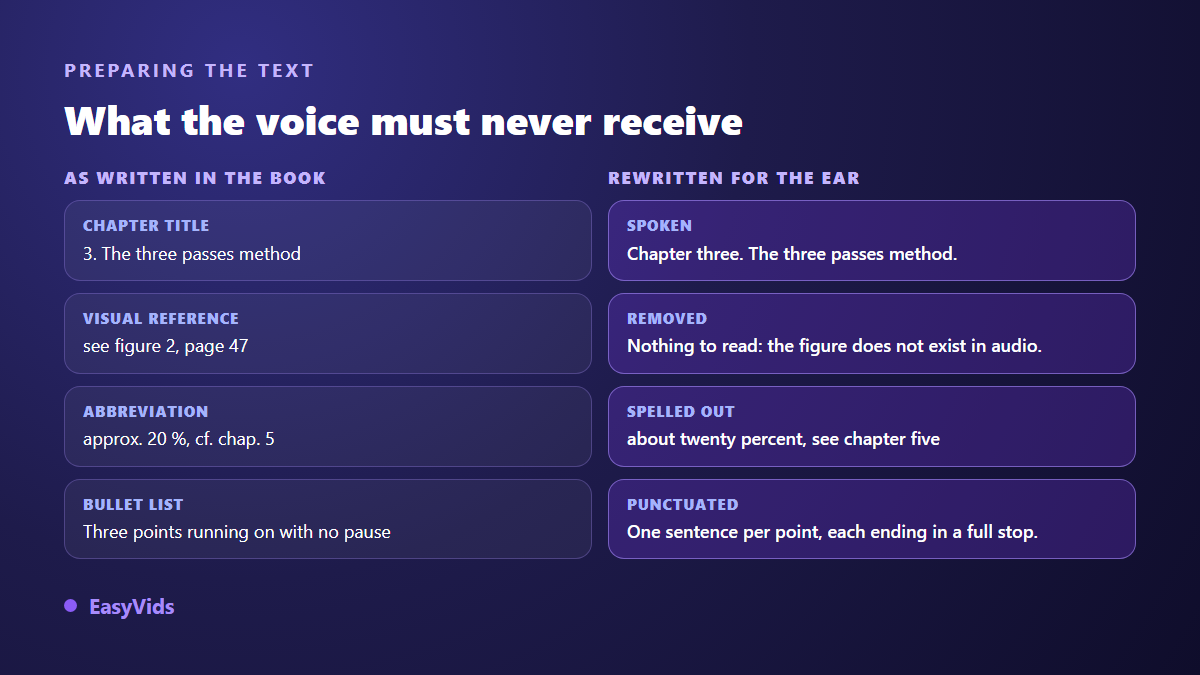
This cleanup pass takes about ten minutes per chapter and removes almost every listener complaint. Here is what to handle every time.
- Chapter numbers and titles: spell out « Chapter three », or the voice announces a bare digit.
- Visual cross references: « see figure 2 », « the table below », « page 47 ». They do not exist in audio, cut them.
- Abbreviations and acronyms: write the spoken form, since some are spelled out and others are not.
- Numbers, dates and units: written in words when the delivery matters to you.
- Bullet lists: turn each point into a full sentence with a full stop, otherwise everything runs together.
- Links and web addresses: they turn into gibberish out loud, replace them with a spoken phrase.
- Footnotes: fold the information into the main text, or drop it.
Step 3: one voice, held from start to finish
The voice you pick commits the whole book. A listener spends hours with it and notices any change of timbre between chapters instantly. Test three or four voices on the same three hundred word extract, listen on headphones, then lock your choice. One range in our studio offers timbres described by character, from deep and steady to energetic, and another focuses on narration voices.
Timbre alone does not decide the result. A voice that runs on without breathing sounds artificial even at excellent audio quality. The settings that separate mechanical reading from believable narration are covered in our article on AI voices that sound robotic, and they apply word for word to an audiobook.
The reading style instruction
Some voice ranges accept a plain language instruction placed at the top of the text, which shapes the delivery without ever being spoken. It is the highest return lever in the whole chain. « Read like a captivating storyteller, in a warm and steady voice » produces a completely different take from « Read like a TV news anchor, serious and brisk ». Write it once, keep it identical across chapters, and save it as an account preference so you never forget it on chapter eleven.
Step 4: generate a full chapter in one go
This is where most tools stall. Speech engines usually cap out at a few thousand characters per request, far below a book chapter. The answer is not to slice your text into twenty pieces by hand and glue twenty audio files back together.
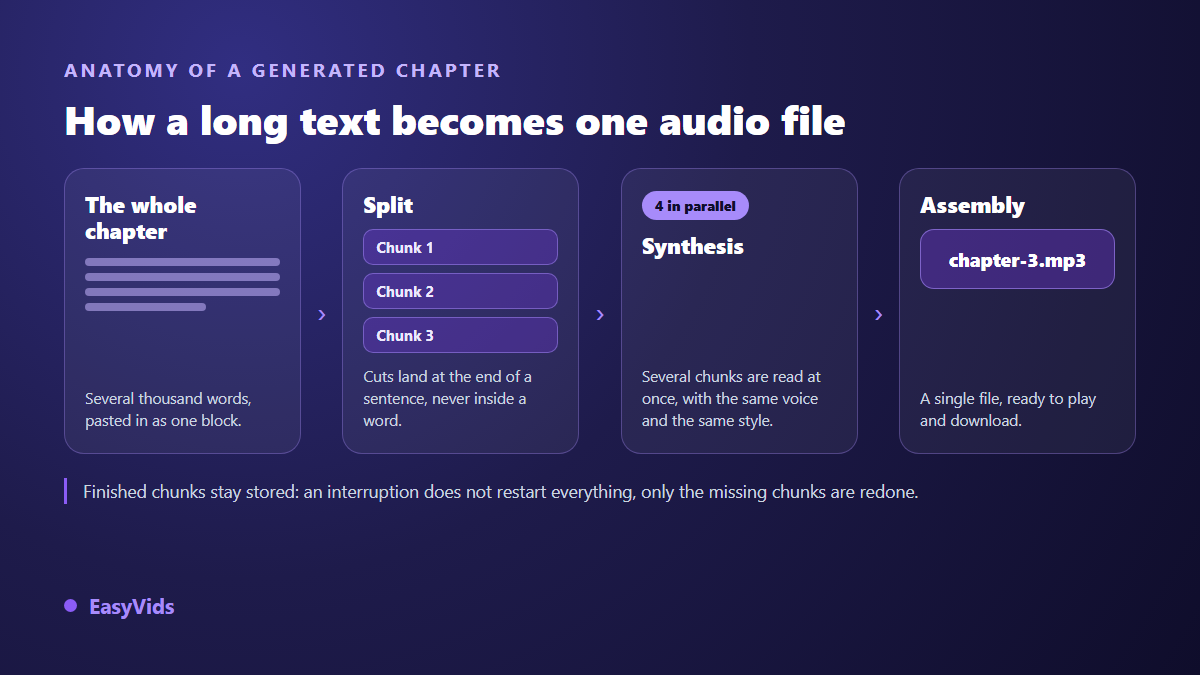
In our voice tool a long text is split automatically at sentence boundaries, never mid word, into pieces of roughly three thousand characters. Those pieces are generated in parallel with the same voice and the same style, then assembled into one file. A single generation accepts up to one hundred thousand characters, close to an hour and a half of listening, which covers a chapter comfortably. Pieces already produced are kept, so an interruption does not send you back to the start. Voice over is billed per character, and the plans are on the pricing page.
Step 5: the listening check you cannot automate
Listen to every chapter in full, on headphones, with the text in front of you. It is tedious, it is essential, and it is what separates a publishable audiobook from a file people abandon after three minutes. Take notes as you go, fix the source text, regenerate the chapter.
- Proper nouns and first names, almost always worth a fix in fiction.
- Acronyms, which are sometimes spelled out and sometimes spoken as a word.
- Numbers, dates and units of measurement.
- Foreign words dropped into a sentence.
- Questions, whose intonation sometimes falls flat.
- The joins between two generated pieces, worth close attention the first time you use a voice.
Corrections happen in the text, not in an audio editor. A mispronounced name is fixed by spelling it phonetically at that spot. A sentence that races is fixed with a full stop instead of a comma. You always work the source, never the output, which makes every fix repeatable.
Technical requirements for a deliverable file
If you target a listening platform, its automated checks reject out of spec files before any human hears them. According to the quality control requirements published by ACX, a file must sit between -23 dB and -18 dB RMS on average, peak no higher than -3 dB, keep its noise floor under -60 dB RMS, ship as constant bit rate MP3 at 192 kbps in 44.1 kHz, and stay under one hundred and twenty minutes. A short silence is also expected at the head and tail of each file.
A synthetic voice ticks several of those boxes by nature: no room noise, no mic handling, an even level throughout. Our assembled files come out as 192 kbps MP3, which matches the expected format. Still check your levels in a free audio editor before submitting, and keep in mind that platform terms change: always read their current documentation before delivery.
Your cloned voice, or a catalogue voice
Cloning your own voice changes the nature of the project: the audiobook becomes an extension of your author identity. A short clean sample is enough on most cloning tools, and the resulting voice can be reused from one chapter to the next. You can only clone your own voice, or one you have explicit permission to use, which is why reputable services put a certification checkbox next to the feature. The legal boundaries are covered in our article on the legality of voice cloning.
Where to publish an AI narrated audiobook
Major platforms have opened up to synthetic narration, each on its own terms. Amazon has offered a virtual voice narration for eligible Kindle titles since late 2023 according to the KDP help pages, with eligibility varying by country and category. Apple has promoted digital narration for independent authors since 2023 on the page it devotes to that programme. The Amazon side of the declaration rules is detailed in our article on AI books and KDP rules.
You are not tied to them. An audiobook sells well as a download from your own site, works as a bonus with the ebook, or ships as episodes, an option that needs the sound design and episode structure our guide to AI voice for podcasts walks through. For video platforms, the online editor accepts audio tracks: drop a chapter file onto a still cover and you have something publishable. Whatever you choose, state that the narration is synthetic. Listeners who know in advance rarely mind, and several platforms require the declaration anyway.
Frequently asked questions
How long does a full audiobook take?
Generation is fast, a few minutes per chapter. The real time goes elsewhere: about ten minutes of preparation per chapter, plus the full listening time of the result. For a hundred page book, plan two to three working days spread out, most of it spent on review.
Do listening platforms accept synthetic narration?
Increasingly, but never unconditionally. Amazon and Apple have each opened a synthetic narration programme for authors, with eligibility criteria and a declaration requirement. Terms change often, so read the official documentation of your target platform before preparing a submission.
Do I need a microphone or audio editing software?
Not for the narration itself, which is produced server side and comes back ready to play. A microphone only matters if you clone your own voice, and then you need a clean recording in a room without echo. A free audio editor stays handy for checking levels before submission.
How do I fix a mispronounced name?
Spell it phonetically in the source text at that exact spot, then regenerate the chapter. Test the spelling on a single sentence first. Keep a short list of those spellings, it will serve you on every book that follows.
Can I produce the audiobook in several languages?
Yes, provided you translate the text first and then pick a voice native to the target language. A French voice reading English carries an accent everyone hears. Plan a listening check by a speaker of that language too, since pronunciation errors will otherwise slip past you.
An audiobook is not one more product to build, it is the same book offered to people who will never open a text file. The work sits in the preparation and in the listening, the technology handles the rest. To try the method on a single chapter before committing the whole book, create your account and generate it in the EasyVids studio, where writing, voice and editing live in one place.