A notebook sold on Amazon needs no chapters, no characters, no proofreading. That is what makes low content books so appealing, and that is exactly why so few of them sell. Thousands of sellers had the same idea in the same quarter. Your file lands in a category where tens of thousands of journals are already waiting for a buyer, and most of them never find one.
The selection happens on three things only: the niche, the cover, the listing. None of them requires writing talent. All three require a method. This guide walks that method from the first decision to the file you upload, and it says plainly which parts AI handles and which parts it does not. If your project leans towards a fully written book instead, our guide to creating a complete ebook with AI covers that side.
Low content books: the short answer
A low content book is a book whose pages are mostly blank or repetitive: lined notebooks, journals, planners, log books, guest books, recipe books. The Amazon KDP help centre uses that exact definition of minimal or repeated content. You are not selling text, you are selling a useful object and a cover thumbnail that earns a click. So your work sits in three decisions: who the notebook serves, what it looks like at thumbnail size, and which words people type to find it.
No content, low content, medium content
The trade splits the category into three levels, and the level you pick decides everything else. No content means blank or simply lined pages. Low content adds a light repeated structure: tracking columns, checkboxes, a habit grid, a weekly layout. Medium content brings in real text: daily prompts, short explanations, questions between the pages.
The higher you go, the thinner the competition gets. A neutral lined notebook competes with tens of thousands of identical files and is judged on its cover alone. A guided journal built for one precise situation competes with a handful of titles, defends itself on usefulness, and supports a stronger positioning. If you are starting out, aim for the middle of that ladder.
Pick a niche that already has a buyer
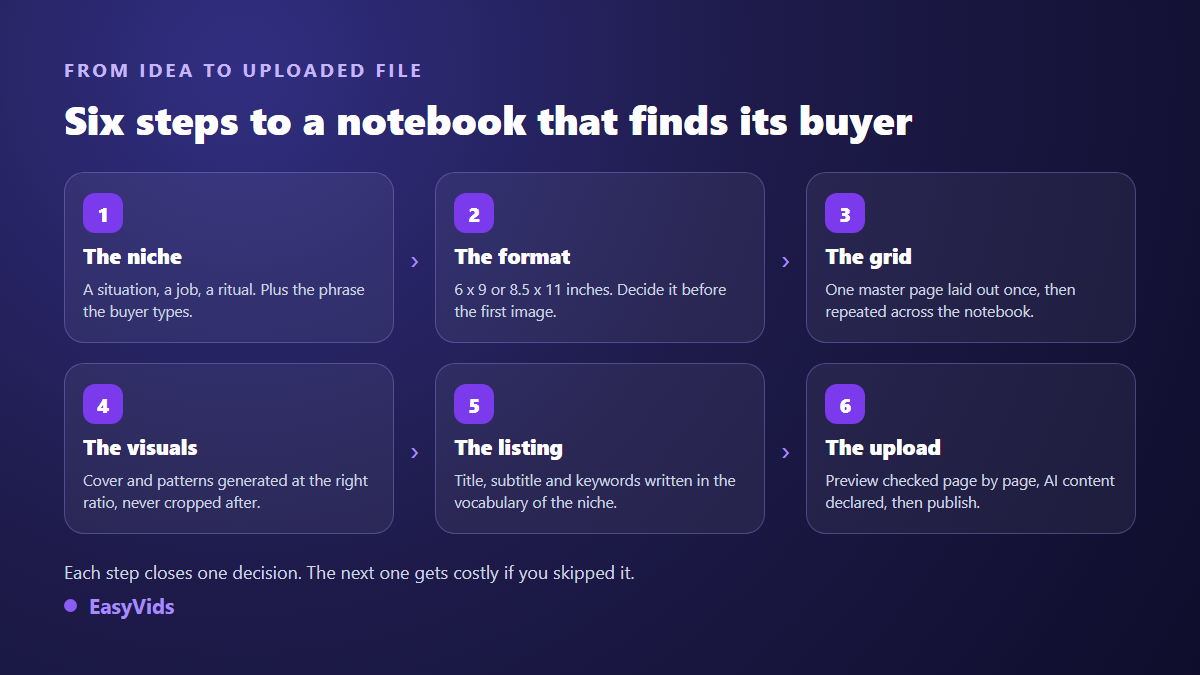
The founding mistake is starting from an idea you like. A low content book sells because someone was looking for that exact object that day. Start from a situation, a job, a ritual, a life stage. One test saves weeks of wasted work: if you cannot write the sentence your buyer types into the search bar, the niche is not ready. Write that sentence first. It becomes your title, your subtitle and half of your listing.
- Professional logs: trade job books, maintenance registers, site diaries, appointment books.
- Personal tracking: sleep, training, gratitude, spending, mood, reading, gardening.
- Life stages: first baby, moving house, going back to study, retirement, grief.
- Serious hobbies: fishing, diving, watercolour, genealogy, tasting notes, knitting.
- Dated gifts: birthdays, weddings, a colleague leaving, a birth, a graduation.
Trim size comes before the first image
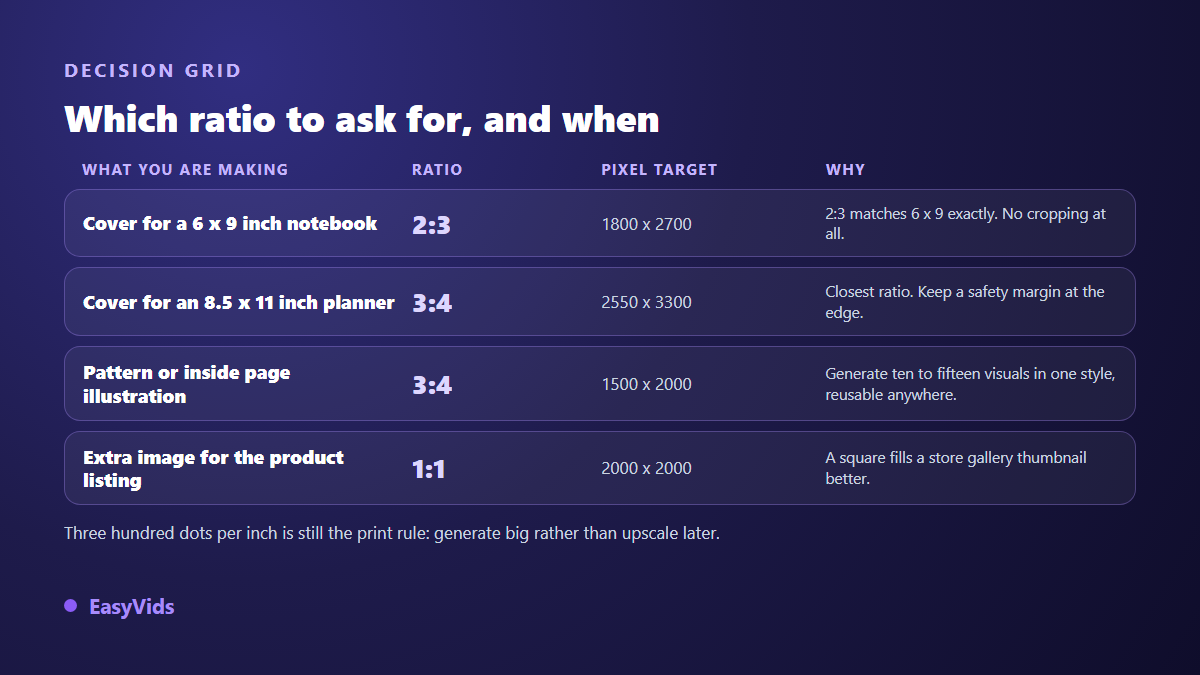
Many beginners generate a beautiful cover, then discover it fits no template. Pick the trim size first. Two sizes cover most of the market: 6 by 9 inches for journals, 8.5 by 11 inches for planners and workbooks. The KDP help centre also states that a printed book must run to at least twenty four pages, and recommends uploading the interior as a PDF.
Two technical details decide the final result. Bleed first: according to KDP formatting documentation, anything touching the edge must extend an eighth of an inch past the trim line, otherwise a white strip appears after cutting. Resolution next: the same documentation recommends three hundred dots per inch. A 6 by 9 inch cover therefore needs roughly 1800 by 2700 pixels, which rules out any small image scaled up afterwards.
The cover is your only sales argument
On a results page your notebook is a stamp sized thumbnail. The artwork has to read at that size, and the title has to be legible without effort. That is where image generation earns its place, provided you steer it. Ask for the right proportion at generation time, never afterwards. Several models in the EasyVids AI images studio accept a 2:3 ratio, which matches 6 by 9 inches exactly, and 3:4, very close to 8.5 by 11. Some models render up to 4K, which leaves the headroom print resolution demands.
For the title text, two routes exist. You let the model write the words inside the image, which some engines now do cleanly, though across our own generations the result still varies from one model to the next and deserves a letter by letter check. Or you generate a background with no text and set the typography in your layout tool. The second route gives a crisp, editable title and lets you spin out ten variants of the same notebook in minutes.
The interior: what AI builds and what it does not
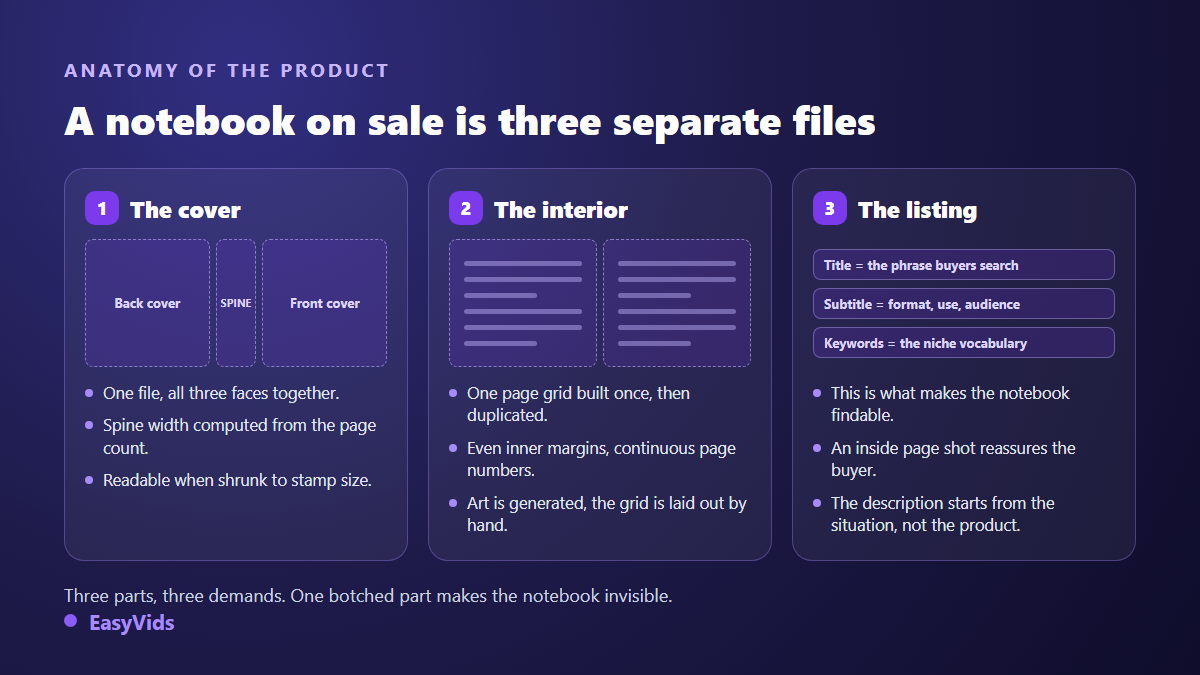
Here is the limit no marketing promise should hide. An image model does not produce a regular typographic grid, page after page, to the millimetre. It produces visuals. The repeated frame of your notebook, the rules, the columns, the page numbers and the inner margins are built once in a layout tool, then duplicated. That is template work, not generation work.
AI does belong everywhere there is decoration: background patterns, section dividers, endpaper illustrations, chapter vignettes, special pages that open a part. A notebook whose interior carries a consistent little illustration stands out instantly from files assembled on a conveyor belt. Ten to fifteen reusable visuals, generated in one style, then dropped into your template, is the right use of the tool here.
One honest note about our own studio: the EasyVids ebook generator composes a written, illustrated book exported as an A4 PDF. It aims at reading and at digital sales, not at the interior of a paperback at a precise trim size. For a printed notebook, use the studio for the cover and the illustrations, then assemble the interior at the exact size in your layout tool. It becomes the right tool again the day your catalogue opens up to a book illustrated page after page, a case covered in our guide to a fully illustrated and laid out AI ebook.
Guided journals: one step up without becoming a writer
Medium content is where a methodical seller still finds room. A guided journal asks one question a day, offers a frame for reflection, slips in a prompt every ten pages. It stays quick to produce, and it steps out of the permanent beauty contest between blank notebooks. Writing those prompts delegates well: ask for thirty questions on a precise situation, sort them by progression, then read them back. That read back is what gives the notebook a voice. Our pricing page explains how the credits work, including what you can test for free.
Series: a mascot that keeps the same face
Sellers who last do not publish one notebook, they publish a collection. Same trim, same grid, same visual signature, ten variations. The catalogue becomes recognisable and every new title benefits from the visibility of the previous ones. The known difficulty appears as soon as a character or a mascot returns across several covers: without a stable reference, the face drifts with every generation. EasyVids image models accept up to four reference images, and the server refuses the job before any charge when the chosen model cannot read them, so you never pay for a render that ignored your brief.
Amazon rules worth knowing before you publish
Publishing a book whose visuals come from a generative model is allowed, with one procedural condition. According to the KDP help page on AI generated content, in force since September 2023, you must declare at publication time whether the text, the images or the translation were generated by artificial intelligence. The same document separates generated content from content that was merely assisted, edited or corrected, which needs no declaration. The disclosure stays internal and does not appear on the public listing.
Two more points deserve attention. Amazon announced in September 2023 a cap on new titles published per day and per account, in response to bulk uploads, so producing fast does not exempt you from publishing calmly. And file quality is reviewed on arrival, which weeds out badly calibrated interiors, blurry images and covers whose text runs past the template. Always check the digital previewer page by page before approving.
The listing does half the selling
An invisible notebook does not sell, however handsome it is. Title, subtitle and keywords carry most of the discovery. Write the title as a search phrase, put the trim size, the use and the audience in the subtitle, and open the description on the situation rather than on the product. Add an interior page to your extra images: what the inside looks like is the number one question buyers ask.
- The title repeats the phrase your buyer types, with no wordplay.
- The subtitle states the trim size, the page count and the use.
- The description opens on the lived situation, then describes the inner structure.
- Extra images show a real interior page at readable size.
- Categories and keywords use the vocabulary of the niche, never generic terms.
Frequently asked questions
Do I need to draw to create a low content book?
No. Covers and interior patterns are generated from a written description. What stays with you is judgement: choosing the ratio, checking legibility at thumbnail size, discarding approximate renders. A basic layout skill will serve you far better than a drawing skill, and it takes an afternoon to pick up on free software.
How many pages does a printed notebook need?
The KDP help centre sets a floor of twenty four pages for a paperback. In practice most journals run between one hundred and one hundred and fifty pages, which gives a spine thick enough to carry a readable title. The cover calculator provided by KDP derives the exact spine width from the page count and the paper type.
Can AI generated images be sold on Amazon?
Yes, subject to the disclosure described on the KDP help page about AI generated content, and subject to the terms of the service that produced the image. Always check that your tool grants commercial use of the renders, and avoid any recognisable imitation of a protected work, character or brand.
Print or digital: which sells better?
A blank notebook only makes sense in print, since nobody writes by hand on a screen. Digital becomes relevant again for guided journals, workbooks and printable planners, where the written content carries the value. Many sellers publish both, with one cover and two distinct layouts.
How long does one notebook take?
Allow a day for the first one, interior template included, then one to two hours for each variation after that. Most of the time goes into choosing the niche and checking the file, not into generating visuals. That ratio is exactly why a collection outperforms a single title.
A low content book that sells is not a file made fast, it is a well chosen niche wearing a legible cover. Start with one idea, take it all the way to an uploaded file, watch what happens, then build the series. To create your covers, your interior patterns and your listing visuals in one place, create your account and run a first batch of renders. The EasyVids studio brings image generation, writing and book layout into a single interface.