You open seven tabs to publish one video. One to write the script, one to generate visuals, one for the voice, one for the music, one to edit, one for captions, one for the thumbnail. Looking for the best AI tools for content creators is therefore almost never about finding a name. It is about deciding how many separate tools you are willing to stitch together, every week, for a single piece of content.
Most comparisons rank brands. This one ranks needs, because that is how the work actually arrives. You will see, need by need, what separates the families of tools, what to check before committing, and the exact point where bringing the chain together beats stacking specialists. No prices appear here, deliberately: pricing pages change every quarter, selection criteria last for years.
The short answer: look for a combination, not a champion
There is no single best AI tool for content creators, because no two steps of a publication resemble each other. Two strategies work. Either you pick a specialist for the one brick that carries your difference, and accept the stitching around it. Or you bring the whole chain into one place, and keep a specialist for the exception. The first maximises the quality of each brick taken alone. The second maximises how much you actually publish. Publishing regularly beats publishing perfectly, and that is the only difference your audience notices.
Why this comparison is organised by need, not by brand
A tool presents itself as a product, when it usually solves one problem and solves it well. Ranking it against a competitor that solves a different problem teaches you nothing. A publication, on the other hand, always crosses the same steps: an idea becomes a text, the text becomes shots, the shots get a voice, music, an edit, captions, and a cover image that decides the click. Seven needs, always the same ones. That list should drive your choice, not a leaderboard of apps.
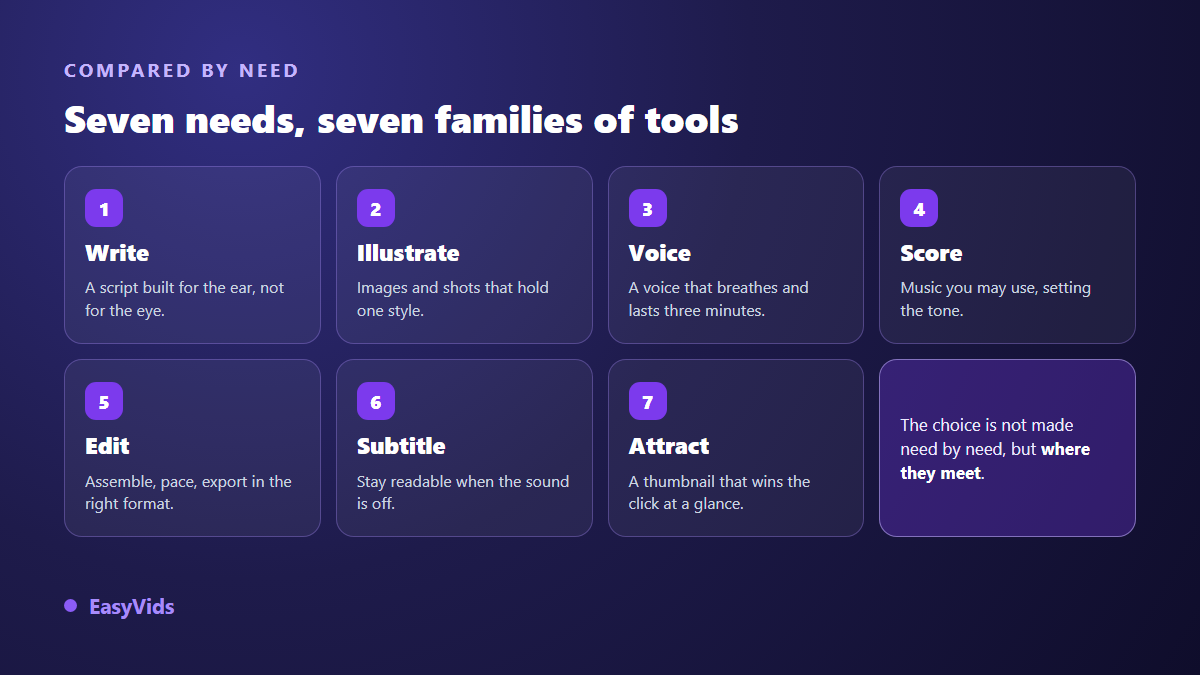
Read the diagram the other way round and the difficulty appears. Each box can be handed to an excellent standalone tool, and the final result still disappoints if the boxes do not talk to each other.
Need 1: a script that survives being read out loud
This is the best served need on the market, and the easiest to cover: general writing assistants all produce decent scripts, and most offer a free tier that is enough to start. What separates them is a detail few people test. Is the text written for the ear or for the eye? A general assistant produces long sentences punctuated like a blog post. Read aloud, they smother the narration. Ask for a two minute script, read it out without pausing mid sentence, and you will know within thirty seconds.
Need 2: visuals that stay consistent
Here the families diverge sharply. Pure image generators produce visuals whose quality no longer needs defending, but every image is an isolated object: nothing guarantees the second one matches the first. What that family does well, where it stops and how to steer it are covered in our AI image generator guide. Services that assemble media libraries, such as InVideo or Pictory, solve the opposite problem. Their shots are consistent because they come from one catalogue, but they never show exactly your subject. A third family generates a presenter speaking on screen, the ground of Synthesia and HeyGen, effective for training and internal communication, less suited to illustrated storytelling. The deciding criterion is neither beauty nor speed, it is consistency across a series: if you make twenty videos with the same character, will the face hold? The same reference mechanism works outside storytelling, when a shop turns phone snapshots into a full catalogue, a chain covered in our product photography method.
Need 3: a voice people listen to all the way through
Speech synthesis now passes for human on a single sentence. Listeners drop off later, after about thirty seconds, when they notice the missing breath and an intonation that never varies. Comparing demo clips is therefore useless, since every demo sounds good. Compare on a full paragraph of your own text, with your technical words and proper nouns. Then check three things: how punctuation is handled, because it controls the pauses; how the engine performs in your working language, since a voice that shines in English can stumble elsewhere; and the commercial usage rights on the generated voice, which vary widely between services.
Need 4: music that will not cost you monetisation
Generated music is the youngest need in this comparison, and the one where promises still outrun results. A decent track is easy. A track that supports the voice without crushing it takes several attempts. The main criterion is not musical, it is legal. Confirm in writing that the track can be used commercially on your target platform, and that no rights claim will land on the video. A demonetised video caused by a background pad is a loss nobody plans for. On the technical side, keep the music well under the voice, around a fifth of its volume.
Need 5: editing, captions and aspect ratios
Editing splits into three families. Installed software, built for long and heavy projects, with a real learning curve. Browser editors, which are enough for almost all short form content and start in a single tab. And transcript based editors, a principle popularised by Descript: you fix the text, the video cuts itself. On captions, automatic transcription has become a commodity, offered as standard by most browser editors such as VEED. The differentiator moved elsewhere: can you fix one mistranscribed word without redoing everything, does the style stay readable vertically on a small screen, and can you move from horizontal to vertical without losing half the framing?
Need 6: thumbnails and cover art
The most underestimated need, even though it decides the click rate before anyone sees the video. Two families share the ground. Template based design editors, of which Canva is the best known, with a free tier that already covers a lot. And text driven image generators, faster when you know exactly what you want, less precise when a title has to sit pixel perfect. In practice the working combination is to generate the background with AI and set the text in an editor, because a readable thumbnail rests on three enormous words and hard contrast, never on a rich image. The same legibility constraint applies to an ebook cover, a format many creators add to their catalogue and one that our guide to building an ebook with AI walks through from subject to finished file.
The cost nobody counts: the seams between tools
Now add the seven needs together. Seven accounts, seven passwords, seven quotas draining at different speeds, seven rights policies to read. That is not even the painful part. The painful part is the file: downloaded here, renamed, reimported there, exported again somewhere else. And the day you change one sentence of the script, the voice, the visual and the edit for that scene must follow, by hand, across three different tools.
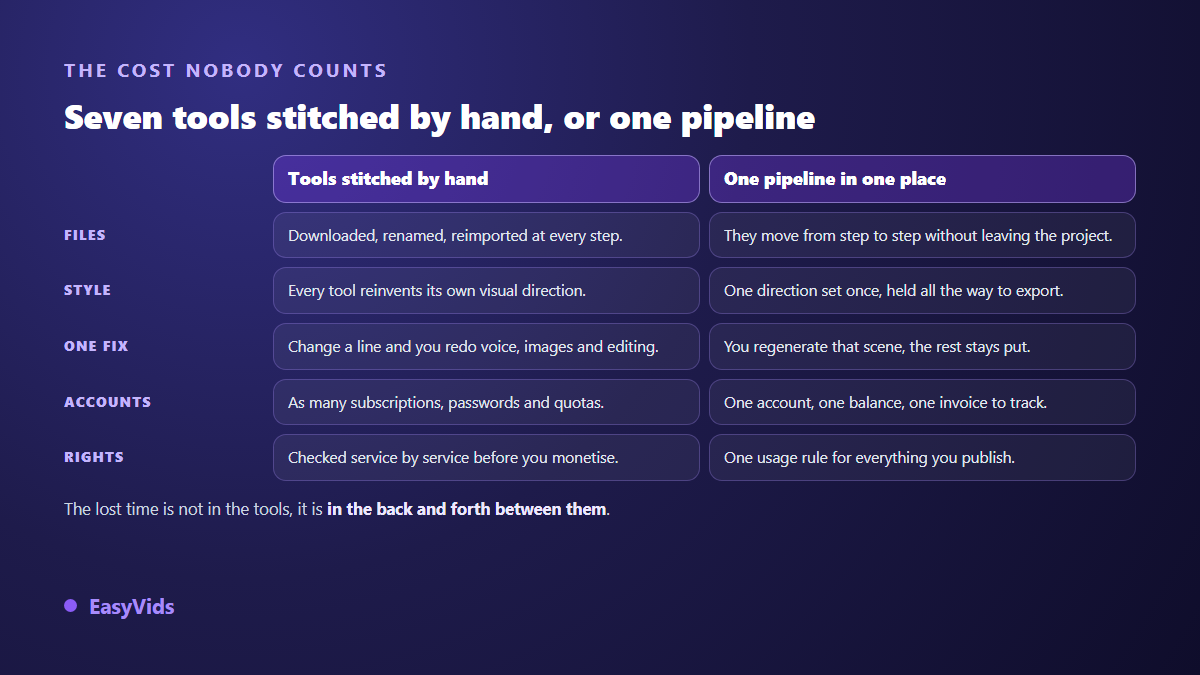
That friction explains a common pattern: very well equipped creators often publish less than a moderately equipped creator whose chain is continuous. Time does not vanish inside the generation, it vanishes in the round trips. Before committing to any tool, whatever its name, check the points below.
- Control: can you redo a single scene without restarting the whole project?
- Continuity: do script, visuals, voice, music and editing live in the same project?
- Series consistency: do style and characters hold across twenty pieces, not just one?
- Formats: vertical, square and horizontal produced natively, without destructive cropping.
- Rights: explicit commercial use on everything you export, visuals, voice and music included.
- Watermark: present or absent on exports, including from a free tier.
- Your language: a tool built for it writes and speaks better than one translated afterwards.
- The exit: can you take your files and projects with you if you leave tomorrow?
What a studio brings together, and what it does not replace
Let us be straight about it, since this article is published by a studio. On any single brick, a specialist will often do better: the best image generator of the moment will beat any built in image module, and installed editing software stays finer than any browser editor. That is not where the strength of EasyVids lies. It lies in the fact that the seven needs of this comparison live inside one project, with one account and one balance. The script knows the scenes, the scenes know the style, the voice knows its duration, the edit knows both. You lose neither the stitching time nor the consistency between steps. If that way of working matches yours, the plans are on the pricing page.
Best AI tools for content creators: what each profile needs
The right choice depends less on your technical level than on your main constraint. Four situations cover most cases, and each tips the decision a different way.
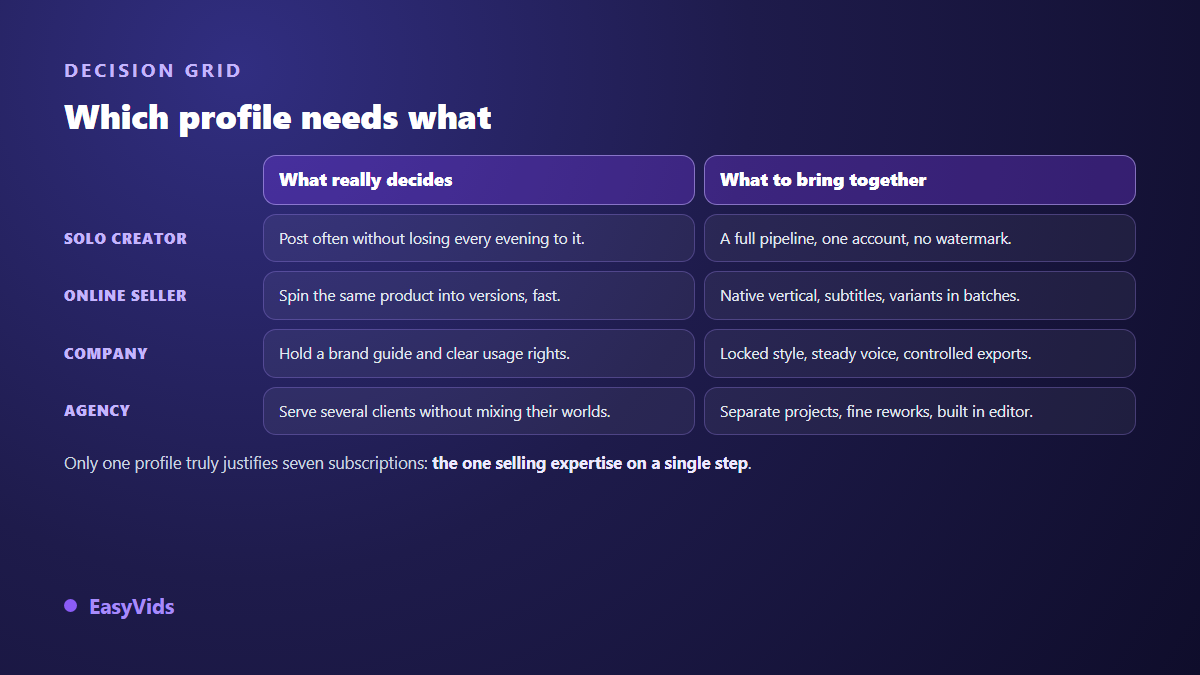
The solo creator is short on time, rarely on ideas. The priority is going from idea to published file without switching applications. A complete chain, even one notch below the best specialist on each brick, will get far more content out. The online seller faces a volume constraint: the same product declined into several versions, vertical, captioned, then repeated next week with another reference. Series variants without redoing everything is the feature that matters.
The company faces a compliance constraint: brand guidelines respected, a consistent voice, usage rights written down. Style locking and legal clarity outrank visual quality. The agency faces a separation constraint: several clients, several universes, no bleed between them. It needs separate projects, shot by shot control and a built in editor for last minute requests. The only profile that genuinely justifies seven separate subscriptions is the one whose expertise sells on a single brick, a voice studio or a designer for instance.
Frequently asked questions
What is the best AI tool for a beginner content creator?
The one that covers the whole chain, even without being the best at every step. Beginners who assemble seven specialists usually give up before the third video, not for lack of talent, but because moving files between tools drains the motivation. Start with a single studio, then add a specialist later, once you can name the brick that limits you.
Do I really need several subscriptions to be well equipped?
No, and it is rarely the right call at the start. Every extra subscription adds a quota to watch and a manual step. The useful question is not how many tools you own, but how much you publish each month. Add a tool when you can name the exact problem it solves, and you hit that problem every week.
Are free tools enough to get started?
For learning, yes. Most families mentioned here offer a free tier or a trial. Two limits come back almost every time: a watermark on exports and a capped resolution. While you are testing formats, neither matters. As soon as you publish for an audience or a client, they become the first serious reason to move to a paid plan.
How should I test a tool before committing?
Have it produce something you have already made by hand, then compare. It is the only honest test, because you know the expected result. Also time the full journey, from idea to exported file, not just the generation itself. Differences between tools show up far more in that journey than in the raw quality of one isolated image.
Can content made with these tools be monetised?
Yes, as long as you add something of your own: an original angle, careful writing, a deliberate edit. Platforms penalise repetitive mass produced content with no contribution, not the use of AI itself. Do check the commercial rights on each brick though, particularly voice and music, since that is where most unpleasant surprises come from.
Read the grid backwards: start from what you publish every week, never from what the tools promise. If your work rests on one brick, take the best specialist and accept the stitching. If it crosses all seven needs, continuity will be worth more than isolated excellence. To see what a complete chain does with your own subject, creating an account opens the full studio, no bank card required.