Your manuscript is written and edited. You export it, open the file, and it looks like a school assignment: one typeface, lines running the full width of the page, chapters starting halfway down. Ebook formatting is not decoration added at the end. It decides whether a reader settles in or closes the file after two screens.
The rules that make a page look composed are few, old, and easy to check by eye. They come from print, they apply to a free guide as much as to a book you sell, and none of them requires design training. This article walks through each one, then shows how to apply them automatically to every new title. If the text itself is not written yet, our complete guide to creating an ebook with AI covers the step before. And if your raw material sits in recordings, a talk, an interview or a pile of voice notes, start by turning that audio into faithful text: you will have a manuscript to compose before margins become a question.
Ebook formatting: the short answer
Two typefaces at most, one for headings and one for body text. A comfortable body size, roughly 11 to 13 points in print, with leading around one and a half times that size. A line of 60 to 75 characters, achieved by limiting the width of the text block. Generous margins, wider on the binding side if the book goes to print. One chapter per fresh page. Images matched to the text width and never split across pages. A clickable table of contents up front.
What readers judge before reading a word
Open any book and look at a spread from a distance without reading. You see a texture: an even grey broken by white space. That texture is read in a second and produces a verdict. Too dense, and the page feels like work. Too airy, and the book feels padded. Between the two, the page breathes and the eye agrees to start. Once the book is for sale, the stakes rise: a buyer who opens a sloppy file does not blame the layout, they doubt the content.
The anatomy of a page
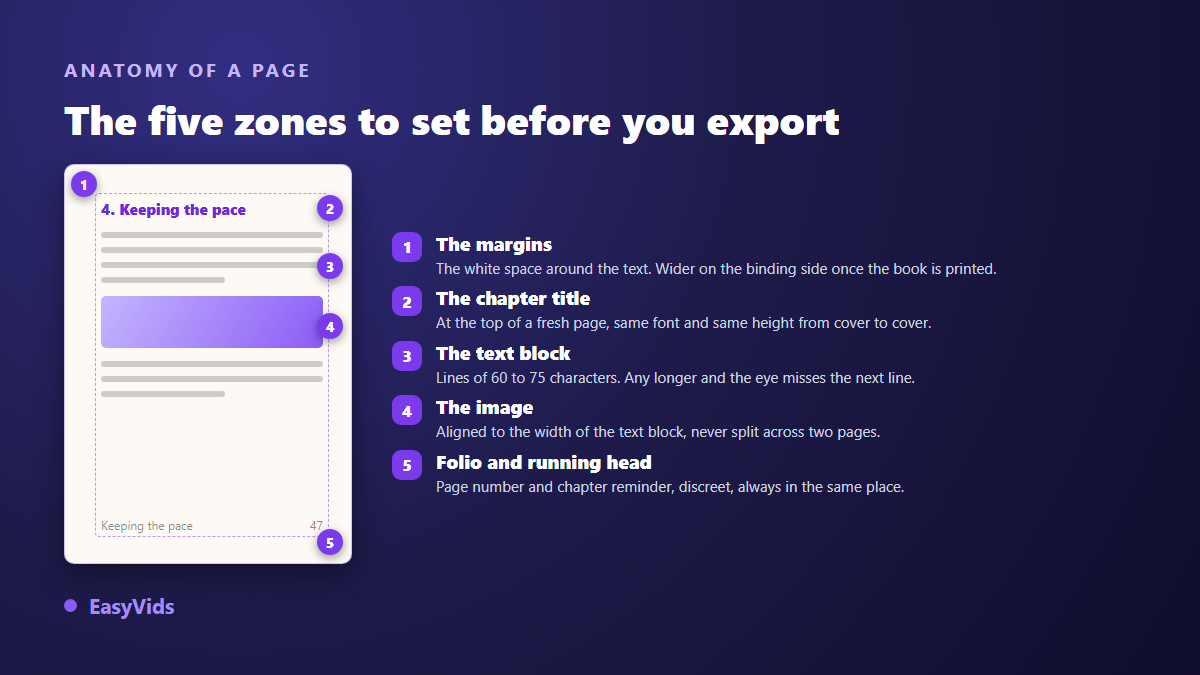
A book page breaks down into zones, each with its own rule. Setting them in order avoids patching things at the end, when the text is already flowed and every fix moves something else.
Typefaces: two families, no more
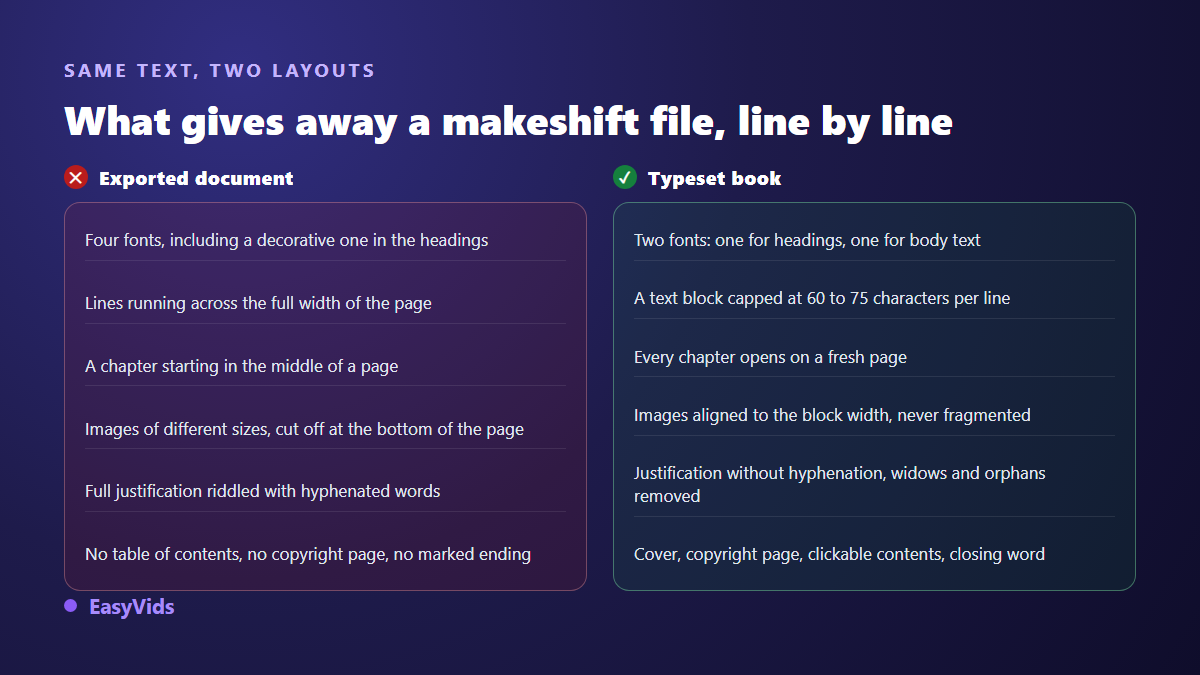
One pairing is enough: a heading face with character, and a quiet body face proven for long reading. A classic serif works beautifully in continuous text, and so does a well drawn sans. What breaks a book is the third face invited in for callouts, then the fourth for pull quotes. Lock the pairing once and use it everywhere, including the contents page and the cover.
Two technical traps wait at export time. A typeface only reaches your reader if it is embedded in the PDF, otherwise the reading software substitutes it and the whole composition shifts. And a display face grabbed online is not always licensed for commercial use, which matters as soon as the book is sold. A pairing supplied by the tool that composes your book removes both risks.
Body size, leading and line length
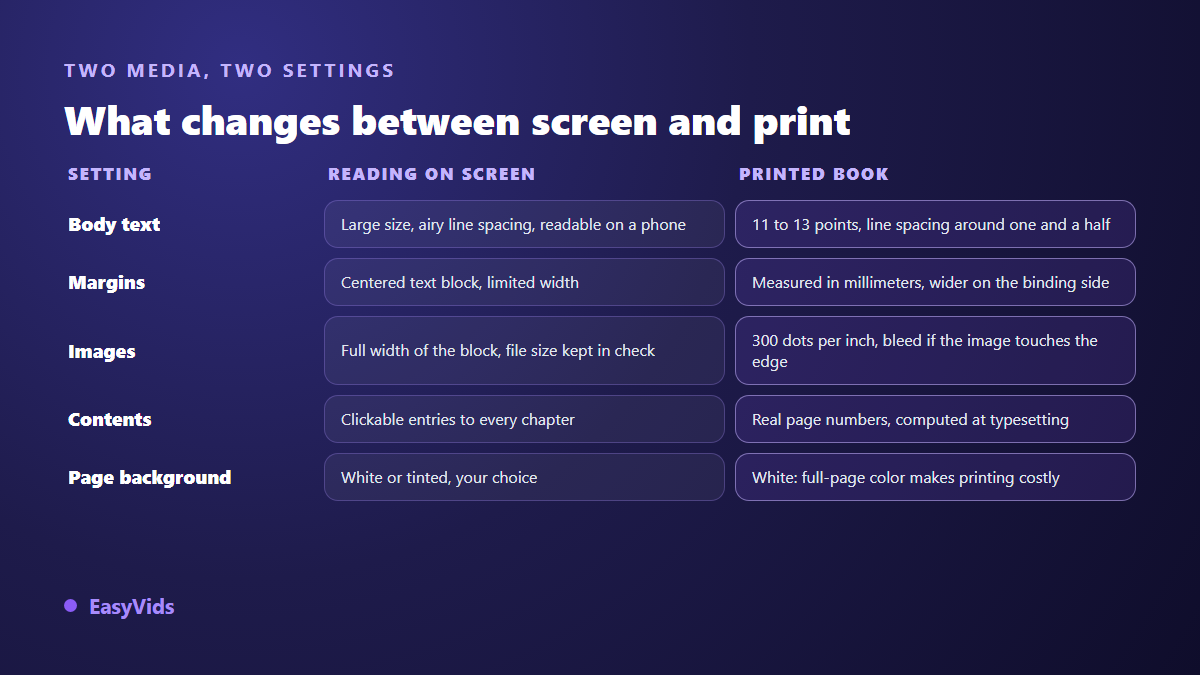
Three settings that behave as one. Body size is measured in points for print, and most books live between 11 and 13. Leading, the space between lines, sits around one and a half times the body size: tighter and the lines collide, looser and the paragraph falls apart. Line length matters even more. Typographers aim for 60 to 75 characters including spaces, because the eye has to find the start of the next line without effort. On an A4 page, text running margin to margin sails past that limit, which is why every printed book uses a centred, width limited text block. These settings also change the final page count, and our note on how long an ebook should be explains why pages are a misleading unit.
Margins: screens forgive, paper does not
On screen, a tight margin goes unnoticed. In print, it ruins the book: text dives into the gutter or gets trimmed off. A paperback therefore needs an inside margin wider than the outside one. According to the Kindle Direct Publishing help centre, that minimum inside margin grows with the page count, because a thick book opens less flat, and any image touching the edge has to be supplied with bleed. For screen reading, aim for comfort instead: wide margins, a centred text block, a white background. Save colour for the cover, the headings and the callouts.
Chapters, running heads and folios
Every chapter opens at the top of a fresh page. That single rule does most of the work of looking like a book, because it creates a pause and announces a new unit. Keep the heading in the same face, at the same size, in the same position throughout. Running heads and folios, meaning the chapter reminder and the page number, belong to paginated documents: a web page has no pages, so the clickable contents list plays that role. In a PDF, contents page numbers are computed at composition time and never typed by hand, because they shift with every paragraph you add.
Images: width, placement and resolution
An illustration matches the width of the text block, or takes the full page. In between sizes, different in every chapter, read as a collage. An image never splits across two pages and never stacks against a neighbour, because the text has to resume between two visuals. Placement is planned while writing, and our guide to illustrated AI ebooks covers how many images each chapter needs. Resolution is where books fail at the last minute: the Kindle Direct Publishing help centre recommends 300 dots per inch for paperback interiors, and a picture that looks perfect on screen can print soft.
The details that separate a document from a book
Beyond the big settings, a handful of finishing touches carry most of the effect. They take minutes and they show, even to a reader who could not name them.
- A drop cap opening each chapter marks where the text begins and signals a composed book.
- Widows and orphans, single lines stranded at the top or bottom of a page, are fixed by editing the text, never by cramming the page.
- Justification gives a clean rectangle, provided you watch for rivers of white opening up between words.
- Hyphenation, those words broken by a dash at the end of a line, hurts readability in a general audience book: turn it off.
- Callout boxes separate a tip from the main thread with a rule or a light background, never with an extra typeface.
- Language specific spacing rules, such as the non breaking spaces French typography requires before certain punctuation marks, are applied consistently or not at all.
Front matter and back matter
Books follow an expected order, and breaking it reads as amateur immediately. The cover fills the first page edge to edge. Then comes the copyright page, with the notice, the year and your author signature. The contents list follows, then the introduction, the chapters, and a closing page so the book ends rather than stops. The cover has its own rules: a short title that still reads at thumbnail size, a subtitle carrying the promise, and a darkened background image so the title stays legible.
Automating the layout instead of rebuilding it every time
None of this deserves to be redone by hand for each title. These rules are constants: written once into a stylesheet, they apply themselves to every chapter. That is the approach behind the ebook generator in the EasyVids studio, where the book is produced as a self contained web page composed from a styling preset matched to the subject. Six presets exist, each with its own type pairing and palette. Pages default to a white background, because books are read and printed on white, while the cover keeps its styling either way.
In practice, the composition targets A4, each chapter opens a fresh page, text is justified without hyphenation, French spacing rules are applied automatically, and the contents list carries real page numbers once the PDF is composed on the server. Two limits are worth stating plainly: the layout targets A4, so a paperback in another trim size needs recomposing, and the book ships as a web page and a PDF rather than a reflowable EPUB. What each plan includes is listed on the pricing page.
Frequently asked questions
Which font should I use for an ebook?
A body face designed for long reading, serif or sans, plus a stronger heading face. The name matters less than consistency: the same pairing from first page to last, embedded in the PDF so every reader sees the same thing.
What margins does a printed ebook need?
A comfortable outside margin and a wider inside margin on the binding edge. According to the Kindle Direct Publishing help centre, that inside margin depends on the page count: the thicker the book, the more room it needs. Confirm the exact figure with your printer before composing.
Should ebook text be justified?
Yes for continuous reading, with hyphenation turned off so words are not broken at line ends. No for a short, heavily illustrated document read mostly on phones, where ragged right stays more even. Either way, hold the same choice throughout the book.
PDF or web page: which one keeps the layout?
PDF freezes the composition, so everyone sees identical pages, which is what a sold or printed book needs. A web page adapts to the screen and reads better on a phone, but its pages do not exist as fixed units. Shipping both covers both habits.
Layout is not improvised at the end. It is decided before the first line: one type pairing, one block width, real margins, one chapter per page. Set those four and your file already reads as a book. To let those rules apply themselves to your next title, create your account on EasyVids and run a generation: text, illustrations and composition arrive together.