You have the video, you are missing the thumbnail. You open an image editor, the page is blank, and half an hour later the text still sits badly. A YouTube thumbnail template exists to remove that blank page: you stop inventing a layout and start filling a frame that already works.
Two different needs get confused here. Looking for an idea means deciding what to show. Looking for a template means deciding where each element sits. For the first one, our 51 thumbnail ideas sorted by niche will keep you busy. This article covers the second: six reusable layouts, each with its composition rule, its word limit, the contrast to hold, and the kind of video it actually suits.
The short answer
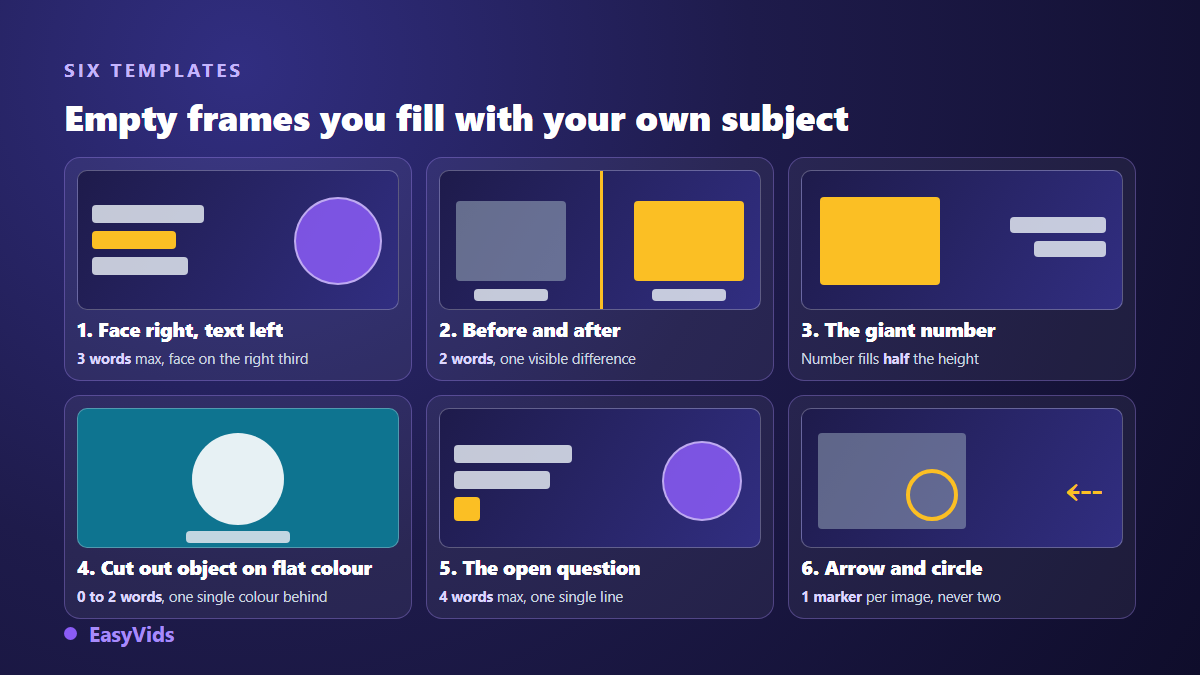
A useful YouTube thumbnail template holds four pieces of information: where the subject goes, where the text goes, how many words, and which contrast. Six layouts cover almost every video published: face right with text left, before and after, the giant number, the cut out object on a flat colour, the open question, and the arrow pointing at a detail. Pick the one that matches your content, respect its word limit, then build the image from that frame.
A template is not a file you download
Most creators look for a ready made file to open in an editor. Those files travel widely, and a thumbnail built on a popular one looks like every other thumbnail in the same suggestion list. A template here is a placement rule, not a layer. It says which zone holds what, and leaves the image, the colour and the words to you. If the subject is new to you, our complete guide to YouTube thumbnails sets the technical scene first.
A rule beats a file twice. It survives a change of tool, since it applies just as well in an online editor as in an image generator. And it travels inside a sentence: a structure described in fifteen words can be handed straight to an AI, which a layered file cannot.
The four settings every template carries
Every template is described the same way. Four settings, never more, and they are what makes a layout repeatable from one video to the next.
- Composition rule: which zone takes the subject, which zone takes the text, and what stays deliberately empty.
- Word limit: the number beyond which the thumbnail stops being readable at stamp size.
- Contrast: what has to be light and what has to be dark so the eye separates them in a quarter of a second.
- Playing field: the kind of video where this structure tells the truth, and the ones where it lies.
The word limit is the setting people skip. A thumbnail is almost never seen large: it shows up shrunk in a home feed, in a suggestion list, in a phone search result. Three words survive, a sentence does not. Font choice, case and weight are covered in our note on text on a YouTube thumbnail, and it applies to all six layouts below.
Template 1: face right, text left
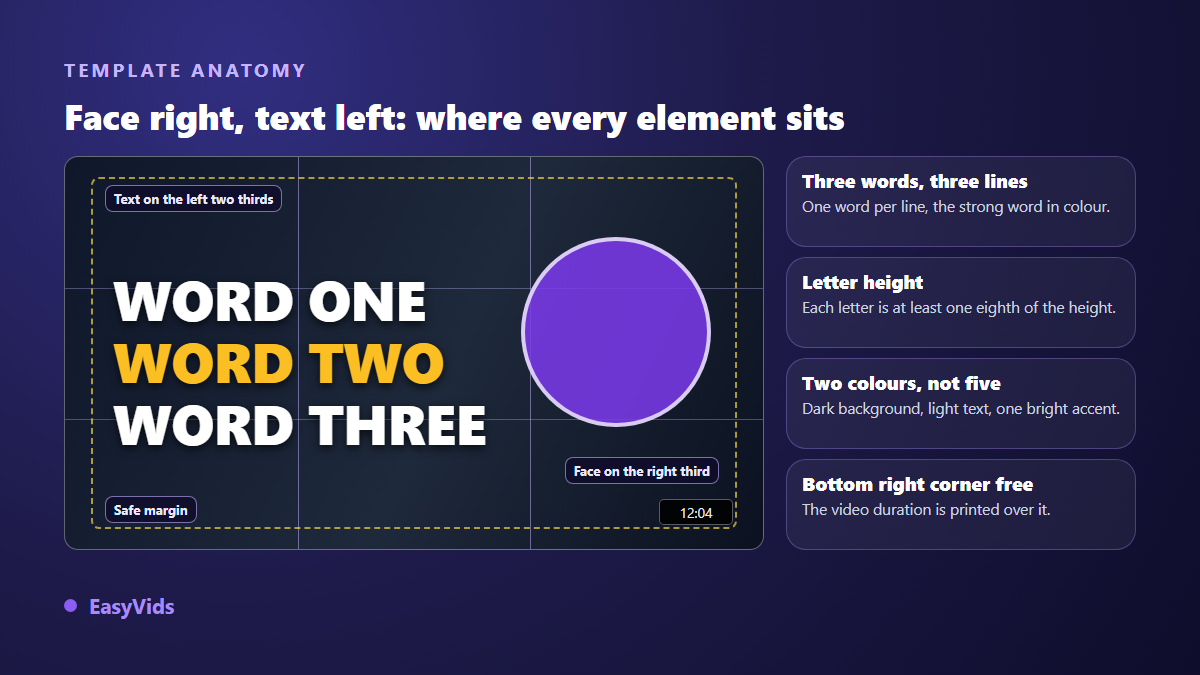
Split the frame into three columns. The face takes the right column, eyes roughly on the upper third line, looking towards the text. The two left columns hold three words at most, one word per line, left aligned. The word carrying the stake takes the accent colour, the others stay white. The tallest letter measures at least one eighth of the image height, otherwise it dies on the way down.
Contrast to hold: lit face, darkened background behind the text zone. Two colours plus one accent, no more. This layout serves vlogs, reactions, reviews, anything with someone talking to camera. It lives or dies on expression: a neutral face turns the structure into a passport photo, so the seven emotions that actually earn clicks deserve more work than the layout itself.
Template 2: before and after
One clean vertical line splits the frame into two equal halves. Starting state on the left, result on the right. The rule that decides everything: the framing must be identical on both sides, same angle, same distance, same light, so a single difference jumps out. Keep the split sharp, never a gradient, because a gradient reads as one blurry picture. Two words are enough, often none.
Contrast to hold: the result half slightly lighter and more saturated than the starting half, which pulls the eye left to right. This layout suits renovations, physical transformations, retouching, photo restoration and edit comparisons. The classic mistake is using two shots taken from different angles: the viewer compares nothing and simply sees two unrelated images.
Template 3: the giant number
The number alone fills half the frame height, aligned left or slightly off centre. Every other word drops to half that size at most, otherwise the two fight for attention. Any image sits behind and works as a ground: the number is the subject. One or two words go with it, never more, because the figure already carries the promise. Contrast to hold: a very light number on a very dark ground, or the reverse, with no half tones.
This layout suits rankings, challenges, lists, measured results and progress logs. Honesty matters more here than anywhere else: the number has to state a real stake, not an episode count dressed up as a record.
Template 4: cut out object on a flat colour
One object, cleanly cut out, centred or pushed slightly right, filling between half and two thirds of the height. The background is a single colour, no pattern, no busy gradient. A soft drop shadow lifts the object off the ground and kills the pasted sticker look. Zero to two words, placed in the empty zone.
Contrast to hold: the background colour opposes the dominant colour of the object. A white product on deep blue reads at every size; the same product on light grey vanishes. This layout suits product tests, unboxings, comparisons, cooking and craft. It is also the easiest to run as a series: change the object, keep the colour, and the channel becomes recognisable within three videos.
Template 5: the open question
The question holds in four words at most, on one or two lines, in the left half. The question mark counts as a character of its own and must stay inside the frame, never glued to the edge. The image behind is pushed back, darkened or slightly blurred, so the text is read first. The question completes the title instead of repeating it.
Contrast to hold: light text over a darkened zone. This layout suits debates, myths, common mistakes and method comparisons. One serious precaution: the video must answer the question in its first minute. A question left hanging produces a fast exit, and a fast exit costs more than a missed click.
Template 6: the arrow and the circle
A screenshot or a photo fills the whole frame. One single marker lands on it: a circle around a zone, or an arrow pointing at it. One marker per image, never two, otherwise the eye hesitates and the layout loses its only advantage. The marker is bright and thick, hand drawn if possible, while the capture behind is deliberately dulled so the marker stands out.
Contrast to hold: a saturated accent on a neutral ground. Three words maximum, bottom left, in the zone nothing covers. This layout suits tutorials, software walkthroughs, settings and gameplay analysis, anything that shows a detail the viewer would have missed. It is the most honest of the six: it promises exactly what the video shows.
Which template for which video
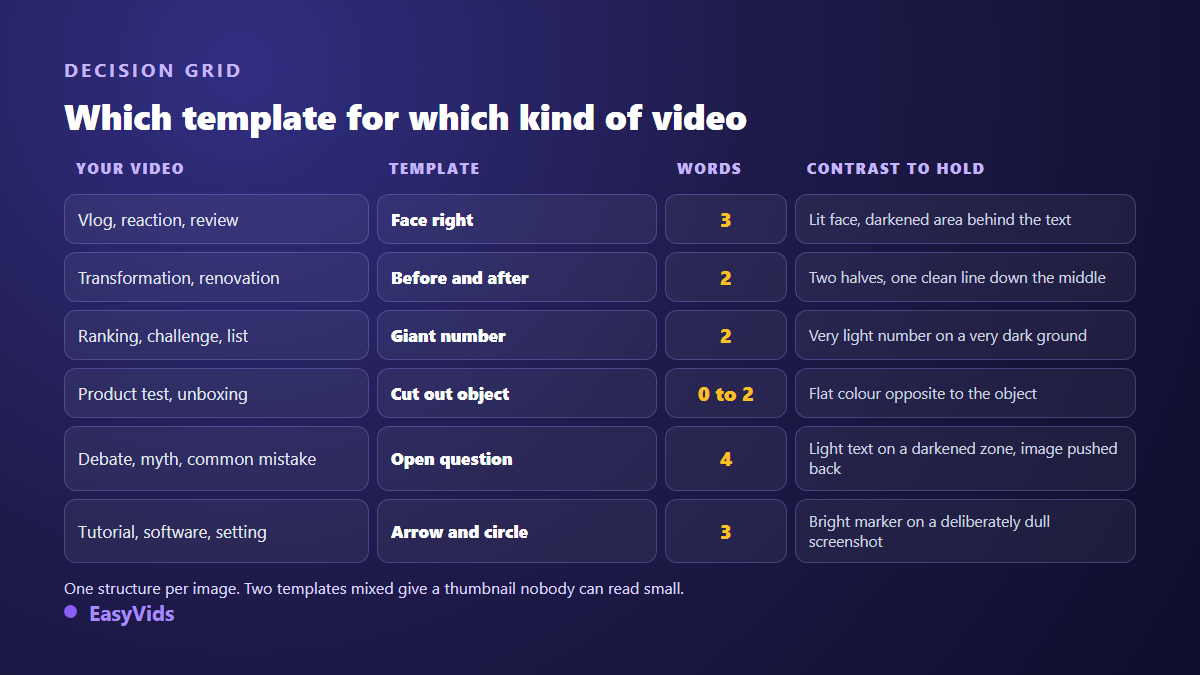
The choice follows the content, not the trend. A video comparing two states calls for before and after. A video showing a detail calls for the arrow. A video carried by a person calls for the face. When the structure contradicts the content, the thumbnail attracts viewers who leave, and that mistargeted traffic is paid back in watch time.
One technical frame holds all six. According to the official YouTube Help pages, a thumbnail is prepared at 1280 by 720 pixels, in 16:9, in a file kept under 2 MB. Add a safety margin of about five per cent on each edge, and leave the bottom right corner free: the interface prints the video duration over your image there.
Filling a template with AI
A template can be described in one sentence, so it can be handed to an image generator. That is the point of thinking in structures instead of files: you dictate the frame, the AI fills it, and the result belongs to you alone. On our AI creation studio, the thumbnail is generated from that description, then finished in the editor where the text is placed.
Order matters more than prompt length. Describe the structure first, the subject second. Across our own generations, that order far more often leaves a genuinely empty text zone, while a prompt that opens with the subject fills the frame and leaves no room for words.
- Structure first: 16:9 image, subject framed right, left two thirds left empty.
- Subject second: who or what appears, in which attitude, with which emotion.
- Background: one named flat colour, or a deliberately blurred scene.
- Light: subject lit from the front, dark background, which is what creates the contrast.
- What to exclude: ask explicitly for an image with no burned in text.
That last point matters. Image models still write badly, and one deformed word ruins the credibility of a whole channel. The reliable method is to generate a clean image with no letters, then lay the text on top in an editor: it stays sharp, alignable, and can be rewritten in a second when you test another wording.
Running one template across a channel
A template becomes a signature when it repeats. Same font, same text position, same accent colour, same background treatment: after a dozen videos, a subscriber recognises your thumbnails before reading the channel name. Keep two layouts in rotation, not six, and when two versions of the same thumbnail split opinion inside your team, test instead of arguing. The Test and compare tool in YouTube Studio, open to eligible channels, runs up to three thumbnails against each other on the same video.
Mistakes that cancel a good template
- Mixing two structures: a face, a giant number and an arrow in the same frame.
- Writing a full sentence because the title cannot say everything.
- Placing text in the bottom right corner, where the duration appears.
- Using five colours when two plus an accent are enough.
- Copying a famous thumbnail pixel by pixel instead of reusing its structure.
- Approving the thumbnail full size on a desktop screen and never shrunk on a phone.
Frequently asked questions
Where can I find free YouTube thumbnail templates?
Online template libraries offer plenty, and they are useful for understanding a structure. The risk is resemblance: the same file serves thousands of channels, sometimes inside your own niche. Take the structure and build the image yourself, from your photos or from a generation. Plans and the free trial are listed on our pricing page.
Should every video use the same template?
Keep the same visual family, not necessarily the same structure. Font, accent colour and background treatment stay constant; the layout follows the content of each video. Two alternating templates stay recognisable, six do not.
How many words can a thumbnail carry?
Three in the general case, four for a short question, two for a before and after, zero for an object that speaks for itself. Test it shrunk: display the thumbnail at stamp size on your phone, and if you squint, cut a word.
Do these templates work for vertical formats?
Four of them transpose well: the face, the giant number, the cut out object and the question. Before and after becomes a horizontal split, top half and bottom half. The arrow and circle works too, provided the target detail is bigger, since a vertical cover is seen even smaller.
Can I change the template of a video already published?
Yes, the thumbnail of a live video can be replaced at any time from YouTube Studio without touching the video. It is the best test ground: take an older video whose subject still holds, apply a clean template, and watch the click through rate over the following weeks.
Take your next video, read the decision grid, pick the structure that matches its content, then build that version instead of starting from a blank page. You can generate the background, place the text and export at the right size in minutes: create an account and try it on your next thumbnail.