Your channel runs on AI. Scripts drafted by a model, generated visuals, a synthetic voice. Then comes the moment you apply to the Partner Program, and the same worry surfaces: do YouTube monetization rules for AI content actually let you in? The question is framed wrong, and that framing costs creators months. YouTube does not sort videos by the tool that made them.
What the platform looks at comes down to three things: what your channel adds, what it declares, and what it borrows. Three separate rules, written in three different parts of the documentation, and each one can cut your revenue on its own. We already broke down the most common rejection reason in our analysis of reused content on YouTube. This guide takes the whole picture, rule by rule.
The short answer
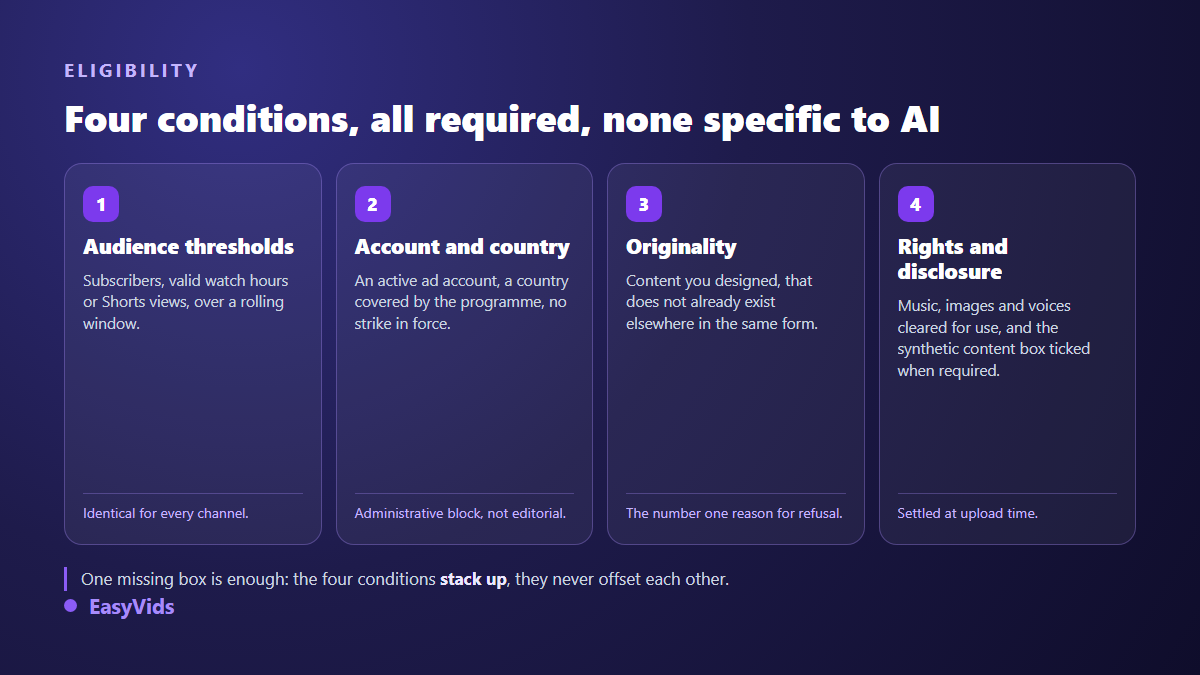
According to the YouTube Help Center, no rule forbids monetizing a video made with artificial intelligence. Staying eligible means clearing four conditions at once. Meet the Partner Program audience thresholds. Follow the monetization policies, which demand original and authentic content. Disclose realistic altered or synthetic content at upload. And use only material you hold the rights to, music included. The production tool is never the rejection reason. A missing contribution of your own almost always is.
The thresholds have no special AI version
There is no separate door for automated channels. The Partner Program eligibility page on the YouTube Help Center applies the same conditions to a studio filmed channel and to one produced entirely by computer. You need to live in a country or region covered by the programme, turn on two step verification, carry no active Community Guidelines strike, and link an active payments account.
- Ad revenue: 1,000 subscribers, plus 4,000 valid public watch hours over the past twelve months, or 10 million valid Shorts views over the past ninety days.
- Fan funding features: a lower tier, at 500 subscribers, three public uploads in the past ninety days, and 3,000 watch hours or 3 million Shorts views.
- Account conditions: two step verification, an active payments account, no live Community Guidelines strike.
- Geography: the programme is not open everywhere, and the covered country list published on the Help Center changes over time.
One implication deserves to be said plainly: volume does not replace an audience. Thirty uploads a month bring nobody closer to 4,000 hours if nobody watches to the end. A faceless channel built to last works on retention before publishing pace, which is the whole logic of our guide to running a YouTube channel without showing your face.
What YouTube calls inauthentic content
YouTube's monetization policies devote a full page to originality. In July 2025 that page was renamed: what used to be called repetitious content became inauthentic content. The platform's creator liaison stated publicly at the time that this was a clarification, not a new ban. The wording moved, the logic did not: YouTube wants content that is original and authentic.
That page never mentions artificial intelligence. It describes symptoms instead, and they are concrete: videos mass produced on a single template, clips borrowed from other creators without a word of commentary, a text read aloud with nothing added, a slideshow scrolling under minimal narration. An AI channel falls into it when it industrialises without inventing anything, never because a model helped write or illustrate.
A detail that reassures many creators: these rules govern monetization, not publication. They belong to the Partner Program policies, not to the Community Guidelines. A rejection cuts ad revenue, it does not remove your videos from the platform.
Disclosure: what the checkbox actually does
Since March 2024, YouTube Studio asks one extra question at upload: does this video contain realistic altered or synthetic content? According to the YouTube Help Center, disclosure is expected when a viewer could mistake the scene for reality. The test is realism, never the tool used to build the image.
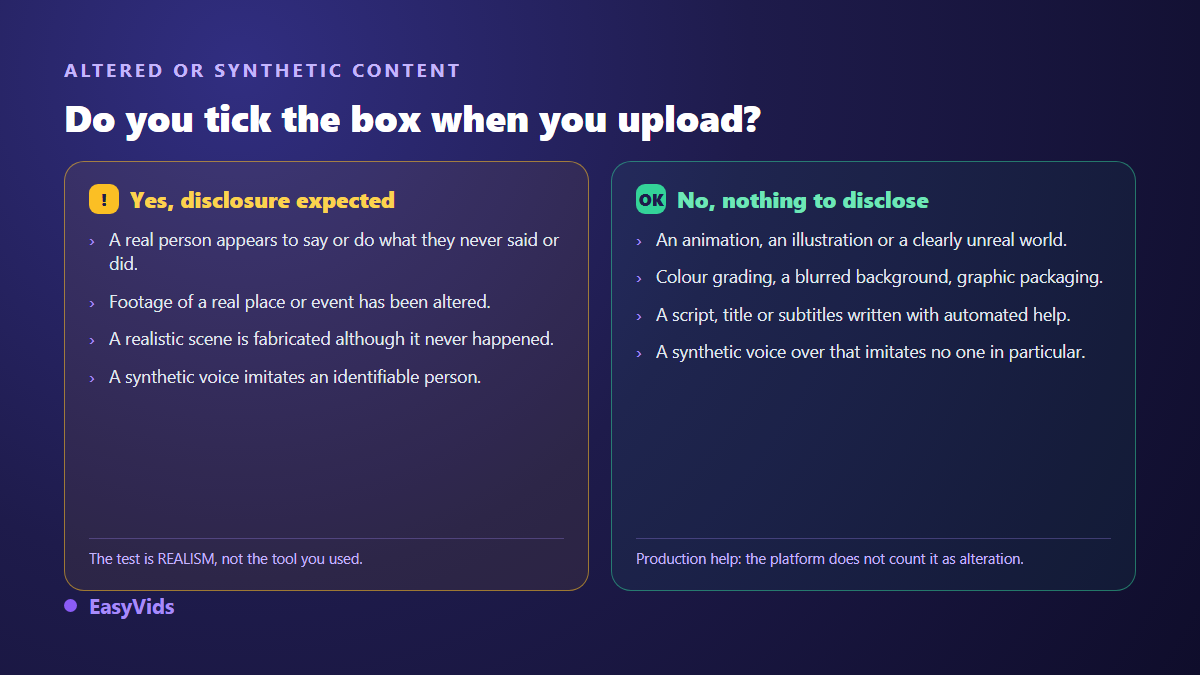
The other half of the rule is less known, and plenty of creators tick the box out of caution and collect a label they never needed. The same page states that disclosure is not required for clearly unrealistic content, for animation, for colour adjustments or background blur, nor for what YouTube calls production assistance: generating ideas, drafting a script, producing automatic captions.
- When it applies, a note saying the content was altered or generated appears in the expanded description.
- On sensitive topics such as health, elections, finance or news, the label shows directly in the player.
- Disclosure does not touch your earnings: the Help Center states it removes no monetization rights.
- Failing to disclose when required can lead to video removal, and to suspension from the Partner Program if it repeats.
- YouTube reserves the right to add the label itself when the subject warrants it and you did not.
Original contribution decides the case
Every rule above collapses into one question, the one your channel review asks silently: what would be lost if this channel did not exist? A strong case answers on four fronts, and it answers at the design stage rather than in the edit. One good video never redeems thirty template episodes, because the review looks at the channel as a whole. Packaging counts towards that answer as much as substance: animated text effects chosen once and carried across episodes build a signature no neighbouring channel copies in five minutes.
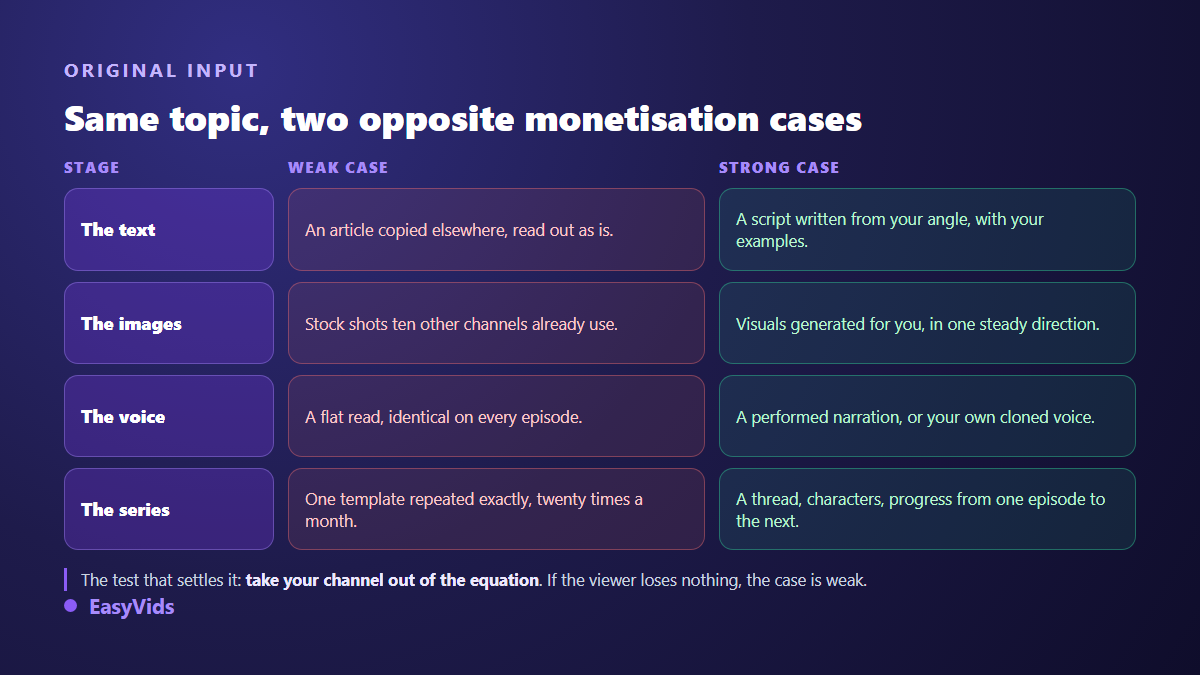
The script carries the most weight, because that is where originality costs the least effort. A script built from your angle, with your examples and your structure, resembles nothing else, even when a model helped write it. Visuals come next: generated for you, they exist nowhere else, provided they form a coherent whole rather than a pile of unrelated shots. That is precisely what our Director does inside the studio, writing a production bible before the first image and giving characters and sets stable reference identifiers that every scene then cites. The full principle is laid out in our complete guide to AI video generators.
Music, the blind spot of automated channels
Part of the revenue creators lose has nothing to do with AI: it goes to the soundtrack. A protected track triggers a Content ID claim, and according to the YouTube Help Center that claim can redirect the video's revenue to the rights holder without penalising your channel in any other way. You keep the video, you lose the money. On a weekly channel the bill adds up fast.
Generated music solves part of it, on two conditions: the tool's licence must clearly allow commercial use, and the track must not reproduce an existing melody. We covered that ground, claims included, in our piece on AI music and YouTube monetization. The EasyVids music studio composes from a theme or from lyrics written for the occasion, which gives you a soundtrack nobody else is using.
Voices, faces and likeness
Real people are the riskiest ground of all. Imitating the voice or face of an identifiable person without consent exposes you twice over: removal by the platform, which handles these as privacy complaints, and a claim under image or personality rights depending on the country. The legal boundaries are summarised in our review of voice cloning and the law.
The safe route also pays best: clone your own voice. A reputable cloning tool works from a sample you record yourself, and the resulting voice stays available for every later video. You get a sound signature that belongs to you and an originality argument that is hard to dispute. Failing that, one catalogue voice, chosen once and held across the whole series, already gives you consistency from one episode to the next.
Advertiser friendly guidelines, the filter people forget
Being accepted into the Partner Program does not guarantee every video earns, which is why steady channels also build a second line of income from digital products they sell straight to their audience. YouTube also applies its advertiser friendly content guidelines, which decide video by video whether ads run fully, in a limited way, or not at all. AI channels get caught on two fronts: horror or true crime storytelling, where a generated shot lands far more graphic than the script suggested, and packaging, where an overly shocking title or thumbnail pushes an otherwise clean video into limited ads. Read the thumbnail and the title against those guidelines, not only the script.
Beyond YouTube: transparency is becoming a legal duty
Disclosure no longer belongs to platform terms alone. The European Union's Artificial Intelligence Act sets out in Article 50 a duty to inform the public when image, audio or video content has been generated or manipulated by a machine and could pass for authentic; the timetable in the text places that obligation from 2 August 2026. Alongside it, the C2PA technical standard, backed by an industry group YouTube takes part in, records a file's production history inside the file itself. The direction matches YouTube's own checkbox: saying what you did costs less than having it said for you.
Seven checks before you apply
This is the list we run over a channel before an application. Nothing magic about it: it simply follows the order in which cases fail. The full studio, from script to export, starts on the EasyVids home page.
- Reread your channel description: one topic, one angle, one promise, understandable in ten seconds.
- Watch your last ten videos back to back. If they are interchangeable, vary the structure and the opening before applying.
- Write every script from an idea, never from a text copied elsewhere, even reworded.
- Generate your visuals instead of pulling stock shots that ten other channels already use on the same topic.
- Replace reading with narration that comments, ranks and takes a position.
- Check the soundtrack: explicit commercial licence, no pending claim in the YouTube Studio tab.
- Tick the synthetic content disclosure when the scene is realistic, leave it clear when it plainly is not.
Frequently asked questions
Can a fully AI generated video be monetized?
Yes. According to the YouTube Help Center, no rule targets the production tool. Monetization depends on how original the result is, on the advertiser friendly guidelines, and on the rights to the material used. A video generated end to end but written, illustrated and narrated from your own angle sits well within the rules.
Do I have to disclose every video made with AI?
No. Disclosure covers realistic altered or synthetic content, the scenes a viewer could take for real footage. Animation, a plainly unreal world, or a script written with automated help require nothing. When a realistic scene leaves you unsure, tick the box: it has no effect on your earnings.
Does disclosure reduce a video's reach?
YouTube's documentation attaches no penalty to the disclosure and states that it does not remove ad revenue eligibility. What genuinely moves reach is retention: a soft opening costs far more than a line at the bottom of a description.
Is a synthetic voice enough to get a channel rejected?
No, a synthetic voice is not a rejection reason on its own. The problem is reading without adding anything: a text taken elsewhere and spoken as it stands. Narration written for the ear, with breath and intent, passes the review whether it was recorded or generated.
How long should I wait after a rejection?
The YouTube Help Center sets a waiting period before a new application, once corrections are made. Do not reapply with the same library: publish a run of videos that show the change of method first, then present the channel again.
Staying eligible takes no trick. It takes videos only you could make, and a clear statement of what they contain. The 2026 rules reward exactly what a well run channel already does. To build that channel without juggling five services, create a free account and try the studio from script to export. Plan details live on the pricing page.