You generated a track, dropped it under your video, and the upload page shows a copyright claim before you even publish. Or the video goes live and the monetisation icon stays yellow with no explanation. AI music YouTube monetization feels like a game with invisible rules, where you discover the limits by hitting them.
The good news fits in one line: YouTube does not ban generated music, and none of its policies target the technology itself. What blocks you are three separate mechanisms that almost everyone mixes up: channel eligibility, automated recording identification, and synthetic content disclosure. This guide separates them, names the official pages that decide, and sets out what to do when a claim lands. On the neighbouring question of ownership, our analysis of AI music and copyright takes over. One caveat first: this is general information, not legal advice.
The short answer
Yes, a video with an AI generated soundtrack can be monetised on YouTube, and a generated track can also stand on its own as a release. Partner Programme policy contains no ban on artificial intelligence: according to the YouTube help centre, it targets inauthentic content, meaning mass produced and repetitive material with no contribution of its own. A Content ID claim, meanwhile, is neither a penalty nor a strike: it means an automated system matched a recording deposited by a rights holder, and you can dispute it from your studio. The real risk is not the machine, it is resemblance to an already deposited recording, plus the reflex most creators are missing in the days that follow.
Three mechanisms, three different answers
When a creator says their generated music is not monetised, they are describing one of three unrelated problems. The first concerns the whole channel: is it allowed to earn advertising revenue at all? The second concerns one specific video: who collects its revenue, you or a third party who deposited a recording? The third has nothing to do with revenue and everything to do with informing the audience: do you have to flag the content as artificial?
Confusing the three leads to expensive decisions, such as deleting a video that was working in order to escape a perfectly disputable claim. Handle them in order: channel first, video second, transparency third. Each has its own official page, its own deadlines and its own remedies.
What YouTube actually requires before you monetise
Access to the Partner Programme rests on thresholds published in the YouTube help centre: 1,000 subscribers plus 4,000 valid public watch hours over the past twelve months, or 1,000 subscribers plus 10 million valid public Shorts views over ninety days. The music you use does not count towards those thresholds. It does count in the review that follows, because that review checks the channel against monetisation policies.
That is where the inauthentic content rule comes in. On 15 July 2025 the YouTube help centre replaced the old reused content wording with inauthentic content, stating it was a clarification rather than a tightening: mass produced and repetitive content stays ineligible, using generation tools does not. A channel posting the same slideshow every day over an interchangeable pad falls under the rule. A channel scoring a written story, along the lines of our guide to AI music generation, has nothing to fear here.
Remember the criterion that arbitrates everything else: your own contribution. A text that belongs to someone, a considered voice, a deliberate edit, a point of view. The same expectation applies to every serious way of making money with artificial intelligence, and music is no special case. A generated track is an ingredient, not a project.
Claim, block, strike: three things not to confuse
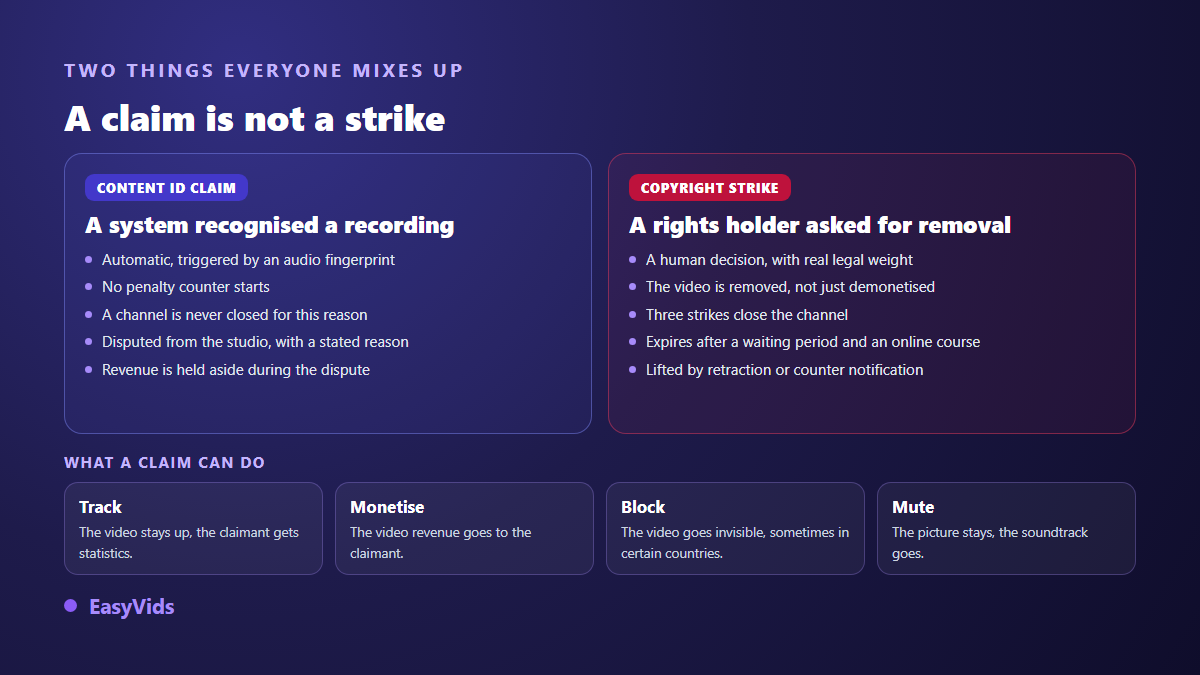
Content ID is YouTube's automated identification system. Its help centre explains that it compares every upload against reference files deposited by rights holders, and that access is reserved for owners of exclusive rights to a substantial body of regularly published original material. When a match is found, a claim fires, and the depositor has already chosen what it does.
- Track: the video stays up and the claimant simply receives audience statistics.
- Monetise: the video stays up, but its advertising revenue goes to the claimant.
- Block: the video becomes unavailable, sometimes only in certain countries.
- Mute: the picture remains and the soundtrack disappears, which ruins the video without removing it.
A claim is not a copyright strike. A strike follows a legal takedown request: according to the YouTube help centre it expires after ninety days provided you complete the required online course, and three active strikes close the channel. A claim starts no counter at all. Many creators delete a video in panic when nothing was at stake, and that is the worst possible move: it also erases the pending procedure.
Why music you generated yourself can still be claimed
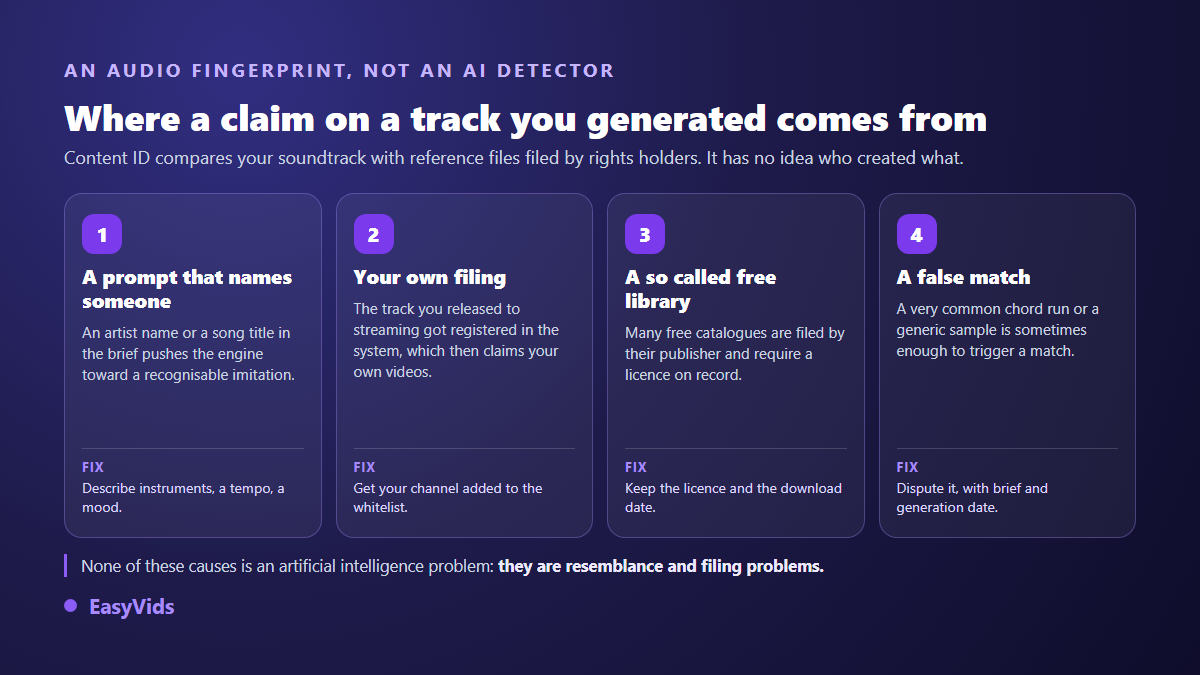
Here is the counter intuitive point behind most panicked support messages: Content ID has no idea whether a file was generated. It does not detect artificial intelligence, it compares audio fingerprints. A track created this morning can therefore trigger a match, and five causes cover almost every case.
- The track genuinely resembles a deposited recording, because the prompt named a title or an artist.
- You distributed the track yourself and your distributor registered it in the identification system.
- You pulled from a so called royalty free library whose tracks are deposited by their publisher, with a licence to declare.
- The soundtrack contains an excerpt, a loop or a sample lifted from an existing recording.
- The match is simply wrong: a very common chord progression is sometimes enough to trigger one.
- A third party deposited material it does not own, which happens and is disputed like anything else.
The distributor trap, the one that catches people out
This deserves its own section, because it hits the most serious creators. You generate a song you are proud of, you decide to distribute it to streaming services, and your distributor offers to register it in the identification system so you can earn when others use it. You accept, which sounds sensible. Days later your own videos are claimed, and your own revenue flows back towards your own deposit.
The fix is well known and takes minutes: ask the distributor to add your channel to the whitelist attached to your deposits, before your first upload rather than after. Keep in mind too that a deposit commits you. Every distributor makes you warrant that you hold the rights to what you deliver, and a track that came out of a machine with no identifiable human contribution supports that warranty poorly. Writing your own lyrics is not only a quality decision, it is what puts substance behind that statement. A song written for one specific occasion is the best training for it: our method for a made to measure wedding song shows how a personal brief produces a text nobody else could have written.
What to do when the claim lands
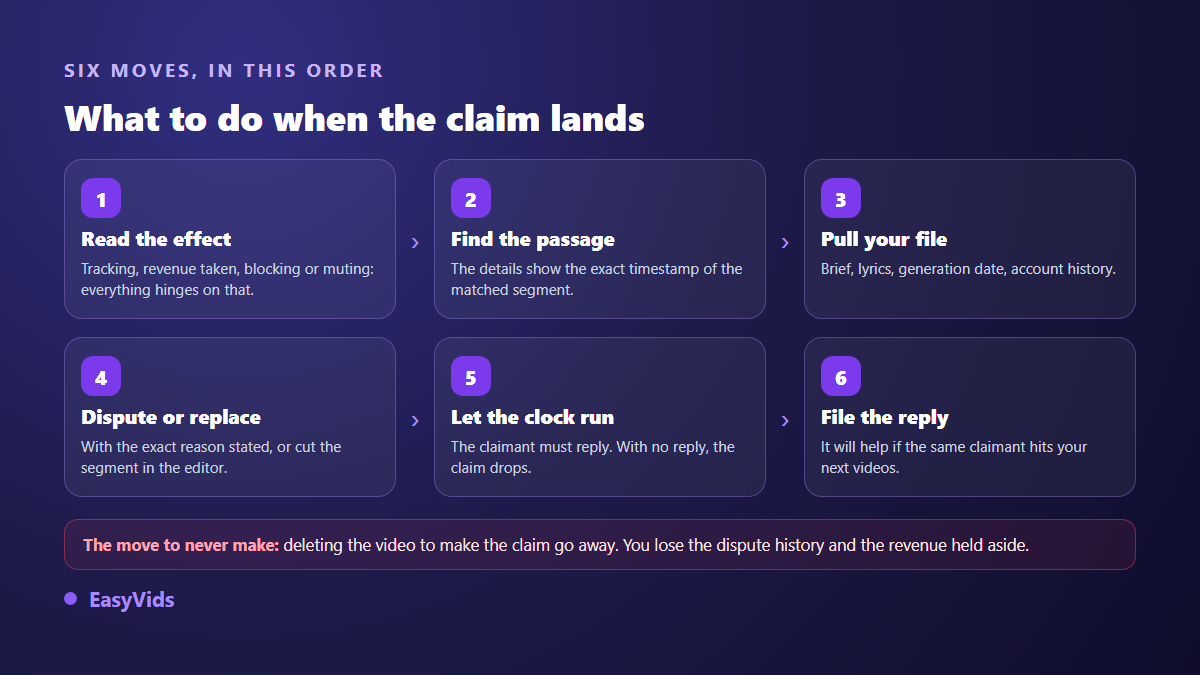
The procedure is well marked, and the golden rule is three words long: delete nothing. Read what the claim actually does first. If it merely tracks the audience, sometimes there is nothing to do. If it captures your revenue or blocks the video, act the same day, because every day of claimed playback is a day of revenue you will not see.
- Open the claim details and note the timestamp of the identified passage: it points to the exact segment at issue.
- Pull out your file: brief, lyrics, generation date, history of the account that produced the audio.
- If the match is wrong or the track is yours, dispute it with the exact reason rather than an approximate one.
- If you would rather publish fast, replace or trim the identified segment with YouTube's editing tools and the claim falls away.
- Never delete the video to make a claim disappear, you would lose the procedure and the revenue held aside.
- File the response you receive: it will help if the same depositor claims your next videos.
Deadlines matter as much as arguments. According to the YouTube help centre the claimant has thirty days to answer a dispute, and silence releases the claim. If they uphold it, a second appeal remains open, at the end of which they must either release the claim or file a genuine takedown request, which exposes them in turn. Revenue earned while a dispute is pending is held aside and paid to whichever party prevails. That is exactly why you should not pull the video down: you would be walking away from money already accrued.
Shorts: catalogue music shares your revenue
The short format follows a specific rule that changes the maths entirely. According to the YouTube help centre, a Short using a track from the music catalogue shares its revenue with music partners, and the creator's share is halved when a single track is used. Put plainly, catalogue music is not free: it is paid out of your revenue, on every view, for as long as the video keeps running.
A soundtrack you generated for your own channel escapes that split, provided it is not registered anywhere. The argument gets very concrete on formats where music carries the weight: quote Shorts, ambient backdrops, or a motivation channel built with AI where every video rests on a rising cue. Across a catalogue of several hundred short videos, the difference stops being theoretical.
Disclosing synthetic content
Since 2024 the YouTube upload form has carried an altered or synthetic content setting. The help centre asks you to switch it on when the result is realistic enough to mislead a viewer, and does not require it for anything obviously artificial or stylised. Instrumental music generated to sit under a video normally falls outside the duty. A song imitating an identifiable voice falls inside it, and raises a personality rights issue on top, closely watched since YouTube announced in November 2023 that its music industry partners could request removal of artificially reproduced singing voices.
European rules moved on 2 August 2026: the transparency obligations of article 50 of the European regulation on artificial intelligence now apply. They require providers of systems producing artificial audio, images, video or text to mark those outputs in a machine readable format, and require anyone deploying content that imitates a real person to inform the audience. For a creator, disclosure stops being an editorial choice and becomes one more box in the publishing routine. The label does not penalise your video; its absence can get the video removed.
What our music studio changes in practice
No tool decides on your behalf what you are allowed to publish, and ours is no exception. What the EasyVids music studio brings is a flow that removes the leading cause of claims up front. You start from an occasion picked among ten ready made ones, birthday, wedding, birth, tribute, dedication or motivation, you give a name and a message, then you describe a genre, a mood and a tempo in words. At no point does the flow invite you to name an artist or an existing title.
The writing engine then drafts the title and the lyrics from that brief, and above all leaves both editable before the audio is generated. Lyrics you rewrite are a text of yours, one more item in the file you will open on the day of a dispute. Past drafts stay saved and reload without a new charge, generation continues server side even if you close the page, and every finished track can be played then downloaded as an audio file with no sonic watermark. An instrumental mode covers video beds, and the video pipeline lets you set the sound treatment scene by scene, between sound design, background music and voice alone.
On rights, article 4 of our terms of service states it plainly: the content you generate, music included, belongs to you within the limits of the rights granted by the underlying model providers, you may exploit it commercially, and EasyVids claims no ownership over your creations. The EasyVids creation studio brings these steps together in one place, and the pricing page sets out what each plan covers.
The checklist before you publish
These checks take two minutes, get set up once, and cover most of what turns expensive later. They apply to a soundtrack under a video as much as to a track released on its own.
- Describe a style with instruments, a tempo and a mood. Never an artist name, never an existing title.
- Listen back and ask whether it recalls a specific track, then regenerate at the slightest doubt.
- Archive the brief, the lyrics, the date and the original file with the project.
- If you distribute the track, insist on whitelisting your channel before any upload.
- Switch on the synthetic content disclosure as soon as the result could pass for a genuine recording.
- On a Short, prefer your own soundtrack over the catalogue when revenue matters.
- Never delete a claimed video before the procedure has run its course.
Frequently asked questions
Can a video with AI generated music be monetised?
Yes. Partner Programme rules target inauthentic content, meaning mass produced and repetitive material with no contribution of its own, not the technology used. A video with a generated soundtrack stays monetisable as long as it gives the viewer something. Remember the synthetic content disclosure when the result could pass for a genuine recording.
Does Content ID detect that music was machine generated?
No, and that is the source of most confusion. The system compares audio fingerprints against reference files deposited by rights holders. It knows nothing about the origin of the file you upload. A claim therefore signals resemblance to a deposited recording, never the use of artificial intelligence.
Can I register my generated tracks in Content ID?
Direct access is reserved for owners of exclusive rights to a substantial body of original material, which a generated output with no identifiable human contribution does not give you. A distributor may offer indirect registration, but it assumes a warranty of rights you must be able to stand behind, and it exposes you to claiming your own videos if your channel is not whitelisted.
What happens if I dispute a claim wrongly?
A baseless dispute can push the claimant to file a genuine takedown request, which produces a copyright strike. That is the only way a claim becomes dangerous. Dispute in good faith, with an exact reason and a file to back it, and let it go when the match is justified.
Do I have to disclose generated instrumental music?
Usually not, if it imitates nobody and is not presented as a genuine recording. The YouTube help centre reserves disclosure for realistic content likely to mislead the audience. The technical marking of outputs, imposed on system providers by the European regulation on artificial intelligence since 2 August 2026, sits at another level and does not excuse you from checking each platform's own rule.
The line to hold is simple: your eligibility depends on what you bring, your revenue on a given video depends on what has been deposited, and your peace of mind depends on the file you keep. Describe a style rather than an artist, rewrite your lyrics, whitelist your channel before distributing, and never delete a claimed video. Creating an account opens the music studio so you can build your first soundtrack, lyrics included, knowing exactly what you can do with it.