Your edit is done. The shots flow, the voice over sits well, and the whole thing still feels flat. What is missing is background music: the layer that sets the tone before the first sentence and holds attention between two ideas. So you open a stock music library, audition fifteen tracks, download two, and an hour is gone without a single cut being improved.
The real trouble comes afterwards. You like the track, but nothing tells you whether you can publish it on a monetised channel, or whether a claim will land three days after upload. Those two questions never separate, so this guide handles them together: finding a mood that serves the edit, and finding it without inheriting somebody else's contract. If the vocabulary already stopped you, what royalty free music actually means puts the words back in order first.
The short answer
A background track is chosen in three words: a genre, a tempo, a lead instrument. It sits well under the voice, it never changes colour halfway through, and it opens the video alone for two or three seconds. On rights, three sources keep you safe: the library built into the platform you publish on, a stock library whose dated licence you keep, or an instrumental composed for you. Everything else, including a few seconds of a commercial release, exposes the video to an automated claim. An AI background music generator that sits in the same studio as your editor removes the round trip between three services.
What background music is actually for
Background music is not a song you listen to, it is an acoustic set. Its job comes down to three moves: announcing the tone before anyone speaks, holding attention through the pauses of the edit, and welding together shots that were never filmed together. The moment it does anything else, it works against the video.
Two symptoms give away a badly chosen track. Viewers catch themselves following the melody instead of the point: the piece is too written, too sung, too recognisable. Or a vague fatigue sets in after a minute: the loop is too short, or the tempo is fighting the pace of the voice. Background music that works is not noticed, it is felt.
The single most profitable rule is one word: instrumental. A sung voice occupies exactly the space your narration needs in the listener's ear, and the two get in each other's way without anyone being able to say why. Keep vocals for passages with no commentary: an intro, a montage, a closing shot.
Five sources, five different levels of comfort
The source decides everything downstream, and it is chosen before the edit, never after. Each one buys a different kind of peace, and none of them covers the other four.
- The platform library. The audio library reachable from YouTube Studio supplies tracks usable on YouTube, some of them only if you credit the author in the description, the requirement being shown on the track's own entry according to the YouTube Help Centre. Safe where you publish, worth nothing anywhere else.
- The licensed stock library. You buy a usage right described by a contract: media, term, territory, advertising or not. Keep a dated copy of that contract as it stood on download day, because that is what lifts a claim, not a link to a page that will be rewritten.
- An instrumental composed for you. No third party catalogue in the loop, so no third party fingerprint to match, and a dated generation trail in your history. It is the easiest source to defend.
- The public domain. The composition frees up with time, the modern recording does not: it keeps its own neighbouring rights. Always check which version you are downloading, not just which tune.
- A commercial release, even three seconds of it. No usable scope without the agreement of the rights holder and the publisher, and the fingerprint is recognised automatically. Rule it out from the start, including on a video you do not monetise.
The economics are rarely read the right way round. A stock subscription covers you while it runs, and many offers tie the licence to the live subscription, which leaves your older videos technically uncovered the day you stop. An instrumental composed for one specific video stays yours. What each of our plans includes is listed on the pricing page, which is the reference since plans change.
The right mood fits in three words
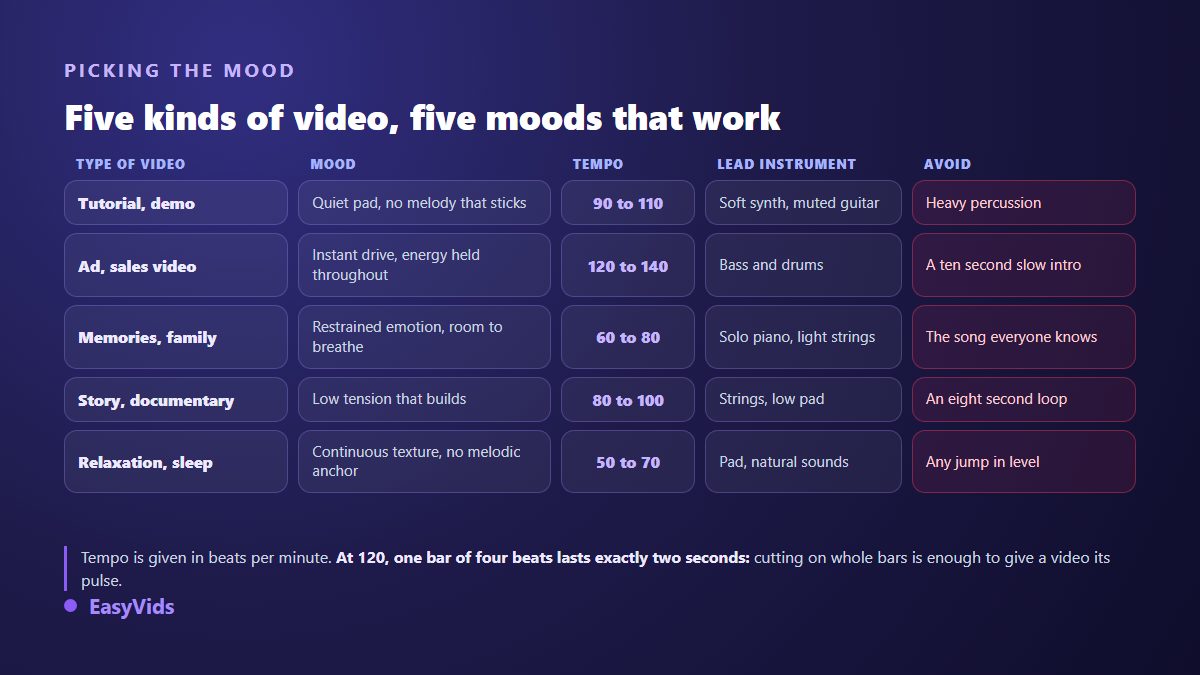
Most creators go looking for a track. Look for a mood instead. It is described in three words: the genre, the tempo, the instrument that leads. A software tutorial wants a slow, discreet electronic pad. A product ad wants a marked pulse, a present bass line and a hook inside the first two seconds. A memory video wants a solo piano and nothing else.
Those three words are exactly what a composition engine expects, and our music prompt examples sorted by genre show the phrasing that returns something usable on the first listen. Long, calm formats follow their own rules: no breaks, no melodic hook for the ear to latch onto, a texture that holds without tiring, as our meditation soundscapes explain in detail.
One habit avoids half the mistakes: describe the viewer's emotion, not the sound. Calm and focused guides better than ambient, proud and in a hurry guides better than epic. Emotional vocabulary is more precise than genre vocabulary, and it stops you copying an aesthetic you never chose.
Tempo is a unit of measurement, not a matter of taste
At 120 beats per minute, one bar of four beats lasts exactly two seconds. Cutting your shots on whole bars is enough to make an edit feel rhythmic, with no transition effect at all. At 90 beats, the same bar runs just under three seconds, which suits a calmer narration. On our own edits, the most frequent mistake is a tempo faster than the pace of the voice: the music pushes, the narration holds back, and viewers feel a contradiction they cannot name. Read your first sentence aloud while the track plays. If you speed up without meaning to, the tempo is too high.
Why a properly licensed track still gets claimed
This is the point that throws most creators, and it has nothing to do with artificial intelligence. According to the YouTube Help Centre, Content ID compares every upload with a database of reference files delivered by rights holders, and access to that system is reserved for owners of exclusive rights over a substantial body of original material. The system reads acoustic signals, it reads no contract. A track you hold a licence for can therefore be matched.
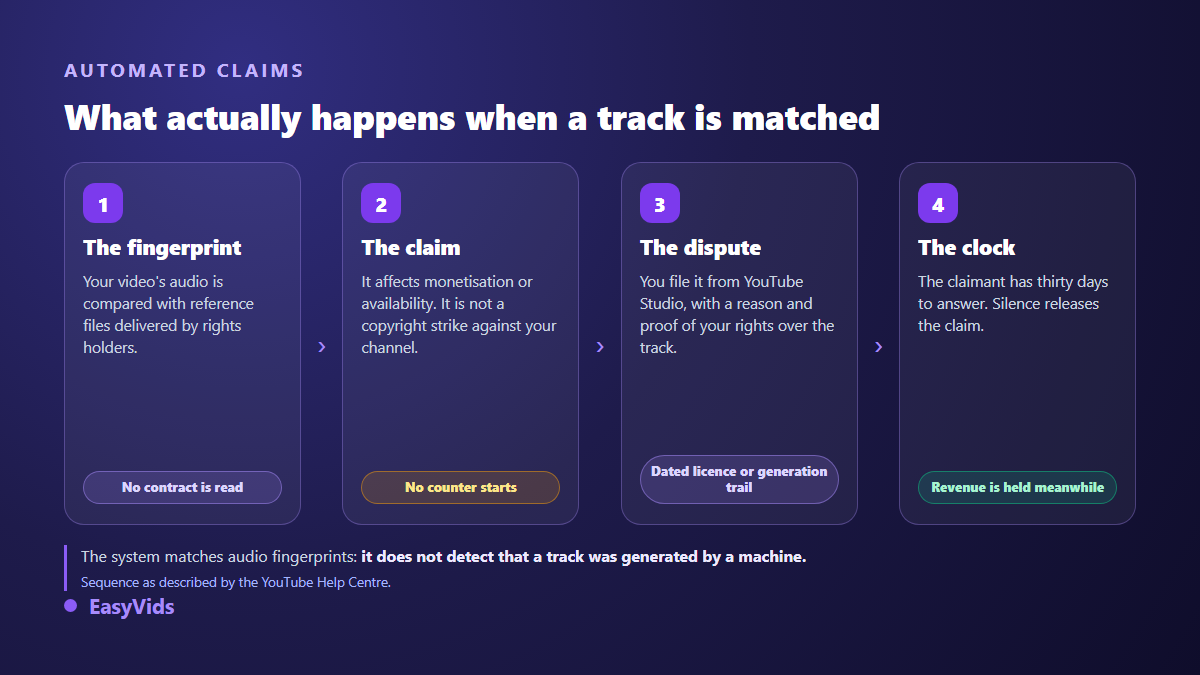
What follows is less frightening than it looks. According to the YouTube Help Centre, a Content ID claim is not a copyright strike: it affects the monetisation or the availability of the video, and it is disputed from YouTube Studio by giving a reason and evidence of your rights. The claimant then has thirty days to answer, and silence releases the claim. The full set of remedies and edge cases sits in our guide to monetising AI music on YouTube.
One more mechanism is worth knowing before you drop a catalogue track onto a short. According to the YouTube Help Centre, a Short that uses a track from the music catalogue shares its revenue with music partners, and the creator's share is halved when a single track is used. Catalogue music is therefore not neutral: it is paid for out of your revenue, while an instrumental that belongs to you takes nothing.
What you own on music you generate
Two different questions get mixed up constantly. First: may I publish and monetise this file? That is settled by the terms of the service that produced it. Second: may I stop somebody else from reusing it? That belongs to copyright law, and the answer there is more nuanced. According to the guidance published in March 2023 by the United States Copyright Office, confirmed by part two of its report on copyright and artificial intelligence published on 29 January 2025, output obtained by prompting alone does not receive copyright protection: what is protected is the identifiable human contribution.
The public domain deserves one precaution, since it is often presented as the free option. In the European Union, the directive on the term of protection of copyright sets protection of a composition at seventy years after the author's death. The score frees up, but the modern recording you find online keeps its own neighbouring rights. On the EasyVids side, article 4 of our terms of use states it plainly: content you generate, music included, belongs to you within the limits of the rights granted by the model providers, you may exploit it commercially, and we claim no ownership over your creations.
Composing a background track to measure
Hunting for the right title in a catalogue often takes longer than the edit itself. The EasyVids Music Studio starts from the need rather than from the catalogue: you describe the occasion, the style, the mood and the tempo, and composition starts from there. Lyrics, when a track needs them, can be written by the writing engine and stay editable word by word before composition.
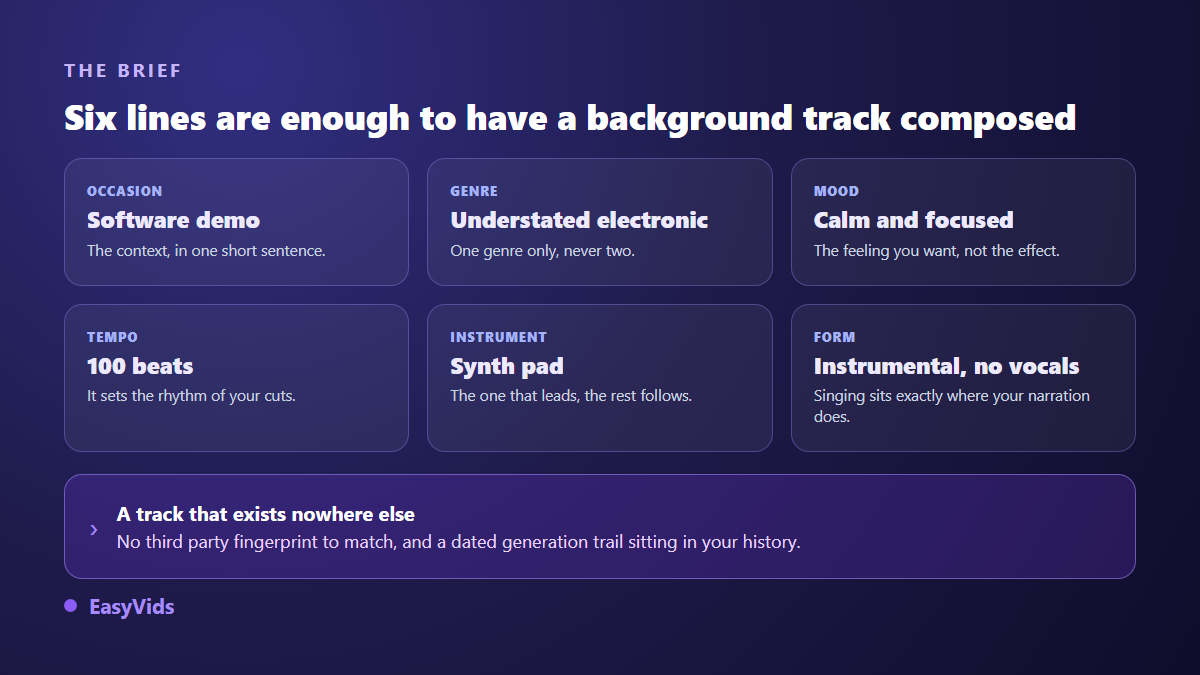
- Describe the occasion in one sentence: a software demo, a year in review, an ad for a skincare product.
- Set the style, the mood and the tempo. One genre, one emotion, a tempo aligned with the pace of your voice over.
- Tick instrumental: that is the form a background track needs, since vocals would occupy the space of your narration.
- Listen, then run it again changing one parameter at a time. Changing three things at once teaches you nothing about what was missing.
- Download the track and import it into the editor, where it is cut, levelled and faded like any other audio file.
Composition takes one to four minutes, and you can close the page: it carries on and the track waits for you in your history. That dated history is your strongest evidence in a dispute, far more solid than a memory of downloading something.
Levels: where music is won or lost
A good track badly balanced sounds worse than an average track well balanced. Music sits clearly under the voice, around a fifth of its perceived volume. It rises in the silences, it steps back the moment somebody speaks, and it enters and leaves on a fade. Three seconds of music alone before the first sentence are enough to set the tone.
When your shots already carry their own sound, street noise, a keyboard, room tone, the music goes lower still, under those sounds as well as under the voice. The precise moves, importing, cutting on the playhead, volume and fade lengths, are covered in our tutorial on adding music to a video. In the EasyVids online editor, an audio file arrives through the Media tab like any image, and its settings panel carries the volume along with both fade durations.
Frequently asked questions
Can I use a short excerpt of a well known song as background music?
No, and the length changes nothing. According to the YouTube Help Centre, no excerpt length is cleared by default: there is no number of seconds below which using a protected work becomes automatically permitted, and a claim can trigger on a very brief passage. The idea of a few tolerated seconds is a stubborn myth, and it regularly costs the monetisation of a video that was working.
Do I have to credit the author of a background track?
That depends on the licence, not on politeness. The audio library reachable from YouTube Studio offers tracks usable on YouTube, some only if you credit the author in the description, the requirement being shown on the track's own entry according to the YouTube Help Centre. A Creative Commons Attribution licence also requires the credit. Careful though: crediting never replaces permission, it only satisfies one condition of a licence.
Can AI generated music be blocked by Content ID?
Yes, it happens, and not because the system detected a machine. Content ID matches audio fingerprints: a match can come from a very common pattern, from a third party track that resembles yours, or from a piece you distributed elsewhere yourself. The dispute is settled with the dated trail of your generation and the terms of the tool that produced it.
How long should the track be for a ten minute video?
A thirty second instrumental is enough if it loops cleanly. Repeat it by cutting on a whole bar, and change track once or twice at the turning points of your argument to avoid fatigue. One loop held for ten minutes tires the ear even when it is beautiful.
Can I use the same music on every video?
Yes, and it even becomes a recognisable signature, like a theme tune. Two limits: vary the section you use so you are not serving the same loop every time, and do not count on registering your theme in a fingerprint system, since access is reserved for owners of exclusive rights over a substantial body of original material according to the YouTube Help Centre.
Background music is not something you hunt for, it is something you describe. Three words for the mood, a tempo aligned with your delivery, a level that keeps the voice in front, and a source you can prove: that is the whole subject, and it repeats from one video to the next without further thought. To have an instrumental composed for your edit and drop it under your images without changing tools, create your account and open the Music Studio.