Your photos are sorted, the running order is settled, and one question is still blocking everything: which songs for a slideshow about a wedding, a birthday or a memorial? This is not a finishing touch. On a photo montage, the soundtrack sets the tone before the first image appears, dictates the rhythm of every cut, and largely decides what the audience takes away.
Most people make the choice backwards. They assemble the images first, then hunt for a track that fits the length they ended up with. You can hear the result immediately: a song chopped off at the last second, photo changes landing in the middle of a bar, emotion that never builds. This guide works the other way round, with 21 concrete ideas sorted by occasion and the settings that go with them.
The short answer
Pick the music before you time the montage, and match it to three things: the occasion, the tempo you want, and whether a voice is present. For a wedding or a memorial, a slow piano or string instrumental is the safest choice. For a birthday or a party, a mid tempo song with the name sung in the chorus does a lot of work for very little effort. For a company review, a clean instrumental with no lyrics leaves room for the faces and the figures. The rest of the montage follows the logic set out in our complete guide to photo slideshows with music.
What makes a track work under photos
Slideshow music is not music you listen to for its own sake. It works in the background, under images that already carry the emotion. A beautiful but talkative track, with a verse telling a different story from yours, competes with the photos instead of serving them. That is the first reason a commercial hit, however loved, often disappoints once it sits under a montage.
The second reason is structure. A slideshow needs a progression: a calm opening, a development, a peak, a close. The tracks that work best have exactly that shape, with a sparse intro and a build you can hear coming. Songs that start at full power from the first second leave no room to construct anything, and the film feels flat throughout.
- A restrained intro, so the first photo lands without overwhelming anyone.
- A clear build somewhere in the middle, where your strongest images belong.
- Lyrics that do not tell a competing story, or no lyrics at all.
- A steady tempo with no abrupt shifts, otherwise the edit has to follow and becomes unreadable.
- An ending that closes, rather than a loop cut short at the finish.
Tempo decides how long each photo stays on screen
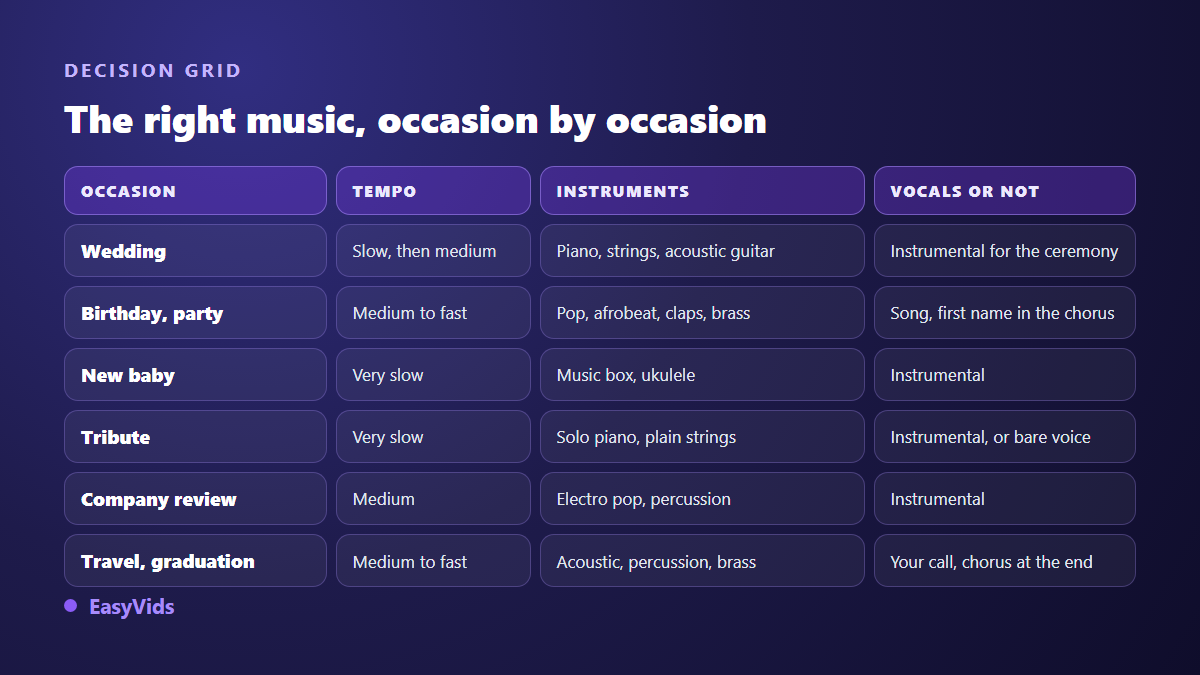
Tempo is not a matter of taste, it is an editing constraint. Across our own montages, a slow track supports photos held for five to six seconds, a mid tempo track calls for four to five seconds, and a fast track pushes you down to two or three seconds before the film starts to feel sluggish. Choosing the music first therefore means choosing the average length of your images, and with it the number of photos your film can hold.
Run the numbers that way round: a three minute mid tempo soundtrack comfortably carries around forty photos. If you have a hundred and twenty to place, the problem is not the music, it is the selection. Two shorter films beat one montage where every image is squeezed into two seconds.
Then comes the fine timing, which nobody notices consciously and everybody feels. Play the track once and note the moments where something changes: a drum entry, a silence, the start of a chorus. Land your photo changes on those moments. No tool detects those beats for you, but the job takes around ten minutes by hand on a timeline, and the montage instantly reads as professional.
Vocals or instrumental, the fastest decision to make
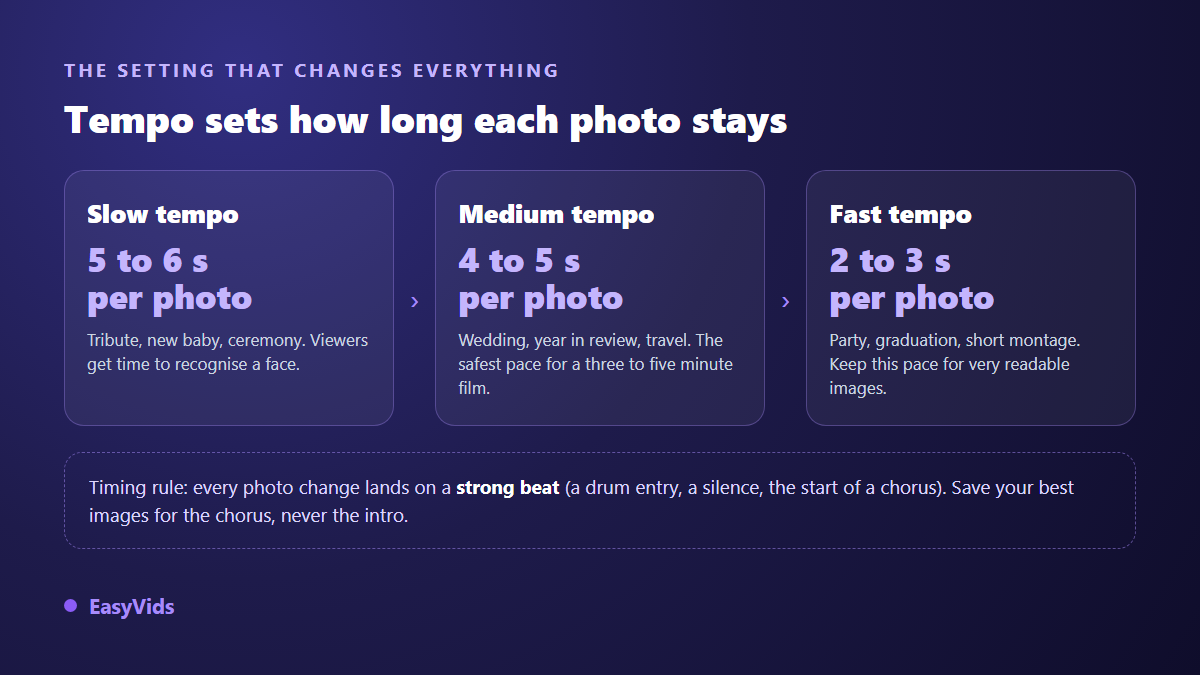
If a voice over narrates your slideshow, the answer is settled: instrumental only. Two simultaneous voices, the narrator and the singer, cancel each other out and viewers drop off within seconds. Keep the music well under the narration, around a fifth of its level.
With no voice over, a song becomes a strong option, provided it speaks about your subject. That is where custom composition earns its place: a track written for the occasion, with the right name in the right spot, beats any approximate match. The general principles are covered in our guide to AI music generation, and the wording that gets good results in our music prompt examples by genre.
Weddings and anniversaries: 4 ideas
A wedding forgives a wrong tone least of all. The slideshow is usually projected in front of a full room, sometimes twice in the same day. The pattern that works: start slow and instrumental, finish livelier.
- Solo piano, slow tempo, for the opening and the childhood photos. The melody leaves all the room to the faces.
- Strings and piano with a gradual build, for the ceremony sequence. Save the peak of the strings for the ring exchange.
- Acoustic guitar and a soft vocal, for an outdoor wedding. The grain of the guitar suits natural light photography.
- Upbeat soul or gospel at mid tempo, for the party section. That is where the slideshow can pick up speed.
A song written for the couple, with both names and one anecdote from how they met, moves a room far more reliably than a well known standard. We cover that approach in our method for a personalised wedding song.
Birthdays, new babies and family celebrations: 6 ideas
Here the trap is the opposite one: too much solemnity makes the montage feel sad. Aim for light, and accept a livelier tempo than you would instinctively pick.
- Bright mid tempo pop, the safe bet for an adult birthday, neutral enough to please three generations.
- A personalised song with the name in the chorus: save your best photos for that chorus, the effect is immediate.
- Afrobeat, funk or disco, when the slideshow plays during the party rather than at the dinner table.
- Music box or soft piano, for a new baby. The very slow tempo carries the imperfect photos of the first days.
- Gentle folk, ukulele and quiet claps, for a first birthday or a christening. Warm without being sugary.
- A deliberately dated style, from the year of birth, for a milestone birthday. Music places the era better than a text card.
For a birthday, a dedicated song remains the idea that lands hardest, and our guide to the personalised birthday song explains what to provide so it rings true.
Memorials and remembrance: 3 ideas
This is the occasion where music matters most, and where excess shows most. One rule: nothing that draws attention to itself. No marked percussion, no spectacular build, no production effects.
- Solo piano, very slow, with no drums and no synthetic pad. The silence between the notes is part of the piece.
- Restrained strings with a single build, placed on the closing sequence and never at the start.
- A bare vocal or a stripped back devotional piece, when the family has a faith practice that register speaks to.
Tone is not only about the soundtrack: pacing, text cards and total length matter just as much, and we covered the whole thing in our tribute video guide. One practical tip: play the track on its own to a relative before you edit anything.
Farewells, year in review and corporate events: 5 ideas
In a professional setting the music has to stay readable on a mediocre meeting room speaker and survive being played twice in a row. Dense tracks turn to mush in those conditions.
- Clean instrumental electro pop, steady and even, for a year in review or a team retrospective.
- Cinematic strings and percussion with a build, to open a conference or an internal announcement.
- Quiet lo fi with no vocals, for a screen looping on a stand or in a reception area.
- Light jazz or swing, for a retirement send off. The register allows humour without caricature.
- A track from the year the person joined, for a leaving party. The nod works every time.
The year in review montage has its own selection and pacing rules, gathered in our guide to the annual recap video.
Travel, graduation and personal projects: 3 ideas
These montages allow far more freedom, because the audience is small and the emotional stakes are lower. Use that to try a register you would not risk elsewhere.
- Sunny acoustic at mid tempo, for a travel diary. Guitar, light percussion, no synthesiser.
- Instruments and percussion from the country you visited, which travel further than any postcard shot.
- A rising anthem, for a graduation: line the peak of the track up with the photo of the diploma being handed over.
Have the track composed rather than hunting for it
Finding a royalty free track that matches your occasion, your tempo and your length often takes longer than the edit itself. Assisted composition flips the problem: instead of digging through a catalogue, you describe what you want. In the EasyVids music studio you pick an occasion among the most common ones, birthday, wedding, dedication, new baby, tribute, achievement, party, or describe your own. You add a name, a message or an anecdote, a musical style from the suggestions or typed in yourself, a mood and a tempo.
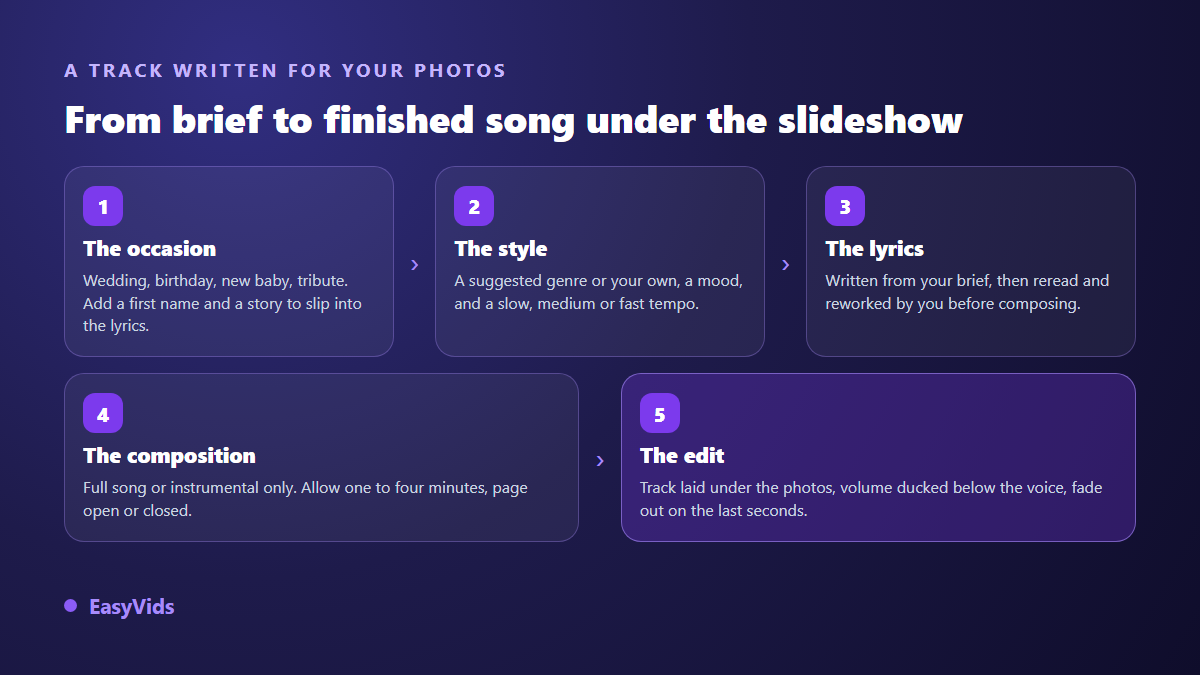
Lyrics are written from your brief, then shown in a field you read and correct before composition starts. That matters: it is where you swap a generic line for the real nickname, or cut one verse too many. You can also tick instrumental only, which is what you want as soon as a voice over narrates. Composition takes one to four minutes, and you can close the page while it runs: production continues on the server and the track is waiting when you come back.
One limit to know before you build a montage around the result: exact length cannot be ordered. A generated instrumental runs around half a minute, a full song runs longer, and neither will land precisely on the length of your slideshow. Plan to trim the track in the edit, or to place the same piece twice end to end with a crossfade, rather than stretching your photos to fill silence. Plan details sit on the pricing page, and the whole toolset lives in one place on EasyVids.
Placing the music properly in the edit
The track goes on its own audio lane, under the photos. Three settings make the difference, and the online editor offers all three. Volume is set in decibels, with a quick mute when you want to compare two versions. A fade in avoids a brutal start on the first image. A fade out, set in seconds, prevents the hard cut that gives an amateur edit away: two or three seconds of descent, and let the last photo breathe after the silence.
For punctuation, the editor sound library holds short elements, from one to twenty seconds: transition sweeps, impacts, chimes, atmospheres. They do not replace the soundtrack, they accent it. One discreet sweep on a chapter change is enough, and two per film is already a maximum.
Rights and publishing: what blocks you at the last minute
A private screening for the family and a public upload are not the same question. As soon as a slideshow goes to a platform, the music is analysed automatically. According to the YouTube Help Centre consulted in August 2026, Content ID compares each upload against reference files supplied by rights holders, and a match can block the video in some countries or route the revenue to the rights owner. The same help centre states that such a claim is not a copyright strike, but it is enough to strip your film of monetisation.
On social platforms, the in app music libraries do not cover every use: according to the music guidelines published by Meta, commercial content and professional accounts do not get the same catalogue as personal accounts. Original music settles the question at the root, and what you may publish with a generated track is set out in our article on AI music and copyright.
Frequently asked questions
What music suits a wedding slideshow?
A slow piano or string instrumental for the opening and the ceremony, then something livelier for the party section. Avoid songs whose lyrics tell a story of separation, which is more common among famous standards than people expect. A song written for the couple, with both names, is what marks a room most.
How long should slideshow music be?
Three to five minutes for a family film, which matches forty to sixty photos at a comfortable pace. Past six minutes attention drops, even in a friendly room. If you have too many images, make two short films rather than one long one.
Can I use a well known song in a slideshow?
For a strictly private screening the practice is common. For an upload, the track will be identified automatically and the video can be blocked or stripped of revenue. If your film is meant to circulate, go with original music or a track explicitly cleared for that use.
Should the track have vocals or not?
No vocals as soon as a voice over narrates, without exception. Vocals when the images speak for themselves and the words match the occasion. When in doubt, instrumental is safest: it does not date, and it never contradicts your photos.
How do I line photos up with the beat?
Play the track once and note the seconds where something changes, then drag the edges of your images to those markers on the timeline. Start with the five most audible changes rather than all of them: the ear registers regularity, not hundredth of a second precision.
A slideshow soundtrack is decided first, never last. Once the occasion and the tempo are settled, everything else falls into place: the length of each photo, how many images to keep, where the strongest ones belong. If no existing track fits, have one composed for your occasion, with the right names and the right tempo, then drop it under your photos. Creating an account opens the full studio, music, voice and editing together, with no bank card.