You have generated eight scenes for the same story. In the first one your lead has a round face and her hair tied back. By the fourth she has aged ten years. By the seventh she is simply a different person. An AI character changing face between scenes is the most common defect in AI produced series, and the one that loses viewers fastest, usually before they can say why.
This is not a talent problem, and not a whim of the model. It is a mechanism, and mechanisms can be taken apart. This page starts from the symptom: what really happens when a scene image is built, why a description will never lock a face, how to read a defect and trace it back to its cause in under a minute, and how to repair a series without relaunching everything. If you would rather have the full method to set up before the first image, our guide to keeping the same character across every video walks through it end to end.
The short answer
A face changes between two scenes because the generator rebuilds the person for every image, from the text it is given and nothing else. It remembers nothing. As long as your character only exists as a description, each generation draws a different face among the millions that fit the sentence. The fix comes down to three moves: produce one reference image, attach it to every scene where the character appears, and stop describing the face in the scene prompt. That is the principle behind the reference based production of the EasyVids creation studio. The rest of this article covers the more interesting case: when the face still drifts.
What really happens when a scene image is built
An image generation is an isolated call. The model receives a text, sometimes files, and returns an image. Then it forgets everything. Scene 7 knows nothing about scene 6, and no setting changes that. Whatever is not sent with the request does not exist for the model. That single sentence explains most face drift.
Attaching a reference image changes the nature of the request. The file travels with the prompt, and an instruction points at it explicitly: reference image 1 shows a character, depict exactly this person, same face, same hair, same build, same clothing. The indexing matters. When several images are attached they arrive in a fixed order, and each sentence refers to a position. Their number is capped, and the cap depends on the generator: some accept only three reference images per request, others up to five. In our own production, portraits and products come before settings when a choice has to be made, with one slot reserved for the location, so that the face and its surroundings travel together.
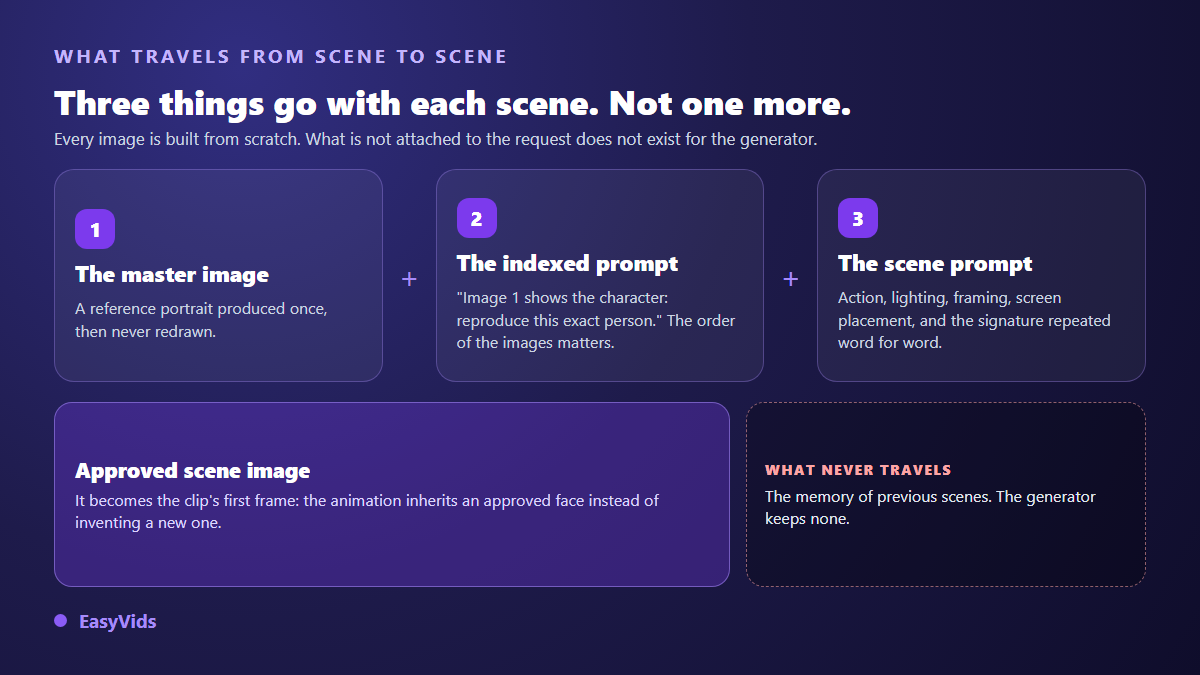
A reference is therefore not training. You are not building a model of your character, you are handing the generator a target to hit on every shot. It is also why an approved scene image should become the first frame of the video clip: the animation then starts from a face you have already validated instead of inventing a new one.
Why a longer description locks nothing
The natural reflex, when a face drifts, is to write a more precise description. Age, face shape, eye colour, hair length, eyebrow thickness. It does not work, for a structural reason: text describes a category of people, an image points at one person. Every added adjective narrows the category a little without ever reducing it to an individual. Past a few traits, the resemblance stops improving.
Worse, a rich description becomes harmful as soon as a reference is attached. Text and photo contradict each other on some detail, hair length for instance, and the generator has to arbitrate. It often sides with the text. That is the most frequent cause of the almost right face, the one that resembles without convincing. So the production rule runs against intuition: the prompt must confirm the photo, never duplicate it. You only repeat what a photo does not lock by itself, the hairstyle and the outfit, written once then copied word for word into every scene.
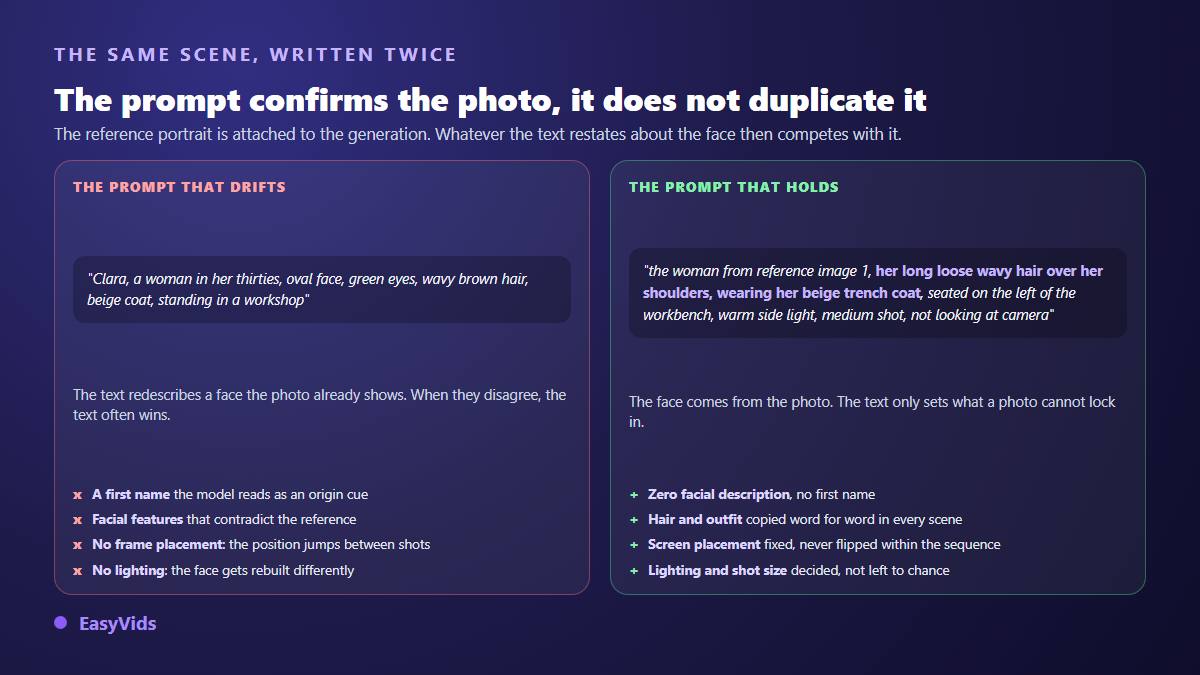
One last detail completes the picture: never put the character's first name in an image prompt. The model does not know your lead, it reads that word as a hint about origin, age or appearance, and applies it. Describe the person physically and soberly, and leave the name to the script and the voice over. The full method for writing a shot prompt fits in five blocks in our piece on how to write an AI video prompt.
Read the symptom, find the cause
Drift does not have one single shape. It shows up in five or six distinct ways, and each one points at a different cause. Looking at how the face changes saves you from relaunching a whole production over a defect that lives in one line of prompt.
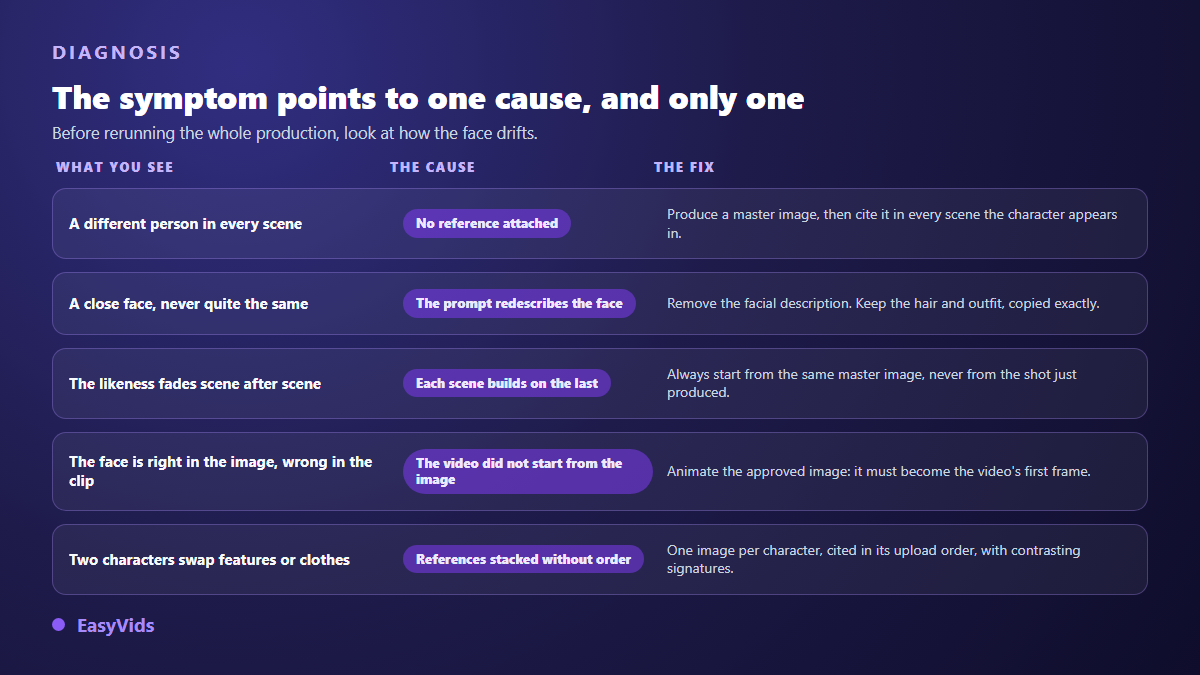
- A different person in every scene: no reference image is attached. Text alone never produces the same person twice.
- A close face that is never quite the same: the prompt re describes the face and contradicts the reference. Remove the facial description.
- A resemblance that fades scene after scene: each shot was generated from the previous one, and the deviations stacked up.
- A face that is right in the still and wrong in the clip: the video was generated from text instead of starting from the approved image.
- Two characters swapping features or clothes: references are stacked with no announced order, or their signatures look too much alike.
- A face that only breaks down in wide shots: it covers too few pixels to be rebuilt properly. Move the camera closer or split the shot in two.
Chained drift, the most expensive mistake
A very common habit is to generate scene 2 from the image of scene 1, then scene 3 from scene 2, and so on. The intuition sounds right: every shot inherits the previous one, so continuity is guaranteed. In practice it is the most efficient drift machine ever built. Every generation introduces a small deviation. When the output becomes the next input, those deviations add up instead of cancelling out. By the tenth shot you are looking at a photocopy of a photocopy.
The counter measure is easy to state and demanding to hold: every scene descends from the same master image, never from the shot that was just produced. That master image is approved once, at the start, and does not move for the rest of the project. A forgotten corollary: do not regenerate it midway because a detail bothers you. A new reference in the middle of a series splits the film in two, with a before and an after that viewers notice. On a series built around recurring characters, that file becomes project property and carries over from one episode to the next.
The face is right in the still, wrong in the clip
This case deserves its own section, because it defeats creators who did everything right upstream. There are two ways to get an animated clip. In the first, the video model starts from text and invents everything, face included: your reference never entered the equation. In the second it starts from an existing image, which becomes the first frame, and only has to set it in motion. For a recurring character, only the second holds up. So check that your approved scene image really is the input of the video model, and not just a preview shown next to it. That check counts double on the opening scene, where viewers decide whether to stay or scroll on, and our collection of hooks sorted by niche handles the other half of the problem, the line that goes with the shot.
Even with that wiring, some residual drift remains inside a single shot: the longer the clip runs, the further the model wanders from its starting frame. Two habits keep it in check. Keep shots short, which serves the rhythm anyway. And avoid violent head or camera moves, which force the model to rebuild the face from an angle no reference ever showed it. The other classic causes of a disappointing render are gathered in our review of why AI videos fail.
Two characters in the same shot
As soon as there are two of them the risks multiply: the generator can blend them into each other, swap their clothes, or give one the other's face. The answer is structural rather than editorial. Each character keeps an identifier, a reference and a signature. The prompt states explicitly which image belongs to whom, in the exact order the files are sent. And the signatures must contrast: two characters with similar hair and clothes will end up merging, however good the portraits are.
Then there are crowded scenes, two characters plus a location plus an object. Do not stack them. Build a group image first, then have the scenes cite that image as a single reference. One production detail is worth knowing, because it saves a bad surprise: that group image is built in stages, adding one character at a time. Asking for three people at once from three portraits regularly returns a fourth invented face, or two characters fused into one.
Repairing a series you have already produced
The first reflex, when a series drifts, is to relaunch everything. It is almost always the worst option: you destroy the shots that worked, and nothing says the new pass will be better if the cause is still there. Serious production is repaired shot by shot, the way an editor replaces one bad take without reshooting the film.
- Put the three or four worst shots side by side and identify the dominant symptom in the grid above.
- Look at the master image before anything else. If it is soft, badly framed or backlit, no scene can be better than it is.
- If the reference is the problem, replace it once, with an uploaded photo or a regenerated portrait, then relaunch only the scenes where the character appears.
- If the reference is fine, fix the prompt of the faulty scenes only: facial description removed, signature copied exactly, screen position restored.
- Then regenerate the video for the scenes whose image changed, never for the ones that were already right.
- Review the result in reading order, not shot by shot: an inconsistency only shows up in the sequence.
The habit pays off in a very concrete way: each regenerated element is billed on its own, so repairing six shots costs six shots and not a whole production. The detail of our plans lives on the pricing page.
Frequently asked questions
Why does my character still change when a reference image is attached?
Three causes cover almost every case. The scene prompt re describes the face and contradicts the photo. The chosen generator does not accept reference images, or accepts fewer than you are sending. Or the scene attaches too many images at once and the portrait gets pushed out by a setting and an object. Check those three before blaming the photo itself.
How many reference images does one character need?
One, as long as it is sharp, evenly lit and framed at least down to the shoulders with the eyes visible. This is not training: you are providing a target, not a dataset. A second view helps for an object or a product, rarely for a face.
Can the character change outfit without breaking consistency?
Yes, if the change is treated as a story event and not as an accident. Announce it in the scene that introduces it, update the signature, then keep the new wording identical for every scene that follows. What breaks consistency is not the change, it is the undeclared change.
Should everything be regenerated when one shot fails?
No, and that is the first reflex to unlearn. Find the faulty scene, fix its prompt, regenerate that scene alone, then its video if the image changed. Work you already approved has no reason to be touched, and a global relaunch will reproduce the same defect as long as the cause is unchanged.
Does drift affect settings and objects too?
Yes, and through exactly the same mechanism. A recurring location gets its reference image just like a character does, and a supplied product is used as is and never redrawn. A living room whose furniture changes every shot is as damaging as a drifting face, even if viewers take longer to put words on it.
A character who holds from one scene to the next is not a matter of luck or of model choice: it is an approved master image, a prompt that confirms it, and the habit of repairing at shot level rather than at production level. Those three habits take one session to acquire and serve every series you produce afterwards. To try them on a character of your own, create your account and place your first reference before you even write scene 1.