Most Pictory reviews list the features and stop there. That is not what you are missing. What you are missing is whether the tool can build the kind of video you have in mind, and the exact point where it will stop being useful to you.
Pictory belongs to a specific family of tools: the ones that turn text into video by searching for footage that already exists. That family saves a huge amount of time, and it has a hard edge. Knowing where the edge runs is what saves you a wasted subscription, the same reasoning we apply in our comparison of AI tools for creators.
The short verdict
Pictory is a strong repurposing tool. It turns an article, a script or a webinar into an edited, captioned, narrated video in minutes, with nothing to install. It becomes frustrating the moment your subject does not exist as stock footage, the moment a character has to come back from one shot to the next, or the moment you want a visual identity that belongs to you. Those three cases call for a different family of tools, the studios that build the image instead of finding it, described in our complete AI video generator guide.
What Pictory actually does
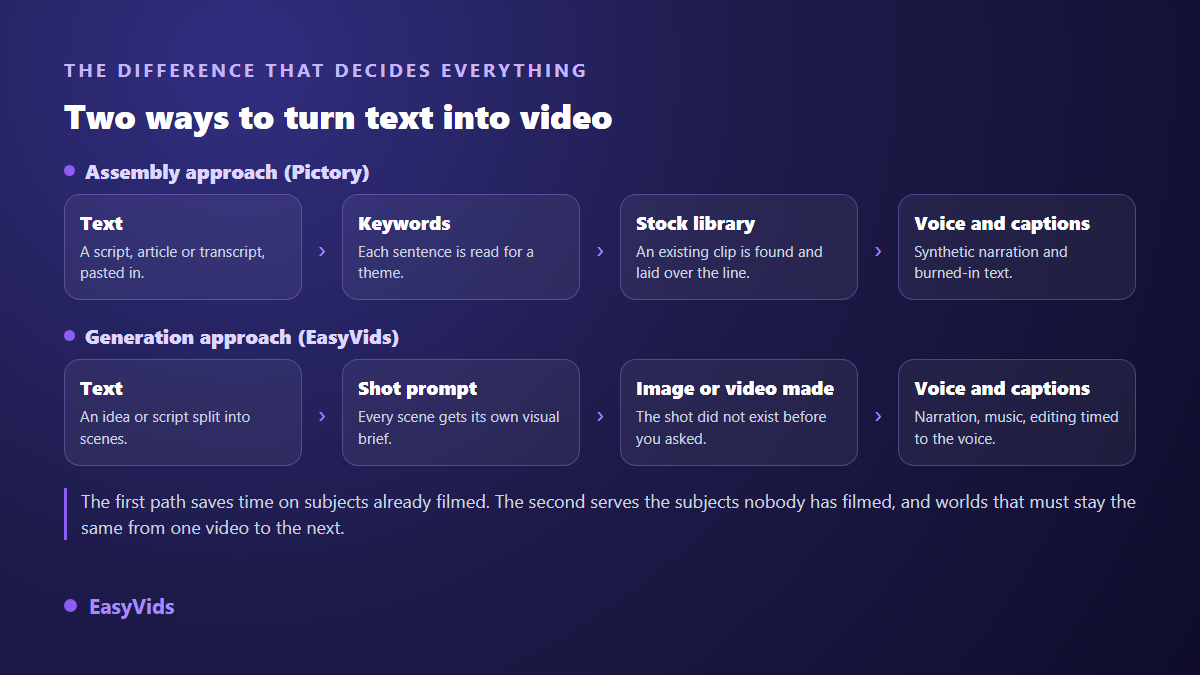
The mechanism has three stages. You supply text. The tool splits it into sentences and extracts keywords. For each sentence it searches a licensed media library, which the company describes as millions of royalty free clips and images, and drops a matching shot onto the line. Then it adds a synthetic voice, burns in captions, and hands you an edited video.
That mechanism explains both the speed and the ceiling. Nothing is created, everything is retrieved. An office shot, a mountain road, a hand holding a phone: those exist in thousands of versions, so the result appears almost instantly. A spaceship landing on a village square, your own craftsman in his own workshop, a product that has not been manufactured yet: no search can find them, because nobody ever filmed them.
The four ways into the tool
Pictory promotes four entry points, and they are worth separating because they answer different needs. Two of them start from text you wrote. Two of them start from a video you already recorded.
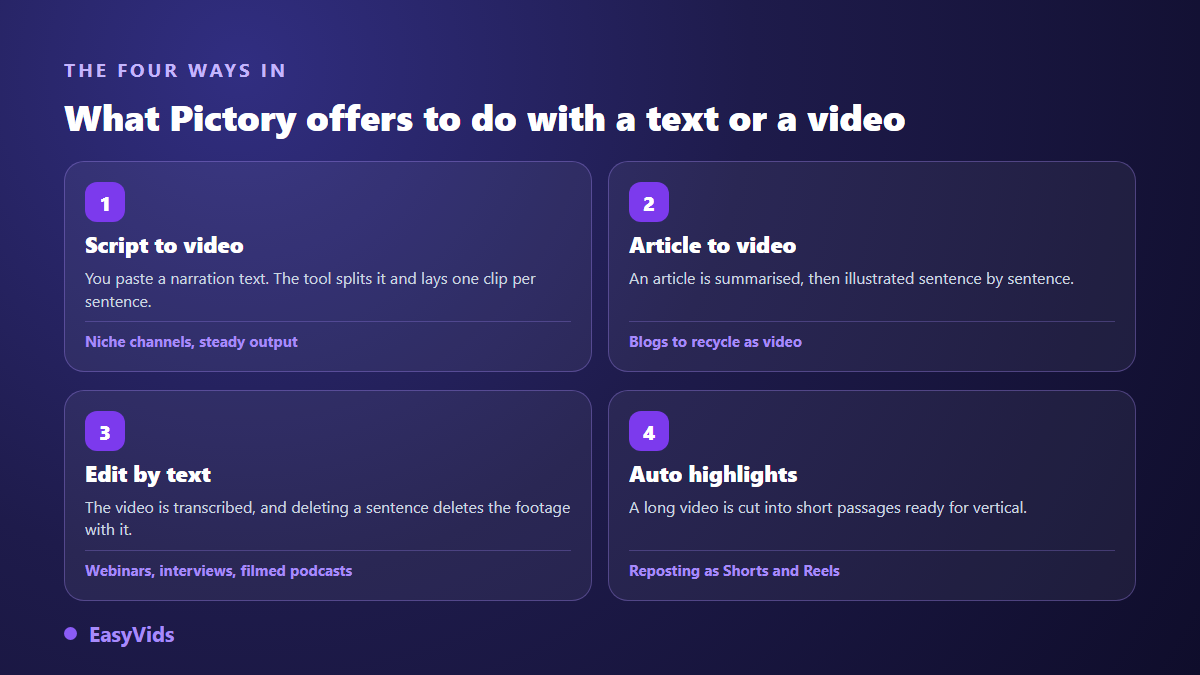
The last two are the underrated ones. Text based editing, where deleting a sentence in the transcript deletes the matching footage, saves hours on a webinar or an interview. Automatic highlights feed vertical reposting. If your job is mostly reshaping existing material, the tool sits exactly where it should.
Where Pictory delivers
A few strengths show up consistently, and they are real. They come less from technology than from a scope the company owns honestly: it never claims to make a film, it claims to make a publishable video out of text you already wrote.
- Speed on generic subjects: an article becomes an edited video in minutes, with no software to install.
- Automatic captions, drawn from the script or the transcript, with adjustable styling.
- Usage rights: according to Pictory's own documentation, library media is royalty free for commercial use, which removes a genuine worry.
- Text based editing, which makes cutting accessible to someone who has never opened an editing suite.
- Everything runs in the browser, with no powerful machine and no installation.
- You can upload your own voice over, usually a better option than a synthetic voice when you own a decent microphone.
Limit one: the stock library belongs to everyone
A media library, however large, is shared. Every creator covering productivity types the same keywords and receives the same shots. In a crowded niche, two competing channels end up with identical footage under different sentences. Viewers will not name the problem, but they will feel they have seen this video before, and that feeling costs subscribers.
The second effect matters even more: the link between shot and sentence stays approximate. Stock footage illustrates a theme, never your exact point. On a broad explainer it passes. On a story, a product demo or anything with characters, it shows on every single shot.
Limit two: no character survives from one scene to the next
A narrative carried by a character requires that character to stay the same. With stock footage that is structurally impossible: every clip comes from a different shoot, with a different face, a different light, a different set. This rules the approach out for fiction, for series, and for any channel building a recognisable identity. Generative studios solve it with references reused across scenes, as our consistent character method explains.
On our side, that consistency comes from a step users never see. Before any scene is produced, the planning pass writes a universe bible where every character and every set receives a stable identifier, and each scene calls those identifiers back when its visual is built. It is tedious to set up, and it remains the only reliable way to get the same face in shot twelve as in shot two.
Limit three: video is only one brick of your output
Pictory covers video, and video alone. It does not build the thumbnail that decides the click, the still images for your posts, an original soundtrack nobody will claim, or the documents you sell alongside. Every missing brick becomes another service to manage, with its own login, its own invoice and its own visual style.
What to check before you subscribe
Plans and quotas change too often to be detailed in an article. Structural questions decide the outcome, not this month's grid. We gathered the way to reason about those trade offs in our analysis of what an AI video really costs, and our own plans stay on the pricing page.
- Your subject: do your next ten videos cover things already filmed, or things you have to invent?
- Export minutes and the number of videos allowed per period, usually more limiting than the plan itself.
- Watermarks: check what the free trial adds to your exports before you rely on it to publish.
- Output ratios: horizontal, vertical and square, with no crop that cuts the point out of the frame.
- What you will still pay for elsewhere: thumbnails, still images, original music, documents.
- Control: can you replace a single shot without regenerating the whole video?
Who it is for, and who it is not for
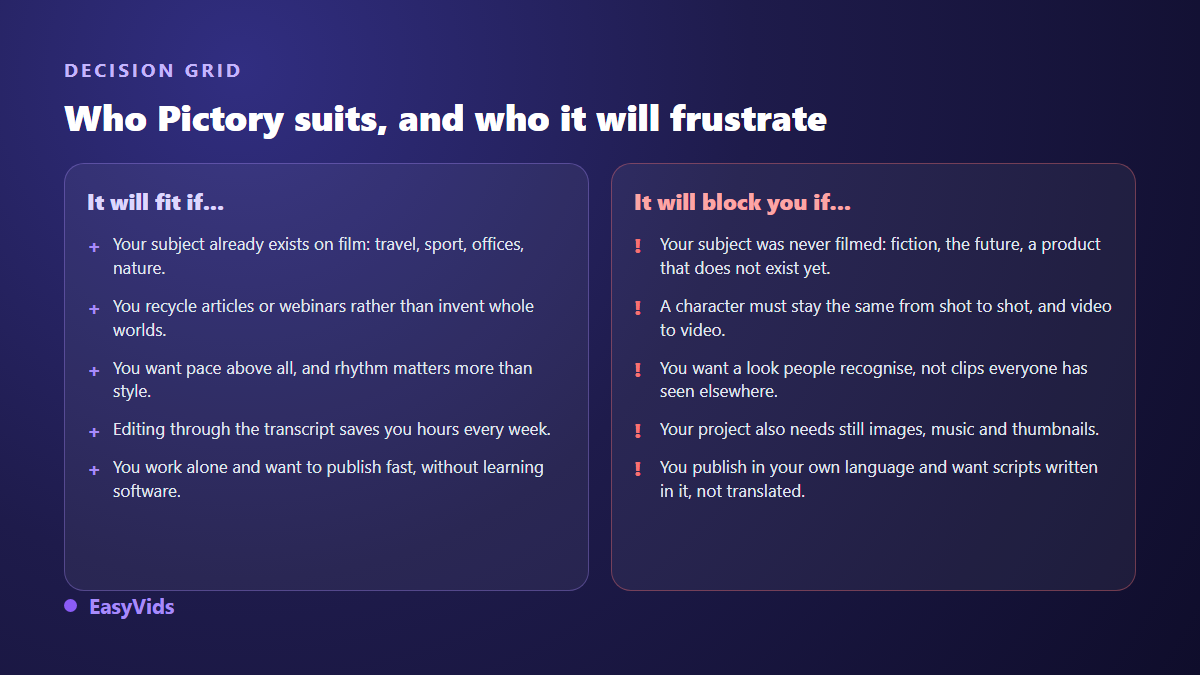
Pictory is a good call for a blog that wants a video version of its articles, a marketing team recycling webinars, a trainer slicing live sessions into short clips. In all three cases the raw material already exists and the tool simply reshapes it. That is its job, and it does it better than most.
It becomes a poor call for a story channel, for fiction, for a brand that wants a look people recognise in three seconds, for a shop that must show one specific product from one specific angle. Those projects need images built for them. So the real question is not whether Pictory is a good tool, but whether your subject lives in a stock library or only in your head.
Frequently asked questions
Is Pictory free?
No. The tool is paid, with a free trial meant to walk the full workflow once. The trial conditions, especially the export length allowed and whether a watermark is applied, change regularly: check them on the company's own page the day you sign up, rather than in an article written months earlier.
Does Pictory generate its own images?
The product was built around searching a library of footage that already exists, which is exactly why it is fast. Generation features may have been added since, so check the current list, but the backbone remains assembly. A generative studio does the opposite: it builds each shot on demand and has no library to query.
Can Pictory videos be monetised on YouTube?
Nothing forbids licensed media in a monetised video. The risk sits elsewhere: according to the YouTube help centre, the reused content rule targets channels that republish other people's material without adding anything of their own, and a stack of stock shots under a synthetic voice comes uncomfortably close. An original script, a considered voice and a deliberate edit remain the condition, whatever tool you use.
Does Pictory work well in other languages?
The interface and the automatic steps were designed for English first. Synthetic narration usually reads other languages well. It is the surrounding steps that deserve a serious test: article summarisation, sentence splitting, and above all footage search from non English keywords, which returns noticeably poorer results.
What is the alternative for genuinely original videos?
You need a different family of tools, not a different brand. A generative studio writes the script, splits it into scenes, builds every visual, adds voice, music and editing, then lets you redo a single scene without starting over. That is what the EasyVids studio brings together, along with still images, thumbnails and the online editor in one place.
The right instinct is not to hunt for the best tool in the abstract. Look at your next ten videos and ask whether their footage already exists somewhere. If it does, an assembler like Pictory will save you weeks. If it does not, no setting will fill the gap, and you need a tool that builds the image. To settle it on your own subject rather than on a review, create a free account and produce the same video both ways.