You wrote a careful description. Three precise lines: the age, the hair, the coat. You paste them into every scene, and by the fourth shot your heroine has a different face. The generator is rarely to blame. The problem is how the AI character prompt is built, and what you left floating inside it without noticing.
A character holds together through two things: a reference image that acts as its identity, and text that confirms that image instead of contradicting it. This guide covers the structure of a character description, what has to stay frozen word for word, what must change in every shot, and how to find the guilty line when a face starts sliding. If you have never written a visual instruction before, our five block method for writing a video prompt covers the ground we assume here.
The short answer
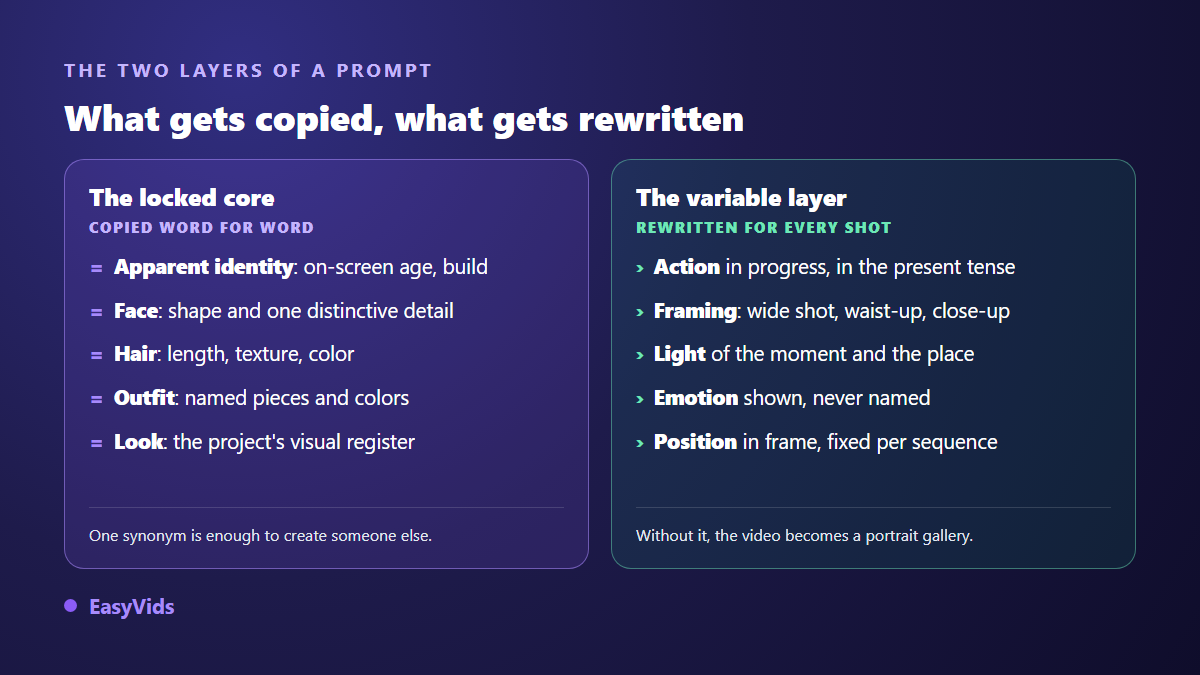
A character prompt has two layers. A frozen core, written once: apparent identity, face, hair, outfit, visual rendering. It is pasted unchanged into every shot, with no synonyms and no rewording. And a variable layer, rewritten scene by scene: the ongoing action, the framing, the light, the emotion, the position in frame. The core is backed by a reference image attached to the generation. Repeating the core word for word alongside that reference is what stops the face from drifting. The character's name, meanwhile, has no place in the prompt at all.
Why a description alone is never enough
An image model does not remember your character. Every call starts from nothing and builds someone who satisfies your description. But a description does not point to a person, it outlines a family of people. "A woman in her thirties with brown hair" matches millions of faces, and the model picks one at random, a different one each time. You did not hand it an identity, you handed it a specification.
That is the rule everything else follows from: text narrows the family, the image narrows it to one person. A reference attached to the generation supplies the face; the prompt exists to stop the model contradicting that reference. Neither works alone. We covered the image side of this in our guide to keeping the same character across all your videos; here we stay on the text side.
The anatomy of a character prompt, segment by segment
A description that holds always reads in the same order, and that order is not decorative. The opening words carry the most weight: they set the category, and everything after hangs off it. A clothing detail placed first takes the slot an identity cue should occupy, and results turn unpredictable from one call to the next.
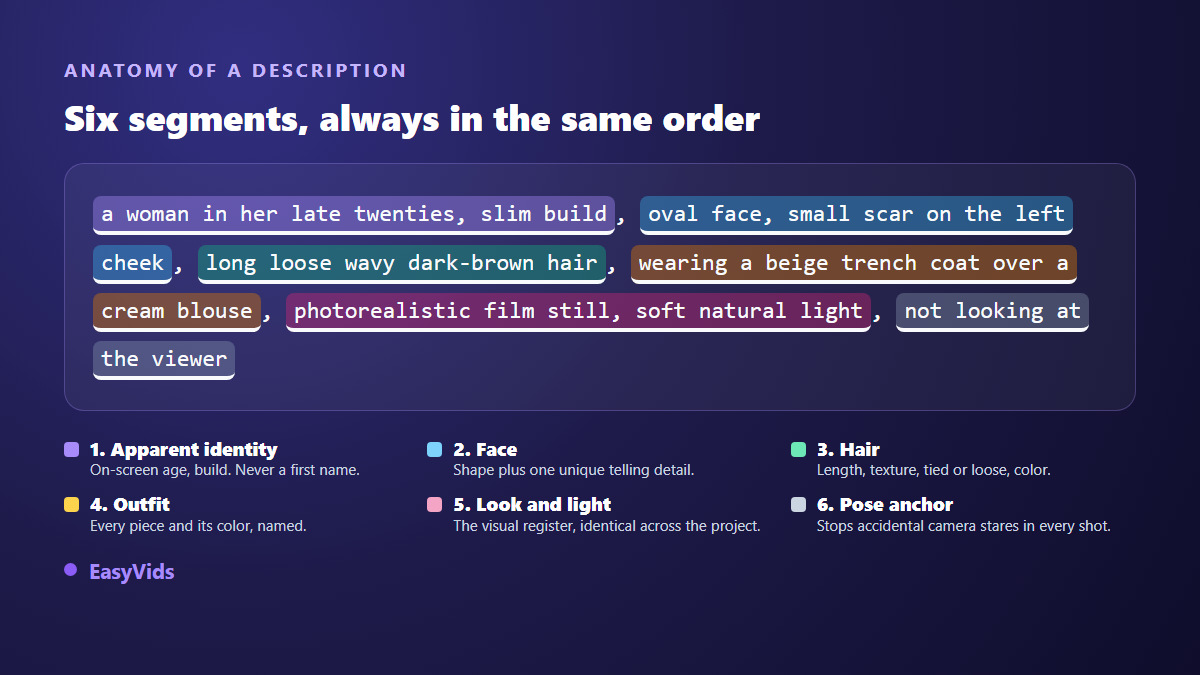
Six segments are enough. Apparent identity gives the on screen age and the build. The face adds a shape plus a single distinguishing detail: a scar, a dimple, round glasses. The hair needs length, texture, whether it is tied back, and colour, never just one of the four. The outfit names every garment and its colour. Rendering and light lock the visual register shared by the whole project. The pose anchor cancels the camera stare that most models add on their own when nothing forbids it.
The frozen core: what gets pasted, never rewritten
The core gathers the segments that are not allowed to move. Write it once, approve it, paste it. The verb that matters is paste: a rewording, even a better one, builds a different person. "Dark chestnut hair" and "brown hair" are not the same instruction to a generator, and "beige coat" is not "beige trench coat".
In our consistent character engine this constraint is written into the instructions handed to the model that drafts the shooting plan: hair and outfit must be repeated word for word from the reference portrait at every appearance, and a description that contradicts the photo breaks consistency instead of helping it. The internal rule fits in one sentence: the text must confirm the image, never correct it.
The variable layer: what has to change in every shot
Freezing the core does not mean freezing the scene. Paste the whole prompt unchanged and you get a portrait gallery, not a video. The variable layer carries everything else: the ongoing action, described as movement rather than a pose; the framing; the light of the place and the moment; the emotion, shown through the body and never named; and the character's position in frame.
That last one deserves care. When several consecutive shots happen in the same place, each person's position is decided in the first shot of the sequence and then repeated identically. Flipping left and right between images breaks the cut even when the faces are perfect: that is the 180 degree rule inherited from cinema, and it applies unchanged to generated images. Our production plan enforces it explicitly, repeating each character's position word for word across consecutive scenes.
Word choice: why "nice dress" never holds
An appreciation carries no usable information. "Nice", "elegant", "modern", "simple": the model swaps them for whatever it has seen most often, and that changes from call to call. Every vague word is an empty slot on the form. The fix is mechanical: replace the judgement with an observable property.
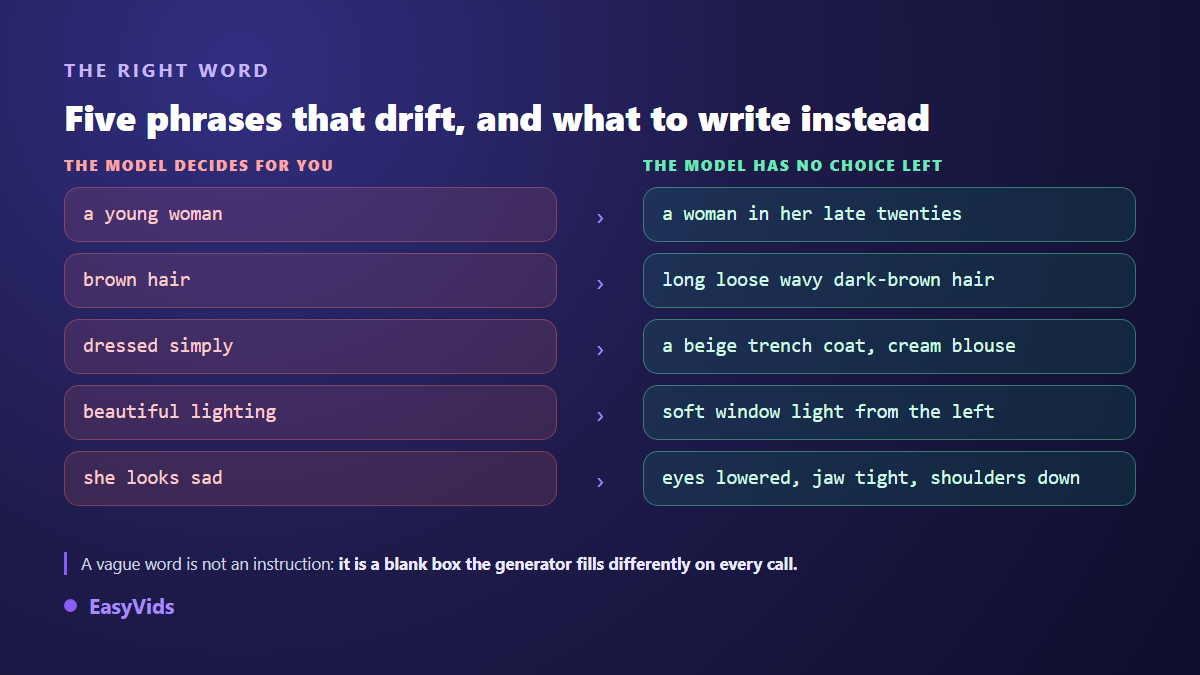
The same holds for emotion. "She looks sad" leaves the model to interpret; "eyes lowered, jaw tight, shoulders down" describes what the camera will see. Describing in the positive also beats forbidding, because a negative instruction often summons the very thing it tries to exclude. We covered that with examples in our video prompt method.
Never put a name in a character prompt
This is the most common mistake, and the most expensive. "Sarah walks down the street" tells an image generator nothing: it does not know Sarah. Worse, a first name carries statistical associations learned during training, and it drags in traits you never asked for. Proper names belong to the script, never to the visual instruction. The script answers to narration rather than to picture, and our seven step sales video script framework shows one worked through from start to finish. In our pipeline the rule is absolute: portrait, image and video prompts never contain a character's name. The person is designated by physical description, including when the prompt has to say who is speaking in a dialogue.
The signature: the line you repeat in every scene
Once the reference image is attached, the face comes from the photo. The prompt's job changes completely: it must not describe the face in detail, or it competes with the reference. What it repeats is the signature, meaning hair and outfit, copied word for word from the portrait.
A signature reads like this: "her long loose wavy dark-brown hair over her shoulders, wearing her beige trench coat over a cream blouse". One line, identical across every scene of the project, pasted into each shot prompt. A signature that shifts even slightly produces exactly the flaw you were trying to avoid. Sets follow the same principle in shorter form: name the place, do not redescribe it.
The reference portrait: what the first image must show
The prompt that matters most is the one behind the first image, because every later shot descends from it. It has strict requirements: upper body, neutral background, soft natural light, sharp focus, no strong expression. You want an identity document, not a beautiful photograph. A portrait shot into the light, from three quarters behind, or with a hat cutting the forehead will give unstable scenes no matter what you write afterwards. The same applies to a photo you upload yourself: it becomes the reference as is, with no generation step, and its quality decides everything downstream.
Character prompts that get rejected
A well built prompt can still fail for reasons unrelated to consistency: the safety filters of the generators. Our own writing rules, applied to every shot produced, impose a few precautions that avoid most rejections. Minors are described soberly, clothed, in a clear context and preferably in a wide shot, with no body vocabulary attached. Violence is suggested off camera through a shadow or a witness reaction rather than shown. No nudity, no sensuality. And above all: no brands, no logos, no celebrities, no identifiable real people.
Seven mistakes that break a character prompt
These come up almost daily in the projects we see. Each takes a minute to fix once you can spot it.
- Rewording the core between scenes: the generator reads it as a new person.
- Naming the character in the visual instruction instead of describing them.
- Redescribing the face in detail when a reference photo is already attached.
- Stacking adjectives: past a certain length, the end of the prompt weighs less and less.
- Describing a frozen pose instead of an action in progress.
- Changing the outfit mid project without producing a new reference.
- Naming an emotion instead of describing what makes it visible on screen.
The moment to fix all this is when the references are produced, before the scenes launch. That is the logic of the checkpoint in our production flow: portraits and sets are generated first, you review them, then you adjust one character's prompt and regenerate that item alone, or replace its image with a photo of your own. Once approved, those references serve every scene. Fixing a prompt there costs one image; fixing it later costs the whole project. Across a series, the same reference set carries from episode to episode, as our guide to building a series with recurring characters explains.
Frequently asked questions
How long should a character prompt be?
Around thirty words for the core, rarely more than fifty. Beyond that the closing segments lose weight and you get the opposite of what you wanted: the more details you add, the less each one is respected. Five precise properties beat fifteen approximations.
Should an AI character prompt be written in English?
Yes, in the large majority of cases. Image and video models are trained mostly on English captions, and an English instruction is followed more closely. This only concerns the visual instruction: script, voice over and dialogue stay in your own language. Our production plans apply exactly that split.
Can a character change outfit mid video?
Yes, as long as the new outfit is treated as a new reference. Generate a second portrait of the same person wearing it, approve it, then switch signatures from that scene onward. Changing the outfit in text alone, while keeping the old reference, gives the model a contradiction it resolves at random.
How do you describe two characters in one scene?
Each keeps their own core and signature, and you add their on screen positions, fixed for the whole sequence. Attach both reference portraits to the generation. Past three people in a single frame, fidelity drops noticeably: split the scene into two shots rather than crowding everyone into one.
Does the same prompt work for an image and for a video?
The core does. The variable layer does not. An image prompt describes an instant; a video prompt describes a duration, so it needs subject movement and camera movement. Keep the core identical, then replace the pose description with an action that unfolds during the shot.
A character who stays the same is a matter of discipline rather than writing talent: write the core once, approve it on a portrait, paste it without touching it, and let everything else vary. To put it to work on a real project, creating an account opens the studio and its consistent character engine, while the rest of the EasyVids studio handles voice, editing and export once your scenes are in place.