You put the item on the kitchen table, took three phone shots, and the result looks nothing like the brands you admire. The next move is usually to hunt for ready made product photography prompts, paste one into an image generator, and end up with an object that vaguely resembles yours, sitting in a busy set, with a label that turned into gibberish.
The model is rarely the problem. The structure of the request is. Most prompts describe the product and forget the light, the surface it rests on and the final format. The fifteen formulas below all share the same frame, adapted per product family. If image generation is new to you, our guide to AI image generators covers the ground this article assumes.
The short answer
A product photography prompt that works always follows the same order: the subject and its material, the surface it sits on, the background, the light with its direction, the lens and camera angle, then the finish and the aspect ratio. One sentence, six blocks. And one rule that outweighs every adjective: attach a real photo of your item as a reference, or the model will build something close to your product, never your product.
The six block formula, ready to copy
Here is the empty frame. Replace what sits in brackets and you have a usable prompt in a minute: [product and material] resting on [surface], [colour or scene] background, [light: direction, hardness, expected shadow], [lens and camera angle], photorealistic, no added text or logo, [aspect ratio].
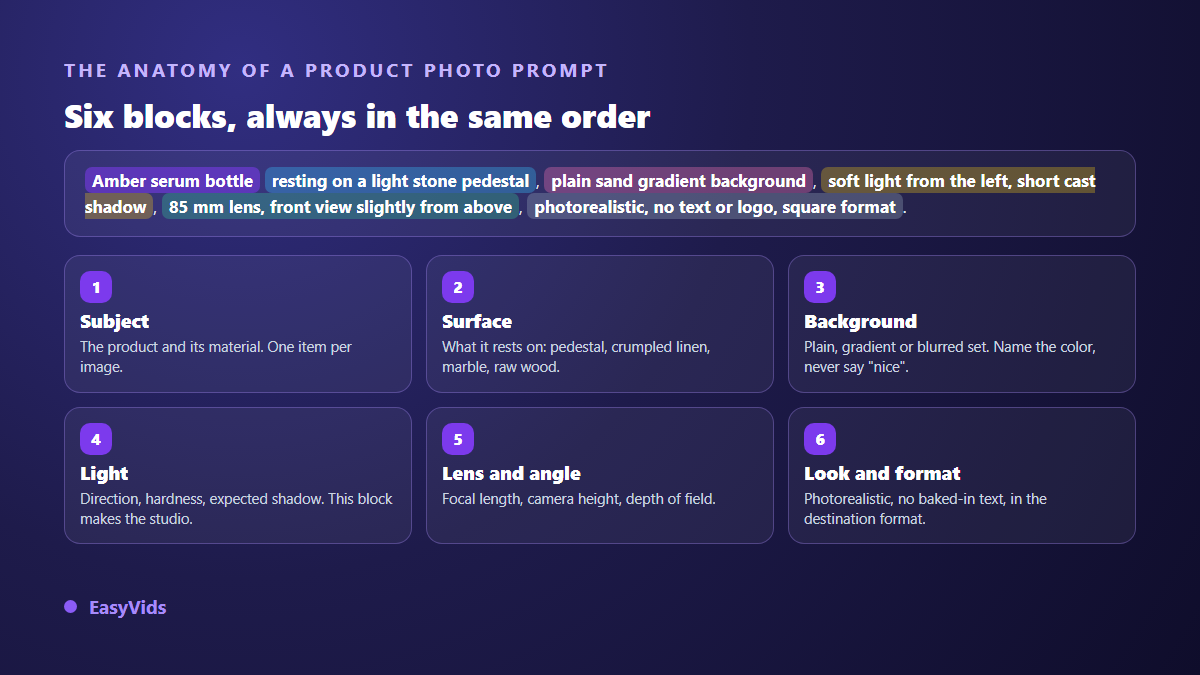
- Subject. The product and its material: grained leather, frosted glass, matte ceramic. Naming the material does more for realism than ten quality adjectives.
- Surface. What the object rests on: stone plinth, crumpled linen, veined marble, raw plank. Without one, the model invents a new surface on every run.
- Background. Plain, gradient or blurred scene, with an explicit colour. A very light grey seamless background is repeatable, a nice background is not.
- Light. Direction, hardness, expected shadow. This is the block that separates a flat picture from a studio shot.
- Lens and angle. A focal length (50 mm, 85 mm, 100 mm macro), an eye level, a depth of field. Photography vocabulary is understood well by current models.
- Finish and format. Photorealistic, no added text or logo, in the aspect ratio you will actually publish. AI generated lettering remains the single most visible giveaway.
Start from your real photo, not from a description
A prompt on its own produces a generic product. To show the item you actually ship, attach a reference photo: the model then keeps the shape, the colour and the label, and changes only the set and the lighting. The AI images section of the EasyVids studio takes up to four reference photos, and refuses the request before charging anything when the selected model cannot read them, rather than dropping them silently.
The source shot deserves five minutes of care. Place the item near a window, out of direct sun, on a plain surface. Wipe the dust, turn the label towards you, take three angles. That opening care decides everything downstream, and our guide to rebuilding a product photo with AI shows step by step what a well taken phone shot makes possible afterwards. Note that one attached reference limits you to a single image per run, while a prompt without a reference can return several variants at once.
Five formulas for fashion and accessories
Fashion buyers want three things: the material, the cut and the scale. A packshot alone never delivers all three, which is why a full listing mixes a neutral background, a lifestyle shot and a tight detail.
- Neutral packshot. Camel grained leather handbag on a square light grey plinth, uniform very light grey background, soft light from the upper left, short cast shadow, 85 mm lens, slightly high front view, photorealistic, square format.
- Worn in context. Beige linen jacket worn by a standing person, framed from shoulders to waist without showing the face, blurred sunlit street behind, late afternoon natural light, 50 mm lens with shallow depth of field, sharp fabric and true colours, vertical format.
- Flat lay. White sneakers laid flat on crumpled ecru linen, two discreet props at the edges, diffused window light, light shadows, airy composition with plenty of empty space, strict top down view, square format.
- Material detail. Macro close up on the buckle and stitching of a black leather belt, raking light revealing the grain, dark out of focus background, very shallow depth of field, maximum sharpness on the buckle, landscape format.
- Retail atmosphere. Steel bracelet watch on a white marble tray, blurred green plant behind, side window light in late morning, controlled reflections on the glass, 100 mm macro lens, cool neutral palette, landscape format.
Keep the same background sentence and the same light sentence across a whole collection: that is what makes a shop look photographed on a single day. Once those stills work, the same set and lighting carry straight over to moving images, as our guide to product video for ecommerce explains.
Five formulas for beauty and skincare
Beauty is decided by light, not by props. Glass, liquids and textures react sharply to the direction of the source: the same serum lit from the front or from behind tells two different stories.
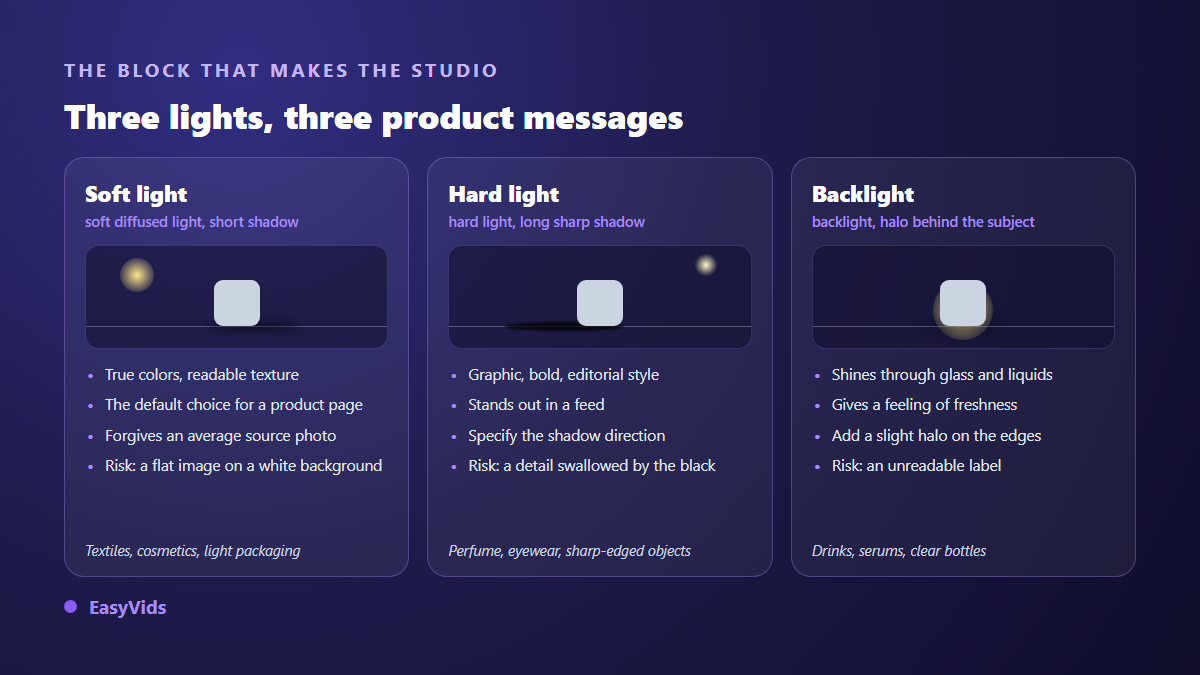
- Backlit bottle. Amber glass serum bottle on a pale stone plinth, sand gradient background, soft backlight passing through the glass, gentle rim halo, 85 mm lens, front view, photorealistic, square format.
- Spread texture. Open jar of white cream beside a curved swipe of cream, veined white marble surface, soft overhead light, sharp texture and visible material, top down view, tight crop, square format.
- Ingredients around. Balm tube surrounded by dried flowers, fresh leaves and seeds laid flat, matte cream background, diffused morning light, soft shadows, beige and green palette, top down view, vertical format.
- Bathroom scene. Shampoo bottle on the edge of a ceramic basin, blurred pale tiles behind, light steam on the mirror, natural side light, 50 mm lens, calm morning mood, vertical format.
- Colour editorial. Perfume atomiser shot against a plain terracotta background with a long graphic shadow to the right, deliberate hard light, 85 mm lens, minimal off centre composition, vertical format.
Five formulas for food and drink
In food, two details give a generated image away instantly: hands and packaging text. So the rule is simple. No hands in frame until you trust the output, and never ask for lettering on a wrapper.
- Top down plate. Plate of fresh pasta seen strictly from above on a dark wooden table, crumpled linen napkin in one corner, soft window light from the left, light steam, saturated but realistic colours, square format.
- Iced drink. Glass of lemonade with ice cubes and condensation on a stone worktop, bright blurred background, strong backlight through the liquid, sharp droplets on the glass, 100 mm macro lens, vertical format.
- Menu angle. Stacked burger on a wooden board, 45 degree view at table height, blurred fries behind, warm slightly hard side light, 50 mm lens, dark blurred restaurant background, landscape format.
- Texture macro. Macro close up on the crumb of a loaf cut in half, sharp crust in the foreground, raking light from the right, shallow depth of field, neutral background, landscape format.
- Table scene. Laid table with a central dish, two empty plates, cutlery and glasses, no hands or people in frame, late day light entering from the left, 30 degree view, warm palette, landscape format.
Pick the format before you write the prompt
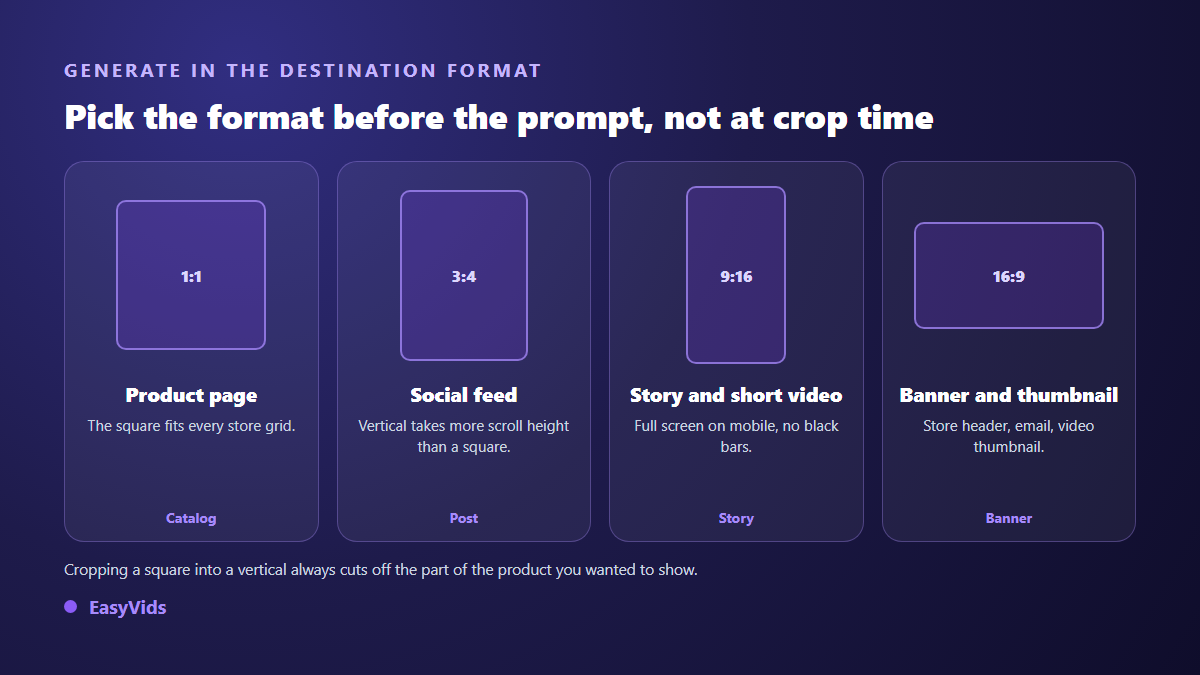
Generating a square and cropping it to vertical always removes the part of the product you wanted to show. Choose the ratio at request time: square for the listing, vertical for the social feed and stories, landscape for a banner or a video thumbnail. Where the model offers it, push the resolution to 2K or 4K for images meant to be zoomed.
Marketplaces add their own constraints. According to the image requirements published in Amazon Seller Central help, the main listing image must sit on a pure white background, the product must fill at least 85 % of the frame, and the same page recommends at least 1600 pixels on the longest side for zoom to behave properly. Google Merchant Center image rules, for their part, rule out promotional text, watermarks and borders inside the product image. A generated packshot must therefore stay bare.
The mistakes that expose a generated product photo
Across our generations the same flaws come back, and none of them depends on the model. They all trace back to an empty block in the prompt, or to a series launched without a shared reference sentence.
- The background shifts in tone between two images of one series: repeat the background sentence word for word.
- The shadow contradicts the light you asked for: state the direction, then check the shadow falls on the opposite side.
- The label turns into invented lettering: ask explicitly for no added text, and work from a reference photo.
- The set swallows the product: one prop, two at most, and plenty of empty space around the subject.
- The delivered item no longer matches the visual: the only flaw here that costs returns and bad reviews.
- An almost white background on a marketplace packshot: ask for pure white, since a very light grey reads as grey on review.
What the image is not allowed to claim
A product photo is commercial communication. European directive 2005/29/EC on unfair commercial practices treats as misleading any presentation that deceives the consumer about the main characteristics of the goods, which includes colour, size, composition and quantity. A generation that lengthens a garment, fills a jar beyond its real level or changes a metal finish exposes you, however beautiful the render. Relighting, restaging and changing the background are fair game. Reshaping the product is not.
Frequently asked questions
Should product photography prompts be written in English?
English keeps a small edge on photographic vocabulary, where wording is more standardised, but recent models handle other languages well. The studio prompt helper writes its suggestion in English straight into the field, and you edit it from there.
How many images does a product listing need?
Five to seven cover most categories: one main shot on a neutral background, two complementary angles, one material detail, one lifestyle scene and one image that conveys scale. Beyond that, visitors stop scrolling. Answer different questions rather than repeating the same shot.
How do I keep exactly the same product across images?
Attach the same reference photo to every generation and vary only the set, light and angle blocks. Repeating a written description never works: the model starts from a different draw, so from a slightly different object. The reference is what locks the identity of the item.
Can a generated image be used as the main listing photo?
It can when it starts from a real photo of your item and only rebuilds the lighting and the background. It should not when the product itself was invented by the model. For lifestyle images, banners and ads, the constraint is far looser.
Take one of these fifteen formulas, swap in your product, attach your photo and compare the output with your current visual: that is the fastest way to know whether the method deserves your time. Creating an account opens the AI images section with no bank card, and the EasyVids studio keeps the visuals, the videos and the voices a product page needs in one place.