You type a sentence, you hit generate, and the shot that comes back has almost nothing to do with what you pictured. The character stares at the lens, the camera never moves, the light is flat, and any text baked into the frame reads like an unknown alphabet. The model is rarely the problem. Your AI video prompt is: too short, too vague, and written like a search query instead of a shot description.
A video prompt is not a magic word. It is a short technical note describing one shot: who, what, how it is framed, how it is lit, how the camera moves. This page gives you the anatomy of that note, then the method to fix a shot that failed, then twenty examples sorted by use case that you can copy straight away. If the whole chain from idea to finished file is still unclear, our guide to the AI video generator sets the scene.
The short answer
A good video prompt runs three to five sentences and carries eight pieces of information: the subject described physically, the ongoing action, the framing, the light, the setting, the camera move, the visual style and the sound. Write it in English, in present continuous, with no proper nouns, and describe what you want in frame rather than what you refuse. Then change exactly one thing between two attempts. Everything else is vocabulary.
The anatomy of a video prompt
The order of the blocks matters less than their presence, but a stable order stops you forgetting one. Always write in the same sequence, the way a cinematographer fills a call sheet: what is filmed, how it is filmed, then style and sound. If the exercise is new to you, our five block method for writing a video prompt gives a tighter version of this grid, to which you then add the blocks that belong to video alone.
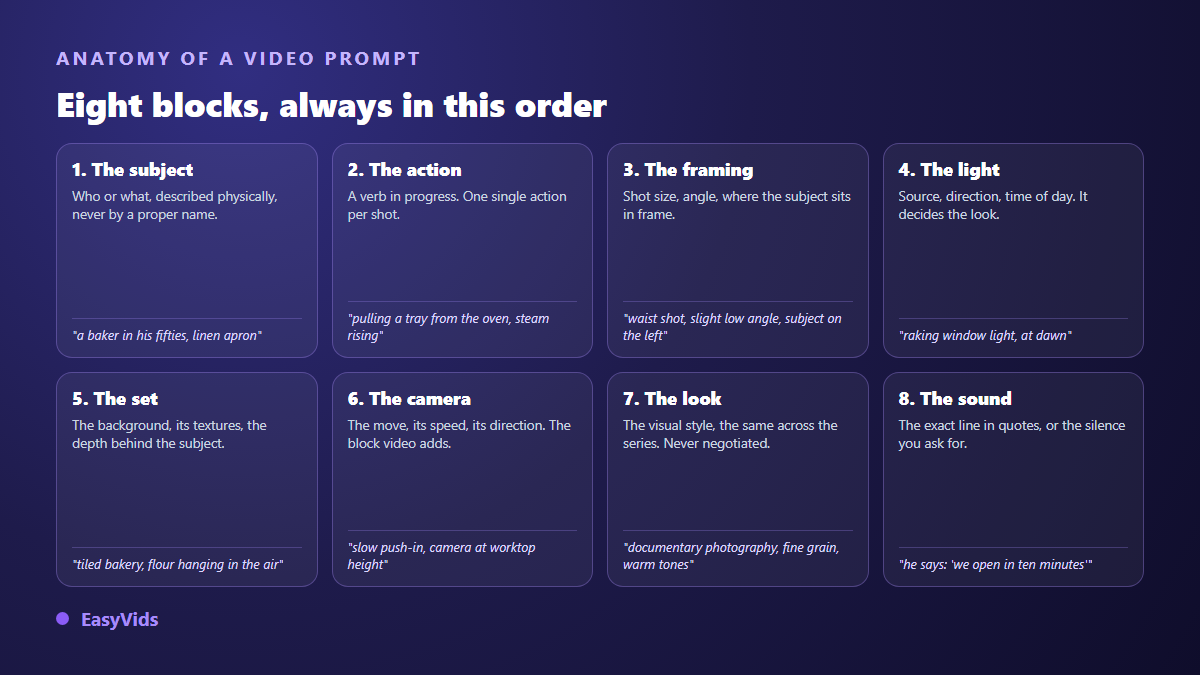
- Subject. Who or what, described physically: apparent age, build, hair, clothing, colours. Never a proper noun, which pushes the model towards faces it thinks it recognises.
- Ongoing action. One verb in present continuous, one action per shot. « Walking towards the door » beats « she decides to leave and closes up behind her ».
- Framing. Shot size, angle, and where the subject sits in the frame.
- Light. Source, direction, time of day. The block that changes the result most for the fewest words.
- Setting. Background, materials, depth behind the subject. A described background is one the model will not invent.
- Camera. Static, slow push in, pan, handheld, crane. Always give a speed: slow moves break far less often than fast ones.
- Style. Chosen once for the whole series: documentary photography, hand drawn illustration, film stock, stop motion.
- Sound. The exact line in quotes if someone speaks, or the ambience you want. This block does not exist in an image prompt.
One counter intuitive point: prompts are written in English even for a video in another language. Video models were trained mostly on English descriptions, and English framing vocabulary is far more precise. Your voice over and your dialogue, however, stay in the language of your script. Prompt language and spoken language are two separate things.
A video prompt is not a longer image prompt
This is the classic mistake made by people arriving from image generation. They reuse a static description, add the word video, and get a frozen shot where only the background shivers. An image describes a moment. A video describes a duration, and that duration needs a beginning, a middle and an end that fit inside a few seconds. Describing a single moment still has its place elsewhere, on a thumbnail or an illustration, and our copy and paste image prompt examples show how far that craft goes.
Three habits fix it. Describe an action that progresses during the shot, not a pose. Give the camera a behaviour, even if that behaviour is standing still, because « camera static » is an instruction and not an absence of one. And never stack two events into one shot: ask a model to open a door, cross a room and sit down, and you will get all three blended or only one of them.
Current video models also produce sound together with the picture. A line written in the prompt is spoken by the character, with lip movement generated in the same pass. That is why a line has to fit inside the shot, fifteen to twenty five words at most. Rewriting copy so it works for the ear follows rules we covered in our guide to natural AI voice over.
Negative prompts, and why « no » rarely works
Many failing prompts are long lists of bans: no blur, no text, no deformed hands, no crowd. The result almost always disappoints, for a simple reason. Most video models have no separate field for exclusions, so your list travels inside the same sentence as everything else. The model reads words describing exactly what you did not want, and has very little room left to build what you did.
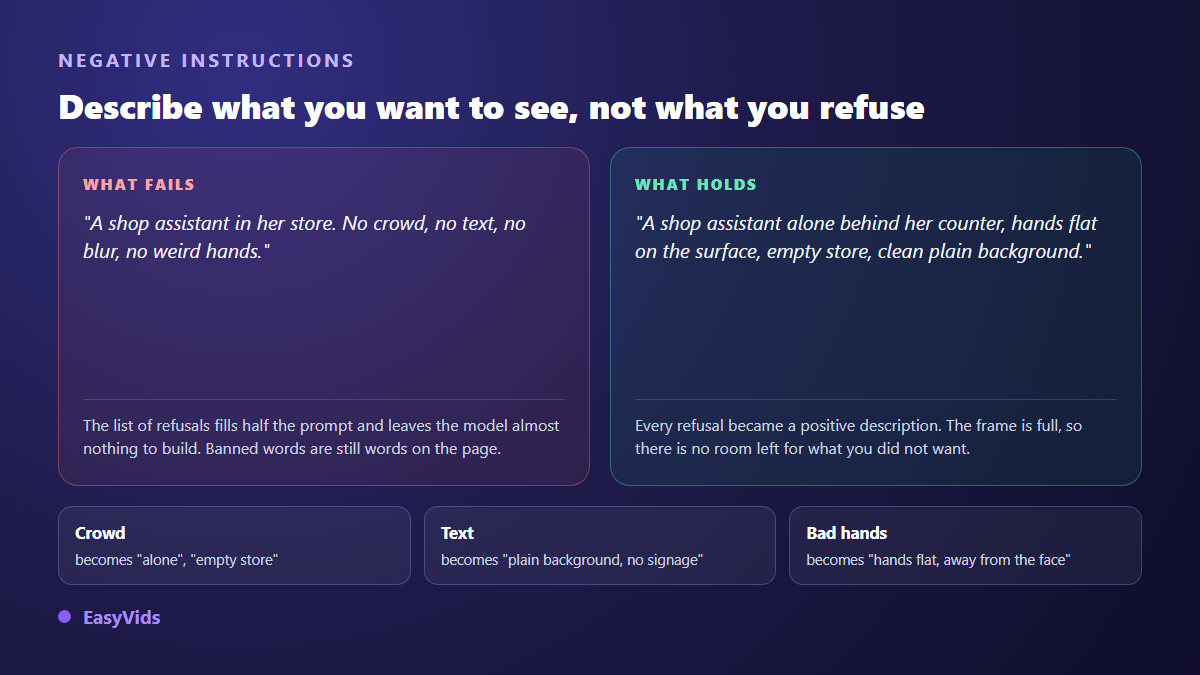
The rule fits in one line: fill the frame instead of emptying it. A fully described frame leaves no room for what you feared. Here are the conversions you will reuse on almost every shot.
- « No crowd » becomes « alone in the room », « empty street », « empty shop ».
- « No text » becomes « plain background », « unbranded packaging », « bare wall ».
- « No weird hands » becomes « hands flat on the table », « arms at their sides », or a framing that leaves them out.
- « Not looking at camera » becomes « looking at their work », « turned towards the window ». This anchor is what kills the frozen stare.
- « No sudden movement » becomes « slow push in », « camera static ».
- « No logos » becomes « generic unbranded object », « plain clothing ».
When the same exclusion returns on every video, stop retyping it. Our workshop stores two preference fields for exactly this, one for what to avoid in images and one for videos. They live on your account and are injected automatically when each scene prompt is written.
One variable at a time
This is the habit that separates people who improve from people who spin. When a shot disappoints, the temptation is to rewrite everything at once. The next shot may be better, but you will never know why, and you will not reproduce it on the following scene.
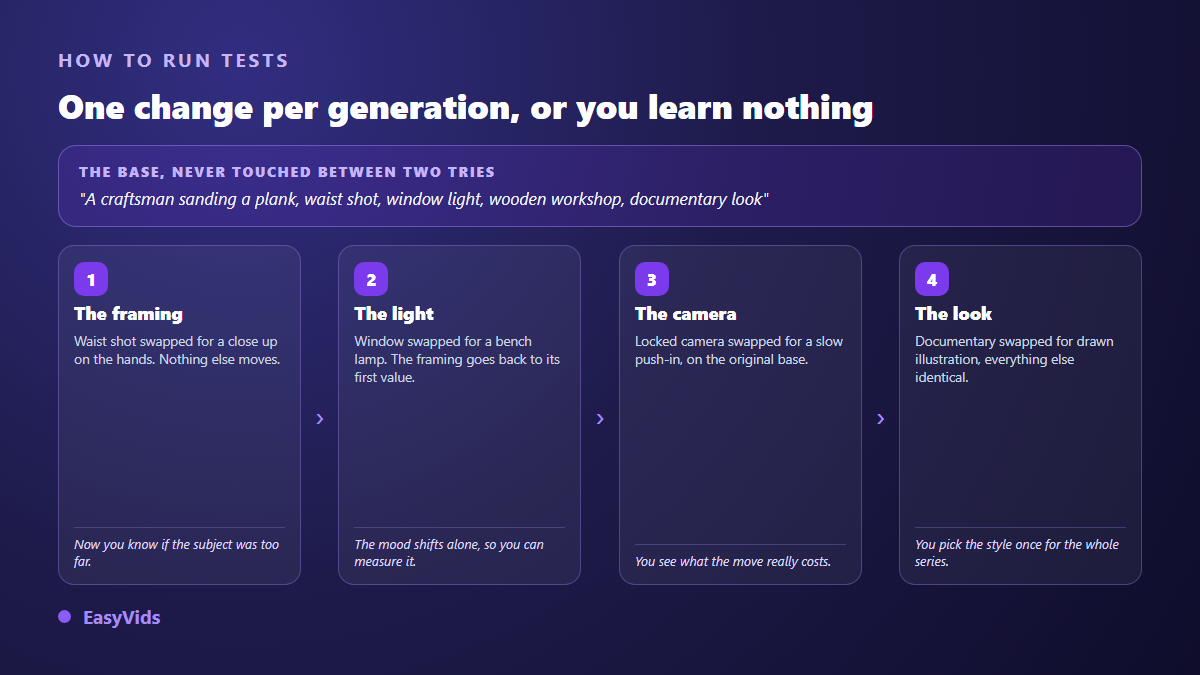
Lock a base prompt with all eight blocks, then test one block at a time, restoring the previous one before moving on. Four generations are usually enough to find the culprit, and you leave with a base you can reuse across the whole series. Write down every version you tried: a prompt that worked and was not saved is a prompt lost. Each generation also uses credits, so a planned loop of four tests costs far less than random retries. Plans are listed on the pricing page, and a free trial is enough to rehearse the method.
Twenty AI video prompts, sorted by use case
These are written in English on purpose and kept generic: swap in your own subject and keep the structure. Each one is followed by the reason it works, because a prompt copied without being understood only serves once.
Product and demo. These shots must stay slow and readable. The camera move is the only movement in the scene.
- A ceramic mug on a wooden counter, steam rising slowly, medium close shot, warm morning window light from the left, shallow depth of field, camera slowly pushing in, documentary photography look. Steam gives life, the slow push gives rhythm, nothing else moves.
- Two hands unboxing a small white cardboard box on a plain grey table, top down shot, soft even studio light, hands entering from the bottom of the frame, camera locked, clean commercial look. Saying where hands enter prevents arms appearing from nowhere.
- A running shoe rotating slowly on a matte black turntable, close shot at product height, single soft key light from the right, dark seamless background, camera static, high end product film. One named light source is enough for a studio look.
- A woman in her thirties wearing a plain lab coat, holding a small amber glass bottle at chest height, medium shot, subject on the right third, soft diffused light, blurred laboratory background, camera slowly tilting up, clean corporate look. Subject placement is an instruction, not luck.
- Macro shot of a thick cream being spread on a fingertip, extreme close up, soft side light, slow motion, camera static, glossy beauty film texture. Slow motion is a visual instruction, it needs no separate setting.
Social hooks in vertical. Declare vertical framing in the prompt and pick the aspect ratio in the generation options. Our step by step guide to a published YouTube video shows how these hooks chain into a real channel.
- A young man sitting on the edge of a bed, talking straight to camera, vertical framing, chest up, natural bedroom light, handheld camera with slight movement, he says: 'I stopped doing this three weeks ago'. The quoted line is performed as written, with sound.
- A person scrolling a phone late at night in a dark room, over the shoulder shot, screen glow lighting the face, vertical framing, camera static, grainy realistic look. Screen glow does all the mood work.
- A pair of hands writing a single word on a white board, close shot on the marker, vertical framing, bright even light, camera slowly pulling back to reveal the whole board, clean minimal look. The pull back is the hook by itself.
- A cook pouring sauce over a plate in a home kitchen, top down vertical shot, warm overhead light, steam rising, camera static, appetizing food film. Top down is the only angle that forgives an ordinary kitchen.
- A woman walking fast through a busy street at dusk, seen from the front, vertical framing, waist up, city lights out of focus behind her, camera walking backwards in front of her, cinematic night look. Describing camera position beats naming a technical move.
Story and narration. These shots serve a story, so they tolerate emptiness, silence and slowness, which happen to be what video models handle best. The text holding them together is written separately, before any shot list, and our guide to writing a video script shows how to lay that spine down.
- An old fisherman mending a net on a wooden pier at sunrise, wide shot, subject small in the left third, low golden light, calm sea behind, camera slowly craning up, warm cinematic look. A small subject in a big frame hides facial flaws.
- A child running down a narrow alley between clay walls, seen from behind, medium wide shot, hard midday sun, dust in the air, camera tracking behind at running speed, documentary look. Shooting from behind removes the face problem entirely.
- An empty classroom at night, moonlight through tall windows, wide static shot, dust floating in the light beams, slow cold blue grade, cinematic look. A shot with no character is the most reliable shot in your series.
- A woman opening a wooden door and stepping into the light, seen from inside a dark room, medium shot, strong backlight silhouetting her, camera static at eye level, high contrast cinematic look. Backlight turns a technical limit into a deliberate style.
- Two men sitting opposite each other at a small table, tense silence, medium two shot, single overhead bulb, dark surroundings, camera very slowly pushing in, film noir look. Silence has to be requested, otherwise ambience is invented.
Explainer, corporate and education. The constraint here is not beauty, it is legibility. A good explainer shot tells the eye instantly where to look.
- A hand placing three wooden blocks in a row on a white table, top down shot, bright even light, camera static, clean explainer look, plain surface with no writing. That last phrase replaces a « no text » that would have done nothing.
- A slow aerial shot moving forward over solar panels in a dry field at sunrise, wide shot, low warm light, camera flying forward at constant speed, documentary look. Constant speed avoids the strange acceleration of aerial shots.
- A woman in a plain office presenting to camera, waist up, standing on the left third, soft window light, blurred office behind, camera static, she says: 'here is what changes for your team'. The left third leaves the right free for a title added in the edit.
- Close shot on a metal gear turning slowly inside a clean machine housing, side view, cold industrial light, camera static, macro technical look. A simple slow mechanism always renders better than a complex machine.
- A paper map unfolding on a desk, hands smoothing the edges, top down shot, warm lamp light, camera slowly zooming out, stop motion paper craft look. A crafted style owns the fabrication and removes the realism question.
What gets a prompt rejected
A prompt can be perfectly written and still be blocked. Generation engines apply strict safety filters, and a rejected scene produces nothing at all. The refusals often surprise, because they hit wording you assumed was harmless: public figures even loosely evoked, children in ambiguous situations, weapons and blood even in obvious fiction, identifiable brands and logos, precise anatomical or medical terms, and a handful of technical words that trip the filter on their own.
The fix is to rephrase rather than insist. Replace the flagged term with a neutral equivalent, keep the scene, run again. One case sits apart: the moment a prompt describes a real, existing person, you leave technique and enter law. The European AI act imposes transparency on content imitating real people, and platforms add their own disclosure duties. The working rule is simple: never build someone's face without their written consent.
Letting the machine write the prompt, then correcting it
Writing twenty prompts by hand for a twenty scene series is long and repetitive. In our AI creation studio prompt writing is automated, and above all kept editable at every step, which is the part that matters. A prompt you cannot correct is a prompt you endure.
On a single generation, a button writes the prompt from a theme: give a style or an idea, a full English prompt appears in the field, and you edit it before launching. In the workshop, each scene carries its own image prompt and, if you want, a separate video prompt: the first builds a still visual, the second describes movement. You can regenerate one scene without touching the others. The director mode goes further on character series: it produces a full production plan where every scene gets its English prompt, with the physical description of the character copied word for word from scene to scene, anti pose anchors, and reference images attached to each shot.
The prompt is not everything: duration, ratio, references
Three settings live next to the prompt and often weigh more than it does. Duration is chosen in the options, not in the text: writing « a ten second video » changes nothing. Aspect ratio is picked the same way, and a model unable to produce your chosen ratio is filtered out of the list rather than returning a cropped result. Reference images outweigh ten lines of description and are the only reliable way to keep the same character, product or setting across shots. Resolution is set upstream; the official YouTube encoding recommendations give the values to target if that is your destination. Other practical questions are grouped in our help centre.
Frequently asked questions
Should AI video prompts be written in English?
Yes. Video models handle English framing, lighting and movement vocabulary far better, and results are noticeably more stable. Your script, voice over and dialogue stay in the language of your video. Prompt language and spoken language are independent.
How long should a video prompt be?
Three to five sentences, around sixty words. Shorter and blocks are missing, so the model invents. Longer and instructions contradict each other, with the last ones often ignored. If your prompt keeps growing, you have probably packed two shots into one.
How do I keep the same character across shots?
With a reference image attached to every scene, never with a copied description. A repeated description gives you a convincing cousin, not the same person. Add an explicit instruction to keep face, hair and outfit, and avoid abrupt lighting changes between neighbouring shots.
Do negative prompts actually work?
Rarely in the « no something » form. Most video models have no dedicated exclusion field, so your list is blended into the prompt. Translate each ban into a positive description: a fully filled frame leaves no room for what you wanted to avoid.
Why does my video look nothing like my prompt?
Three causes cover most cases: a prompt describing a pose instead of an action, two events stacked into one shot, or a duration and ratio setting incompatible with the scene. Go back to the base prompt, test one variable at a time, and the culprit usually shows up on the second run.
A video prompt is written like a shot note: describe, frame, light, move the camera, then listen. The method needs no special talent and no clever vocabulary, only consistency and a base you do not change at random. Take one of the twenty examples above, swap in your own subject, and run a first shot: creating an account opens the studio and lets you rehearse your base before committing to a full series.