Your budget burns, impressions climb, and orders stay flat. The instinct is to rebuild the targeting. That is almost always the wrong lead. Now that Meta hands most of the distribution over to its own models, the video sorts the audience rather than the other way round. Facebook video ads that convert are not prettier than the rest: they are built in a precise order, where every second answers an objection the viewer has not yet put into words.
This article takes that structure apart, block by block: what has to appear before the third second, where the proof belongs, what single request closes the ad, and how to ship several versions of the same offer without losing a week. It works for a physical product and for a service alike, and it extends our guide to product video, of which the paid creative is simply the most demanding case.
The short answer
A converting video creative holds five blocks, always in the same order: a visual hook landed in under three seconds, the customer problem named in one sentence, a demonstration of the product in use, proof that removes doubt, then one single call to action. It has to make complete sense with the sound off, which means captions. It is framed vertically. And it exists in several versions, because the winning variation is discovered by testing, never by picking.
Why the creative now outweighs the targeting
Manual targeting controls have shrunk year after year, and Meta now pushes campaigns where audience and placement choices are largely delegated to its algorithm, branded Advantage+ in its documentation for advertisers. In practice the system shows your ad to a broad audience, watches who responds, then concentrates delivery. The signal it watches comes from the video. A weak creative produces a weak signal, and the system has nothing left to learn from.
That changes the job. The lever is no longer to uncover a hidden audience, but to produce enough different creatives for the algorithm to find its own. A good campaign today looks like a production workshop, not a targeting spreadsheet.
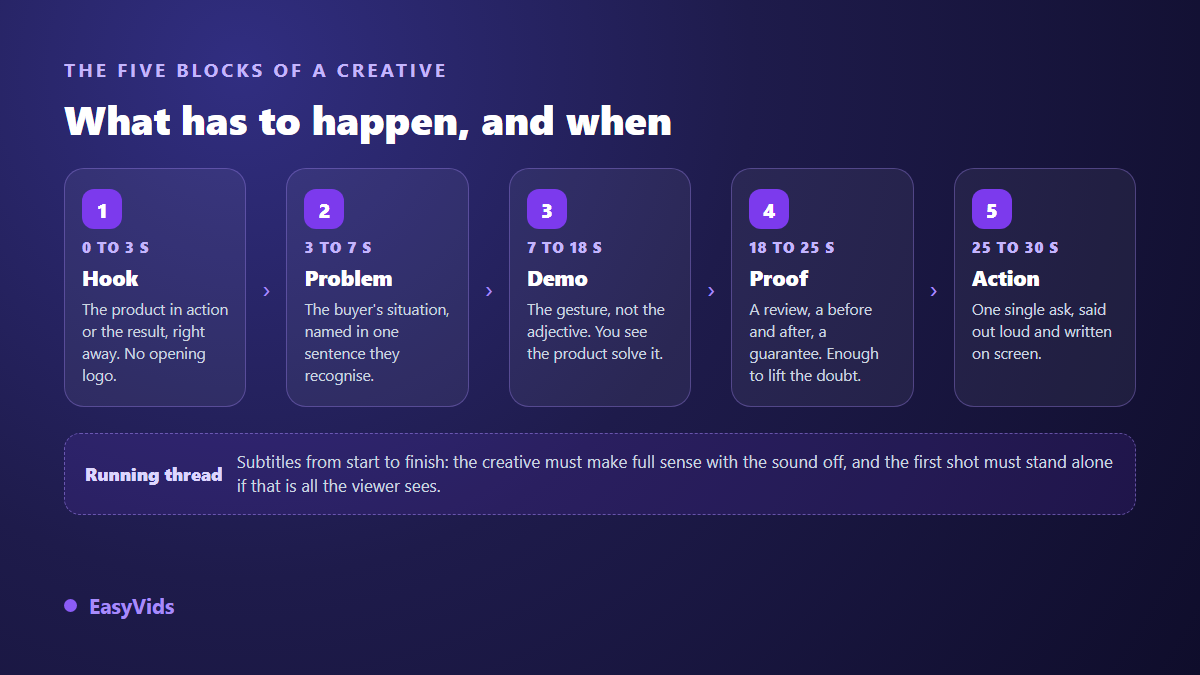
Block 1: the first three seconds carry everything
The first second is not there to explain, it is there to stop the thumb. What works: the product already in use, a visible result before any explanation, an unexpected gesture, a face speaking in close up. What does not: an opening logo, a brand plate, a polite introduction. The brand introduces itself once the viewer is held, not before.
The hook also has to work on mute. Meta's creative best practices recommend designing feed videos to be understood without sound, and the hook is where that rule bites first. An opening that rests entirely on a spoken line vanishes for a large share of the audience.
Block 2: name the problem before you mention the product
Viewers do not buy an object, they buy their way out of a situation. The second block names that situation in their own words: the pan that sticks, the back that aches after an hour, the tangle of cables at the bottom of the bag. The more concrete the wording, the faster the recognition.
A simple way to find those lines is to read reviews of comparable products and lift the exact phrasing buyers use. A winning creative rarely sounds like a product page, it sounds like an annoyed customer minutes before they find the fix.
Block 3: show it, never describe it
This is the longest block and the one most often botched. Describing a benefit convinces nobody, showing the gesture does. A hand pouring, a surface wiped clean in one pass, a garment springing back into shape: the camera does the work ten adjectives will never do. Plan two to four short shots rather than one long take, and give each shot a single idea. When the product is not in your hands yet, our guide to product demonstration video shows how supplier photos become credible usage shots.
Block 4: proof, placed before the hesitation
Once the demonstration lands, an interested viewer starts looking for a reason to disbelieve you. The fourth block gets there first: a customer review on screen, a filmed before and after, a stated guarantee, a manufacturing detail. Proof has to arrive before the objection, otherwise the viewer has already left to look for it elsewhere.
Block 5: one request, spoken and written
A creative that asks for three things gets none of them. Pick the single action you want, say it out loud, write it on screen, and match it to the ad button. If the button offers to buy while the voice invites people to follow you, the friction is yours, not the market's. Keep the closing shot to two or three seconds. Meta calls it ThruPlay, in its business help centre, when a video is watched to the end or for at least fifteen seconds, and overlong endings are the first thing to damage that number.
Format, sound and the zones to keep clear
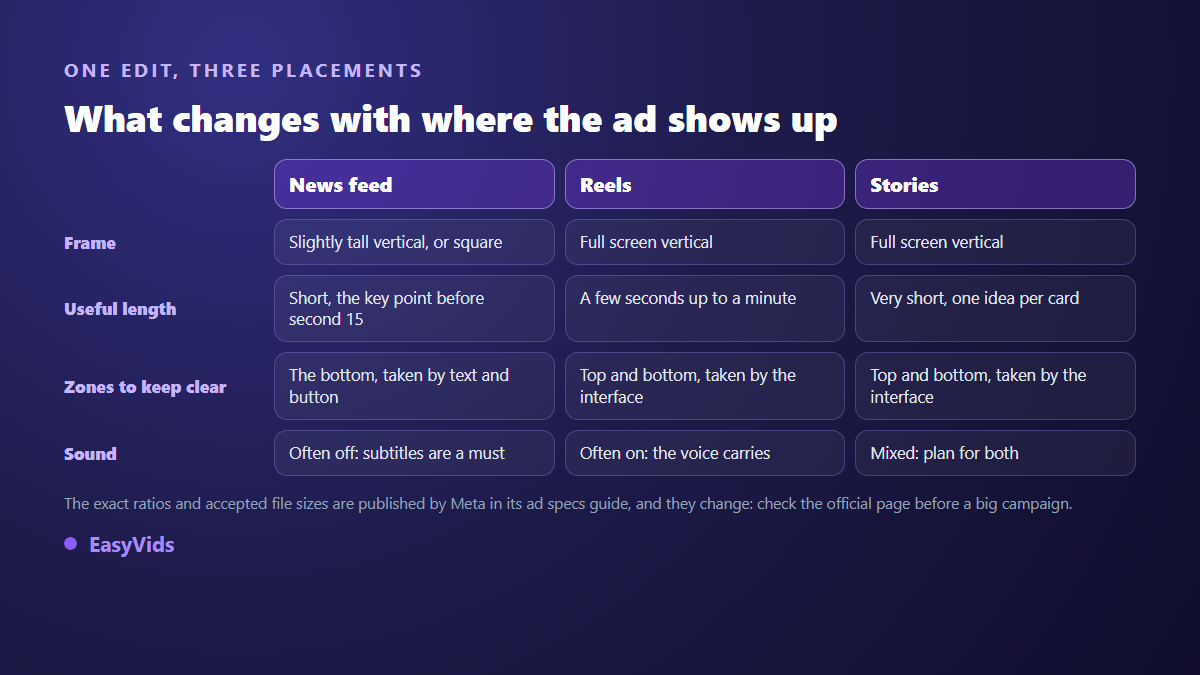
Meta publishes its recommended ratios in its advertising specifications guide: a slightly tall vertical frame for feed video, full screen vertical for Reels and stories. Those official pages move, so they deserve a check before any campaign of scale. The rest is editing discipline that applies everywhere.
- Frame the subject centrally: the interface takes the top and bottom of a full screen placement.
- Keep burned in text away from the edges, it slides under the call to action button.
- Add captions from start to finish, even when the voice over is excellent.
- Check legibility on a phone, not on the screen you edited on.
- Prepare a shorter cut for stories, where attention is measured in moments.
Write the script before you open any editor
A thirty second creative fits on half a page. Writing that half page takes ten minutes and saves hours: you then know how many shots to produce, in what order, and what line sits on each one. In EasyVids the script length is set by target duration rather than by word count, with a tone of your choice and an option that closes the text on a call to action.
The script then becomes the production plan: each block of the anatomy maps to one shot to build. The one shot generator inside the EasyVids studio accepts reference images, including your product photo, outputs vertical, square or horizontal, and lets several generations run in parallel while you write the rest. The online editor takes over for on screen text, music and captions transcribed from the voice. What each plan allows is set out on the pricing page.
Nine variations beat one perfect creative
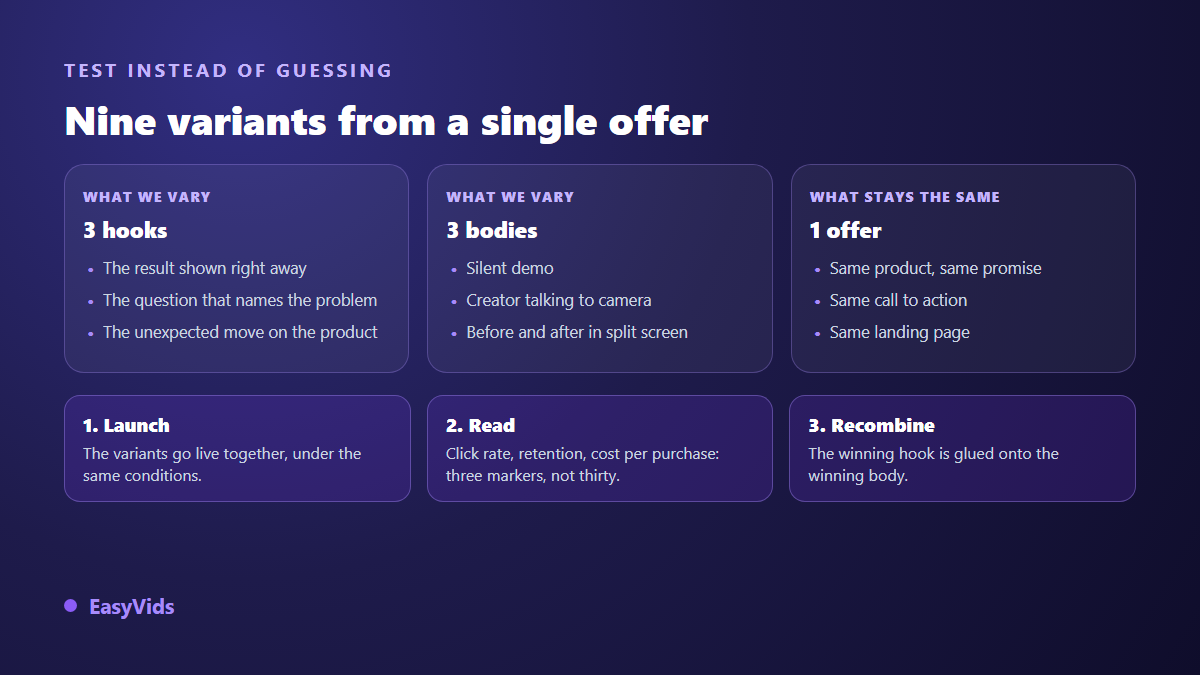
Nobody knows in advance which hook wins. The method that holds is to freeze the offer and vary two things only: the hook and the body. Three hooks crossed with three bodies give nine variations from one script, comparable with each other because the promise, the call to action and the landing page never move.
Launch them together, read three metrics rather than thirty, then recombine: the hook that holds attention gets pasted onto the body that sells. This volume of production is what makes AI generation worth an advertiser's time, and our method for product presentation videos without stock applies the same principle to a whole catalogue.
The mistakes that sink a creative
- Opening on the logo: three seconds gone, and they were the only ones that counted.
- Describing instead of showing: every adjective stands in for a missing shot.
- Stacking arguments: one benefit per creative, the others become other variations.
- Skipping captions: half the message leaves with the sound.
- Changing the offer between variations: the test stops measuring anything.
- Stopping at the first creative that works: it will fatigue, and no replacement will be ready.
Frequently asked questions
How long should a Facebook video ad be?
Fifteen to thirty seconds for a selling creative in the feed, shorter still in stories. The useful constraint is not total length but order: if the demonstration has not started by the tenth second, the video is too slow whatever its duration.
Do I need a human face in the creative?
Not necessarily. A talking face performs well on products that need explaining, while silent demonstrations do better on products whose use is obvious in one shot. Test both bodies on the same offer instead of deciding on principle.
Can I run an AI generated video as a Facebook ad?
Yes. Meta's advertising standards do not ban computer generated content as such: they target deceptive advertising, unsubstantiated claims and shocking visuals. Meta does require a disclosure for political and social issue ads that use digitally created images or audio, a rule the company announced in 2024. For an everyday product, the line is simply never to show a result the product does not deliver.
How many creatives should I test before finding the right one?
More than you expect, and the exact number depends on your market. Think in batches: one batch of variations from a single script, one lesson learned, one next batch built on that lesson. A single failed creative teaches nothing, a batch always teaches something.
Do I have to rebuild the video for every placement?
No, but a crop alone will not do either. Start from the same edit, export to the right frame and move the burned in text so it stays clear of interface zones. In an online editor that adaptation takes a few minutes per placement once the vertical version is finished.
Facebook video ads that convert do not come from inspiration. They come from a structure held to the end, a script written before the edit, and a batch of variations submitted to the market without sentiment. Start with the simplest experiment there is: take your best current ad, rewrite its hook three ways, and let the numbers pick the winner. Creating an account opens the full studio, script, shot generation, voice over and editor, enough to produce those three variations today.