Your channel is running, the view counter climbs, and the figure in YouTube Studio looks nothing like the numbers you read before starting. That is normal. Almost every estimate floating around ignores the one metric that decides the outcome: your YouTube RPM. Two channels with identical view counts can bank wildly different sums, because that number swings by a factor of ten depending on the topic and the audience behind it.
This page covers what RPM really measures, why some niches pay several times more than others, and what you can change without leaving your subject. You will not find a per-topic rate card here, for a simple reason: YouTube does not publish one, and the tables circulating online rarely say where their figures came from. If you want a full revenue projection instead, our detailed breakdown of what an automated channel earns walks through the whole calculation.
The short answer
RPM is the revenue you actually keep per thousand views, all sources combined, after the platform takes its share. You read it in YouTube Studio, in the revenue tab. The niches that pay the most are those where the viewer stands one step away from a serious purchase: finance, insurance, tax, real estate, business software, professional training. The ones that pay least live on mass entertainment and very young audiences. Between the two extremes, three factors weigh almost as much as the topic: where your views come from, how long your videos run, and which format you publish.
What RPM adds up, and what it leaves out
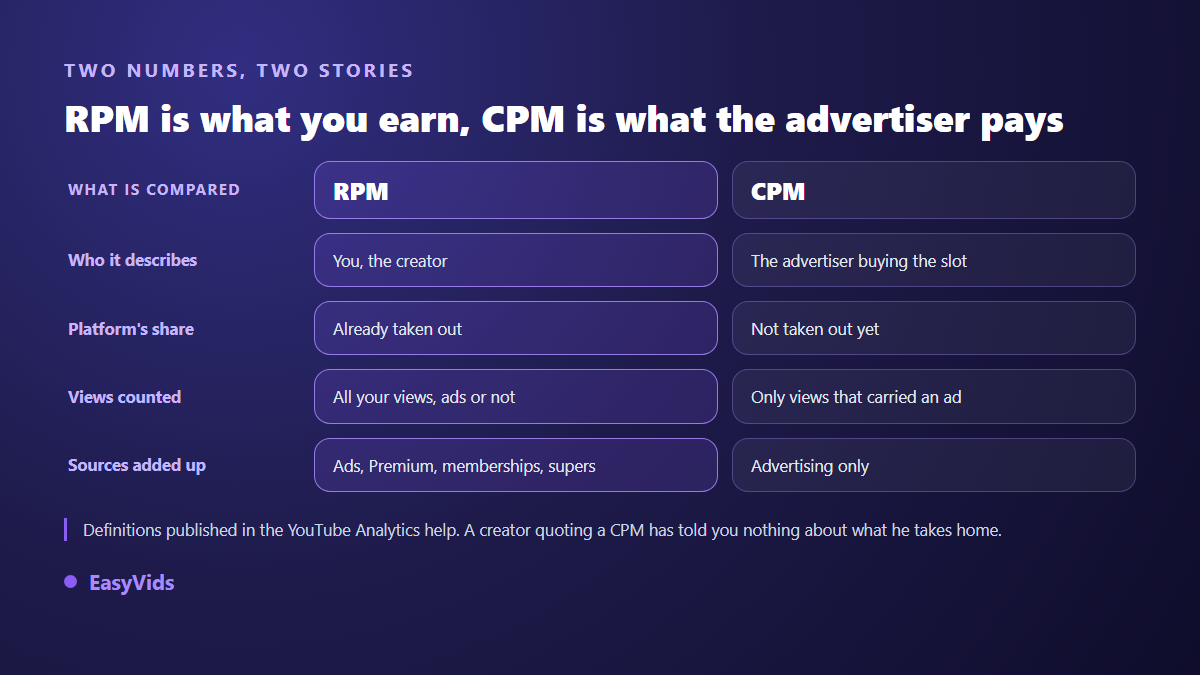
According to YouTube Analytics help, RPM divides your total revenue by your total views, then multiplies by a thousand. Two details in that definition change everything. The revenue counted is what reaches you, after the platform share. And the denominator includes every view, including the ones that carried no advertising at all, because the viewer skipped the ad, ran a blocker, or watched a video that served none.
RPM also gathers what advertising alone never shows: revenue tied to Premium subscribers, channel memberships, thanks and other fan funding features. CPM describes something else entirely, from the buyer's side: what an advertiser pays for a thousand ad impressions, before any split. On long-form watch page videos, YouTube's help centre states that creators receive 55 % of advertising revenue. Your RPM therefore always sits well below any CPM quoted publicly, and mixing the two up is enough to inflate a revenue forecast twofold or threefold.
Where to read your RPM in YouTube Studio
The number lives in YouTube Studio, in the revenue tab of your analytics. You get a channel RPM for the selected period, and a per video RPM inside each publication's stats. The second level is the one that teaches you something. A channel average blends videos with nothing in common, and hides exactly the topics that pay.
- The period: twelve rolling months for a solid base, never a single week after one video took off.
- RPM per video: find your three best paid uploads, then look for what they share.
- Audience geography, in the audience tab: it often explains half the gap between two videos.
- Content type: separate long-form, Shorts and live streams, because they are not paid the same way.
- The gap between views and monetised views: if it widens, look at rules and packaging, not at your audience.
Why one niche pays several times more than another
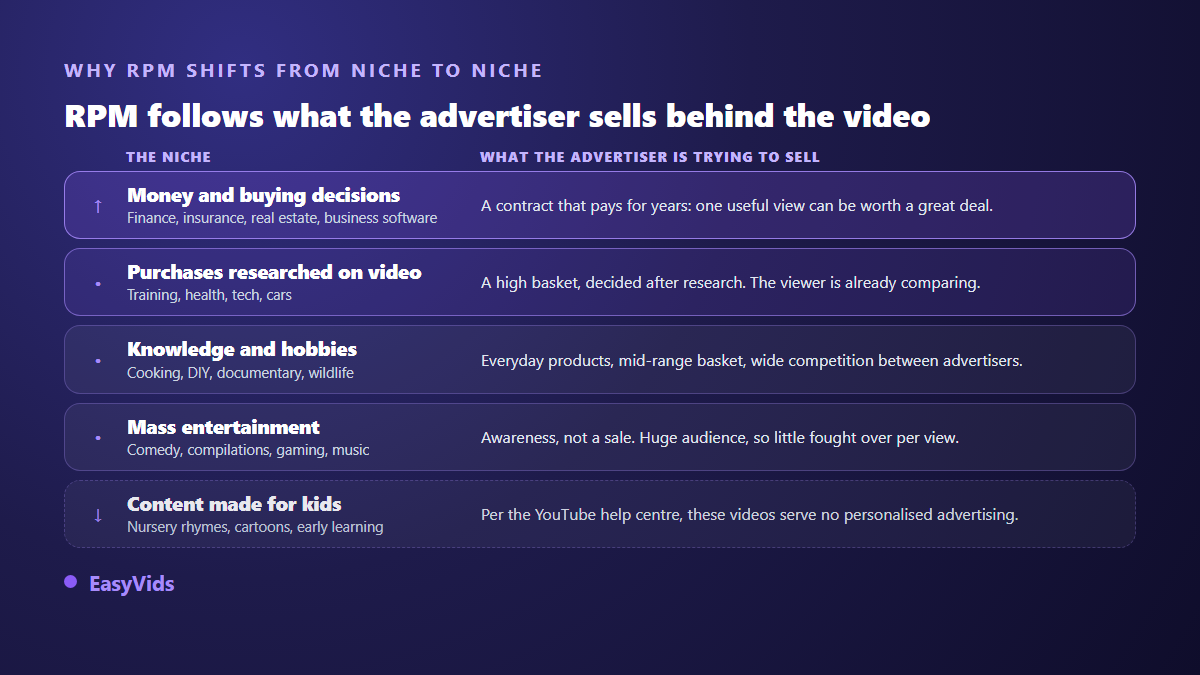
YouTube ads are sold at auction. What you earn rewards neither your editing skills nor your hours of work: it mirrors what an advertiser will spend to reach the person sitting in front of your video. An insurance broker covers their costs with a single signed contract, so they can bid very high. A free mobile game publisher cannot match that, however many viewers are watching.
This mechanism explains a result that surprises many creators. A personal finance channel with a few tens of thousands of monthly views can bank more than an entertainment channel pulling ten times that. Before picking a topic for its RPM, look at the other side of the scale: the best paid niches demand an accuracy that mass production handles badly, and a mistake on a money topic costs you trust. Our review of profitable niches for an automated channel covers that trade off.
The highest paying niches, and what they demand in return
At the top sit the topics that come just before a significant expense: personal finance, insurance, tax, real estate, investing, business software, marketing and sales. What they share is not a theme but a distance, the gap between your viewer and a purchase. The shorter that gap and the bigger the basket, the higher the bid climbs. Just below come purchases researched on video: training, health and wellbeing, consumer technology, cars, travel. That second tier is often the sensible compromise, because it can be treated seriously without regulated expertise.
The middle of the ladder gathers knowledge and hobbies: cooking, DIY, documentary, wildlife, sport, general education. At the bottom sit the most watched and least sellable formats, comedy, compilations and ambient music. One case deserves its own line, because it traps entire mass produced channels. According to YouTube's help centre, a video flagged as made for kids does not serve personalised advertising, which pushes revenue per view sharply down. Hundreds of nursery rhyme episodes can therefore earn less than a handful of videos on a professional subject.
Where your audience lives matters as much as your topic
The same subject is not worth the same in every advertising market, because advertisers do not commit the same budgets everywhere. A channel whose audience spreads across several continents shows an average RPM that describes nothing precise: it is a blend. Open the geography tab before drawing any conclusion about your niche. Your publishing language then becomes an economic decision as much as an editorial one, since aiming at a market where advertisers spend more moves your RPM without changing a line of your script.
Seven levers that lift RPM without changing niche
Switching topic is the heaviest decision, and rarely the first one to take. Seven settings act on RPM with your content unchanged, and most of them take one evening.
- Go past eight minutes: according to YouTube's help centre, mid-roll ads are only available from that length. It is the most direct lever.
- Place those breaks at the pauses in your story, never mid sentence: a forced interruption closes the video, and a lost view earns nothing.
- Stay inside the advertiser friendly guidelines: a shock title or a graphic thumbnail is enough to push a healthy video into limited monetisation.
- Check your soundtracks: a Content ID claim can redirect a video's revenue to the rights holder. You keep the views, you lose the income.
- Cover the topics closest to a decision inside your theme: a tools comparison attracts better advertisers than a string of anecdotes.
- Protect watch time: a video watched longer carries more ad slots and feeds recommendation at the same time.
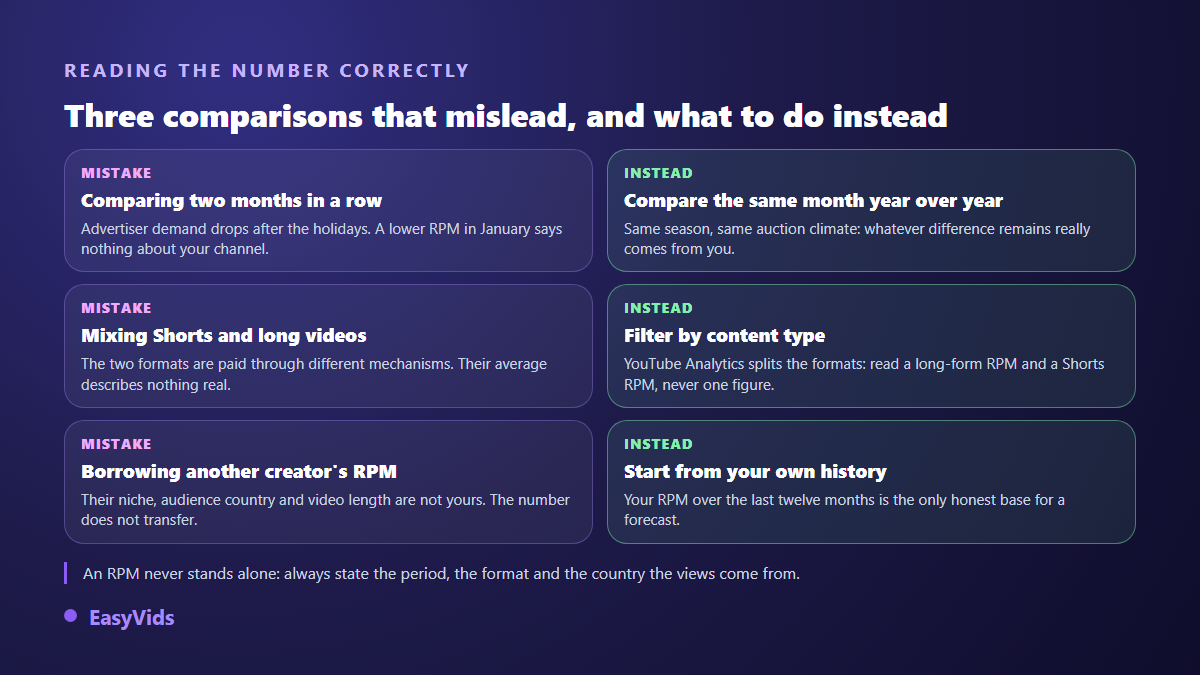
- Compare like for like across seasons: advertiser demand drops after the year end holidays, and a lower RPM in January signals nothing wrong.
One point outweighs all seven: channel compliance. A channel judged outside the monetisation policies earns nothing, whatever its theoretical RPM. If you lean on generation tools, the exact rules for monetising AI produced content deserve a careful read before you publish in volume.
Shorts are paid on a different mechanism
Never blend Shorts and long-form into one average. According to YouTube's help centre, Shorts advertising revenue first goes into a shared pool, from which the platform covers music rights holders, before allocating 45 % of the remainder to creators, split by share of views. Revenue per view on a Short therefore sits structurally far below long-form. That does not make it a bad format: it is an acquisition channel that fills the long-form catalogue, as long as you count it separately. Our method for producing Shorts with AI sets out a pace you can hold.
Comparing an RPM without fooling yourself
Another creator's RPM teaches you almost nothing. Their niche, their audience, their video length and the season they measured differ from yours, and they rarely state those four parameters. The only honest benchmark is your own history, read over twelve months, format by format.
RPM only describes half of your income
Channels that genuinely make a living almost never live on advertising alone. It works as a base: steady, predictable, modest. The rest comes from what you build around the audience, and none of it depends on an auction. A mid ladder niche carries a course, a paid template or a brand deal very well, sometimes better than a high RPM niche whose audience compares without buying. Our overview of serious ways to monetise artificial intelligence goes through each route.
Publishing enough long videos for RPM to matter
An excellent RPM across three videos a year fills no bank account. The real constraint is output: aim for eight to twelve useful minutes, hold a regular pace, keep the quality steady. That is precisely what an AI creation studio takes over. On EasyVids, the script generator writes text calibrated to a voice over duration, the Director splits it into scenes and builds the visuals, the narration and the music, then the online editor adds captions and branding. Your catalogue grows without a studio or a crew, and the plans are listed on the pricing page.
Frequently asked questions
What counts as a good YouTube RPM?
No figure serves as a reference, and any page quoting one without a source is telling you a story: YouTube publishes no rate card by topic. A good RPM is first a stable or rising RPM in your own history, at comparable season and format. If you want an outside marker, use the ranking of niches rather than an average, and check whether you sit at the top, the middle or the bottom of the ladder.
Why did my RPM drop from one month to the next?
Three causes cover nearly every case. Season first, since advertiser demand falls sharply after the year end holidays. Format mix second: one Short taking off drags a channel average down while nothing has deteriorated. Geography third, when a spike of views arrives from a market with smaller advertising budgets. Check those three before touching your editorial line.
Is the RPM on Shorts really lower?
Yes, and it is structural. According to YouTube's help centre, Shorts are paid from a shared pool split by share of views, after music rights holders are covered, while a long video is paid on the ads it serves itself. Treat Shorts as an acquisition channel, never as your main income line.
Can I raise my RPM without changing niche?
Yes, within limits. Passing eight minutes opens mid-roll placements, staying inside the advertiser friendly guidelines avoids limited monetisation, and covering the topics closest to a purchase decision attracts better advertisers inside your own theme. Your niche ceiling does not move: these settings push you towards the top of your range, they do not move you into another category.
Do AI produced videos earn a lower RPM?
How a video was made does not enter the calculation: RPM depends on the advertiser, the audience and the format, not on the tool that built the images. What really weighs is policy compliance. A channel judged repetitive and lacking its own contribution loses monetisation, and its RPM then falls to zero. An original story, a considered voice and a deliberate edit sit well within the rules.
RPM is not a fate handed down by your niche: it is the sum of a topic, an audience, a length and some discipline with platform policy. Start by reading your own figure over twelve months, format by format, then change one thing at a time and watch what moves. To produce the long videos that make that number worth something, create your account and run the full chain, from script to edit, inside the EasyVids studio.