You have seen the demo reel. A few seconds of footage, cinematic light, a camera move that looks handled by a professional, and the feeling that filming just became optional. Now you want a Runway review that tells you what happens next. The useful question is not whether the tool impresses you, because it does. It is what you get back when you ask it for a whole video, with an opening, an ending, a voice, and a publishing date.
This review starts from that gap, the one between a beautiful shot and a publishable video. It covers what Runway does in 2026, what it leaves entirely on your plate, and the exact point where a solo creator should look elsewhere. If you are still assembling your toolkit, our comparison of AI tools for content creators places each family of tools next to the others.
The short verdict
Runway remains one of the best places to build a shot. Image texture, how a face holds inside a moving frame, the ability to rework footage you already own: few tools match it on that ground. The weakness is not quality, it is scope. Runway stops at the shot. It does not write your script, does not split your story into scenes, and does not hand you an edited, captioned file in the aspect ratio your platform expects. For a director or a production studio, that is exactly right. For someone publishing several videos a week, the road left after generation is longer than the road just travelled.
Runway in 2026: four building blocks, not one model
Reviews contradict each other because they describe different products. Runway AI, a New York company founded in 2018, does not sell one generator: it stacks several families of tools. According to the research announcements published by Runway, the Gen-4 generation arrived in spring 2025 with character and scene consistency as its headline claim. The next flagship model, Gen-4.5, was introduced by Runway in December 2025, producing short shots with audio generated alongside the picture.
Two tools of a different nature complete the set. Aleph, released to paid plans in late July 2025 according to Runway's own release notes, does not build a shot: it transforms an existing one. Change the light, swap the season, erase an object, obtain a camera angle nobody filmed. Act-Two transfers your webcam performance onto a generated character. And since Runway opened its developer offering in July 2026, third-party models are served from inside the same interface.
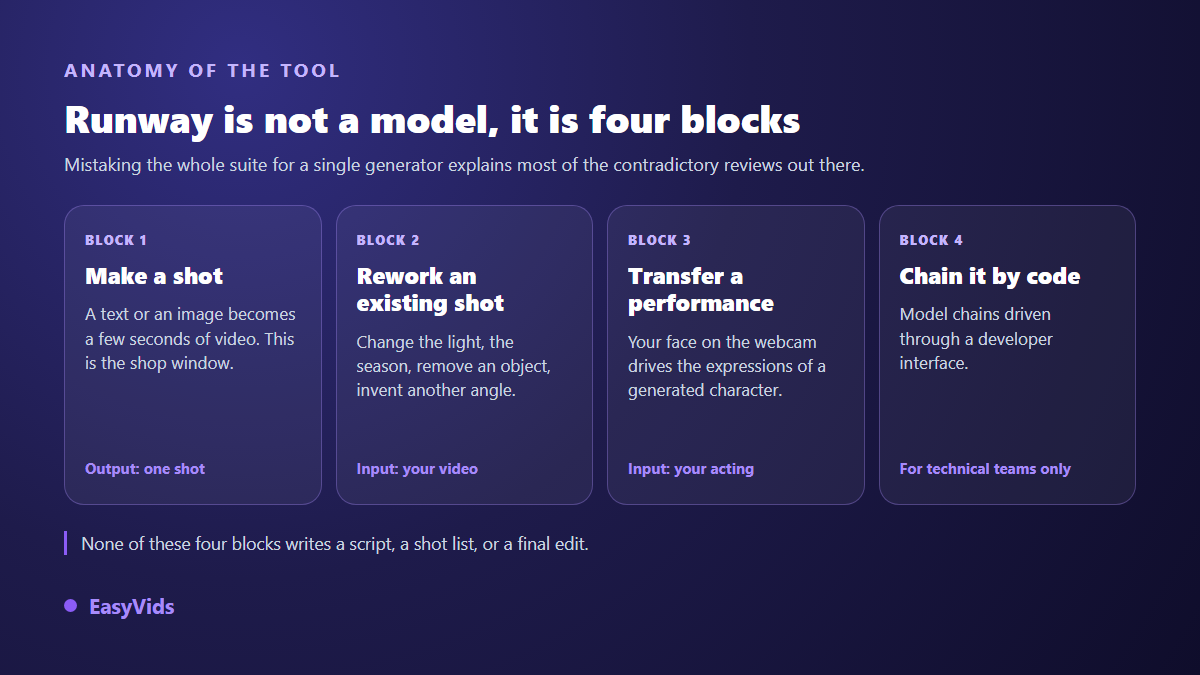
Keep that map in mind before reading any verdict. Someone judging Runway on reworking a filmed rush and someone judging it on feeding a YouTube channel are not testing the same product. Both can be right inside their own lane.
What Runway genuinely does well
The first strength is cinematography. Shots come out with visual intent: believable depth of field, materials that answer to light, camera moves that read like a cinematographer rather than a software zoom. On an atmosphere shot, a slow travel through a set, a product turning in the light, the result holds up on a large screen. That is exactly what creators chase when they want a cinematic look, a subject we cover in our guide to realistic AI video.
The second strength is rarer on the market: editing what already exists. Start from real footage, describe a change in one sentence, get back a coherent variant. A grey sky becomes a sunset. A distracting passer-by disappears from the background. A reverse angle appears although no camera ever shot it. For anyone working with filmed material, that family of features alone can justify the subscription.
- Image quality on atmosphere, landscape and product shots.
- Transforming existing footage from a written instruction.
- Face consistency inside a single shot, including through movement.
- Transferring a webcam performance onto a generated character.
- Access to several model families from one subscription.
- A workspace built for technical teams, with programmatic access.
Where a real project starts to hurt
The first wall appears at the second shot. A generation model remembers nothing of what it just produced. The same character returns with a slightly different jacket, hair that moved, light coming from the other side. Workarounds exist, mainly feeding reference images back in, but they demand discipline and a visual library kept up to date. Demo reels never show that step, although it eats most of the real working time.
The second wall is the success rate. A descriptive shot often lands on the first try. A shot describing precise action, two people crossing paths, a hand grabbing an object, takes several attempts. Across our own generations, whichever engine is behind them, the rule holds without exception: the more complex the action, the higher the attempt count. The third wall is more ordinary but costs beginners dearly, and that is the learning curve. The interface speaks to image professionals, the vocabulary comes from film sets, and English is the working language.
The calculation nobody runs before subscribing
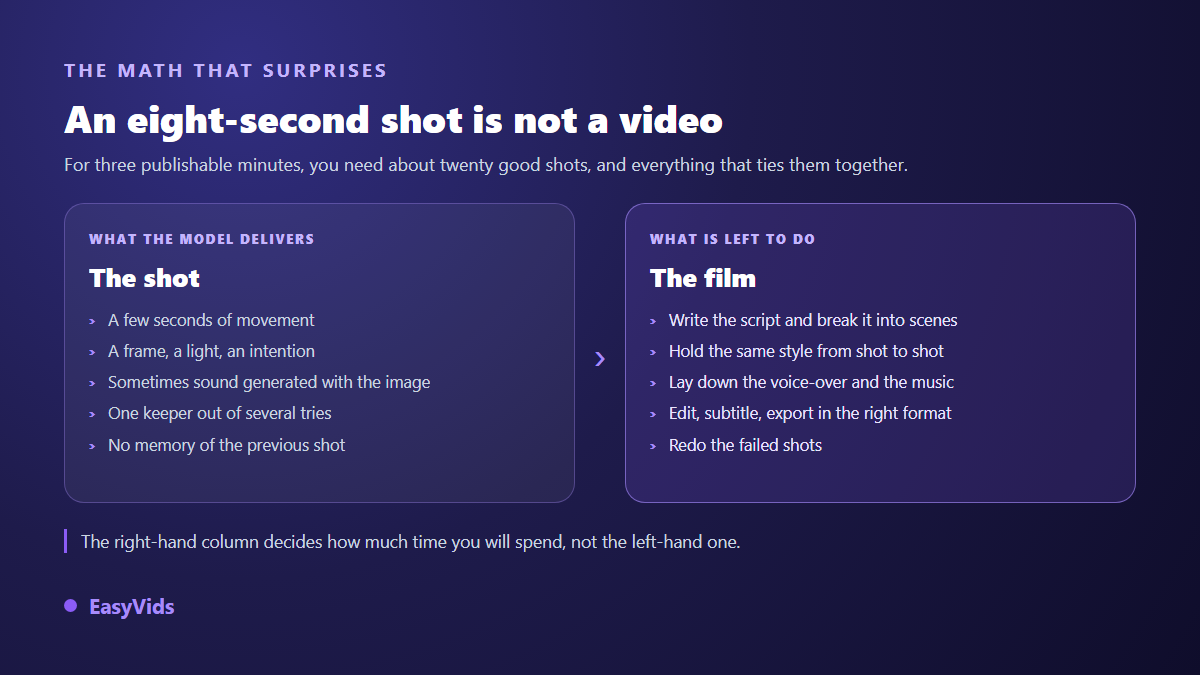
Take a three minute narrative video, a common YouTube format. With shots of five to ten seconds, you need around twenty successful ones. Add failed attempts and the generation counter doubles easily. Then add the script, the scene breakdown, the voice, the music, the edit, the captions and the export. Runway covers one of those boxes. A full film project makes the gap obvious, as shown in our method for making a complete film with AI.
That is where the verdict forms. If your deliverable is a shot, or a handful of shots sold to a client, Runway works for you. If your deliverable is a finished video, the tool covers a fifth of the journey and the rest falls back on you or on three more subscriptions. Studios that assemble the whole chain, from text to edit, answer a different need, explained in our complete guide to AI video generators.
Credits: the real subject, and how to look at it
Runway runs on credits. Every generation consumes some, depending on the model, the duration and the resolution. The detail changes often, which is why comparing grids is pointless: they expire before they become useful. One thing matters, and it is rarely said. Failed attempts consume exactly as much as successful ones. Your real spend therefore depends on your success rate, meaning on your prompting practice, far more than on any advertised figure. We laid out the method in our analysis of what an AI video really costs, and our own plans sit on the pricing page.
The right indicator fits in one line: what a published video costs you, not what a generation costs. A tool that produces a stunning shot in three attempts can end up heavier than a decent tool that lands on the first try, especially once you add an editor, a voice service and a captioning service to finish the job.
The free plan: what it honestly allows
According to the Runway help centre, the free tier rests on a limited credit allowance, exports carry a visible watermark, and higher resolution output stays on paid plans. The message is clear enough: it is a trial, not a production mode. You can judge image quality, test two or three shot ideas, measure your own success rate. You cannot feed a channel with it. That is not a criticism, it is how the whole sector works, and it is better known before you build a publishing calendar on top of it.
Who should pick Runway
The tool speaks first to people whose craft is the image. An editor rescuing a sequence, a director chasing a shot nobody can film, an agency selling premium visuals, a studio testing an art direction before an expensive shoot. In all those cases, time spent on attempts is part of the job, and the quality obtained repays the patience.
- You sell shots rather than finished videos, and clients judge the image.
- You start from footage you already filmed and want to transform.
- You explore an art direction before committing to a real shoot.
- You can write a cinematic prompt and you accept several attempts.
- You already edit in another application and expect no help there.
Who should look elsewhere
The opposite profile is the creator who publishes often and alone. A YouTube channel fed every week, an online store refreshing its product pages, a trainer turning a course into video, a brand testing ad creatives. There, the need is not one sublime shot, it is a complete and fast chain. The same reasoning applies to avatar tools built on another promise, as we explain in our detailed Synthesia review.
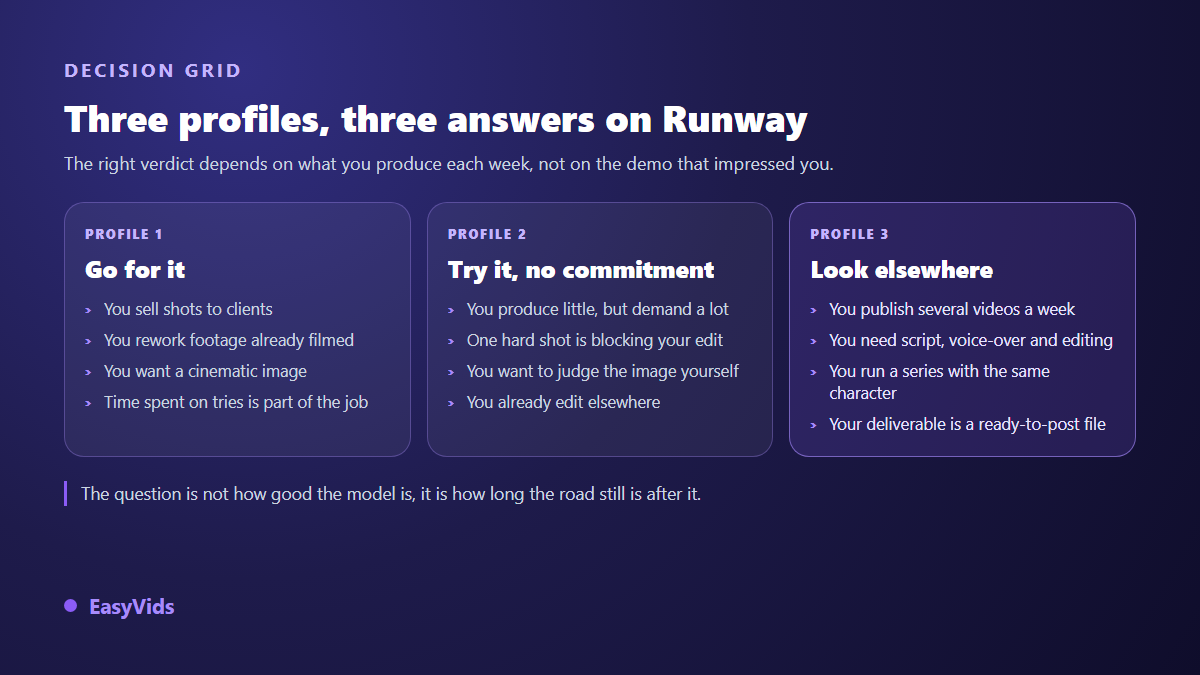
That reasoning is why EasyVids is built the other way round. The Director starts from a one sentence idea, writes the text, splits it into scenes, generates the shots, lays a voice over and music, then assembles everything. The one-shot generator answers the opposite need, a single video to produce fast, with a choice of model, format, duration and up to four reference images. The online editor then lets you take one scene back without relaunching the whole production, and the aspect ratio chosen at the start holds all the way to export.
Forming your own verdict in one evening
No review, including this one, replaces a test on your own material. The method below takes about two hours and gives a firm answer, because it measures the whole journey instead of one isolated frame.
- Pick a real pending project rather than a demo idea: a video you had to publish anyway.
- Write the script separately, time it out loud, then cut it into shots of five to ten seconds.
- Generate the three hardest shots on the list and record how many attempts each one needs.
- Regenerate the first shot with the same character from another angle, and judge how far the face drifts.
- Time what is left afterwards: voice, music, edit, captions, export.
- Compare that total with the hours you can give a single video every week.
Frequently asked questions
Is Runway free?
A free tier exists, but it is made for trying, not for producing. According to the Runway help centre it rests on a limited credit allowance and stamps exports with a watermark. Treat it as one evaluation session, judge the image, then decide.
Do Runway videos carry a watermark?
On the free tier they do, according to Runway's own documentation. Paid plans remove that mark and unlock higher definition output. Check this before any client delivery: a watermark on an invoiced video is an expensive mistake to explain.
Can Runway output be used commercially?
Runway's terms of service assign generated content to the user, subject to the prohibited uses they list, and the rights granted vary with the plan you subscribe to. Read those terms on the day you sign, especially for paid work: they change over time, and a forum screenshot proves nothing.
Can Runway produce a full video with voice over and editing?
Not in the sense of a ready to publish file built from an idea. The tool creates and transforms shots, with audio on recent models. Writing, scene breakdown, continuous narration, editing and captions still have to be assembled elsewhere, or inside a studio that covers the whole chain.
What is the best Runway alternative for frequent publishing?
Look at complete studios rather than shot generators. The criterion that matters is not how beautiful a demo frame looks, but whether you can go from an idea to an exported file without switching tools three times, and take one scene back when it disappoints.
Any review of a video generator ages fast, because the models turn over every quarter. What does not move is the length of the road left after generation. To measure that gap on your own project, create a free account and run the same idea through a chain that goes all the way to the exported file. The EasyVids studio keeps the script, the shots, the voice, the music and the edit in one place, which makes the comparison fair in a single sitting.