You are weighing up Synthesia and you want a review that is not a sales page in disguise. The real question is always the same one: will this tool produce the videos you have in mind, or will you pay for a subscription built for somebody else's job? The answer has little to do with quality, which is genuinely high. It has everything to do with a misunderstanding about the kind of video the platform makes.
Synthesia is a serious product, used by large organisations, and hard to fault on its own ground. We produce AI video every day, and we keep seeing the same disappointment from creators who expected a storytelling studio and ended up with a presenter standing in front of a slide. Before comparing tools at all, it helps to understand what an AI video really costs, because the spending rarely lands where people expect.
The short verdict
Synthesia is excellent at one thing: the talking presenter video, produced in volume, localised into many languages and managed by a team. Internal training, corporate communication, product walkthroughs, HR announcements. Few tools do that better. The moment your project needs scenes, atmosphere, an illustrated story or a look that belongs to you, it becomes the wrong choice. Not because it is weak, but because it was never designed for that.
What Synthesia actually is
Synthesia is an avatar video platform. You write a script, pick a virtual presenter from a library, pick a voice and a language, and the tool renders a video where that presenter delivers your text with careful lip sync. According to the company's public materials, it was founded in 2017, is based in London, and its library runs past two hundred avatars across more than a hundred languages and regional variants.
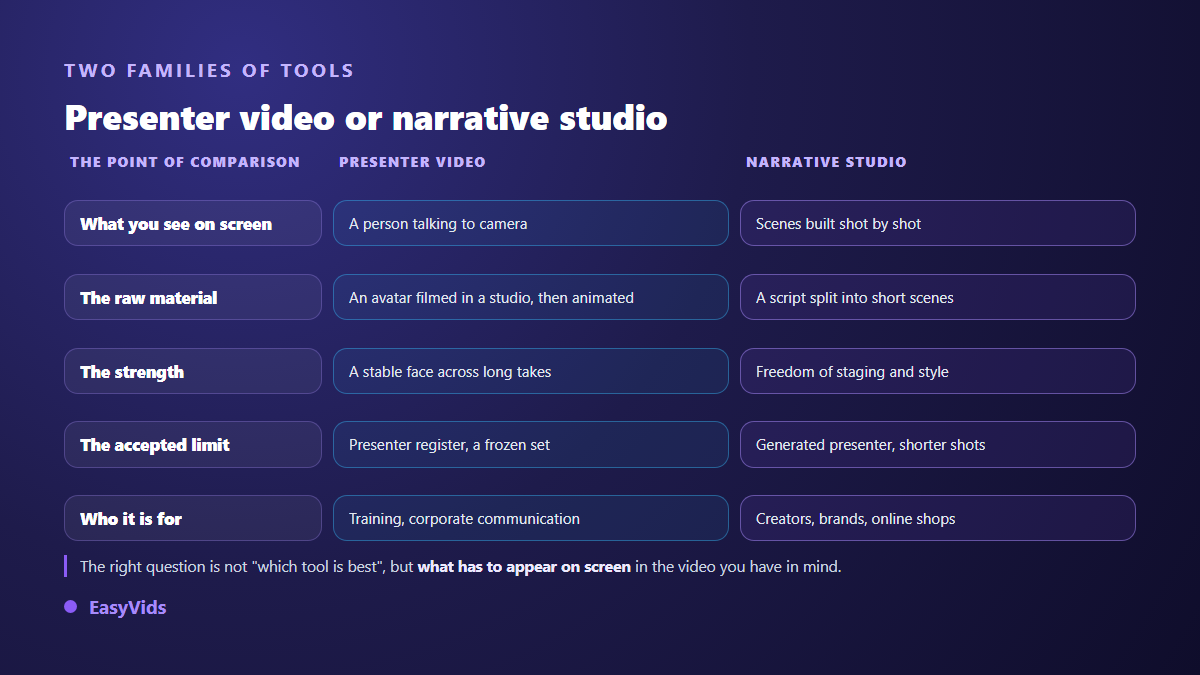
Everything else in the interface orbits that single building block: slide templates, a background, a logo, on screen text, stock imagery, a screen recorder. You are not directing shots, you are assembling an animated presentation around a person who speaks. That is a very different family of software from the narrative studios described in our complete guide to AI video generators, where each scene is built from the script, shot by shot.
What it does genuinely well
The first strength is presenter realism over time. Avatars are filmed in a studio with real actors, then animated. On a two minute waist up shot the face holds, without the waxy drift generative video models often produce when a character speaks for long stretches. That is a real advantage and it deserves to be acknowledged by a competitor.
The second strength is industrial. Translating an existing video into another language, with the voice and the lip movement rebuilt, takes a few clicks according to the company's own documentation. A learning team shipping one module across twelve countries saves weeks. Add presentation import, export aimed at online learning platforms, a shared brand kit, comments, versions and a genuine multi user workspace.
- A believable presenter on long takes, with no facial drift.
- One click translation of an existing video, voice and lip movement included.
- An avatar, language and accent library few competitors match.
- Enterprise plumbing: brand kit, approvals, shared workspace, learning platform export.
- A learning curve short enough for someone who has never edited a video.
- A stated consent and moderation framework that a legal team can live with.
Custom avatars and the consent requirement
You can build an avatar of yourself rather than picking one from the library. According to the Synthesia help centre, the process requires a filmed consent statement in which the person explicitly authorises the use of their likeness, on top of the footage used to build the avatar, and those elements are checked before the avatar goes live. That is not red tape. It protects the filmed person as much as the customer, and it mirrors what we explain about the legal frame around voice cloning, where recorded consent is the only thing that holds up in a dispute.
The flip side is real moderation. The published content policy limits what can be produced and rules out several categories, including material that imitates news reporting or touches political debate, with stricter rules on entry level plans. If your project looks like an automated news channel, check that first, before anything else.
Where Synthesia runs out of road
The main limit is structural and no setting fixes it. An avatar speaks, it does not act. It stays in presenter mode, framed waist up, with restrained gestures and a background that never moves during the delivery. It will not cross a street, hold a product, turn towards an object or react to something off screen. For a training module none of that matters. For an advert, a story or a channel format, everything that keeps a viewer past the first sentence is missing.
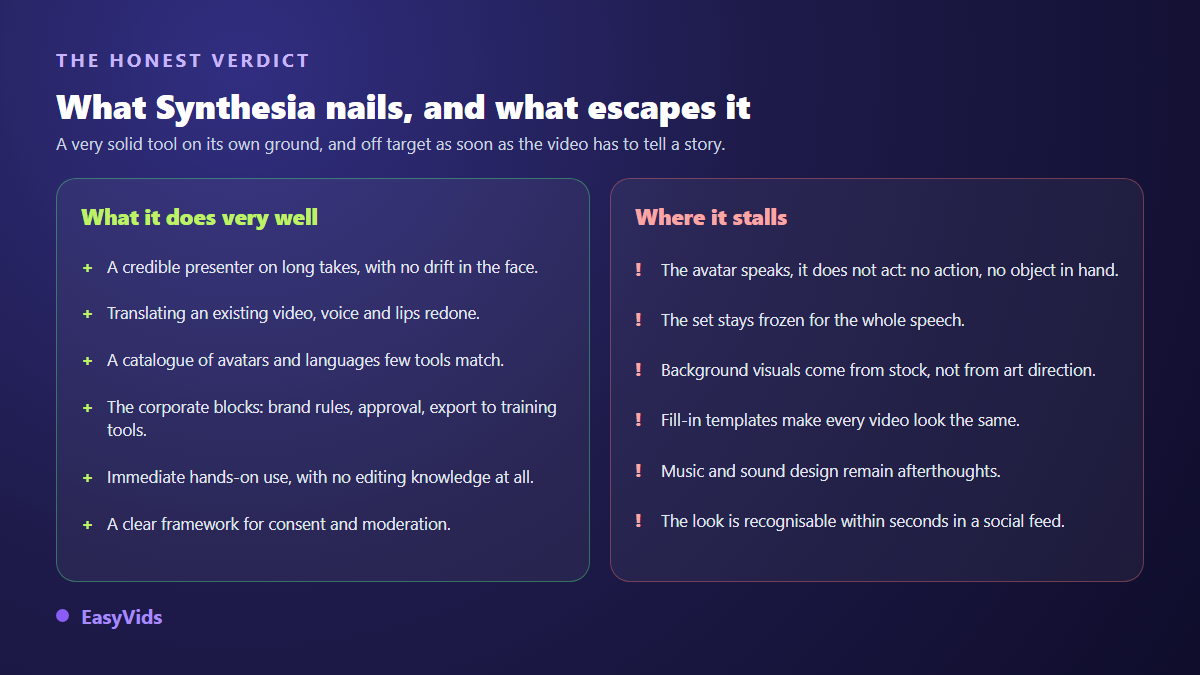
The second limit is visual: the output is recognisable. Flat background, restrained animated text, centred presenter, stock imagery as filler. The look is clean and professional, and it is also instantly identifiable. On an internal portal that consistency reassures. In a social feed it files you within seconds into a category the audience has learned to scroll past.
- No narrative scenes: the shot stays a presenter in front of a background.
- Little directing control over framing, lighting or camera movement.
- Filler visuals pulled from stock libraries rather than an art direction of your own.
- Creativity funnelled through templates, which makes videos look alike.
- Music and sound design treated as accessories, when they carry half the emotion.
- Vertical formats are possible, but the tool is built for a desktop screen first.
Budget: what to look at instead of a price
We publish no pricing, ours or anyone else's, because those grids change faster than the articles quoting them. What matters is the shape of the bill. Synthesia runs on subscriptions, with a volume of video minutes per period and seats per user. That model suits a company shipping a steady stream of modules, and penalises a creator whose output swings between busy months and quiet ones. A credit system, like the one described on our pricing page, follows real usage instead.
Who should buy it
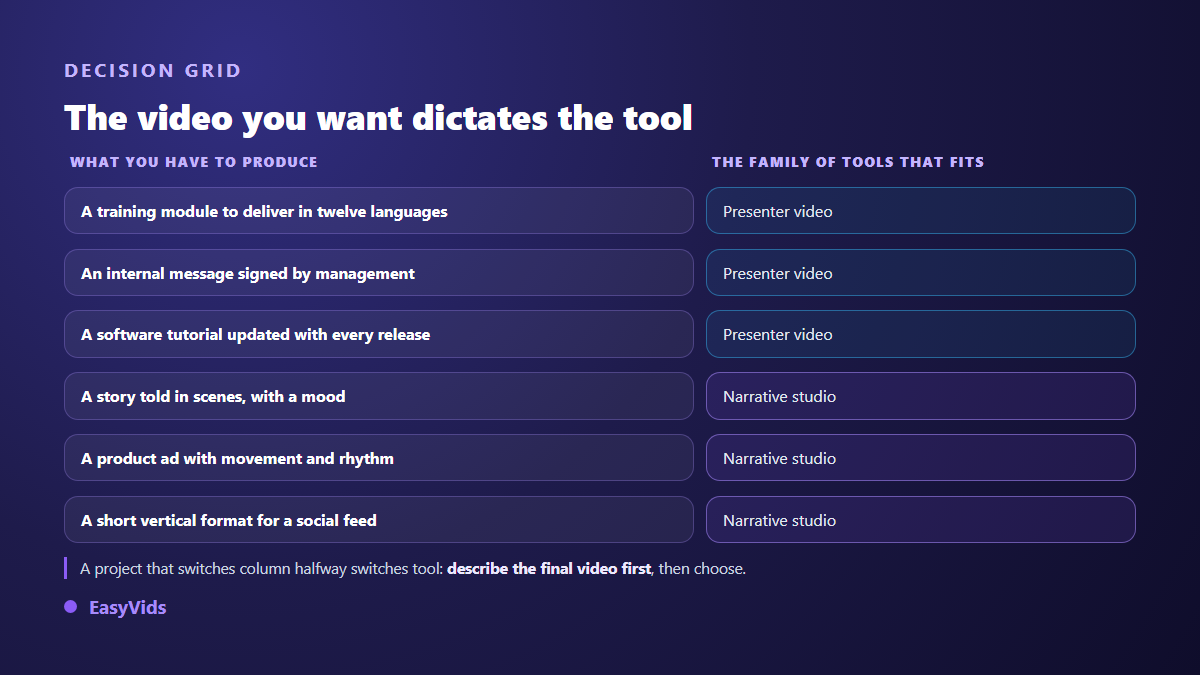
Three profiles gain immediately. The learning team industrialising multilingual modules and keeping them current. The communications team shipping clean internal messages without briefing an agency every time. The software vendor documenting features on video and refreshing tutorials at every release by changing two lines of script rather than booking a shoot. In all three cases the time saved is substantial, and style never enters the conversation.
Who should look elsewhere
If you are a creator, your need sits somewhere else: scenes, pacing, a voice that tells a story, a look that separates you from the video posted just before yours. That is the territory of narrative studios, which we went through in our comparison of AI tools for content creators. The useful question is never which tool is best, it is what has to appear on screen.
On our side, EasyVids starts from the script rather than the avatar: the AI writes, splits the text into scenes, builds an image or a clip for each one, adds a voice over picked from a catalogue of natural voices, adds music, then assembles everything by matching each shot to the exact length of its voice. The online editor then handles trimming, on screen text and captions. A creator mode covers pieces to camera: you upload a photo and your character delivers the script on screen in short segments. Be clear about the difference, it matters: that presenter is generated, it does not come from a studio shoot, and on a long take an avatar filmed with an actor stays steadier. Our guide to AI avatars and UGC video shows exactly where that line falls.
How this review was put together
Two points of honesty beat a fake neutral tone. We publish an AI creation studio, so we have a stake in this, and you should read the piece knowing it. And we give no score out of ten and no invented benchmark, because a made up number is worth nothing. This review draws on Synthesia's public documentation, its help centre and content policy, and on our daily practice of generated video. These platforms move fast, so check the current state of the product when you decide.
Frequently asked questions
Is Synthesia right for a YouTube channel?
Rarely. The presenter format works for a company or training channel, where viewers come for a precise answer. On a general audience channel, the fixed background and the absence of scenes cost retention within seconds. The topic may be strong, the form works against you.
Can you build an avatar from a single photo?
Not with Synthesia: according to its help centre, a custom avatar needs video footage plus a filmed consent statement. Other approaches do start from one photo, with a different look and less stability on long takes. These are two distinct techniques, not two quality tiers of the same thing.
Can videos made with Synthesia be monetised?
That is settled by the distribution platform, not the tool. The YouTube help centre asks creators to disclose realistic synthetic content, and monetisation rules target repetitive content published without meaningful contribution. A video you wrote and structured yourself is not disqualified simply because an avatar presents it.
Is there a free version to test it?
A free trial exists, capped by volume of video produced. It is enough to judge avatar realism and voice quality in your own language, which is exactly what you should check before committing. We do not detail the tiers, they change too often for an article to stay accurate.
Do you need an avatar to make an AI video at all?
No, and that is the most common misconception. A large share of generated video shows nobody: illustrated scenes, a voice over, animated text, music. An avatar only earns its place when the video rests on someone addressing the viewer directly.
Choosing a tool starts with one sentence: describe the video you want, then look at who is speaking on screen. Someone explaining something serious to a team, and Synthesia does that better than most. A story, a product in use, a format that has to stand out in a feed, and you need a studio that builds scenes. To judge from evidence rather than promises, create a free account and produce the same video both ways. The EasyVids studio keeps script, visuals, voice, music and editing in one place.