Your product page has decent written reviews, clean photos, and shoppers still hesitate at the buy button. That gap is what a customer testimonial video fills: a real person, on camera, describing what their life looked like before, what made them decide, and what changed since. The hard part is almost never technical. It is what your customer says, and the order they say it in.
Most brand shot testimonials fail the same way. They open with the compliment. « I recommend it, it is great, the team is lovely. » That sentence proves nothing because it describes nothing. A testimonial persuades when it makes a gap audible, between a before and an after. This guide covers that three part structure, how to gather the footage without a studio, and what AI legitimately does in the process. If your product pages are starting from scratch, our guide to ecommerce product video sets the wider frame first.
The short answer
An effective customer testimonial video runs in three beats, in this order: the before, the turning point, the result. Budget forty five to ninety seconds for the main cut, with the person's first name and role on screen from the very first second, captions throughout, and a single closing ask. The raw material always comes from a real customer who gave consent. AI produces, edits, captions and repurposes the video. It never invents the person speaking.
Why a testimonial video outweighs a written review
A written review is read in three seconds and forgotten just as fast, because nothing proves a human wrote it. Video adds three things text cannot: an identifiable face, a voice with its hesitations, and a room that places the person somewhere real. Those three signals are hard to fake convincingly, and your visitor knows it before they think about it.
There is a second, plainer reason. A testimonial video gets reused everywhere: product page, paid ad, follow up email, story. One twenty minute interview feeds a year of content, provided you asked the right questions on recording day. That is the one moment you cannot fix later in the edit.
The three beats, and why that order
A testimonial is not an interview. It is a demonstration of proof, and proof needs a starting point. If your customer opens with the result, there is nothing to compare it to and the viewer hears an opinion. If they open with the before, the exact same sentence becomes a measurement.
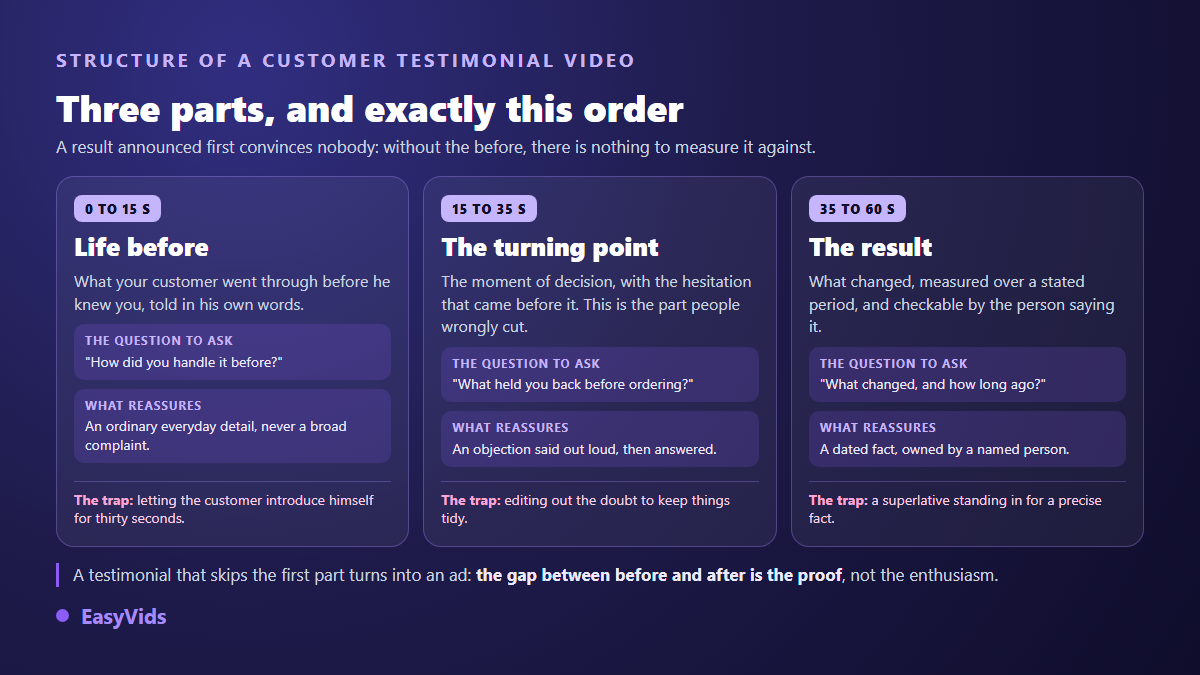
- Beat 1, the before: what your customer used to do, with which tool, and how much time it cost them.
- Beat 2, the turning point: what decided them, and above all what was holding them back just before.
- Beat 3, the result: what changed, over what period, with a fact they can verify themselves.
- First name, role and how long they have been a customer, on screen from second one.
- One closing ask, and it is yours, never the customer's.
Beat 1: the before, in their own words
This is the beat everyone trims because it feels slow. It is also the beat that creates recognition. Your prospect does not see themselves in a result they do not have yet. They see themselves in a problem they have right now. So ask for specifics: which tool, which typical day, which repeated chore, which precise irritation.
One rule governs this section: never rephrase. If your customer says « I used to spend Sunday evenings copying numbers across », keep it exactly like that. Clumsy wording reads as authentic. Product page vocabulary in a customer's mouth is the clearest tell that a brand wrote the script.
Beat 2: the turning point, with the doubt that came first
The most valuable passage in the whole testimonial is the one editors delete on reflex: the doubt. « I hesitated because I had been burned before. » « I thought it would be too technical for me. » « I was not sure it would work with my setup. » Each of those is an objection your prospects hold and will never type into a contact form.
When a customer names the objection themselves and then explains how it fell away, you get a sales answer you could never have delivered without sounding defensive. Keep the full sentence, hesitation included. The edit should make that passage clearer, not smoother.
Beat 3: the result, specific and dated
A convincing result has three properties: it is concrete, it sits in time, and the person saying it can verify it. « I get two hours back on Saturday mornings » beats « it is so much faster ». « For the past six months » beats « since I started using it ». Viewers do not retain enthusiasm. They retain the detail they can picture.
Never feed a number to your customer. If they have none in mind, an improvement described through actions works perfectly well. A number suggested by the brand turns a sincere testimonial into an advertising claim, with the legal exposure that follows. More on that below, because it is where brands take the most risk without noticing.
The five questions that produce all three beats
You will not get this structure by asking your customer what they « think » of your product. You get it by asking precise questions about lived experience, then letting the silence do its work. Here is the prompt list you can send as is, by message, to any customer willing to film themselves.
- « Before you found us, how did you handle this? Walk me through a typical day. »
- « What pushed you to look for something else at that particular moment? »
- « What was holding you back before you ordered? Be blunt, it genuinely helps us. »
- « What has changed since, and how long has it been exactly? »
- « What would you say to someone hesitating the way you were? »
Add one instruction to those five questions: ask your customer to fold the question into the answer. « What was holding me back was... » rather than « fear of picking wrong ». Without it, every clip becomes unusable the moment you cut the question out, and you end up with an hour of footage where nothing stands on its own.
Four honest ways to gather the footage
None of these four sources needs a studio, and all of them start from a real customer who agreed. They differ in turnaround, image quality, and above all in what you are then allowed to claim about them.
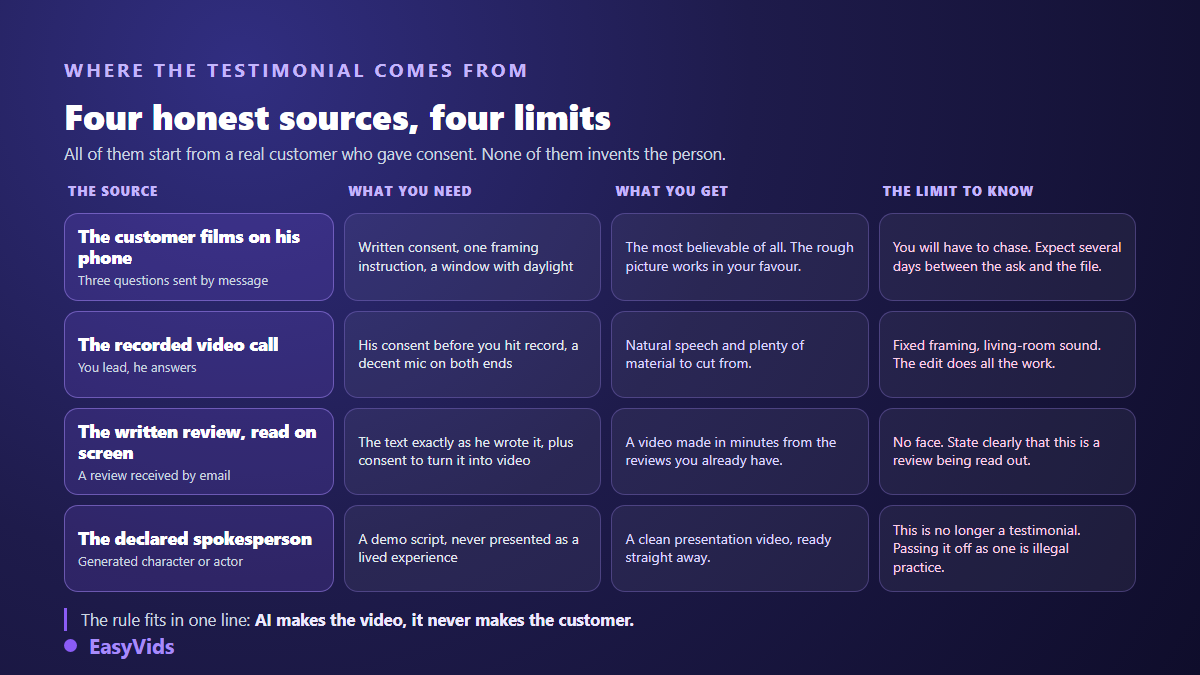
The fourth deserves a note, because it is where brands slip. A presentation video carried by a spokesperson, whether an actor or a generated character, is perfectly legitimate as long as it is presented for what it is: a demonstration. That is the creator format we cover in our method for producing product presentation videos. It stops being legitimate the second it passes itself off as a customer's lived experience.
What AI legitimately does here
The line is easy to hold: AI works on the form, never on whether the content is true. It transcribes the interview so you can find the good sentences without replaying an hour of audio. It generates captions and syncs them to the voice. It builds the cutaway shots you never filmed: the product on a worktop, the app screen, the gesture your customer describes but nobody ever sees.
In EasyVids those missing shots come from a single photo, and the editor assembles everything in the browser: trimming your footage, on screen text, captions generated from the audio, music held well under the voice. When the same video has to exist vertically for social and square for the product page, the aspect ratio is chosen before the first shot rather than at crop time. Our guide to automatic captions covers the transcription side.
If you go with a declared spokesperson, a technical constraint appears: their face has to stay the same from one video to the next, otherwise your brand speaks with ten different heads. That is a question of stable visual references, covered in our method for keeping the same character across scenes. The Character mode in EasyVids works that way: you supply the photo, it becomes the reference, and the person delivers your script word for word to camera in six, eight or ten second segments.
The red line: what the rules actually forbid
This is law, not style. In the United States, the Federal Trade Commission Guides Concerning the Use of Endorsements and Testimonials, revised in 2023, require a testimonial to reflect the honest opinion of the person giving it, and any material connection with the brand to be disclosed, including a free product. The same agency adopted a rule on consumer reviews and testimonials in 2024 that explicitly targets testimonials attributed to people who do not exist or never used the product.
In Europe, the Omnibus directive, applicable since May 2022, requires a trader displaying consumer reviews to state whether and how they check that those reviews come from real buyers. Presenting a testimonial as genuine when it is not sits among the commercial practices banned in all circumstances. A generated character claiming to be a happy customer lands squarely in that description.
Then there is consent, which covers likeness and voice alike. Filming a customer means getting their written agreement on how you intend to use the video, channels and duration included. Cloning their voice to make them say something they never said leaves the territory of testimony entirely, and voice synthesis platforms require explicit consent from the person whose voice is reproduced: our full take on the legality of voice cloning sets out what that means in practice.
One last habit, if your video contains realistic generated shots: disclose them. YouTube has offered a dedicated checkbox at upload for realistic altered or synthetic content since March 2024, and TikTok asks creators to label realistic AI generated content. That disclosure does not hurt your video. It protects you the day somebody asks.
Editing: one hour of interview, one useful minute
A testimonial edit is judged on what you cut. Introductions, thank yous, repetitions, every sentence where your customer talks about you instead of themselves: all gone. What remains is the three beats in order, preceded by one strong sentence you pull forward to hold the opening seconds.
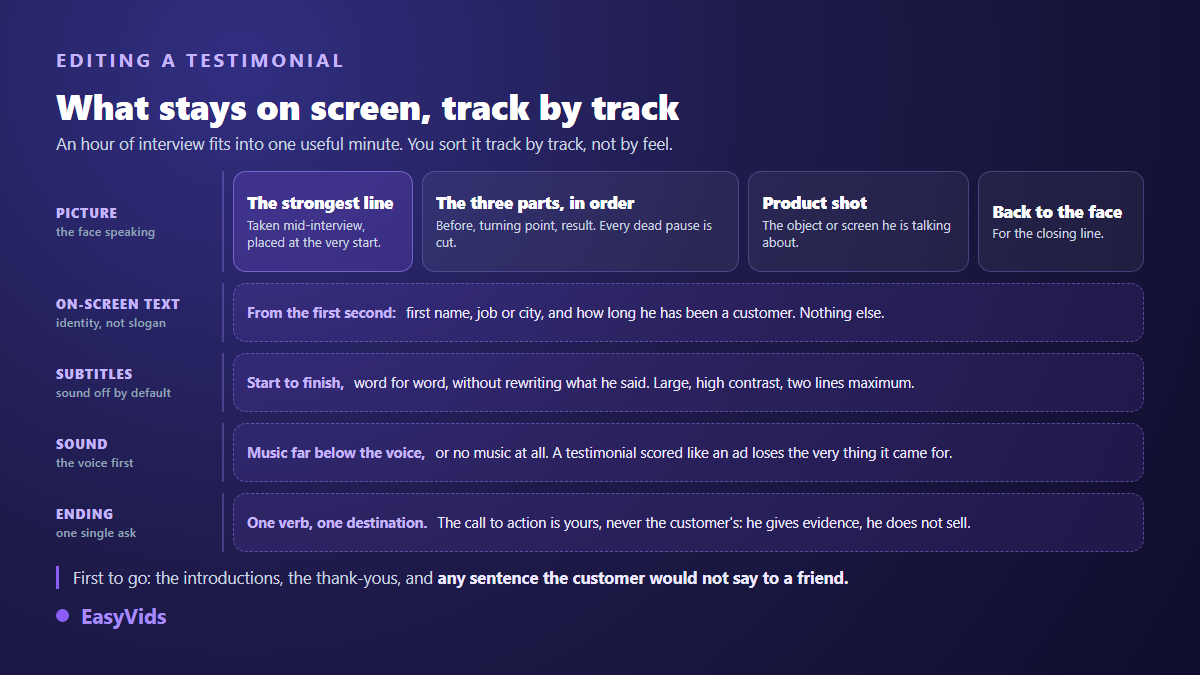
Two settings carry most of the perceived quality. Captions first, start to finish, because a large share of your audience watches with the sound off. Music second, well under the voice or absent entirely: a testimonial mixed like an ad loses precisely what it came for. The closing ask is yours to write, and our call to action formulas show how to place it without breaking the tone.
The product shot nearly everyone forgets
A phone shot testimonial shows a face and a wall. What is missing, almost always, is the thing being discussed. Dropping two or three seconds of product footage exactly when your customer names it changes how the whole sequence reads. You do not need to reshoot anything: one decent photo is enough to build that shot, as our method for turning a product photo into a clean visual explains.
Where to publish it, and what to watch
A testimonial lives in three places at minimum. On the product page near the buy button, in the long cut. On social, vertical, with the strong sentence up front. In your follow up emails, as a clickable thumbnail. Those three uses do not need three shoots. They need three edits of the same interview, which changes the arithmetic completely.
What deserves your attention is not the view count but the behaviour of visitors who watched: time on page, add to cart rate, pre purchase questions. A good testimonial does not generate volume, it removes hesitation. Producing those cuts costs selection time above all, and the EasyVids studio keeps transcription, trimming, captions and export in one place. Plan details sit on the pricing page.
Frequently asked questions
How long should a customer testimonial video be?
Forty five to ninety seconds for the main cut, the one that lives on the product page. A short version of fifteen to twenty seconds, focused on the turning point and the result, serves social and paid. Past two minutes, only viewers already deep in their decision stay to the end.
Can you give a customer something in exchange for a testimonial?
Nothing forbids it, but any incentive, including a free product or a discount, has to be disclosed in the video or its description. That is what the Federal Trade Commission Guides have required since their 2023 revision, and European rules point the same way. A few seconds of on screen text is enough, and it does not destroy credibility the way most brands fear.
Can a written review become a video?
Yes, on three conditions: keep the text exactly as written, get the author's agreement to turn it into video, and make clear it is a review being read rather than a person on camera. It is the fastest route when you already have reviews and no shoot on the horizon.
Can an AI generated character play the customer?
No, not while presenting itself as a customer. A generated character can carry a demonstration or a product presentation, provided nothing in the video suggests it is recounting lived experience. The rule adopted in 2024 by the Federal Trade Commission on reviews and testimonials names testimonials attributed to people who do not exist.
Are captions necessary on a testimonial?
Always. Sound is off by default across most feeds, and an uncaptioned testimonial becomes a silent face. Use your customer's exact words without tidying them up: rewriting their sentences to look polished cancels the authenticity you came for.
The hard part of a customer testimonial video is neither the camera nor the edit. It is getting your customer to say the right thing in the right order. Send your five questions to three customers this week, keep their answers untouched, and cut the first video from whatever comes back, imperfections included. For the production side, creating an account opens the full studio, transcription, captions and missing shots included.