You have a script and no microphone, or no wish to hear your own voice for eight minutes straight. So you go looking for free AI text to speech, and you open five tabs that have almost nothing in common: a reader that speaks in the browser and saves nothing, a character counter, a demo that greys out the download button, and two voices that stumble on the first proper noun.
Finding a tool is not the hard part. There are dozens. The real questions are how far free carries you before it stops, and what separates a voice people listen to from one they close after twenty seconds. This guide follows the whole chain, from pasted text to a downloaded audio file. If you want the mechanics and the vocabulary first, our complete guide to AI voice over takes the technical route.
The short answer
Text to speech turns written text into an audio file in seconds, with no microphone and no booth. Four decisions carry the result: the script you paste, the voice you pick, the reading style you ask for, and the split once the text runs past a few pages. Free tiers cover listening and comparing perfectly. They stop on three points, and quality is rarely one of them: the downloadable file, the monthly character cap, and commercial usage rights.
Text to speech, TTS, speech synthesis: one job, three names
All three phrases describe the same operation: a machine reads a text and produces sound. Speech synthesis is the term used by screen readers and accessibility systems. Text to speech, shortened to TTS, is the developer term, and it is the one that won the search results. Searching either leads to the same tools.
What changed in recent years is not the name but the way the voice is built. Older systems glued recorded fragments together, which is why automated announcements sound chopped. Current engines predict the audio signal from the text, using a model trained on hours of speech. They produce breaths, pitch changes and small accelerations. That is also why they sometimes fail spectacularly where the previous generation was merely flat.
Six steps between pasted text and an audio file
The job looks like one button. It has six steps, and five of them happen before the machine speaks. That is why two people get very different results out of the same tool and the same starting text.
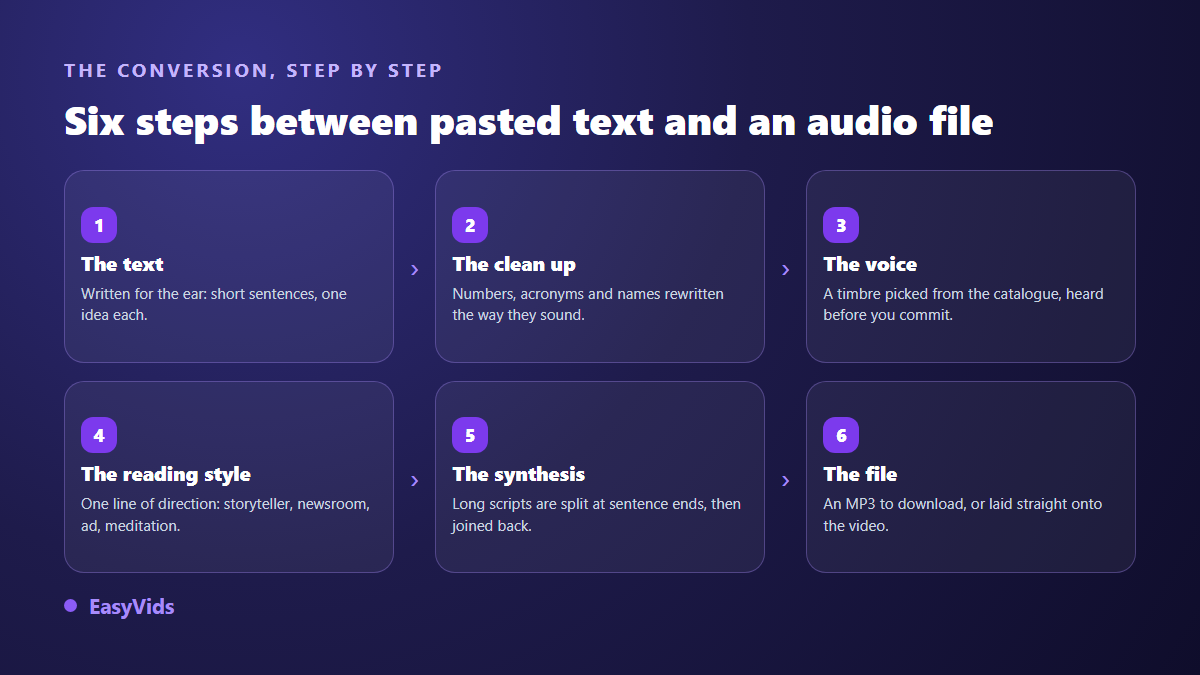
- Write or paste the script. Short sentences, one idea each. Text meant for the ear does not look like text meant for the eye.
- Clean it up. Numbers, acronyms, dates, abbreviations and proper nouns rewritten the way they sound. The highest return step of all.
- Pick the voice. Listen to a sample of each timbre before you generate the full file, never the other way round.
- Give a reading style. One line of direction outweighs any slider the interface offers.
- Run the synthesis. A long text is split, generated in parts, then joined into a single file.
- Collect the file. An MP3 you download, drop onto an edit, or publish as it is.
The script matters more than the engine
This is what surprises newcomers most. Switching tools buys a marginal gain, rewriting three sentences changes the listening experience entirely. An engine does not understand your text, it reads it as a score: punctuation gives the rhythm, sentence length gives the breath, structure gives the intonation.
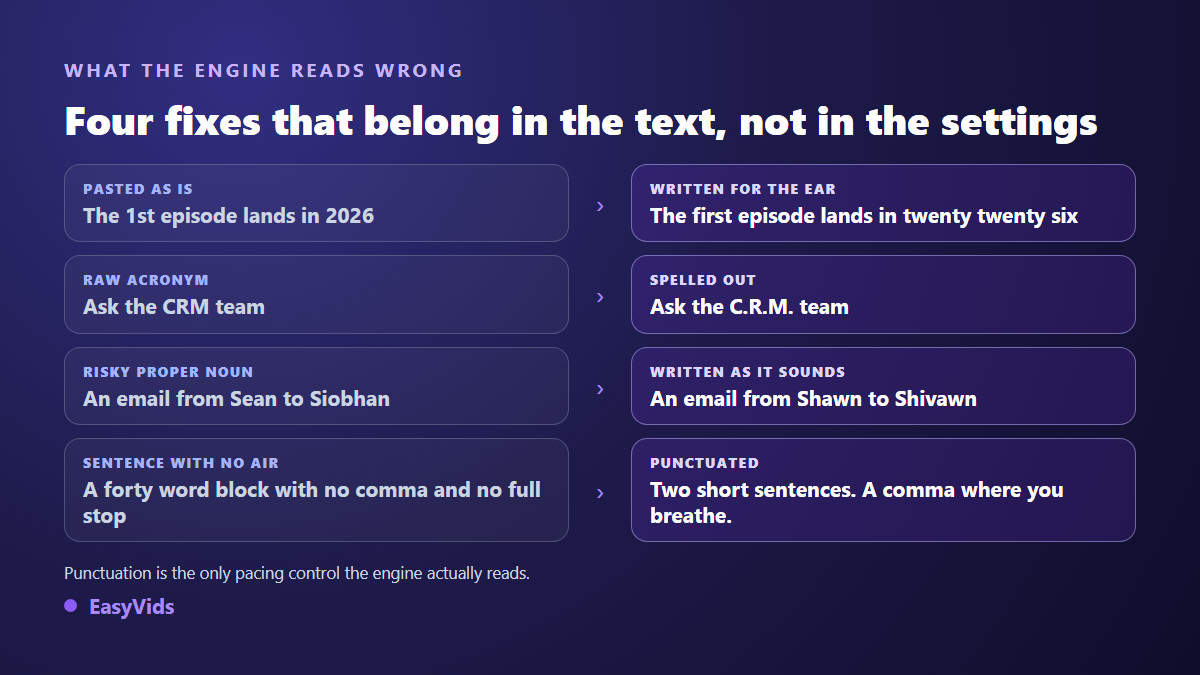
The most common flaw fits in one sentence: the text was written for the eye. A forty word sentence with two clauses reads beautifully in silence. Read aloud, it forces the engine to hold a flat intonation until the full stop, and the listener leaves before it. Cut it in two. Put a comma where you would breathe. The gain is audible with no setting touched. If the delivery still sounds mechanical after that clean up, the causes of a robotic AI voice are listed one by one.
What engines still read wrong
Every language has its traps, and engines handle them unevenly. Numbers are written one way and said another, acronyms are guessed rather than spelled, and a large share of the proper nouns in circulation are foreign. These are the fixes that come back most often on our voice overs.
- Numbers. Spell them out whenever they carry meaning. A misread date, version number or ordinal breaks the whole sentence.
- Acronyms. Separate the letters with full stops when they must be spelled. Otherwise the engine will happily pronounce them as a word.
- Foreign proper nouns. Rewrite them phonetically in the spoken version. Nobody reads that text, only the sound counts.
- Abbreviations. Write the full word. The engine often guesses right, but not always, and never the same way twice.
- Ellipses and dashes. They create unpredictable silences. A comma or a full stop does the job more cleanly.
Reading style: the instruction almost nobody gives
On voice ranges that accept it, you can write in plain language how the text should be read. "Read like a storyteller, warm and unhurried." "Read like a news anchor, serious and paced." "Read softly, like a meditation." That line is never spoken aloud. It directs the performance, and it is the cheapest quality gain available. Beginners skip it because it does not look like a setting. For pacing, silences and timbre, getting natural intonation out of an AI voice goes through the settings one by one.
Where free actually stops
The free question comes up every time, and the answer is not the expected one. Listening quality rarely separates the two camps, since many free tiers play exactly the same voice as the paid one. What changes is what you are allowed to take away.
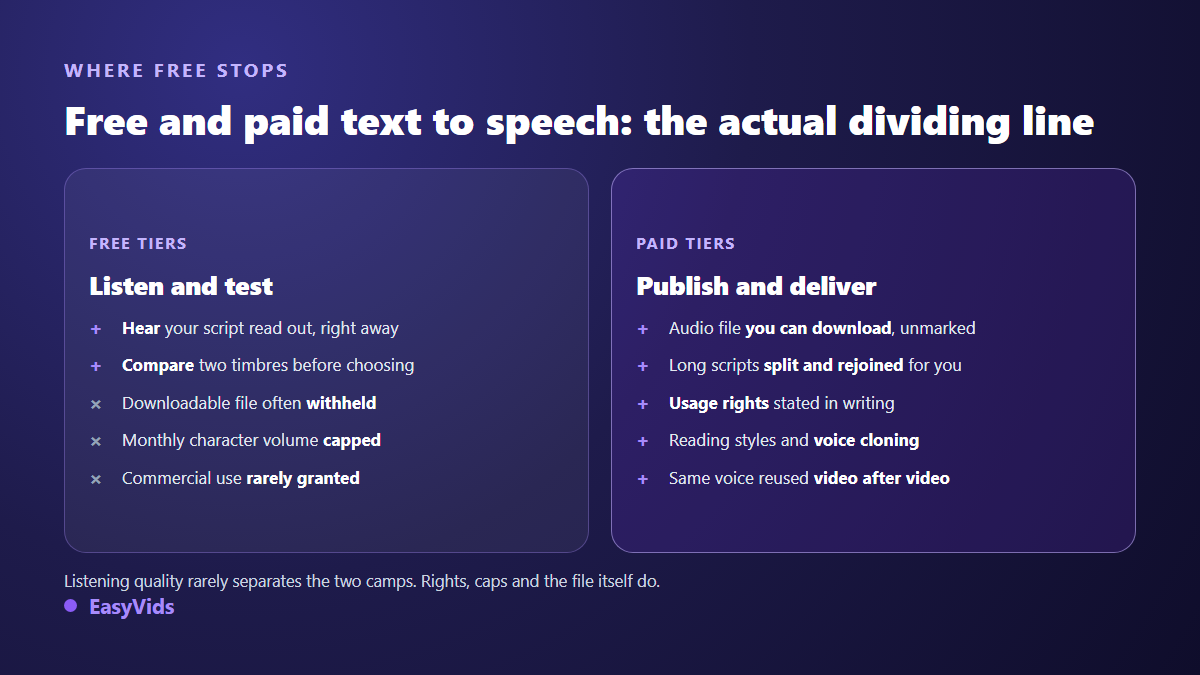
Three walls come back: the file you cannot download, the monthly character cap, and commercial use excluded by the terms. The third is the expensive one, because it stays invisible until something goes wrong. Read the rights line before you produce an hour of audio, not after. What each family of free offer really delivers is set out in our inventory of free voice generators, and our own plans sit on the pricing page.
Long scripts: the split that keeps the voice steady
Almost every engine caps the length of a single request, usually at a few thousand characters. Past that, the text has to be split. Splitting in the wrong place is audible at once: a cut mid sentence produces a tonal break, and two parts generated separately do not always start with the same energy. The rule is one line long: cut at a sentence boundary, never at a character count. On our chain the text is split automatically around three thousand characters, always at a sentence end, the parts are generated in parallel, then joined into a single file, up to one hundred thousand characters per request. That is what makes a full chapter or an audiobook produced from an ebook practical.
Choosing a voice: timbre before gender
The usual reflex is to pick male or female first, then take the first voice in the list. The reverse order gives far better results. Play three timbres on the same sentence, the one from your hook, and keep the one that holds without tiring. A voice that is pleasant for fifteen seconds can become hard work after six minutes, and long form is where the verdict falls. Then two practical criteria: the voice must fit the subject, and it must stay available over time. A channel is recognised by its voice as much as by its branding, and swapping timbre every third episode breaks that marker. On EasyVids every catalogue voice has a free listening sample, generated once and served as is, so comparing costs nothing.
From audio file to finished video
An MP3 on its own is enough for a podcast, a phone greeting or a lesson to listen to. As soon as a video is involved, the voice becomes the backbone of the edit: it sets the duration of every shot, never the other way round. Producing images before the voice means recutting everything at the first script change. The order that works is always text, then voice, then images timed to the voice. That is exactly the chain an AI video generator follows, splitting the script into scenes, narrating each one, then fitting the visual to the real length of the audio.
Turning a text into a voice on EasyVids
The path is four moves. Open the voice over tab, paste your text, pick a voice and, if the range accepts it, write your reading style. Run it, and collect an MP3 you can download. On a long text the screen shows progress part by part, because the splitting and the joining happen without you. Several voice ranges are available, with a catalogue of natural voices in several languages, and one of them accepts plain language reading styles. The resulting voice over is reusable everywhere, as narration for a video, a slideshow or a training module, or as a standalone file. The studio keeps these pieces in one place.
Frequently asked questions
Is AI text to speech really free?
Free to listen, almost never free to publish. Most services will read your text back at no cost, then stop at the download, at a monthly character cap, or at commercial use excluded by the terms. Check those three points before producing an hour of audio.
How much text can be converted at once?
Engines usually accept a few thousand characters per request. A serious tool therefore splits long texts for you, at a sentence boundary, and joins the parts into one file. On our chain a single request accepts up to one hundred thousand characters, which comfortably covers a book chapter or a long episode.
Can a video with a synthetic voice be monetised?
A generated voice is not a disqualifier in itself. According to the YouTube Help Centre, the altered or synthetic content disclosure targets realistic content that could mislead viewers, such as making a real person appear to say something they never said. The decisive point sits elsewhere: since the July 2025 update on inauthentic content, the platform expects original input and added value, not a stream of texts read one after another.
Why does the voice trip on the same word every time?
Because the engine settled on a pronunciation and keeps it. Regenerating ten times changes nothing. Rewrite the word phonetically in the spoken version, or add full stops if it is an acronym. The fix belongs in the text, never in the options.
Can I use my own voice instead of a catalogue one?
Yes, through a voice cloning tool. Cloning needs a clean audio sample, often around fifteen seconds, recorded in a quiet room. One rule applies everywhere: only clone the voice of someone who has agreed to it, and cloning services require that authorisation in their terms before you upload the sample.
A text becomes a voice in seconds. All the remaining work happens in the ten minutes before that, on the script, the timbre and the reading instruction. Take a paragraph you have already written, clean up the numbers and acronyms, pick a voice and listen. You will know straight away whether the result holds up for your project. Create your account and run the test on your own text: it is the only way to judge.