You want to post on TikTok, and filming yourself is the thing stopping you. Too shy, too recognisable at work, or simply unwilling to spend twenty minutes getting ready for three seconds of footage. Running a faceless TikTok account is not a fallback for camera shy creators. It is a full production model, used by accounts that post daily and never show anything more than hands, objects, generated images or animated text.
The trap is to strip the face out of a format built around a face. The video empties out, the eye has nothing to hold on to, and the viewer swipes within two seconds. A faceless video has to compensate elsewhere: with the voice, with the cutting rhythm, with a hook that lands immediately. The logic is close to the long form model covered in our guide to the faceless YouTube channel, only tighter. Vertical, short, and usually watched with the sound off.
The short answer
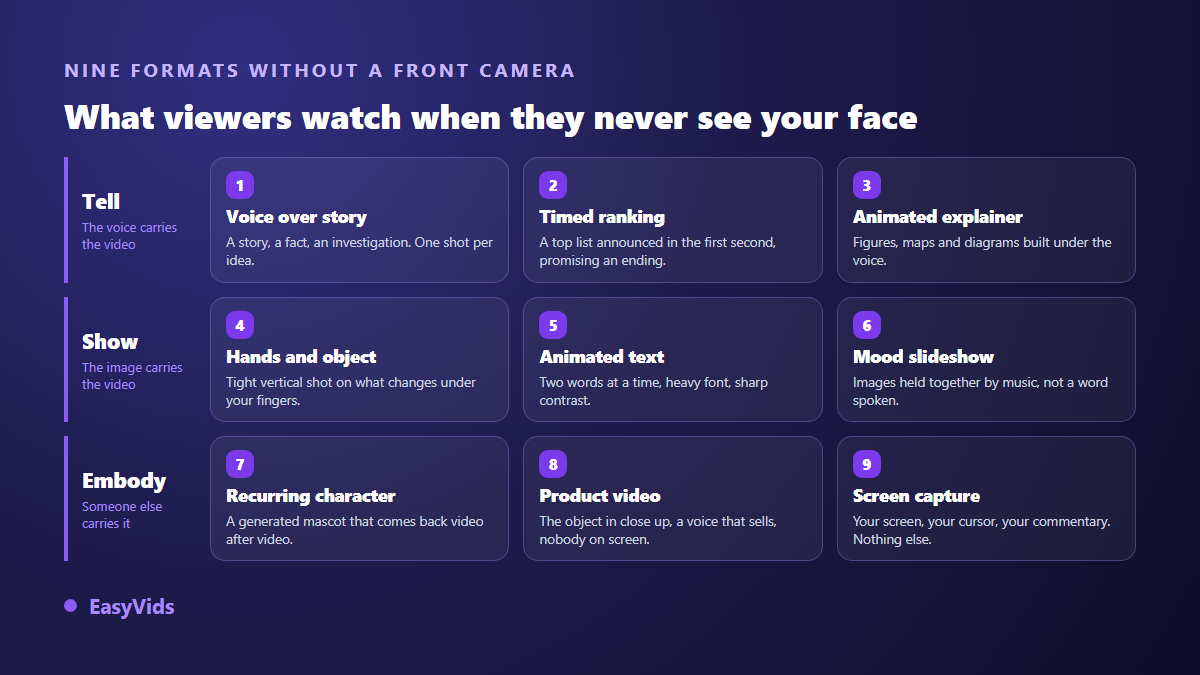
Nine formats hold up without a front camera: voice over storytelling, the countdown ranking, the animated explainer, hands working on an object, animated text, the mood slideshow, the recurring generated character, the creator free product video, and the screen recording tutorial. All of them rest on the same four building blocks: a short script, a voice, vertical visuals and captions. None of them needs gear, none of them needs your face, and all of them can be produced in a browser.
Why faceless videos work on TikTok
The main feed is not a friends feed: it is a recommendation queue served to people who have never heard of you. A video is judged on what it triggers, not on who posted it. Watch time, replays, shares, comments: none of those signals requires a face. What a face usually provides is an instant anchor for the eye, something to look at while the ear listens. Without it, that anchor has to come from motion, on screen text or the voice. That is the only real constraint.
The second advantage shows over time. Without a face, production repeats and delegates: you can prepare ten videos in one evening, switch niche without rebuilding everything, open a second account without becoming a second public person. That is what made the model take off on long form, as our piece on the faceless phenomenon explains, and the reasoning carries over to vertical intact.
The nine formats at a glance
- Voice over storytelling: a story, an investigation, a surprising fact, carried by narration over generated visuals.
- The countdown ranking: a top list announced in the first second, each entry lasting a few seconds.
- The animated explainer: numbers, maps and diagrams in motion, with no filmed footage at all.
- Hands and object: a tight shot on what you handle, cooking, repairs, stationery, unboxing.
- Animated text: one strong line, a book excerpt, a short lesson, staged through typography.
- The mood slideshow: images cut to music, for travel, interiors or relaxation.
- The recurring character: a generated mascot or narrator who comes back in every video.
- The creator free product video: the object in close up, a voice that sells, nobody on screen.
- The screen recording tutorial: your screen, your cursor, your commentary, nothing else.
Formats 1 to 3: telling a story without appearing
Voice over storytelling is the sturdiest of the nine, because it moves attention to the ear. A true story, an unsolved case, an unexpected scientific fact: the words do the work, the visuals illustrate. The rule that changes everything is the cutting. One shot per idea, five to eight seconds at most, and an image that moves forward with the sentence. Since the voice carries half of the perceived quality, it deserves the most care, and our AI voice over guide applies here with one twist: on vertical, you speak faster.
The countdown ranking works because it promises an ending. Announce the number in the first second, then count down without ever pausing. Every entry deserves its own visual, otherwise the video turns into a slideshow of captions. The format scales endlessly: places, beginner mistakes, objects, records. Better still, it batches: once the frame is written, ten videos come out of the same structure with ten different lists.
The animated explainer replaces the presenter with graphic motion. A figure climbing, a map filling in, a diagram assembling under the voice. It is the most credible format for a serious topic, and the most thankless to build by hand. Generating shots one by one and assembling them in an editor is still faster than opening animation software, especially for a forty second video.
Formats 4 to 6: give the eye something else
Hands and object needs a phone and a clean surface, nothing more. Cooking, repairs, calligraphy, unboxing, furniture assembly: the viewer watches something change. Two details make the difference. Frame tight and vertical, so the action fills the screen. And work in daylight from the side, never with a ceiling light straight above your hands: the giveaway of an amateur video is the cast shadow, far more than the gear.
Animated text makes typography the subject of the shot. A sentence appears word by word, timed to a voice or a track, over a moving background. It suits quotes, book excerpts, punchlines and short lessons. Three settings decide it: a heavy typeface, hard contrast, one or two words at a time. A full sentence appearing at once does not get read in a scrolling feed.
The mood slideshow stays the most underrated. Images held together by music, with sparse text: travel, interiors, motivation, calm. It needs no narration, which makes it publishable in any language without re recording anything. Its weakness is known: with no progression, it bores. Give it a direction, a before and an after, a journey, a countdown.
Formats 7 to 9: a character or a screen instead of you
A recurring character swaps your face for another one, openly fictional. A mascot, a drawn narrator, a recognisable silhouette that returns in every video. The upside is double: the account gains a visual identity, and you stay anonymous. The difficulty is technical. A generated character drifts with every new image if you simply describe the look again in the prompt. You need visual references reused from one video to the next, which is exactly what the consistent character feature in EasyVids does by feeding the same reference images into every scene.
The creator free product video borrows the codes of a recommendation: the object in close up, a voice speaking to the viewer, on screen text repeating the argument. Nobody appears, yet the video reads like advice from a friend. It is the format of shops and affiliates. One rule of restraint: one promise per video. Creatives stacking five arguments into fifteen seconds do not convert, they exhaust.
The screen recording tutorial is the fastest to produce when you know a piece of software well. You record the screen, you comment, you cut the dead air. No face, no set, no lighting to fix. If you want more angles in the same spirit, our list of video ideas that need no camera covers others with a method for each.
The first three seconds decide everything else
Without a face, you have no smile to stop the thumb. The hook has to be explicit: a question, a number, an image that puzzles, or a line that announces where the video ends. Write it before the rest of the script, never after. A library of hooks ready to adapt saves considerable time, and our 51 TikTok hooks sorted by niche exist for exactly that.
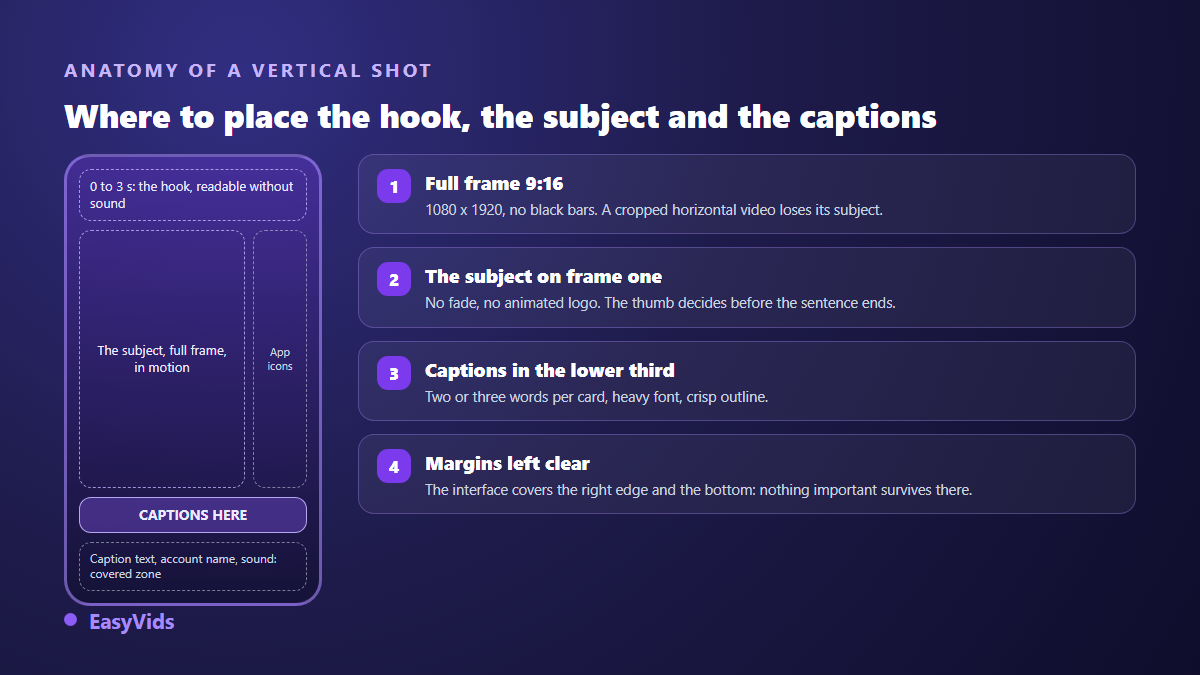
Second habit: the first frame must already show the subject. A fade from black, an animated logo or one second of nothing costs you the video. On vertical, the viewer decides while the thumb is still moving. Put your most striking element right at the start, even if you show it again later. And keep the same promise from start to finish: a hook that does not deliver drops retention faster than a weak hook.
Without captions, half the message is lost
A large share of the audience watches with the sound off, on public transport, in class, at work. A faceless video with no captions then becomes a run of silent images. Captions are not a mere accessibility gesture: they carry the words when the voice does not get through. Style matters as much as presence, and our guide to word by word animated captions shows how to get the short, punchy look that works on vertical. In the EasyVids online editor, one button transcribes the audio of your timeline and drops the captions onto a text track, where you then set the font, the size and the placement.
From idea to vertical file: the production line
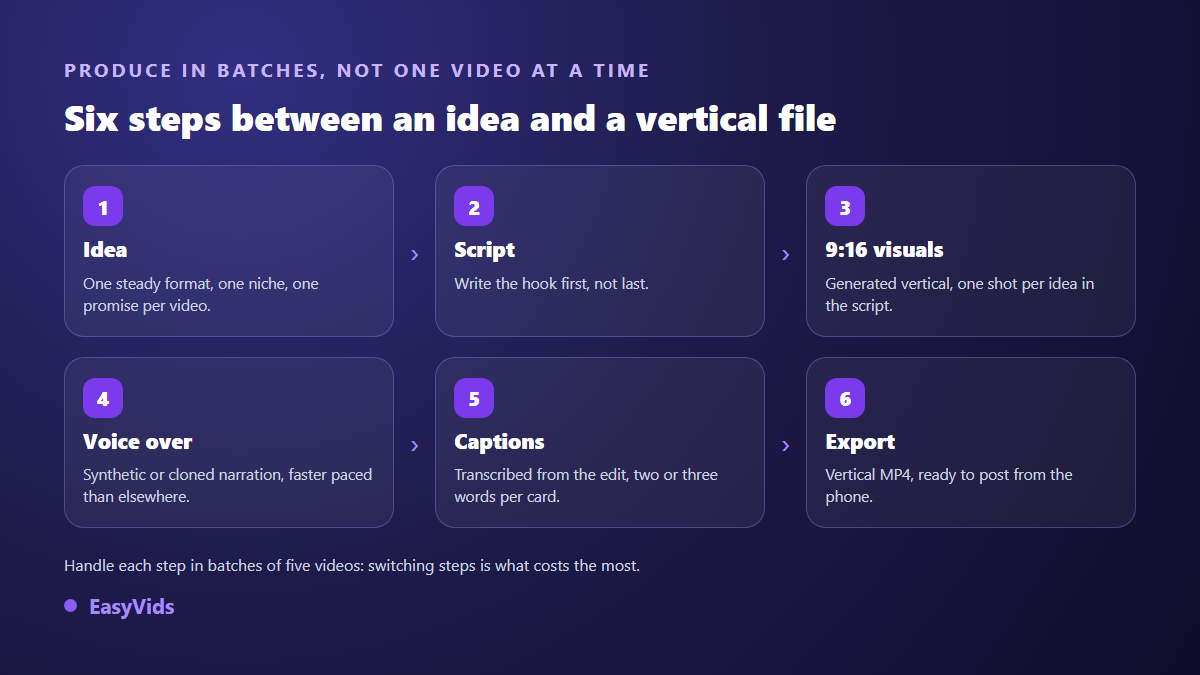
The real subject of a faceless account is not creativity, it is cadence. A clear production line beats one brilliant idea. It comes down to six steps: the idea, the script with its hook, the vertical visuals, the voice over, the captions, the export. Each one is handled in batches. Write five scripts in a row, then generate the visuals for all five, then record all five voices. Switching between steps costs more attention than the steps themselves.
The one shot generator in EasyVids covers the visual step: describe a shot, pick the 9:16 ratio and the duration, and you get a vertical clip of a few seconds with no destructive cropping. For a story with several shots, the workshop chains the scenes and syncs each visual to the real length of its voice. Both run in a phone browser, which matters when you produce on the move. What each plan includes, and what the free trial lets you test, is on the pricing page.
What TikTok expects from AI generated video
TikTok community guidelines require realistic AI generated or AI edited content to be disclosed, and the app provides a dedicated toggle at the posting stage. TikTok also announced in May 2024 that it would automatically label uploaded content carrying Content Credentials, the metadata defined by the C2PA standard. Two practical consequences: switch the label on whenever your video shows scenes or people that could pass for real, and do not strip that metadata. A labelled video is not a penalised video. A misleading one is.
On the revenue side, the TikTok creator rewards programme only accepts videos longer than one minute, according to the platform help centre, on top of age, follower and recent view requirements. That shapes the format: fifteen second videos get the account discovered, longer videos fund it. Other routes stay open, affiliation, products, services, and our overview of serious ways to monetise AI compares them one by one.
Mistakes that stall a faceless account
- Posting cropped horizontal videos: the subject leaves the frame and the text gets cut.
- Laying a voice over static images: the feed scrolls faster than your shot.
- Forgetting that the interface covers the right column and the bottom of the screen.
- Changing style with every post, when a faceless account is its style.
- Opening on an empty line such as: today I am going to talk about.
- Posting once a week and waiting: this model lives on repetition.
- Reposting another account's content as it stands, which platforms penalise.
Frequently asked questions
Can a faceless TikTok account really grow?
Yes. The recommendation feed ranks videos, not people. What you lose in human presence is made up with a sharp hook, a fast rhythm and a consistent visual identity. Plenty of niche accounts work without anyone ever seeing the creator, and some turn that anonymity into part of the brand.
Do I have to use my own voice?
No. A well tuned synthetic voice holds up on short form, provided you care about punctuation and pace. If you would rather use your own without recording it every time, voice cloning covers that need, with one rule: only clone your own voice, or the voice of someone who has explicitly agreed.
Does TikTok penalise AI generated videos?
No, using AI is not against the rules. What the community guidelines target is misleading content and undisclosed realistic content. A story illustrated with generated images, labelled where confusion is possible, stays compliant. The risk lies in repetitive mass produced content with no added value, not in the tool used to build it.
How often should I post?
Pick a pace you can hold for three months. Daily posting speeds up learning, but three a week without a gap beats a week of seven followed by a month of silence. Produce in batches, keep a few videos in reserve, and post on fixed days.
Which ratio and length should I start with?
Vertical 9:16, full frame, no black bars. For length, start short, fifteen to thirty seconds, long enough to spot the hooks that work in your niche. Move to longer videos once you know how to hold attention: that is where retention and revenue sit.
A faceless account is built like a workshop, not like a stage: one format held, one steady voice, a hook worked on, and production running every week. Pick a single format from the nine above, hold it for twenty videos, then judge the results. To produce those vertical videos without gear or a shoot, creating an account opens the full studio, and the EasyVids toolset brings visuals, voice, music and editing together in one place.