You sell online, you have a supplier photo, and your competitors post a new clip every week where somebody holds the product and explains why they use it. That format has a name in the trade: AI UGC for dropshipping, a product video shot like an ordinary creator post. Except you have no creator on hand, no sample in the mail, and no appetite for paying three people to try three hooks.
The good news is that this format can now be produced from the single image you already own. The bad news is that many sellers cross a line without measuring the exposure: letting a fabricated character claim to be a happy customer. This guide covers both sides, the build itself step by step, and the limit that is not negotiable.
The short answer
A UGC video is a vertical shot, framed like a phone recording, where a person talks about the product in their hand. To produce one without a creator, you upload the real photo of your item, you write or commission a short script, and each sentence becomes a few seconds of footage where the character says it on screen. The photo works as a reference attached to every shot: it is never repainted. That is how the EasyVids studio approaches online sellers. One rule outranks the rest: you may show, demonstrate and persuade, but never pass a synthetic character off as a real buyer.
Why the UGC format converts
UGC stands for user generated content. In paid social it now describes a style rather than an origin: vertical framing, the ordinary light of a flat or a street, one person talking to their phone about something they bought. No title card, no polished soundtrack, no studio set. Viewers recognise the language instantly, because it is the language of everything they watch between ads.
That is where conversion happens. A branded commercial announces itself in the first frame and the thumb removes it before the first second ends. A product video that looks like more of the feed earns a few extra seconds of attention. Those seconds are enough to show the object, the gesture it enables and the annoyance it removes. The format does not sell on its own: it buys listening time, and the script turns that time into an order.
Dropshippers have a specific need. They test many items, keep few, and must decide quickly whether an offer deserves budget. Waiting for the sample, finding a creator, negotiating, receiving the video and discovering it flops is far too slow for a catalogue that changes monthly. That delay, much more than the price of any single video, is what assisted production removes.
Start from a product photo, not an invented render
Your starting point is the photo, not the copy. You upload the real image of the item, give it a name and a short description, and that photo becomes a reference attached to every scene where the product appears, with an explicit instruction never to redraw it. The gap with a written prompt is wide, and we covered it in our guide to the AI video generator: a description gives you something similar, a reference image gives you yours.
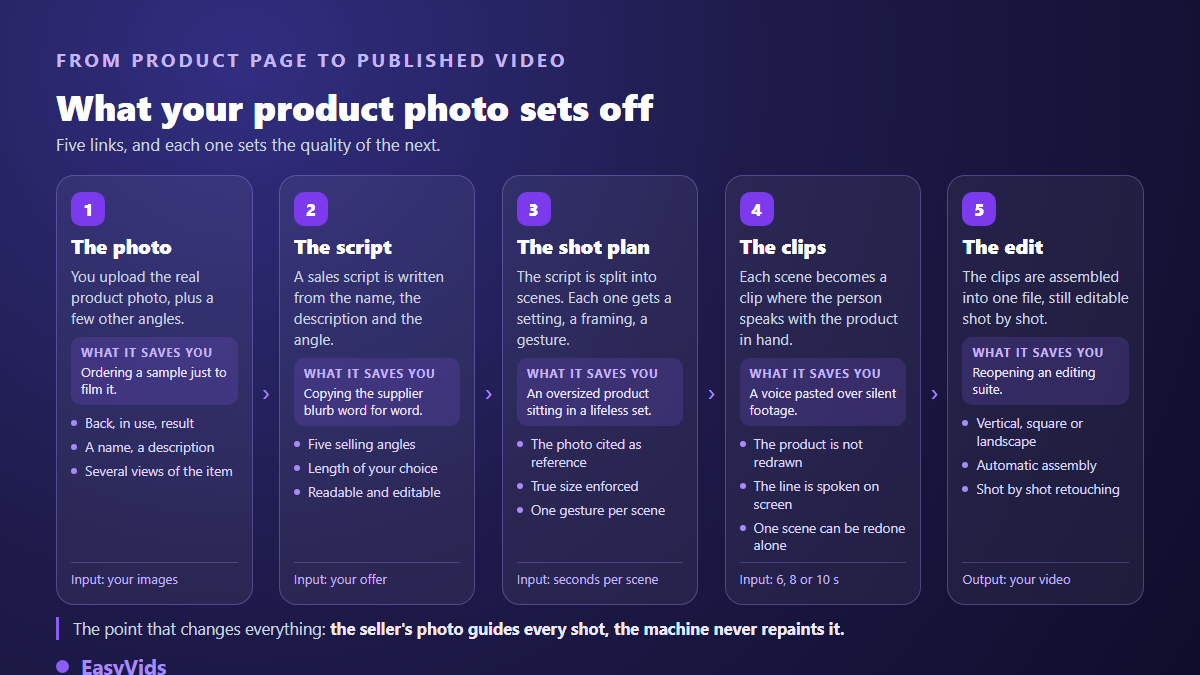
You can attach several views of the same item: the back, a shot in use, the result. Those views are not decoration, they hold scale and material. Without them the machine routinely misjudges real size, and you get a kitchen appliance the size of a bathtub or a tiny bottle in a giant hand. The description you write is the same kind of guard rail: it fixes the function, the capacity, the material, what the item does and what it does not. An optional web lookup can check how it is actually used, so the demonstration shows the right gestures instead of invented ones.
- A sharp photo of the whole object on a plain background, never a collage of several views in one file.
- The product alone: no burned in text, no promotional sticker, no decorative frame.
- A shot in hand or beside a familiar object, because that is what conveys scale.
- A back or underside view as soon as the rear appears in the video.
- A shot in use, even imperfect, to signal the expected gesture.
- An honest description: material, capacity, what the item does and what it does not.
- No catalogue image carrying another brand's logo, which you have no right to use.
The shape of a thirty second video
Thirty seconds is the length that survives on every short form feed. The number is not arbitrary: it is roughly the time needed to state a problem, show a fix and ask for an action before attention scatters. The sturdiest structure has five beats, and each one has a single job. A scene without a job does not belong. The other videos a store needs, the listing clip, the long demonstration or the studio shot, follow different lengths and different codes, which we gathered in our complete guide to product video.
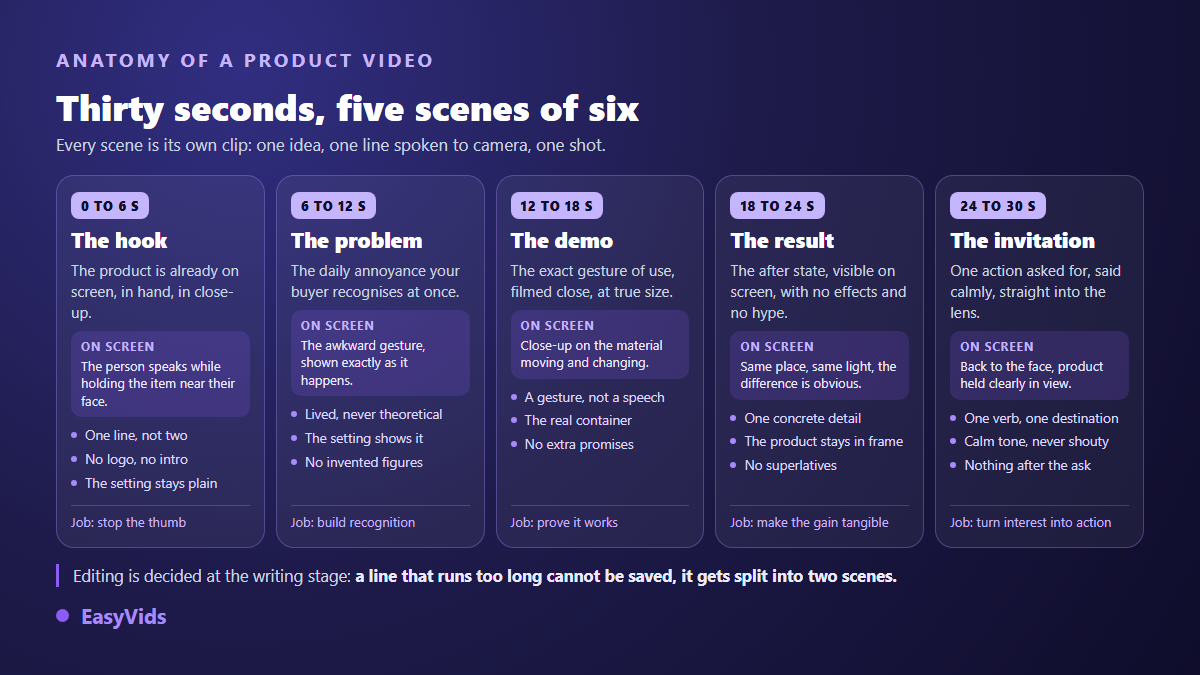
The structure also answers a technical constraint worth knowing before you write. A generated clip lasts seconds, not minutes. In our workflow each scene is locked to 6, 8 or 10 seconds of speech and nothing else, because the character has to deliver the whole segment to camera in one shot. A line that runs long is not sped up, it is split into two scenes. No separate voice track is laid over the picture in this mode: the character carries the words.
- One idea per scene. The second one is never heard.
- Fifteen to twenty five words for a six second scene, read aloud before approval.
- The product visible in the very first frame, never at the fifteenth second.
- A concrete benefit instead of an adjective: a gesture, a duration, a visible result.
- Your buyer's vocabulary, not the supplier listing's.
- A single ask at the end, plainly worded, with no stack of calls to action.
- No claim the item cannot back, not even by implication.
Pick the selling angle before the first line
The angle decides everything downstream, and switching it produces a completely different video from the same product. Assisted writing starts from the name, the description and, for a digital item, the document you attach; you set the target length and the angle, you read it back, you edit, and nothing runs before you approve. Five angles cover most seller situations.
- Problem then solution: open on the daily annoyance, the item arrives as the way out.
- Demonstration: the gesture, the material changing, the result, in that order.
- Before and after: the contrast between two states, same place and same light.
- Story: a short credible narrative that leads naturally to the object.
- A user's voice: the tone of somebody describing their use, with the caveat set out below.
That last angle needs care and we return to it. Note that a second writing mode exists, where the character speaks off screen while illustration shots run. The demand for natural phrasing is identical, and we described writing for the ear in our guide to natural sounding voice over. A sentence written for the eye turns suspect the moment a mouth says it.
Run variants that actually teach you something
A single video teaches you nothing. Sellers win with series: one offer in several versions posted together, of which one will pull ahead. Assisted production makes the series affordable, provided you build it cleanly. The usual mistake is changing the hook, the presenter and the format at once, then reading results you cannot explain.
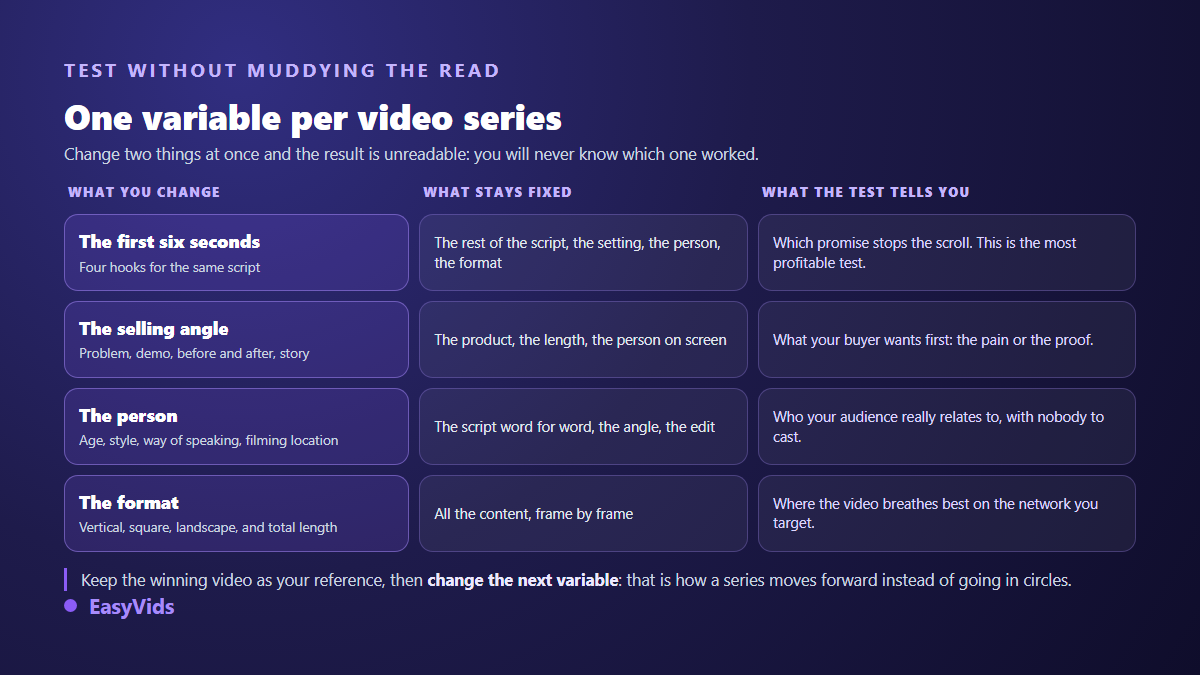
Start with the hook, since it decides the rest. Keep the script, the setting, the person and the format, and write four different opening lines. Post all four. The version that holds attention longest becomes your reference, and you move to the next variable: angle, then presenter, then format. A presenter photo stays optional here; without one, a credible creator is defined for the project, which is exactly what lets you change faces between series without negotiating with anybody.
Two practical details save time. Every scene stays editable afterwards: if one shot disappoints you, regenerate that scene rather than the whole video. And the project keeps its memory, so picking a series back up a week later does not mean typing everything again.
Format, length and the silent viewer
Vertical remains the safe bet: 9:16 fills a phone screen and is native to short feeds. Square and landscape exist too and are chosen when the project starts. One caveat: not every engine accepts every combination of length and ratio, and the interface rules out those that cannot produce your settings instead of handing you a badly framed file. For publishing itself, we walked through the whole path in our step by step guide to a published video. Plan for silence as well: a large share of your audience watches muted, so the object must be identifiable from the picture alone.
What it changes about spending
A word on money, without figures, because figures move. The real gain is not the price of one video, it is the disappearance of delay and risk: you no longer pay for a production before knowing whether anyone wants the item. A store is only one outlet for this kind of production, and we gathered the others in our survey of the serious ways to earn with AI. We compared conventional and assisted production in our breakdown of what a video really costs, and the current plans live on the pricing page, which is the only up to date source.
The red line: a fake testimonial is not a creative angle
Here is the section most dropshipping guides skip. Letting a fabricated character claim to be a happy customer of your store is not bold marketing, it is a fake testimonial. In the United States, the rule on the use of consumer reviews and testimonials, in force since October 2024, explicitly targets reviews and testimonials attributed to someone who does not exist, including machine generated ones, as the Federal Trade Commission set out when it announced the rule. It reaches whoever creates them and whoever spreads them knowing what they are.
The European Union lands in the same place by another route. Publishing fake consumer reviews sits on the list of commercial practices banned in all circumstances, the list that allows no case by case assessment, under the unfair commercial practices directive as amended. So the question is not whether your buyer was actually misled: the practice is prohibited in itself, whatever technology produced it.
- Banned: presenting a generated character as a customer testifying about their purchase.
- Banned: displaying a rating, a review count or a ranking you did not earn.
- Banned: showing a result the product does not deliver, however convincingly filmed.
- Banned: using a real person's face without written consent, influencers and public figures included.
- Allowed: a staged demonstration that honestly shows what the item does.
- Allowed: an openly labelled brand spokesperson who explains and shows.
- Allowed: a genuine customer review, used with consent and shown as an identified quote.
The boundary is easy to hold. Showing, demonstrating and explaining stays open, and that is most of the work anyway. Attributing a lived experience to somebody who lived nothing is never open. A visibly staged spokesperson misleads nobody. A person claiming their parcel arrived last week when that person does not exist does, and no small print repairs it.
Disclosing generated content
Disclosure is the last piece, and platforms have converged. TikTok requires a label on AI generated content that carries realistic images, audio or video, with a setting provided at upload. Meta's apps add an automatic label when provenance markers are detected in the file and expect a manual declaration otherwise. On YouTube the declaration happens in the video settings at upload. For an ad, disclosing synthetic content sits alongside disclosing the commercial partnership, it does not replace it.
Regulation points the same way. The transparency obligations of the European AI act have applied since 2 August 2026: content that realistically imitates a person or a scene must be recognisable as artificial to the viewer, without them needing a tool to work it out. Turning the label on costs nothing and does not remove your video from monetisation. Forgetting it can cost the video, sometimes the ad account.
Frequently asked questions
Do I need the product in hand to make a UGC video?
No. A real photo of the item works as the reference, together with a precise description. The demonstration, however, has to match what the object genuinely does. If you do not know how it is used, research it before writing rather than inventing a gesture. A false demonstration is visible, and it exposes you as much as a fake review.
Can I use the supplier's photo?
It depends on what your reseller agreement allows, and checking is on you. Two cases are refused outright: an image carrying another brand's logo or watermark, and a photo showing a person whose written consent you do not hold. When in doubt, shoot the item yourself or ask the supplier for written permission.
How many variants should I run to test an offer?
Start with four hooks on a single script and change nothing else. You will learn which promise stops the scroll. Only then vary the angle, then the presenter, then the format. One variable at a time, otherwise the results become unreadable and you will make poor calls with real budget.
Can a generated UGC video be rejected in advertising?
Yes, though rarely for the reason people assume. Rejections come from unsupported claims, fake testimonials, missing disclosure where it is required, or the use of a real person's face. An honest, properly labelled demonstration goes through. The rules target deception, not the production tool.
Can the character speak several languages?
Yes. It delivers the script in whatever language you supply, with no change of face or setting. In practice you produce one version per market by swapping the text, which makes opening a new country far quicker than reshooting on location.
A UGC video that sells depends neither on the engine nor on the budget. It depends on a usable photo, a script that says one thing per scene, and a series of variants you can actually read. Start small, with one item and four hooks, keep the one that holds attention, then change a single variable. Disclose what you publish, never let a character claim to be your customer, and you will keep your audience's trust along with your ad accounts. Creating an account opens the studio so you can turn your first product photo into a presentation video.