You make thumbnails that get clicks. Two creator friends keep asking you for theirs, and you have been doing it for free for months. The next question always follows: how do you sell YouTube thumbnails properly, with clients who pay, deadlines you keep and a workflow that does not eat your evenings? It is a service business like any other, and AI just moved its economics.
Demand is not the problem. Every channel publishes, every video needs a cover image, and most creators dislike that step. Your problem is visibility, proving your worth in a single image, and holding a pace that pays. This guide walks the whole chain, from niche to first contract to monthly retainer. If the design fundamentals are still shaky, our complete YouTube thumbnail guide covers them, and this article starts where it stops.
Selling YouTube thumbnails: the short answer
You are not selling files by the unit, you are selling a visual decision. Five moves: pick a narrow niche instead of a style, build ten demonstration pieces before you have any client, produce each order from a four line brief with an image generator, deliver several variants meant to be tested, and prospect the channels already publishing every week. Charge a flat rate per thumbnail or per month, never by the hour, so getting faster never costs you money.
Why a creator pays for one image
A video competes twice. First inside a grid of thumbnails, where the viewer decides in a fraction of a second. Then on screen, where the content does its job. A creator can spend ten hours editing: if nobody clicks, those ten hours are wasted. The thumbnail is the element whose effect shows up fastest, since according to YouTube Help, the click through rate shown in YouTube Studio measures the share of impressions turned into views.
The creator writing to you is not buying graphic design. He is buying distance. He knows his own video by heart, so he can no longer see what a stranger understands from the image in a tenth of a second. He is also buying time, because the thumbnail lands at the very end of production, exactly when energy runs out. Those two gaps are your market, and no tool fills them for him. That is what makes a thumbnail service one of the easiest offers to launch among the serious ways to make money with AI.
What you actually deliver: a concept, variants, a test
A beginner delivers one image. Someone who keeps clients delivers a concept, two or three executions of it, and a way to decide. The difference is not cosmetic, it matches a platform feature: according to YouTube Help, the test and compare tool lets several thumbnails run against each other on the same video, keeping the one that performs best.
Delivering variants makes you the supplier who feeds that test rather than one more opinion. One rule: change a single thing at a time. The facial emotion, or the background, or the number of words on screen. Three images that differ in every way teach nobody anything, and the client walks away without knowing why one won.
Step 1: choose a niche, not a style
A generalist competes with the whole world. A specialist competes with three people. Pick a territory whose audience you already understand: gaming, personal finance, cooking, fitness, faith, filmed podcasts, story channels. Every world has its codes, and those codes are exactly what you sell. Gaming carries saturated colours and glowing edges. Finance wants a sober frame, a serious face and one readable figure. Cooking lives on the close up, with no text covering the plate.
That focus changes your outreach completely. You write "I design thumbnails for finance channels" instead of "I make thumbnails". The first message gets a reply, the second gets deleted. To build a reference library before you start pitching, our thumbnail ideas sorted by niche gather the compositions that keep working in each world.
Step 2: build the portfolio before you have clients
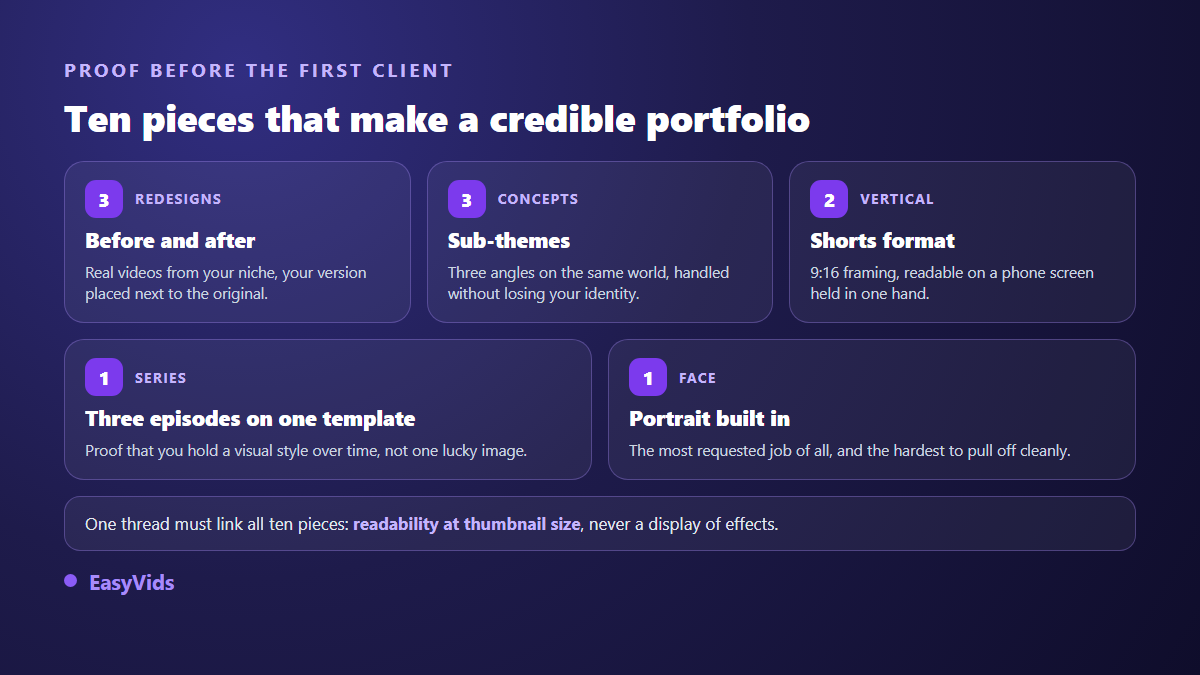
Nobody hands an image to a stranger without proof, and you will have no proof until you have a client. The way out of that loop is to manufacture the proof yourself. Ten pieces are enough, as long as they show one skill instead of a catalogue of effects.
- Three redesigns: take three real videos from your niche and show your version next to the original.
- Three concepts for fictional channels, one per sub theme, proving you can vary without losing your identity.
- Two vertical thumbnails in 9:16, framed to be read on a phone held in one hand.
- One three episode series on the same template, proving you can hold a visual charter over time.
- One thumbnail with a face, the most requested piece in client work and the hardest to pull off cleanly.
Two rules for redesigns. Never trash the original work: show an alternative, explain your choice, let the reader judge. And pick videos that performed well rather than obvious failures, because your version should prove you push a good result further, not that you can beat a beginner.
Step 3: the production chain, from brief to variant
The brief fits in four lines, filled in with the client at order time: the exact video title, the promise in one sentence, the intended emotion, the mandatory element (a face, a product, a logo). Without those four lines you work blind and hand out revisions nobody will pay for.
Then production. In the EasyVids one shot workspace, the Thumbnail tab asks for the subject in one sentence, optional on screen text, a style among eight families (viral, gaming, vlog, documentary, tutorial, horror, luxury, spiritual), an emotion (surprise, shock, joy, fear, serious), the 16:9 or 9:16 format, and up to five reference images. That reference is what changes everything in client work: the photo supplied by the client puts his own face on his own thumbnails, instead of a generic stranger his audience will never recognise.
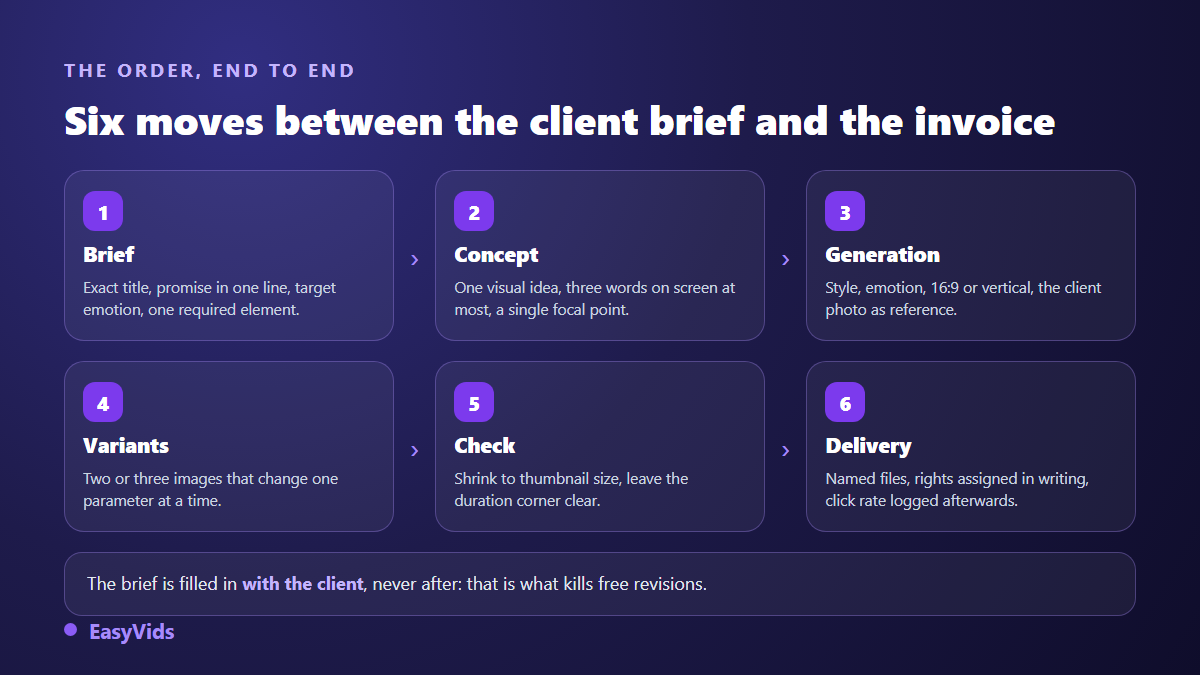
Each generation returns one image. To get your variants you relaunch the same description with a single parameter changed, and generations run in parallel, so you never wait for the first one to start the second. Plan a finishing pass in your usual image editor when typography has to be exact, for instance to match the font an established channel already uses.
Step 4: three tiers a client can read in ten seconds
An undecided client does not buy. Three tiers let him place himself without negotiating. The first covers a one off need and works as a trial. The second covers the real need, which is comparing several images. The third turns the work into recurring revenue, and that is the only goal that matters.
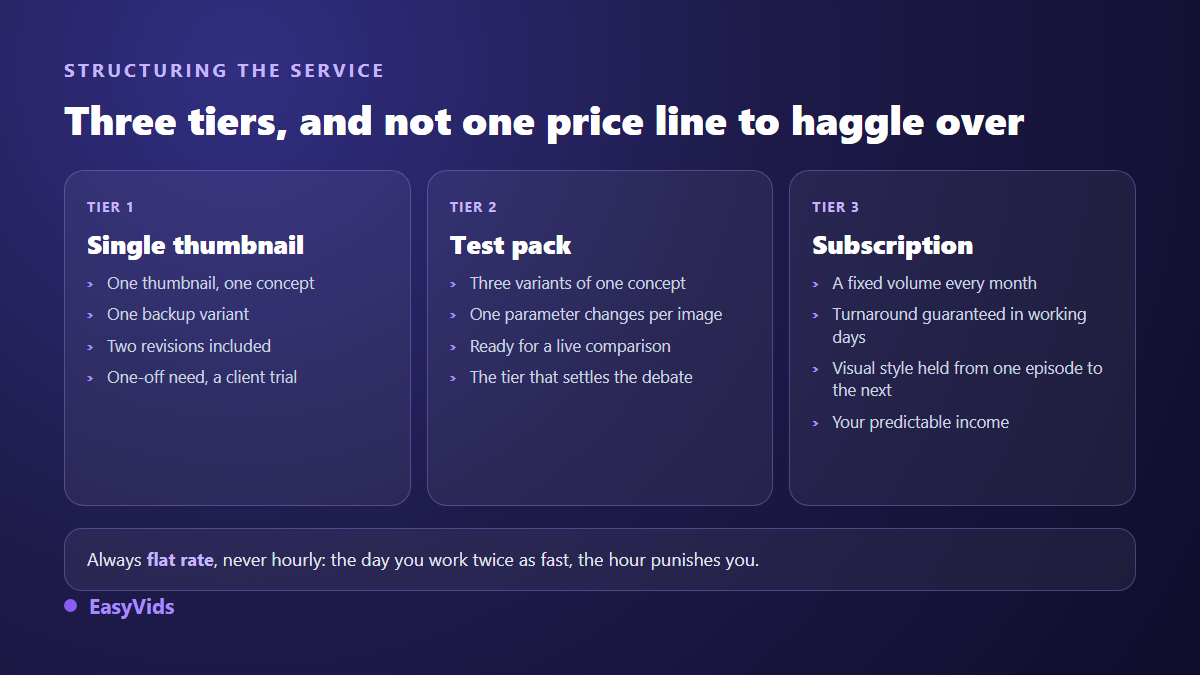
A few framing rules are worth more than any contract. Cap revisions at two rounds, beyond that it is a new order. Announce a deadline in working days and hold it, because punctuality gets you referred before style does. State in writing that delivered files belong to the client. Charge flat, never hourly. To set a margin you need your production cost, and the pricing page explains the credit system your calculations will sit on.
Step 5: first clients, without waiting for them
The fastest route is also the least comfortable: the unsolicited redesign. Find ten channels in your niche publishing at least weekly with weak thumbnails. Redo one, for free, and send it with a three line message: what you changed, why, and a question that invites an answer. Out of ten careful sends, one or two replies are enough to start.
Freelance marketplaces come next, crowded but navigable once you are specialised, followed by the creator communities you already belong to. Your best clients publish a lot without appearing on camera: series channels, usually run by one person. The faceless channel model forces a high publishing pace, so a weekly need, so a retainer rather than a one off order.
Step 6: deliver cleanly, then prove the result
Delivery is a credibility moment, and most freelancers rush it. Respect the platform constraints first: according to YouTube Help, a custom thumbnail uploads at 1280 by 720 pixels minimum, in 16:9, under a 2 MB weight limit, and the feature stays reserved for verified accounts. Name your files with the video title and the variant number, deliver in a single folder, and add a compressed version when the weight runs close to the limit.
Before sending, run the thumbnail test. Shrink the image to the width of your thumb and look at it at arm's length. If the text disappears or the subject turns into a blur, it fails where it will actually be seen. Check the bottom right corner too, covered by the video duration.
Then ask for numbers. The click through rate before your work, the rate after, measured at seven and twenty eight days. A client who sees progress does not argue about renewal, and you collect the only thing that truly sells a thumbnail service: a dated result on a real channel, quoted with the owner's permission.
Mistakes that sink a thumbnail service
- Unlimited revisions: a profitable order turns into a loss on the third round.
- Delivering a single image, which removes the client's comparison and invites a flat refusal.
- Copying a famous channel stroke for stroke: viewers recognise it and credit the original.
- Promising in the image what the video never shows, when YouTube's misleading metadata policy exposes the video to removal.
- Working without a written brief, then learning at delivery that the client wanted his face on it.
- Charging by the hour, which penalises you a little more every time you improve.
- Ignoring vertical format, when any channel posting Shorts eventually asks for it.
Rights, faces and brands
Three questions come up with every serious client. The first is ownership. On EasyVids, our terms state that generated content belongs to you and can be used commercially, which covers reselling it as a service. Always check that point on whatever tool you use, because licences vary widely.
The second is faces. A real face requires the person's consent: ask the client for a photo he owns and keep written proof of his authorisation. Never lift a stranger's portrait found online, not even for a portfolio mockup. The third is brands and game worlds. Logos, characters and screenshots belong to their owners, their use depends on each publisher's policy, and it is the client who carries that risk on his channel. Write it into your quote.
Frequently asked questions
Do I need to draw to sell YouTube thumbnails?
No. The job rests on three skills: understanding what triggers a click in one specific audience, describing an image well to a generator, and setting text that stays readable at tiny sizes. Drawing helps, it is not the entry barrier.
How many pieces should a starting portfolio have?
Ten is plenty, and eight well chosen beat twenty scattered ones. Clients look for a thread: the same legibility standard across images, plus at least one piece resembling what they need. Add a before and after redesign, it triggers the most replies.
Should I tell clients the images are AI generated?
Yes, and it causes no friction when you say it in the first exchange. Clients buy an outcome and a response time. Hiding it risks a breach of trust later, while stating it explains why you deliver several variants when a traditional studio delivers one.
How do I set a price without underselling myself?
Start from value, not from time spent. A thumbnail that lifts a channel's click through rate earns its owner far more than the service costs. Set a flat rate per thumbnail, add a premium for rush delivery, and offer a monthly plan that lowers the unit cost while securing your income.
Where do I find first clients with no network?
In the comment sections and communities you already visit. Creators publishing weekly are visible, reachable and overloaded. One free redesign sent to ten of them does more than a perfect marketplace profile competing with a thousand others.
A thumbnail service launches in a week: two days for the niche and the portfolio, one day for the offer and the outreach message, the rest for sending and following up. The first client rarely appears by chance, he appears because you showed an image before anyone asked. To build your ten pieces today, create an account and open the Thumbnail tab: the EasyVids studio keeps image generation, reference photos and vertical formats in one place.