You have a finished file: an ebook, an image pack, a document template. It is good, and you know it. Yet it sits in a folder. The content is almost never what blocks a launch. Learning how to sell digital products means building a whole chain, from the finished file to money in your account, and one missing link is enough to stop every sale.
This guide walks that chain in the order you actually build it: what you sell, how you make it, where the file is hosted, how you take payment, how the buyer receives it, and what happens once the sale is done. No amounts here: prices and platform cuts change month to month and country to country, the mechanics do not. If you are still weighing what to create, our inventory of digital product ideas you can build with AI is the place to start; from here we assume your choice is more or less made.
The short answer
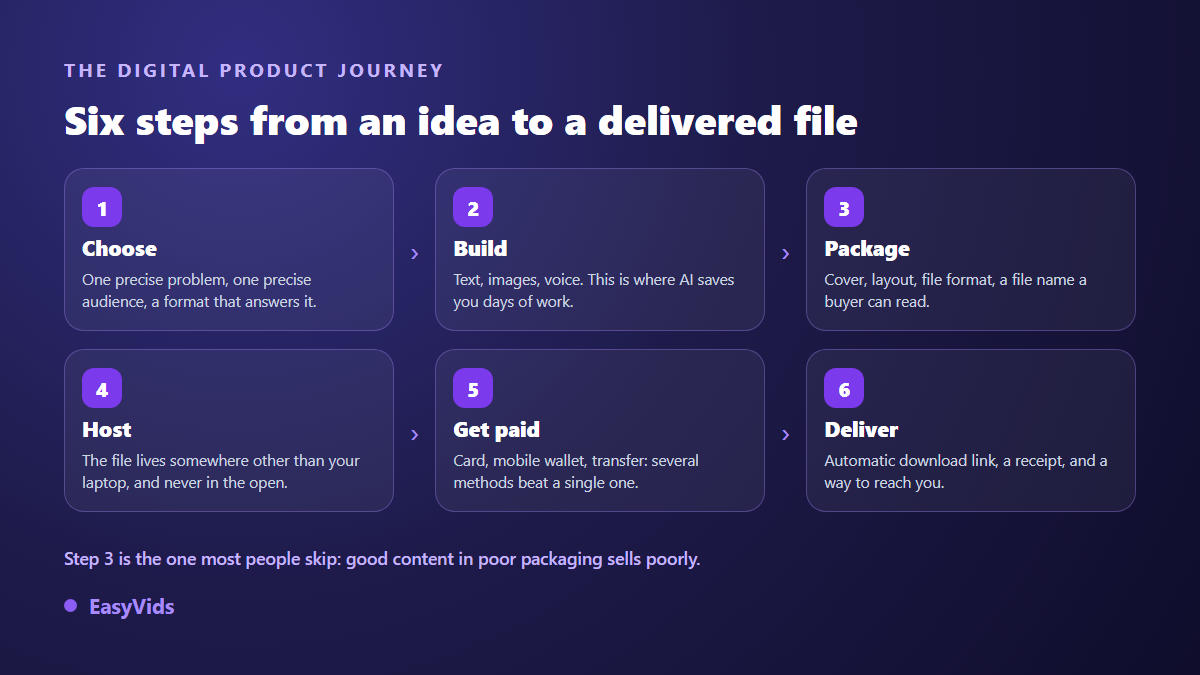
Selling a digital product comes down to six steps: pick a product that solves one precise problem, build it, package it into a clean file, host it somewhere other than your own computer, connect a way to take payment, then automate delivery. The first five take a few hours with the right tools. The sixth, automatic delivery, is what turns a one off sale into income that runs without you. Everything else, sales page, reviews, legal duties, hangs off that spine.
A digital product is a file plus a promise
A digital product is a file people download or open online: an ebook, a guide, an image pack, a document template, an editing preset, music, a video course, an app. The economics are simple. You build it once, you sell it as often as you like, and each copy costs nothing. The commercial side is harder. Buyers cannot hold it, flip through it or return it like an object. They are buying a promise, and most of your work is making that promise credible before the payment goes through.
Step 1. Pick a product that solves one precise problem
The first decision is not the format, it is the problem. A digital product sells when it fits in one sentence: it helps this person get that result. If you cannot write that sentence, no platform, no sales page and no cover will rescue the vagueness. The format follows: what gets read becomes an ebook or a template, what gets shown becomes an image pack, what gets learned becomes a course. Before you build anything, check that somebody is already asking for the solution in their own words, in comments, in groups, in search boxes. A need other people already put into words sells far better than a need you worked out on your own.
- Does the problem fit in one sentence, with no « and also » bolted on?
- Is somebody already describing it out loud, in their own words?
- Does your product deliver a result, or only information?
- Can you build all of it, without relying on content you have no right to use?
- Will you still be able to update it in six months?
Step 2. Build it without losing three months
This is where AI genuinely changes the calendar. A complete ebook, outline, chapters, illustrations and layout, now takes one working session instead of several weeks. Method matters more than tooling: start from an angle, approve an outline, write chapter by chapter, reread, illustrate. Our guide to creating an ebook with AI from topic to first sale covers that route, proofreading included.
Visuals follow the same logic. A cover, chapter openers, images for the sales page: all of it can be generated, as long as you hold one visual style across the set. When the images become the product themselves the rules change, and every marketplace applies its own policy to generated files, which is the subject of our article on selling AI images. Whatever you generate, reread every line: AI writes fast and gets things wrong just as fast, and a factual error inside a paid product costs a refund and a bad review. The EasyVids studio keeps writing, images and layout in one place, and the plans are listed on the pricing page.
Step 3. Package the file, the step almost everyone skips
Excellent content inside a careless file sells badly, and its author never understands why. Packaging means the cover, the layout, the file format, the file name and the first page. Those are the few seconds in which a buyer decides whether paying was a good idea, before reading a single line.
Choose the format by use. Something read end to end on an e reader wants EPUB, where text reflows on any screen. Something consulted, filled in or printed wants PDF, where the layout stays put. An image pack wants a tidy archive, named folders and a short read me explaining what is inside. Name the file with the product title and your name, never « version-3-final »: that name will sit on the buyer's computer for years. Add a title page with your name, a contact address and the version date, so you can send an update later.
Step 4. Host the file and choose where to sell
The file has to live somewhere other than your laptop, and its address must never be guessable. A public share link sent by message gets copied around within days. Three setups exist, and they differ less by their commission than by a far more decisive question: who brings you the buyer.
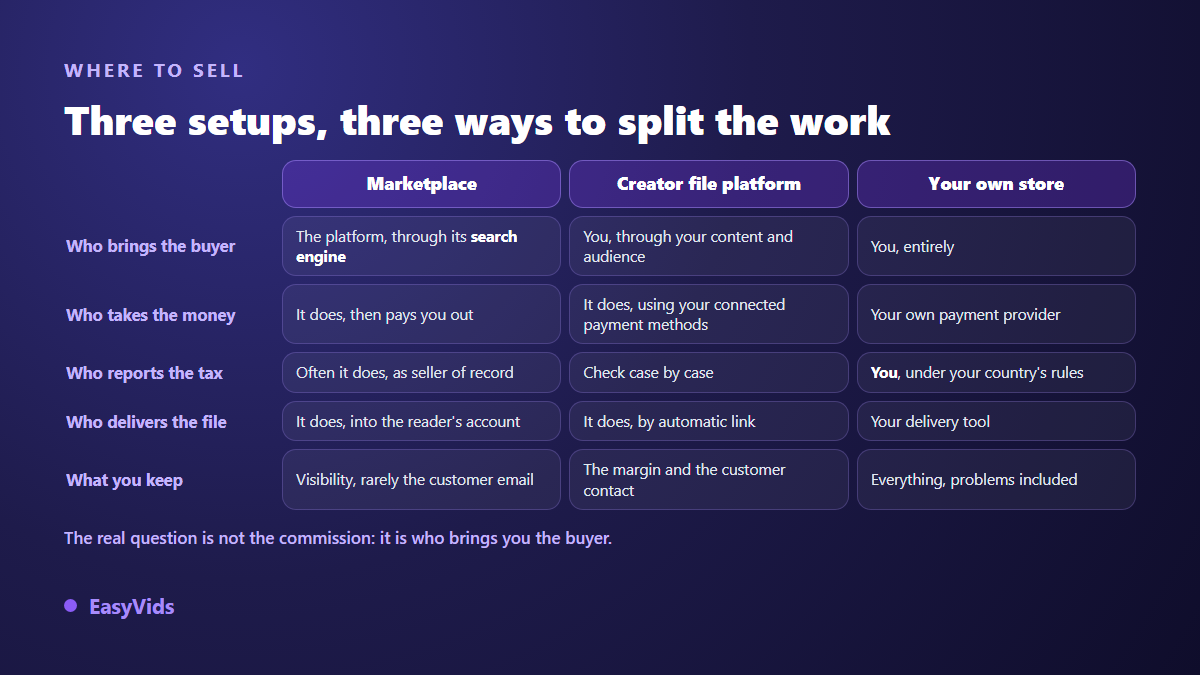
A marketplace lends you its audience and handles payment, often tax, and delivery; in exchange it keeps the customer relationship. A creator file platform leaves you the margin and the contact, but you bring the visitors. Your own store gives you everything, technical incidents included. Most sellers start with the second setup and add the first later. The channel by channel reasoning sits in our comparison of ebook sales channels, and it holds for almost any file. One rule avoids a classic disaster: never list the same file under an exclusivity programme and for direct sale at the same time.
Step 5. Take the payment, in more than one country
Taking payment needs a payment provider, whether the platform supplies one or you connect your own. Check this before anything else: is your country accepted by that provider, and can you receive payouts into an account in your name? Plenty of projects stall exactly there, product finished, because nobody checked that line first.
Then offer several payment methods. Cards do not cover everyone: depending on the region, mobile wallets, instant transfers or local schemes carry most transactions. Every missing payment method is a buyer closing the page. Show the price in the currency the buyer recognises, tax included where their country requires it, because a total that changes at checkout kills the sale.
Step 6. Deliver the file without thinking about it
Manual delivery works for the first three sales, then it becomes a trap: you are asleep, the buyer is waiting, and the refund request arrives. Delivery has to fire on its own within a minute of payment. That means three things. The download link is unique and expires, after a delay or a number of downloads. The confirmation page already shows the link, because many buyers do not check their inbox straight away. And an email goes out anyway, with the same link, the receipt and a way to reach you. That last point settles most complaints by itself.
What happens after the sale
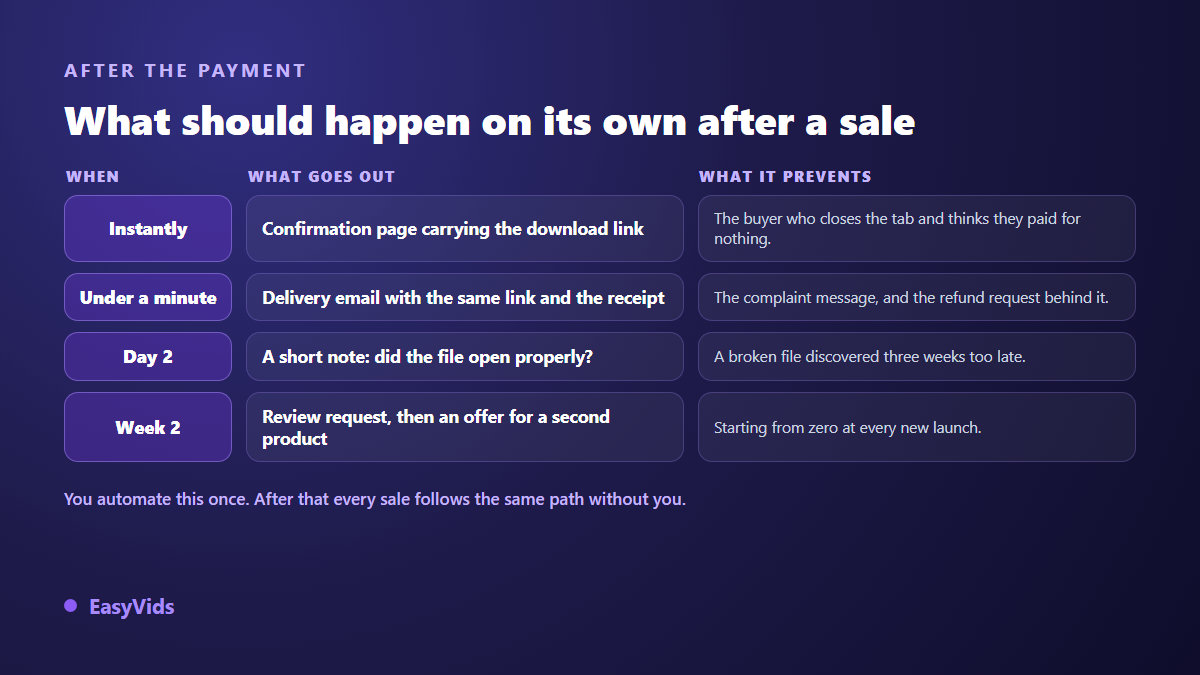
A sale is not an ending: it is the first time somebody trusts you. Two or three automatic messages get a lot out of that. A short note after two days asking whether the file opened catches technical problems before they become refunds. A review request two weeks later feeds your sales page, because a product with no reviews sells badly whatever its quality. It is also the moment to think about the next product: selling to a satisfied buyer is far easier than finding a new one, and the natural sequel to an ebook is often a longer format such as an online course built on the same subject. Keep your buyers' email addresses whenever the platform lets you: it is the only asset left when a channel closes or changes its rules.
Legal points to check before you list
The rules depend on where you are established and where your buyer lives. Treat what follows as a checklist, not legal advice: find the texts, check the version in force, and get advice for your own case. On cancellation, European directive 2011/83/EU of 25 October 2011 on consumer rights sets a fourteen day withdrawal right for distance purchases, and its article 16 creates an exception for digital content supplied without a tangible medium: that exception applies only if performance began with the buyer's prior express consent and their acknowledgement that the right is lost. The checkbox at checkout is therefore not a layout detail. Outside the European Union the regime differs, and platforms add their own refund policy on top.
On information, the same 2011 directive requires you to state, before the order, the main characteristics of the product, the seller's identity, the total price and, for digital content, its functionality and interoperability, meaning what is needed to open it. Three lines cover it: file format, approximate size, devices it reads on. On tax, since 1 January 2015 the European VAT rules place the tax on an electronically supplied service to a consumer in the buyer's country rather than the seller's, with a one stop declaration scheme widened on 1 July 2021 to avoid registering in every country. Many marketplaces declare themselves seller of record and handle it for you, which is a line worth reading in their terms. Other countries have adopted comparable mechanisms with their own thresholds, so check with the tax authority you answer to.
Mistakes that leave a product unsold
- A product promising everything to everyone: nobody recognises themselves in it.
- A sales page describing the content instead of the result the buyer gets.
- No sample to look at, when the buyer has no reason to take your word for it.
- One payment method only, which shuts out part of the audience.
- Manual delivery, which breaks on the first sale that lands overnight.
- No visible contact when something goes wrong, turning an incident into a dispute.
- A single launch with nothing behind it: the product dies with its release week.
Frequently asked questions
Do I need a website to sell digital products?
No. A creator file platform provides the sales page, the checkout and automatic delivery, which is plenty for your first sales. A site becomes useful later, once you have several products, an audience of your own and a reason to control the whole presentation.
Am I allowed to sell a product made with AI?
In most cases yes, with two conditions. The first is copyright, which varies by country and by how much human input went into the work. The second is the channel's own rule: the Kindle Direct Publishing content guidelines, updated in 2023, ask publishers to tell Amazon when content is AI generated at the moment of publication, as covered in our article on AI books and Amazon KDP. Read the rule of the platform you target before you publish.
How do I stop the file being shared for free?
You cannot stop it entirely, and fighting it costs more than the sharing does. What works: a unique link that expires, a discreet watermark carrying the buyer's name, and above all a reason to come back to you, updates and extras, that a copied file does not carry.
How long does a first product take to launch?
Allow one focused working day for a short guide built with AI, packaging included, then half a day for the sales page, the checkout and automatic delivery. The long part is not the building, it is the decision at the start: choosing one precise problem and staying on it.
Should I launch one product or a full range?
Start with one, actually on sale. A product that has sold teaches you more than five in preparation: you learn who buys, what they ask for next, and where the journey breaks. The range is built on those answers, never before them.
Selling digital products needs neither a huge audience nor technical skill: it needs a complete chain, built once, where every step runs without you. Pick a precise problem, build cleanly, package with care, automate delivery, then look after the buyers you already have. To build the product itself, text, images and layout in one place, creating an account opens the full studio, and EasyVids brings those tools together in a single interface.