You need to explain your product, your method or your service to someone who knows nothing about it. You open a document, you write three paragraphs, and you already know nobody will read them to the end. An explainer video solves that, on one condition: the message has to be arranged in the right order. A badly built video does not lose its viewer at the end. It loses them around the twelfth second, the moment they realise you are not talking about them yet.
Sixty seconds is the right length, and that is not a stylistic preference. One minute is what a person will grant an explanation they never asked for. The whole exercise is fitting a problem, a solution, a mechanism and a proof into that narrow corridor. This article gives the complete timing map, segment by segment, with what each one must contain and the mistake that kills it. If script writing is new to you, our full guide to writing a video script covers the ground the rest of this assumes.
The short answer
A one minute explainer video splits into six segments: the problem from 0 to 5 seconds, what it costs from 5 to 15, the solution named in one sentence from 15 to 25, how it works in three steps from 25 to 40, the proof from 40 to 50, and a single call to action from 50 to 60. The finished script runs to roughly 150 words. Each segment has exactly one job, and one typical mistake that ruins it: introducing yourself instead of talking about the viewer, stacking problems, using jargon, listing features instead of showing a journey, promising instead of proving, and asking for three things at the end.
Why sixty seconds beats two minutes
A longer explanation is not clearer, it is easier to abandon. Someone watching an explainer video was not looking for you. They landed on your page, on a post, on a link a colleague sent. Their first question is not how it works, it is whether this concerns them at all. A minute is enough to answer that, and more importantly it forces you to cut everything that does not.
The format has a second advantage: it travels. One minute fits on a homepage, in an email, in a social feed, at the top of a meeting. A three minute video only works where the viewer already committed. Keep in mind that many feed viewers start with the sound off, so your first sentence has to be readable on screen as well as audible. The first three seconds decide the rest, and seven ways to hold attention from the opening frame give wording you can reuse as is.
The full structure, segment by segment
Here is the timing map. It does not come from communication theory: it is the order in which a person discovering a subject agrees to receive information. The problem first, because it creates attention. The consequence next, because it creates appetite for a solution. The solution after that, because it only means something once the gap exists. Swap two blocks and the video turns into a brochure.
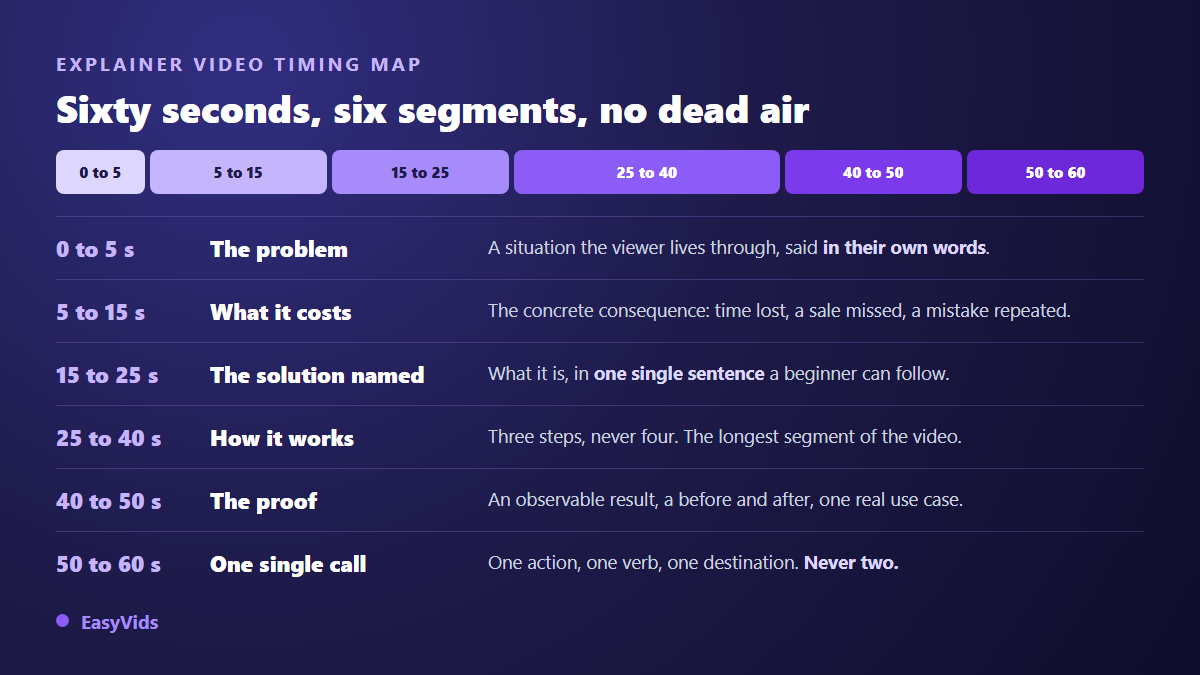
One thing to watch before writing: these boundaries are voice durations, not shot durations. A single segment can hold two or three shots. Between 25 and 40 seconds that is exactly what you want, since every step deserves its own visual.
0 to 5 seconds: the problem, in the viewer's own words
What this segment must contain: one sentence, and only one, describing a situation your viewer instantly recognises as theirs. Not your market, not your sector, not your ambition. Their working day. Something like: your quotes go out late because you type them by hand. Twelve words is enough, and twelve words is what you have.
The mistake that kills it: introducing yourself. The animated logo, the company name, the warm welcome burn the five most expensive seconds of the video on something nobody needs. Your name belongs at the end, once the viewer has a reason to remember it. Put that first sentence on screen too, in large type: it has to work with the sound off.
5 to 15 seconds: what the problem actually costs
A problem stated does not make anyone act. Its consequence does. This segment answers a question the viewer never says out loud: so what? A good consequence is concrete and measured in time, in frequency or in missed opportunities. Two hours a week. One file in three comes back for correction. The client has already called again before you replied.
The mistake that kills it: stacking. Afraid of leaving anyone out, people list three different problems. The viewer then recognises none of them, because none is described precisely enough. An explainer video speaks to one person in one situation. If you have three, make three videos: the script is short, so the second and third are rewritten by changing two segments out of six.
15 to 25 seconds: the solution named in one sentence
Here you name the thing and say what it is, in a sentence a complete beginner would follow. The formula that almost always works has two halves: what it is, and what it replaces. An online quoting tool that replaces your spreadsheet and your document template. The viewer can now file your product somewhere in their head, which is the entire point of the segment.
The mistake that kills it: in house jargon. Unified platform, integrated solution, ecosystem: none of it means anything to someone discovering the subject. The test is easy. Read the sentence out loud to someone outside the project and ask them to say it back in their own words. If they hesitate, rewrite it. Do not add a selling point here either, that comes later.
25 to 40 seconds: how it works, three steps and never four
This is the longest segment and the only one where detail is welcome. Fifteen seconds, around thirty eight words, three steps. The three step limit is not decorative: beyond it, viewers stop memorising and start merely watching. Each step opens on a verb and ends on a visible result.
- Step 1, what the person does first: import your client list.
- Step 2, what the tool or the method does from there: the quote fills itself in.
- Step 3, what the person ends up with: you send it, the client signs online.
The mistake that kills it: listing features. Seven features in a row never explain how something is used. A three part journey does. Give each step its own shot as well: fifteen seconds on a single still image feels endless, however good the voice is.
40 to 50 seconds: proof, not promises
The viewer understands. They do not believe you yet. This segment turns understanding into trust, and it only tolerates observable material: a before and after, a result you can stand behind, one real use told in two sentences, a customer's own words.
The mistake that kills it: the superlative. The best tool on the market proves nothing and triggers suspicion. If you have no proof yet, show the product doing what you just described: ten seconds of demonstration beats any adjective. And when you quote a number, name its source in the sentence, out loud and on screen. A figure with no origin always ends up used against whoever cited it.
50 to 60 seconds: one single call to action
Ten seconds, one action. One verb, one destination, the same wording in the voice and on screen. This is also where your name belongs, now that it means something. Hold the last frame two or three seconds longer than feels necessary: a viewer deciding to act needs to read the address twice.
The mistake that kills it: offering three doors. The website, the demo, the social accounts, the newsletter. Every extra option splits the action. Pick the one that matters for this particular video and drop the rest without regret.
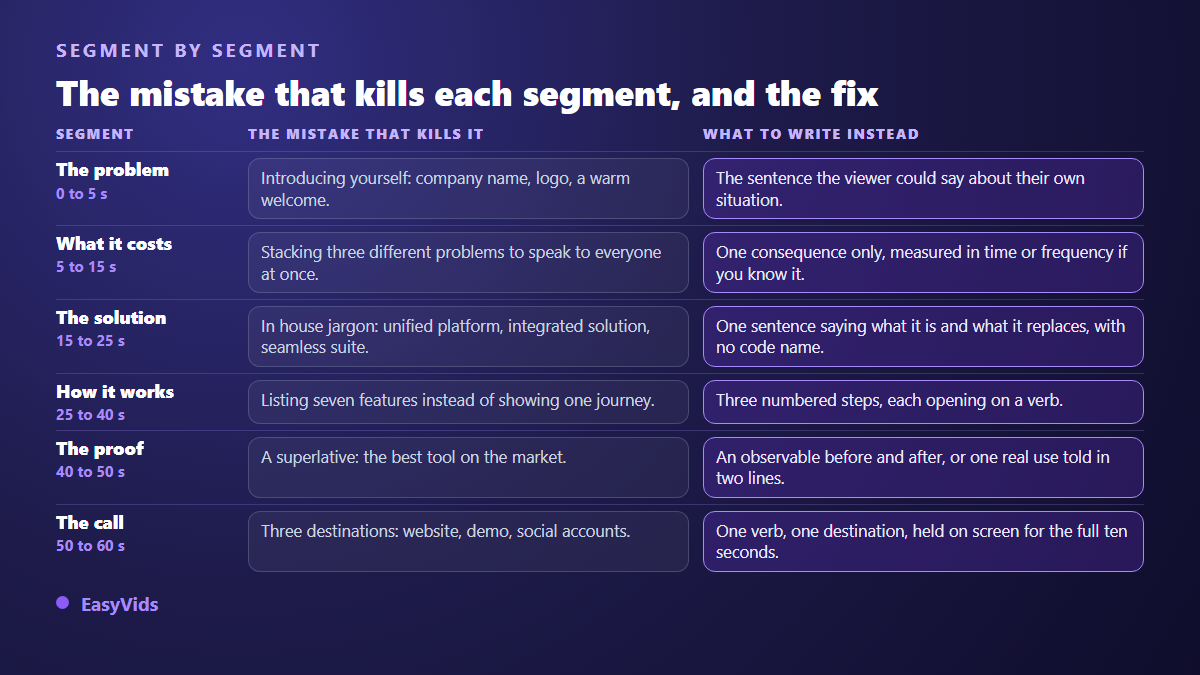
All six mistakes share one root cause: talking about yourself earlier than the viewer invited you to.
The word budget: 150 words, no more
A steady voice over delivers roughly 150 words per minute. A one minute explainer video therefore has a fixed word budget, and that budget is allocated before writing, not after. This single discipline improves scripts faster than anything else: instead of cutting down an overlong text, you write to the right length from the start.
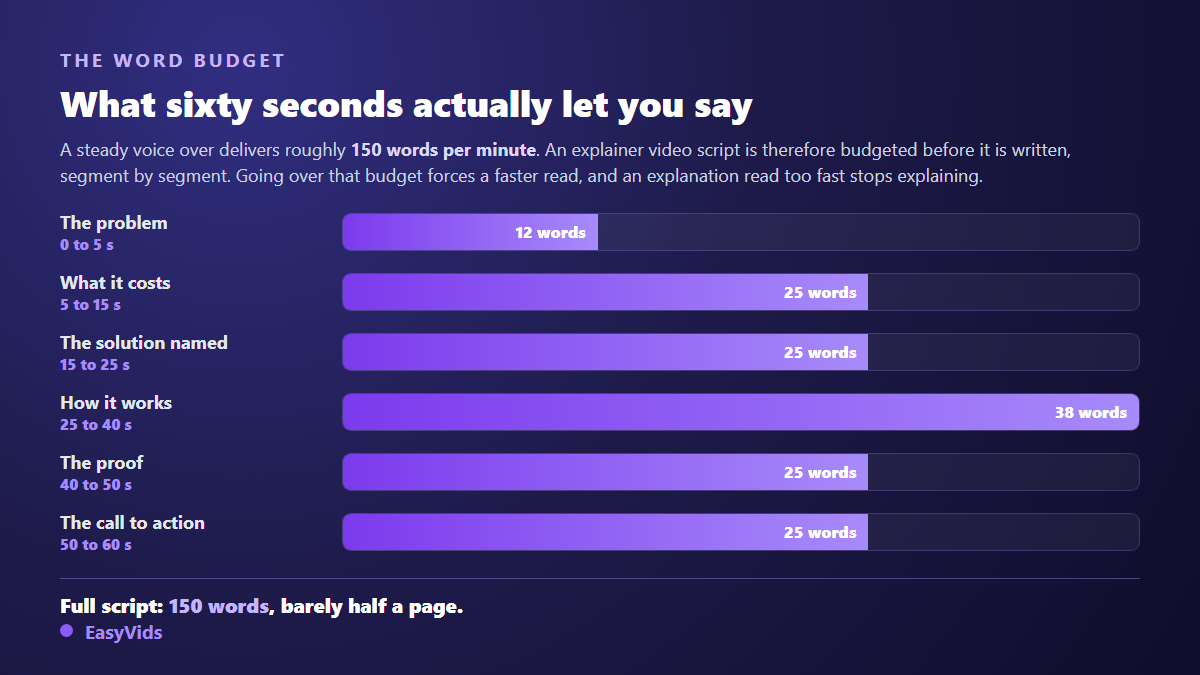
If your delivery is faster or slower, adjust the split: the exact calculation per speaking rate is covered in our piece on how many words fit into a minute of video. One rule holds either way. When a segment overflows, do not speak faster, remove an idea. An explanation read too fast stops explaining.
Write for the ear, not for the page
An explainer script is not website copy read aloud. It follows different rules, because the ear cannot go back. Five habits are enough to make any explanation land.
- One idea per sentence. If a sentence uses an and to join two ideas, split it.
- Fifteen words maximum per sentence. Read the script aloud: where you run out of breath, the viewer runs out of attention.
- Present tense, active voice, a clear subject. The quote fills itself in, not the filling of the quote is performed.
- No unexplained acronyms, no internal code names, no decimals.
- The word you more often than the word we. Count both in your script: if we wins, the video is about you and not about the viewer.
From script to shots, without rewriting twice
Once the script is locked, you decide what is seen. A segment is not a shot: these six segments usually produce eight to twelve shots, because how it works needs three on its own. That breakdown belongs before any production, and our method for cutting a script into shots avoids the rewrite that always follows a generation launched too early.
For production itself, explainer videos suit animation particularly well: shapes, on screen text, icons and transitions often explain better than filmed footage, and they can be corrected without reshooting anything. The motion design engine at EasyVids builds those sequences from your script with nothing to install, and our motion design guide covers the styles that serve an explanation best.
Adapting the structure without breaking it
The frame stays, the proportions move. A company presentation keeps all six segments but gives more room to proof, because trust matters more there than mechanics. An internal tutorial does the opposite, since everyone already knows the problem: how it works can take half the running time. A version made for a social feed compresses everything to thirty seconds by merging the first two segments.
Across our own generations, scripts that stay inside the range of 15 to 40 words per shot need noticeably fewer edits afterwards than scripts that exceed it. When one shot carries too much voice, the image sits frozen for too long and has to be recut. Writing short upstream removes that work downstream.
Frequently asked questions
How long should an explainer video be?
Sixty seconds for a homepage or a social feed, ninety for a product that needs a demonstration, thirty for an advert. Past two minutes you are no longer making an explainer video but a presentation, and that needs a different structure with chapters and visual markers.
Do I need a presenter on camera, or is a voice over enough?
A voice over is enough in the vast majority of cases, and it simplifies everything: no shoot, text you can correct at will, several languages from the same script. An on camera presenter earns its place when trust in a specific person is part of the message, for a consultancy or a professional practice for instance.
How do you write an explainer video for a very technical product?
You describe the working problem, never the technology. The rule for the 15 to 25 second segment does not change: what it is, what it replaces. The technical detail does not vanish, it moves to a second video or to the page behind the click, where people actually want it.
Are captions necessary on an explainer video?
Yes, every time. A large share of the audience watches with the sound off, in a social feed as much as in a shared office. The on screen text of the first segment matters even more: it has to carry the same sentence as the voice, large and high contrast, or the video opens silent for half of its audience.
What does an explainer video cost to produce?
The gap between a studio shoot and an animated video generated from a script is considerable, and it widens as soon as you need several versions or several languages. Plans and the free trial are listed on the pricing page, which we keep current rather than quoting figures here.
Take your subject and write the six sentences in order, with the word budget written next to each. The exercise takes twenty minutes and almost always exposes two things: the problem was not described from the viewer's side, and the call to action asked for too much. Fix those two and you have an explainer video that works. To go from script to animated video in the same sitting, create an account and let the studio cut, animate and score your minute.