You found the product, the listing is ready, the store is waiting. The only missing piece is the video, and the video decides everything: without a creative, no campaign runs. Ordering a sample, waiting for delivery, filming and editing adds two to four weeks to a calendar that has none. Dropshipping video ads can be built from what you already have, which is the set of photos the supplier published.
The shortcut works, on one condition: you need to know what those images let you show honestly, and what they will never show. That line separates an approved ad that keeps running from a rejected one that puts your ad account at risk. This guide covers the full method, from sorting supplier images to producing testable variations, and extends our guide to UGC style dropshipping videos into classic product advertising.
The short answer
Pull three to five sharp photos from the supplier, use them as visual references in a video generator, then produce four short shots: hook, use in context, close detail, offer. Assemble them into a vertical video of fifteen to thirty seconds, with a voice over and burned in captions. Keep anything that demonstrates something for a real sample: the mechanism, the durability, the material, the results. A fair ad made without a sample shows the product, it does not prove anything on its behalf.
Why the creative is the real bottleneck
Finding a product takes an hour. Building the listing takes two. The video creative blocks the launch for weeks, even though it is the one asset the ad platform truly evaluates. Advertiser guidance from both Meta and TikTok stresses refreshing creatives regularly instead of running a single ad, so a seller who cannot produce quickly is penalised twice, at launch and during the campaign.
The second problem is quieter. Supplier photos circulate among every seller listing the same item, often inside the same edit bought from the same freelancer. A buyer who meets the same visual three times in one feed stops clicking. Generating your own shots from those photos breaks that repetition without touching your logistics, because the setting, the light and the movement become yours.
Step 1: audit what the supplier actually gave you
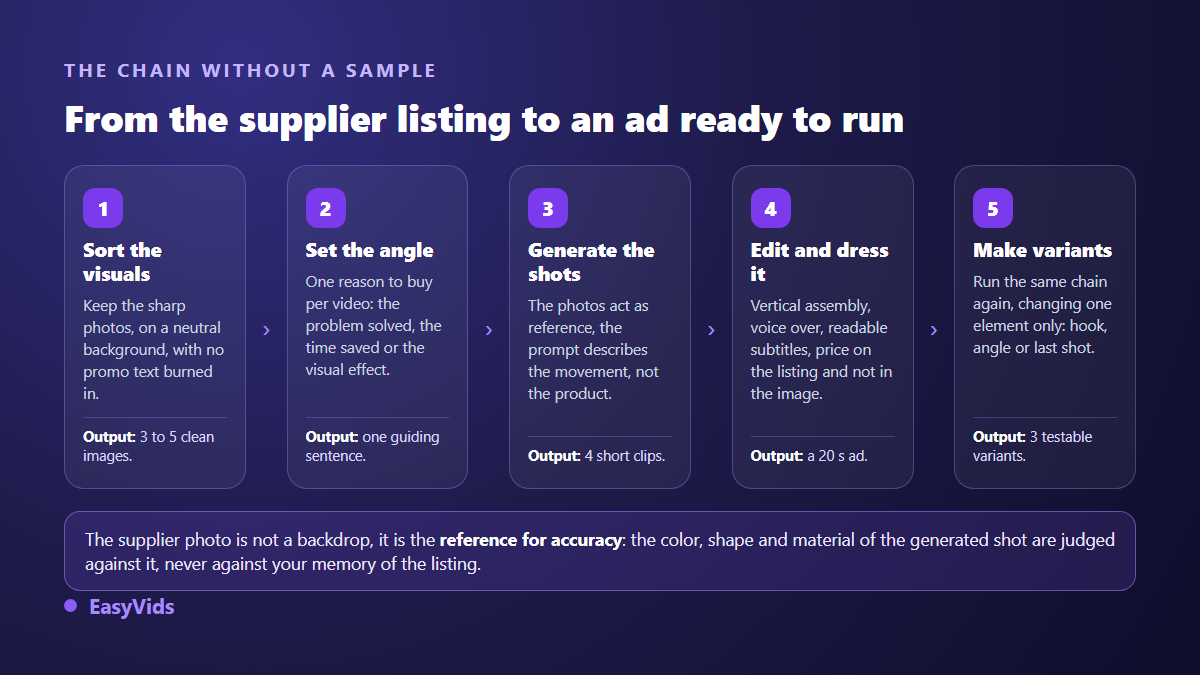
Open the listing, download everything, then throw half of it away. An image feeds a video model as a reference: its sharpness, framing and background shape the result more than the prompt does. Across our own generations, a product cut out on a plain background produces a far more faithful shot than a visual already carrying a promotional banner, because the model copies that banner and turns it into unreadable letters.
- Keep photos where the product fills at least half the frame, front view and three quarter view.
- Drop any visual with burned in text, a marketplace logo or a watermark.
- Drop collages that pack several views into one image: the model builds a hybrid object from them.
- Keep one close detail, a seam, a zip or a connector, it will feed your third shot.
- Write down the exact colour and the stated material: these become your two acceptance criteria.
- Grab the supplier video if one exists, however poor: it documents how the thing actually works.
One legal point deserves thirty seconds. A photograph is protected from the moment it is created, with no registration and no notice, across the countries that signed the Berne Convention. A supplier leaving it downloadable on a listing is not a licence to run it in paid advertising. Ask for written permission inside the platform chat: two lines are enough, and they cover you the day the question comes up.
Step 2: the four shots that sell
A product ad does not tell a story, it answers four silent questions in order: what is it, what does it do in my life, is it solid, what do I do now. One shot per question and the video is written. That frame holds for any store, stocked or not, and our complete product video guide breaks down the variations by product type.
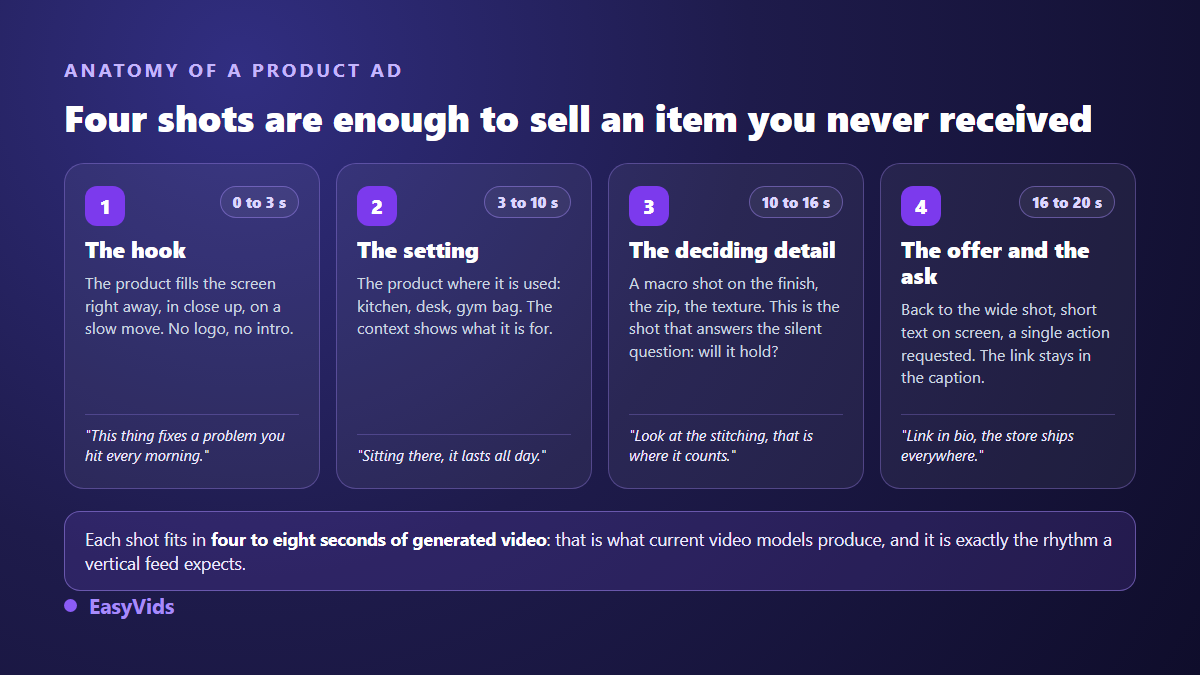
Shot length is not an aesthetic choice, it is a technical limit that happens to help you. Current video models output four to ten seconds depending on the one you pick, which is exactly the length of a vertical ad shot. So you generate shot by shot, keep what works, relaunch the rest, and never rebuild a whole video to fix three seconds.
Step 3: animate the photo without warping the product
The central move is to feed the photo to the generator as a visual reference, then describe the motion you want. The camera moves that work on a static object are detailed in our method for turning a product photo into video. Our generator accepts several reference images for a single generation, so you can supply the front view and the detail view together and limit drift from one shot to the next.
One rule protects accuracy: describe the movement, never the product. Writing 'a blue glass bottle on a kitchen counter' invites the model to reinvent the bottle. Writing 'the camera slowly orbits the object from the photo, soft late afternoon light, blurred kitchen background' leaves the object alone and hands the model nothing but the staging. If you need starting formulas, our product video prompt examples are ready to copy and adapt.
Step 4: write the words after the shots
The script comes after the visuals, never before, because it has to match what the image really shows. Budget around fifty words for twenty seconds of voice over. That constraint alone removes every decorative sentence.
- First second: name the problem, not the product. 'Your cables tangle again every morning?' beats a brand name.
- Second beat: state the use in one concrete sentence, with a place and a time of day.
- Third beat: lean on a detail visible on screen, a finish or a material, never on a performance figure you cannot prove.
- Final beat: one single action, in the present tense, with no stacked arguments.
- Throughout: burned in captions, large and high contrast, because a large share of the feed is watched with the sound off.
The voice over then raises the market question. The same product rarely sells in one country only, and rebuilding the video per language would be absurd. Generate the shots once, then swap the voice track and the captions: the picture stays identical while the message becomes local. Watch the pace though, since a voice that rushes in a language you do not speak reads as a careless edit to the people who do.
What you cannot show without a sample
This section is the one that keeps you out of disputes. A video model extends what it sees; it knows nothing about real weight, durability, or a mechanism no photo documents. Any shot that claims to demonstrate becomes a statement, and an unverifiable statement turns into a refund request the day the parcel reaches the buyer.
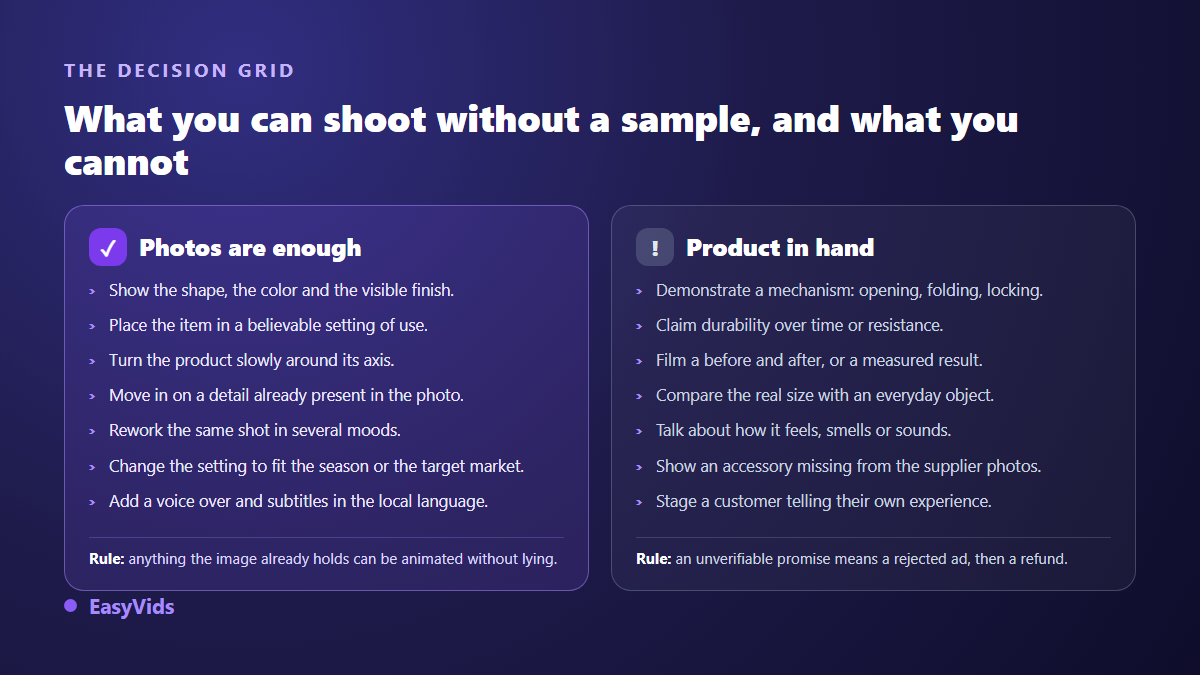
The sound practice is to launch with descriptive shots, measure, then order samples only for products that already proved demand. That reverses the usual order: logistics no longer funds tests, it follows winners. Out of ten products tried in a month, a store skips nine pointless orders and keeps its shipping delay for the single item that deserves a sample.
Ad policies to read before you spend
Three sets of rules govern what you publish. Meta advertising standards prohibit misleading claims and, in the health and appearance category, before and after images along with unrealistic results. TikTok community guidelines on synthetic media require clear labelling of AI generated content that shows realistic scenes or people. And according to the application calendar of the European AI Act, the transparency obligations in its article 50 have applied since August 2026 to generated or manipulated content.
Two habits cover you in practice. Use the generated content label the platform offers at upload time, since it exists for this and beats a flag applied without you. Then check what your tool writes into the exported file: the C2PA standard defines a provenance metadata format that several generators now attach to their outputs, and that information travels with the video.
Produce variations instead of chasing one perfect ad
A single creative tells you nothing. Three versions of the same product, differing only in the hook or in the selling angle, show immediately which argument lands. The full protocol, with the thresholds to read and the moment to cut, sits in our winning product testing method. At minimum, keep the one change rule: alter two things at once and you will know which version wins, never why.
This also changes how you spend. The unit becomes a generated shot rather than a shooting day: a failed shot is relaunched on its own, a variation costs one shot instead of a production. Our plans are listed on the pricing page, and the principle holds with any tool, which is that the budget belongs on tests rather than on a perfect first attempt.
Format and export settings that avoid recropping
Choose the aspect ratio before generating, never after. A shot built in 16:9 then cropped to vertical loses a third of its subject, and the product itself is usually what leaves the frame. Video models natively offer 16:9 and 9:16, some add square: pick the ratio of the platform you target from the first shot and hold it across the series. Meta and TikTok advertising guides both recommend 9:16 at 1080 by 1920 pixels for vertical placements, with 4:5 still useful in feed. Export MP4 with H.264, and make sure no watermark survives in a corner.
Frequently asked questions
Do I need a sample before running an ad?
Not to test. Supplier photos are enough to produce honest descriptive shots and to measure demand. The sample becomes necessary as soon as the product passes the test and you want to demonstrate a mechanism, a material or a result. Ordering it at that point costs you the same, except it now serves a validated product.
Can I use the supplier photos in my ads?
Not automatically. A photograph is protected from creation across countries that signed the Berne Convention, and publishing it on a listing does not grant a commercial licence. Ask the supplier for written permission, keep the record of that exchange, and avoid images carrying a third party watermark.
Can an AI generated video be rejected by an ad platform?
Rejection rarely comes from the generation itself, it comes from what the video claims. Meta advertising standards target misleading claims and unrealistic results regardless of how the footage was made. A generated ad that plainly shows a product goes through; the same video with an invented before and after gets rejected, and your account keeps the record.
How many videos do I need to test a product?
Three versions of the same video are enough for a first round, each changing one element only: the hook, the selling angle or the final shot. Once the winning element is known, build three new versions around it. Testing in rounds produces lessons you can reuse on the next product, which a batch of ten creatives launched together never does.
How long should a dropshipping video ad be?
Fifteen to thirty seconds in vertical format, with the product visible in the first second. Longer videos work when they carry a genuine demonstration, which means having the item in hand. Without a sample, the short version stays both more honest and more effective.
The real constraint in dropshipping was never creativity, it was the delay between a product idea and an ad you can actually run. Supplier photos, a generator that accepts visual references and a vertical edit bring that delay down to one afternoon, as long as you stay on the side of what you can show without lying. To build your first shots from a supplier listing, create an account and launch a generation with your reference images: the EasyVids studio keeps generation, voice over, captions and editing in one place.