Your listing images are clean, your bullets are written, and conversion still sits flat. What the page is missing is the one thing a still image never shows: the product actually being used. An Amazon product video fills that gap. It answers the questions that stall a purchase, real size, material, how it assembles, in seconds rather than in three paragraphs of description.
Then comes the part that discourages most sellers: the file goes up, comes back rejected, and the reason is rarely readable. Almost always the cause is one of three things. An encode outside spec. A forbidden element inside the frame. A length the placement will not take. All three are settled before you open any editing tool. If the topic is new to you, our guide to product video for ecommerce covers what every platform has in common, while this page focuses on what is specific to Amazon.
The short answer
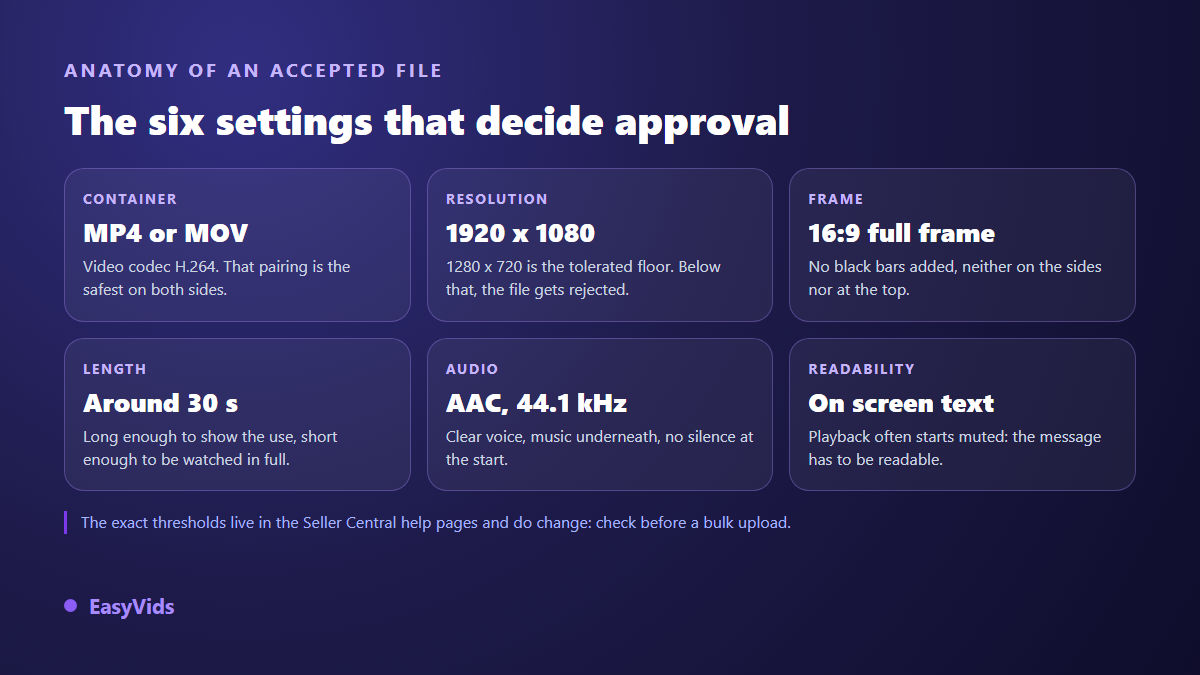
Amazon expects an MP4 or MOV file encoded in H.264, at least 1280 x 720 pixels, with a clear preference for 1920 x 1080 in full frame 16:9, as described in the Seller Central help pages about uploading videos. On content, Amazon's video policy rules out prices, promotions, time sensitive claims, website addresses, contact details and any invitation to buy elsewhere. Aim for around thirty seconds, show the product in use from the first frame, and carry the message on screen as much as in the voice.
Where the video appears, and why that changes the rules
The word video covers several distinct placements on Amazon, each with its own demands. The listing video sits inside the image carousel next to your photos, and also surfaces in the related videos block further down the page. Premium A+ content has its own video modules, with lower minimum resolutions. Video ads belong to Amazon Ads and follow a noticeably stricter brief.
That distinction has a practical consequence: one file does not travel everywhere untouched. A listing video tolerates a comfortable length, while a Sponsored Brands ad has to sit between 6 and 45 seconds and stay under a capped file size, according to the specifications published by Amazon Ads. Producing a short thirty second version from the start solves it: that one fits everywhere. On the substance, what a video changes on a product page applies to Amazon exactly as it does to your own store.
The technical specs of the file
These are the values to know before you configure an export. They come from the specification pages Amazon publishes for Seller Central and for Amazon Ads, in their 2026 state.
- File: MP4 or MOV, video encoded in H.264. WebM is not an option here.
- Resolution: 1280 x 720 minimum, 1920 x 1080 recommended, with 3840 x 2160 accepted on ad placements.
- Frame: horizontal 16:9 for the listing video, with no black bars added in the edit.
- Frame rate: 24, 25 or 30 frames per second is plenty, and it has to stay constant throughout.
- Audio: an AAC, PCM or MP3 track, sampled at 44.1 kHz or above, stereo or mono.
- Weight: ad placements cap out around 500 MB, while the listing video accepts far heavier files.
One detail catches sellers out: black bars. Amazon Ads creative rules explicitly reject videos carrying letterbox or pillarbox bars added in the edit. If your source shot is vertical and you drop it in the middle of a 16:9 frame, you have built the exact thing that is banned. Recompose the shot in the right format instead of placing it in a box.
The content rules that get a video rejected
The technical side is fixed with one export. The content side is fixed by remaking the video, so it pays to know the list before you generate or film anything. Amazon's video content policy, which applies to sellers and creators alike, rules out the following.
- A price on screen, a discount, a promotional mention or any dated claim that will age badly.
- A website address, a scannable code, an invitation to buy through another channel.
- Contact details: phone number, email address, social media handle.
- A named comparison with a competitor or with another marketplace.
- Customer reviews pulled out of context, or a star rating screenshot presented as proof.
- Health claims, unverifiable promises, an award badge that nothing backs up.
The logic fits in one sentence: the video sells the product, never the seller, and it must never move the shopper off Amazon. That is why the classic web call to action, with a site address on the last frame, has no place here. The only call to action that works is visual: show the product well enough that the eye travels back up to the buy button on its own.
The thirty seconds that convince
A listing video is not a brand film. Nobody lands on your page to discover your story: the shopper has one precise question and wants it settled before closing the tab. The most effective structure therefore reads like an answer, not a narrative. It runs in five beats, and each one clears an objection.
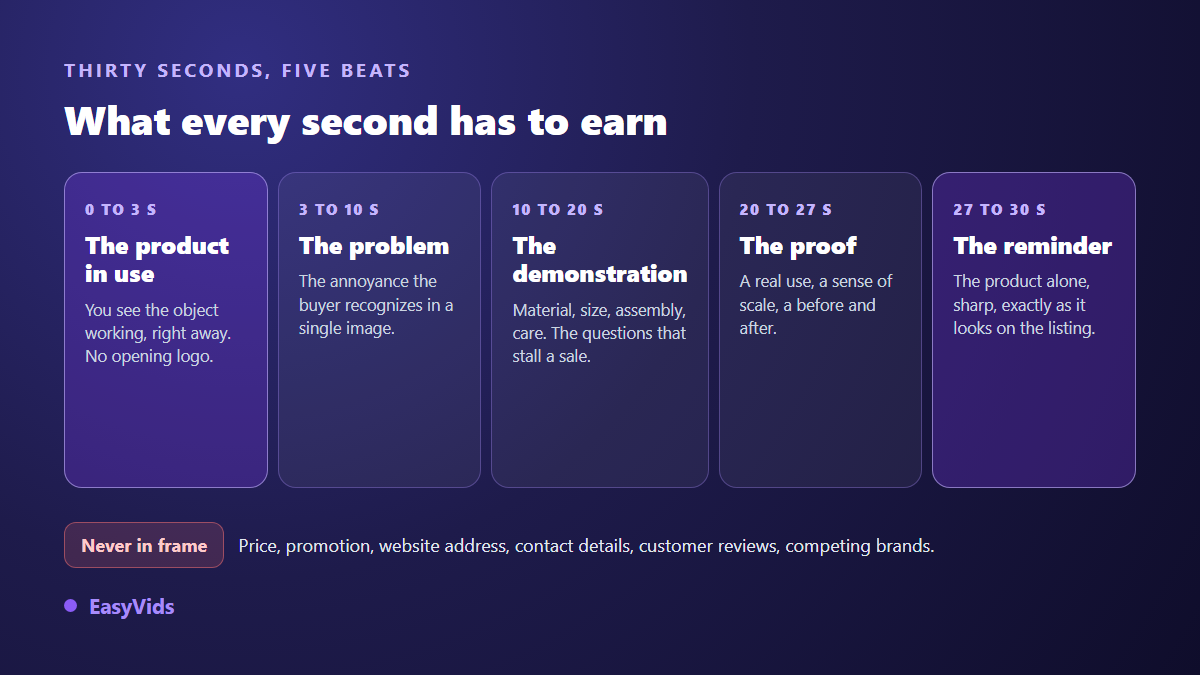
Two points deserve emphasis. The opening shot must contain the product, not your logo: a three second brand intro burns a tenth of the video on something the shopper does not care about. The closing shot must show the item exactly as it appears in the main listing image, otherwise the video creates doubt instead of removing it. For everything in between, our method for a product demonstration video explains how to film a gesture rather than an object sitting still.
Step by step, from listing photo to uploaded file
Here is the full path, the one a seller follows with no studio, no sample on the desk and no production budget. It runs on material you already own: the visuals on your listing.
- Gather the visuals: the white background packshot, two or three detail shots, and if possible one lifestyle photo.
- Write the script first. Thirty seconds of narration is roughly 75 words. One sentence per shot, no more.
- Generate the shots from those photos. Each animated shot runs 4 to 10 seconds depending on the model, so five shots cover the whole video.
- Record the voice over in a calm, descriptive tone. A radio advert delivery hurts a product people are inspecting.
- Edit at 1920 x 1080 in a project set to the right frame from the start, never cropped afterwards.
- Burn in the key text and captions, large and high contrast, then check how it reads at small size.
- Export to MP4, then upload from the Catalogue tab in Seller Central, in the video management tool, against the right ASIN.
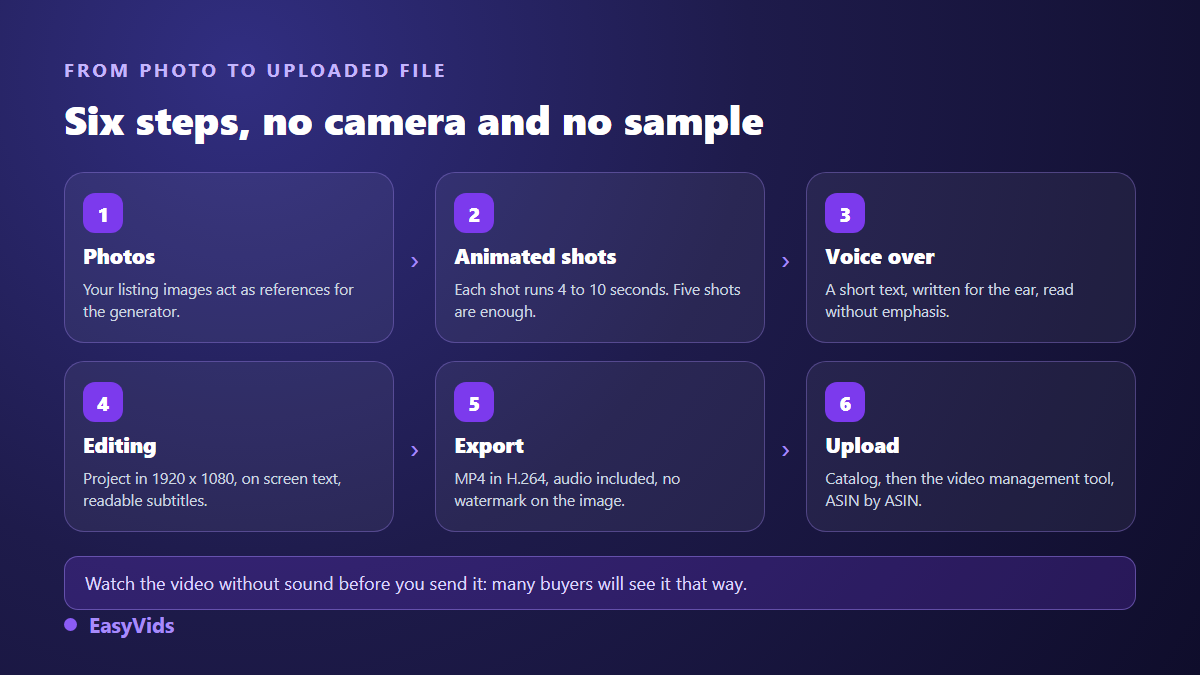
Step three surprises people the most. Animating a listing photo is not adding a slow zoom: image to video models rebuild motion around the object, which gives a believable pan or a hand reaching for the product. One rule outranks the rest: the item on screen has to stay exactly the one you sell, with no detail invented by the model.
Setting the export so it passes first time
This is where most rejections are decided, and it is the easiest part to secure. In the EasyVids online editor, the project frame is picked when you open it from a set of ready sizes, including 1920 x 1080 horizontal, 1080 x 1920 vertical and 1080 x 1080 square, with custom width and height available. Set that frame before you drop shots on the timeline: that is what keeps black bars out.
At export, three settings matter. Pick MP4, never WebM, which Amazon does not accept. Leave the frame rate at 30 rather than 60: the frame rates listed in Amazon's video specifications stop there, and nothing justifies a heavier file for a product shot. Keep the audio track enabled even when there is no voice. The file comes out with no watermark, which matters: an overlay burned in by a third party tool falls squarely into the category of elements unrelated to the product. The EasyVids studio keeps shot generation, voice, editing and export in one place, so you never convert the same file three times between services.
Captions and on screen text carry half the work
On a listing, video often starts before the shopper touches the volume, and a good share of browsing happens in public. A video whose whole message rides on the voice is therefore half lost. The fix takes two moves: burn in three or four short lines at the key moments, and keep readable captions running throughout. Watch the placement, because the carousel crops differently by device, so keep text away from the edges.
Frequently asked questions
Do I need Brand Registry to add a video to a listing?
Listing video access was reserved for sellers enrolled in Amazon Brand Registry for a long time, then it widened, with different options depending on whether the account is tied to a registered brand. The safest check is your own dashboard: if the video management tool shows up under the Catalogue tab, the feature is open to you.
How long should an Amazon product video be?
Around thirty seconds covers almost every case. Amazon Ads specifications bound video ads between 6 and 45 seconds, and the lower end stands a better chance of being watched to the end. A technical product that needs an assembly demonstration can stretch towards a minute, provided every shot adds something new.
Are AI generated videos allowed on an Amazon listing?
Amazon's rules address the content, not the tool that produced it. What counts is that the video represents the item accurately: same proportions, same colour, same accessories as those included. A generated shot that invents a finish or an accessory missing from the box exposes you far more than the production method ever will.
Can I reuse the same video on TikTok or on my own store?
The horizontal edit reuses as is on an ecommerce product page. For vertical feeds, rebuild the same shots at 9:16 rather than cropping the export. One substantive difference remains: outside Amazon you may show a price and a website address, so the social version can carry a call to action the Amazon version cannot.
My video was rejected with no clear reason, what do I check first?
Work through three points in order: the container and codec of the file, the presence of black bars or a black frame at the start, then every second of picture hunting for a price, an address or a promotional line left in a corner. Those three causes cover the large majority of rejections, and none of them requires reshooting.
A compliant Amazon product video is no technical feat: an MP4 file at 1920 x 1080, thirty seconds showing the item in use, and nothing forbidden inside the frame. The real work sits upstream, in choosing the shots and writing the words. To test the full chain on one of your items, create an account and start from a single listing photo. The first edit will tell you within half an hour whether the format deserves to roll out across your whole catalogue, and the pricing page explains how the credits work.