A hesitant buyer does not read your listing, they skim it. They want one thing: what the item actually looks like out of the box, how big it is, what it lets them do. Ecommerce product videos answer that in seconds, where ten lines of description fail. Video shows the use instead of describing it, which is why it now sits on store pages and social feeds alike.
The blocker is elsewhere. Filming one video per catalogue item means a studio, lighting, an edit, and starting over for every new colourway. Most sellers give up, or publish a single video that fits no channel properly. This guide starts from what you already have, a clean photo of your item, and walks the full method: the structure that holds attention, the format to pick for each placement, and the variants that tell you what actually works.
Product video, the short answer
A product video is a five to forty second clip that shows an item in context to remove a doubt before purchase. Three families cover almost every use: the presentation, which tours the object and gives its scale; the demo, which shows a gesture and its result; the testimonial, which puts a person in front of the promise. It is now built from an image of your product rather than with a camera, it ships in several formats, and it gets tested as variants instead of being delivered as one final cut. The wider production chain is covered in our guide to AI video generators.
What a product video has to achieve, in order
A product video is not a brand ad. It is not there to tell your story or to make people love your logo. It has three jobs, in this order. Show first: real size, material, finish, everything a photo flattens. Reassure next: remove the one doubt that blocks the sale, how a clasp holds, how a colour really reads, how simple assembly is. Trigger last: say what to do now, once, without ambiguity.
That hierarchy explains most failures. A video that opens on an animated logo spends its three most valuable seconds showing nothing. A video that stacks technical specifications reassures an engineer, not a shopper. And a video offering three actions at the end, follow, browse, buy, gets none of them. Write the job of the video in one sentence before writing the script, then cut everything that does not serve it.
From product photo to moving footage
The starting point is no longer a shoot, it is an image. A generation studio accepts a photo as input and uses it as a reference: the product in that image stays the subject of the shots it builds, with a set, a light and a movement you describe in one sentence. That is what makes the format workable across an entire catalogue, item after item, without rebuilding a set every time.
Two uses are worth separating. For a still, you can supply several views of the same item, front, back, in use, and the engine composes a scene that respects those references. For a moving shot, a single starting frame is what gets animated. The method that follows is therefore to build the right scene image from your views first, then animate it, rather than hoping a shot comes out right on the first try.
The result depends almost entirely on the source image. A blurry, badly lit or cropped photo produces footage where the product warps from shot to shot, and no amount of editing fixes it afterwards. A few habits prevent it.
- Shoot the whole product, sharp, in daylight, with no direct flash and no glare on the label.
- Clean the background before generating anything: a clean edge stops the set bleeding into the object.
- Supply several views of the same item when generating a still: front, three quarter, in use, and a close up of the material.
- Describe the scene, not the product: an oak worktop, raking light, a hand reaching for the object.
- Lock the aspect ratio on the first generation, instead of cropping a finished edit.
- Check text and logos on every delivered shot: that is where a generation gives itself away.
One limit deserves stating plainly. Staging is fair, altering the product is not. Changing a real colour, erasing a seam, slimming a silhouette, all of that builds an expectation the parcel will not meet. It comes back as returns, poor reviews and sometimes disputes. What the customer sees has to be what the customer receives.
The five beats of a short product ad
Short videos that sell almost always share the same frame, and it holds in five beats. This is not a creative recipe, it is an order for presenting information: what the viewer must see, then understand, then believe, then do.
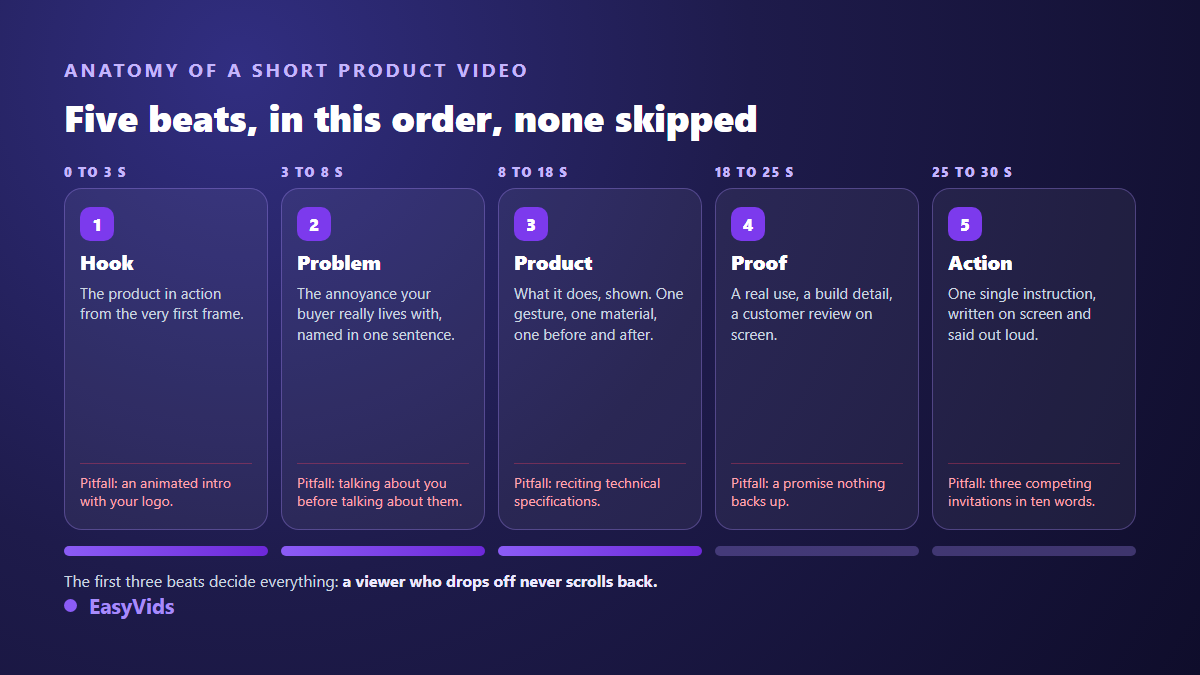
In a twelve second ad the five beats still exist, they are simply compressed: the hook is a single image, the proof becomes a text bar. What never changes is the order. A product shown before the problem is stated has no reason to interest anyone, and that is exactly what most catalogue videos do.
What does change is the selling angle. The same item can be told as problem and solution, as a demo, as a before and after, as a story, or as a testimonial. The angle decides the content of beats two and four, never the frame itself. The story angle borrows its devices from vertical narrative formats, and our guide to Reddit story videos shows how a narrative hook holds a viewer who asked for nothing. Pick yours before writing the first line: it is the setting that moves the result most, and the easiest one to test from variant to variant.
The first three seconds decide everything else
The first three seconds are not there to introduce, they are there to retain. In a vertical feed the viewer never chose your video, they ran into it. Your only chance is to give them something to look at immediately: movement, contrast, an unexpected result. Here is what makes people leave before they understand what you sell.
- An animated logo intro: three seconds handed to your competitors.
- A wide static shot of the product on white, with no scale and no motion.
- A spoken hook delivered too slowly, unfinished by the time attention breaks.
- On screen text nobody can read on a phone: too small, too long, or hard against the edge.
- No product in the first frame, replaced by a mood shot that says nothing.
- An opening transition placed before anything has actually been shown.
The most useful test is to cut your video at three seconds and watch that fragment alone, muted, on a phone. If it says neither what this is nor why anyone should keep watching, the rest will not be seen, whatever its quality. Fix that fragment before touching anything else in the edit.
Pick the format before the first shot
The same video does not work everywhere, and the common mistake is producing one cut then slicing it for every placement. A listing visitor already clicked: they want detail and will grant thirty seconds. A vertical feed viewer asked for nothing and must be won in ten. A paid ad pays for every second and has to work muted. A catalogue plays the video as a thumbnail, usually silent and cropped.
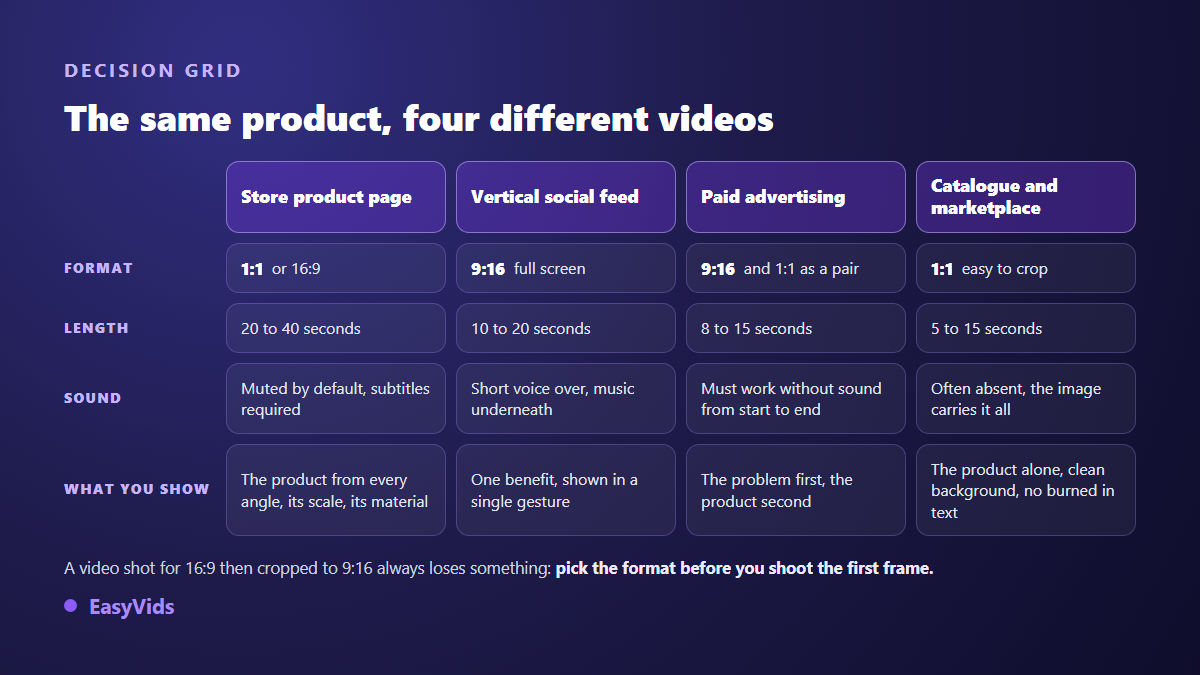
The cropping rule matters most. A video composed in 16:9 then cut to vertical loses its edges, which often means the product itself or part of the text. Generate straight into the target ratio, or compose centrally with a safe margin all around. Across one campaign, producing the vertical and the square versions in parallel takes less time than rescuing a broken crop.
Demo and testimonial: two videos, two jobs
The demo is the most profitable format as soon as your product does something. It shows a gesture and its result, with no commentary to spare. Its golden rule is to show the result before the explanation: the stain disappearing, the knot holding, the drawer closing by itself. Instructions come after, if at all. A good demo reads without a single word, which makes it usable wherever sound is off by default.
The testimonial works on another register: it supplies the proof you cannot write yourself. One person describing their use outweighs three stacked arguments. Two precautions apply. A testimonial must stay true: shaping the words of a real customer is honest, inventing a customer who does not exist is not, and several ad networks explicitly forbid it. And a written review, shown on screen with its source visible, very often does the same job with no risk at all. In practice the simplest honest route is to take a real customer's exact words, have them read as a voice over, and illustrate them with shots of the product in use. That staged form of testimonial has its own playbook, and our guide to product presentation videos made without a creator covers the sets, the hooks and the lines you must not cross.
Ship variants instead of chasing the perfect cut
The costliest mistake is aiming for the perfect video first time. Nobody knows in advance which hook works on a given product, not even an experienced art director. The method that works is to build several versions from the same source image, put them live, and let viewers settle it. One practical note: stills are happy to come out in batches of several proposals at once, while moving shots are requested one at a time. So do your sorting at the image stage, while it is still fast.
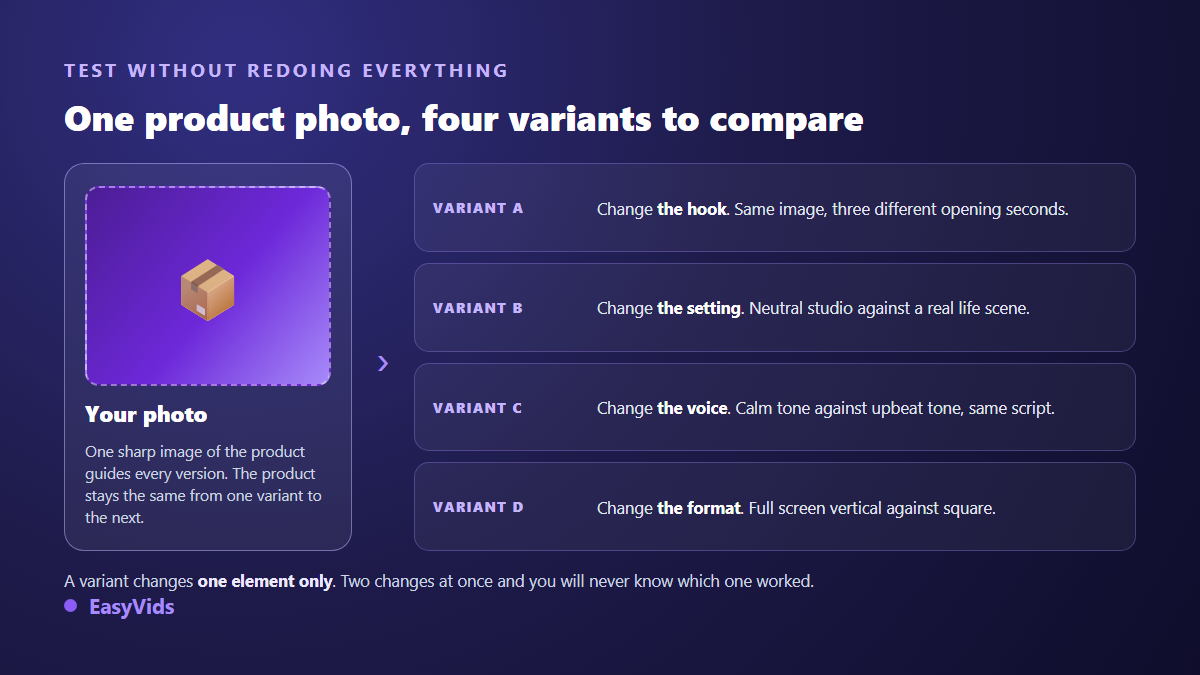
The discipline holds in one sentence: a variant changes exactly one element. Change the hook and the set together and you may well get a better result, but you will not know what to repeat on the next item. Start with the hook, almost always the strongest lever. Then test the format, then the voice, then the set. Every lesson carries across the whole catalogue, which makes the effort pay from the second product onward. For orders of magnitude on volume production, see our breakdown of what a video really costs, and our plans are on the pricing page.
Voice over, captions and the muted feed
A large share of your audience watches with the sound off, out of habit as much as circumstance. Your video therefore has to read in silence: legible captions, short on screen text, and a visual sequence that stands on its own. Sound then becomes a bonus that reinforces the message rather than something the message depends on. In practice, write the muted video first and add the voice afterwards.
When you do add a voice, two settings carry most of the effect. Tone first: a demo voice settles and articulates, a vertical ad voice moves fast and lifts slightly at the end of a line. Punctuation second, which controls breathing far more reliably than any speed slider. We covered these settings in five tips for a genuinely natural AI voice over. Keep music well under the voice, around a fifth of its level, and mute it entirely on demo shots where the product sound matters.
The full sequence, from photo to published file
Here is the run, applied to one catalogue item. It fits in a single working session, and the steps carry over unchanged to the next item.
- Write the job of the video in one sentence, before anything else.
- Choose the placement, and with it the aspect ratio and the length.
- Prepare the source image: sharp, whole product, clean background, neutral light.
- Draft the five beats, one line each, hook included.
- Generate the shots one per beat, keeping the same reference image so the product does not drift.
- Assemble, place the on screen text, add captions and check legibility on a phone.
- Produce three variants, changing a single element each time.
- Publish, watch for a week, keep the version that holds, move to the next item.
Rolling out a whole catalogue without losing weeks
One good video in isolation moves nothing measurable for a store. What counts is the ability to roll out. Three things carry from item to item: the five beat structure, the visual charter (the set, the light, the typeface of your on screen text) and the winning variant from your last test. Only the source image and the benefit line change each time. Work your catalogue by families rather than product by product: items answering the same need share the same opening problem, so the same hook, and often the same set.
One organisational point gets overlooked. Batch generation has no reason to keep you sitting in front of a screen: launched server side, it carries on after you close the tab, and the shots are waiting when you come back. The right habit is to prepare all your source images and texts in one pass, launch everything, then spend your own time on selection and editing rather than on waiting.
Frequently asked questions
Do I have to film my product to get a product video?
No. A sharp photo of the item is enough to act as a reference: the studio uses it to compose shots where the product stays recognisable, with the set and movement you describe. Filming keeps its value for complex gestures and difficult materials such as glass, mirror or very fine fabric.
How long should an ecommerce product video be?
It depends only on where it will be seen. Expect around ten seconds in a vertical feed, fifteen for a paid ad, twenty to forty on a product listing where the visitor is already interested. In every case the first second matters more than the last.
Do I need a voice over, or are captions enough?
Captions are essential, the voice is optional. Write a video that reads without sound first, then add a voice if it brings a tone, a warmth or a rhythm that on screen text cannot. A well built silent demo works perfectly, especially on platforms that mute by default.
How many variants should I test?
Three or four versions of the same video are enough for a first round, as long as they differ on a single point. Beyond that you dilute the reading and can no longer attribute anything with confidence. Keep the version that holds, make it your new reference, and change another element next round.
Are AI generated product videos allowed in advertising?
Yes on the major ad networks, as long as the video does not mislead: the product shown must be the product shipped, and a testimonial must correspond to a real person. Some platforms also require you to flag synthetic content when it features people. Check the current rule on the network you use before launching, because it moves quickly.
A product video is judged not on how pretty it is but on the doubt it removes. Start from a sharp photo, write the job in one sentence, hold the five beats, generate straight into the target ratio, and ship three variants rather than one final cut. The rest is repetition, and repetition is exactly what carries from item to item. To turn your product images into video today, creating an account opens the full studio, no bank card required.