Your photography is clean, traffic is landing, and the cart still sits empty. A visitor zooms in, hunts for a detail that is not there, hesitates, closes the tab. A Shopify product video sitting in the media gallery answers exactly what a still image leaves open: the real size of the object, how the material behaves in light, the gesture you make with it. This is not a matter of taste. It answers three specific doubts that kill purchases, and that later feed your return rate.
The hard part is getting from intention to a file that is actually live. Three things usually block it: knowing what the platform accepts, knowing where to place the video so it does real work, and knowing how to get it when you own no camera, no studio and no sample. This guide handles all three, in that order. For the purely creative side, which applies on any platform, our complete guide to product video is the one to keep open alongside.
The short answer
Video is added exactly where a photo is: in the product media gallery, from your store admin. According to the Shopify help centre, an uploaded file must be MP4 or MOV, capped at one gigabyte per file and ten minutes of running time, at a resolution that can reach 4K. You can also paste a YouTube or Vimeo address, which shows up in the gallery without using your storage. So the technical limits are almost never the real obstacle. The real obstacle is producing a short, readable clip for every SKU in the catalogue, and that is what the EasyVids studio does from photos you already own.
Formats and caps, checked before the first upload
Two ways of showing video coexist in a store, and they follow different rules. An uploaded file lives on Shopify: it is processed after upload, then appears in the gallery once conversion finishes. That processing delay explains the grey thumbnail for a few minutes after sending, rather than a browser fault. An external video stays hosted by its original platform and is only embedded in the page.
- MP4 and MOV: the two accepted extensions for a file uploaded to the platform.
- One gigabyte per file maximum, according to the Shopify help centre.
- Ten minutes of running time maximum, far beyond anything a product page needs.
- Resolution up to 4K: available, rarely useful in a gallery thumbnail, and heavy.
- YouTube and Vimeo videos: added by address, with no upload and no storage cost.
- An up to date theme: older themes do not always render video inside the gallery.
These caps move with platform releases. Get into the habit of reopening the Shopify help centre page on product media before a bulk upload, rather than trusting a value read in an article, this one included. And always test on a single product before processing a hundred SKUs: a badly configured theme shows itself in thirty seconds on one page, never in a spreadsheet.
Four places where video changes something
A store offers more than one slot, and each one calls for a different video. The most common mistake is dropping the same file everywhere, when the first second has an entirely different job depending on where it fires.
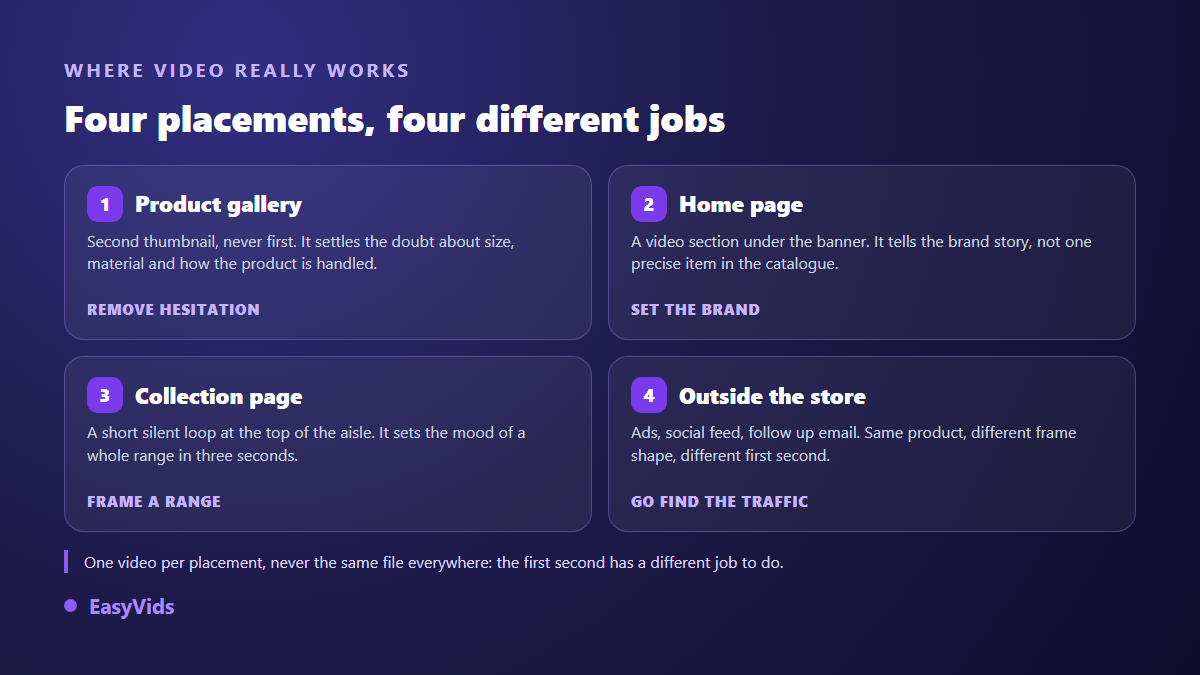
The product gallery takes the most useful clip, the one that clears a named doubt: scale, material, how it opens, how it assembles. The home page carries a slightly longer brand shot, usually silent and looping under the banner. A collection page benefits from a very short loop that sets the tone of a whole range. Outside the store, the same raw footage goes back out in vertical format for a social feed or a paid campaign. Four uses, four edits, one production session.
Uploaded file or embedded external video
Decide slot by slot, not by principle. On a product page the uploaded file almost always wins: it renders as a native thumbnail among the photos, with no foreign branding and no end screen politely inviting your visitor to watch something else. On a home page or a long article, embedding defends itself: you store nothing, you get playback statistics from the video platform, and the file stays available elsewhere.
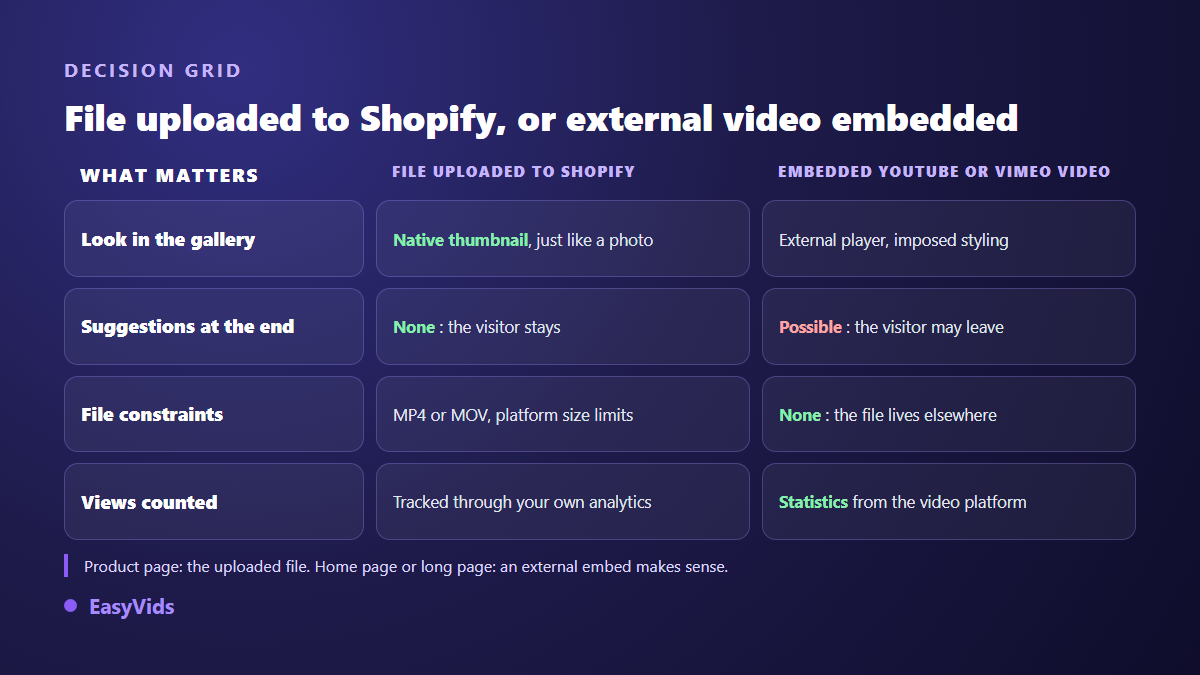
One point deserves checking in your own store before you generalise: playback behaviour depends on the theme. Some themes autoplay muted, others wait for a click. Open a product page on a phone, not only on your desktop screen, and watch what actually happens as the page loads on an ordinary connection.
File weight decides page speed
This is the classic objection, and it is a fair one: a slow product page loses sales. But the culprit is almost never the presence of video, it is weight and position. A well encoded ten second loop weighs a few megabytes. The same shot exported in 4K without thinking can weigh fifty times more, for a strictly identical result inside a gallery thumbnail a few centimetres wide on a phone.
Three settings settle the question. Export at 1080p, never above, for a product page clip. Keep the video in second position in the gallery, behind the main photo, so it is not loaded ahead of the element the visitor looks for first. And drop the audio track when it carries no information: a silent file is lighter, and nobody was going to hear it anyway.
Six to fifteen seconds, silent, on a loop
Duration is not much of a debate. Between six and fifteen seconds, looping, a visitor sees the full turn of the product without feeling they signed up for a film. Beyond that they leave before the end, and you paid for an encode nobody watched. The same logic of placement and length is worked through in our piece on video inside a product page, which also covers other marketplaces.
Sound is settled in advance: assume nobody hears anything. The message therefore travels through the image and one short text label, four words at most, placed in the upper third of the frame because the lower part is often masked by playback controls. If your clip carries a voice, always double it with captions burned into the image, or half the message disappears.
Producing the clips without ordering a sample
Here is the real difficulty: a hundred SKU catalogue needs a hundred videos, and nobody rents a studio for that. The way out is to start from what you already hold, meaning supplier photography or your own product shots. One sharp image is enough to generate an animated shot that respects the shape, the colour and the label of the product, as our method for turning a product photo into video sets out.
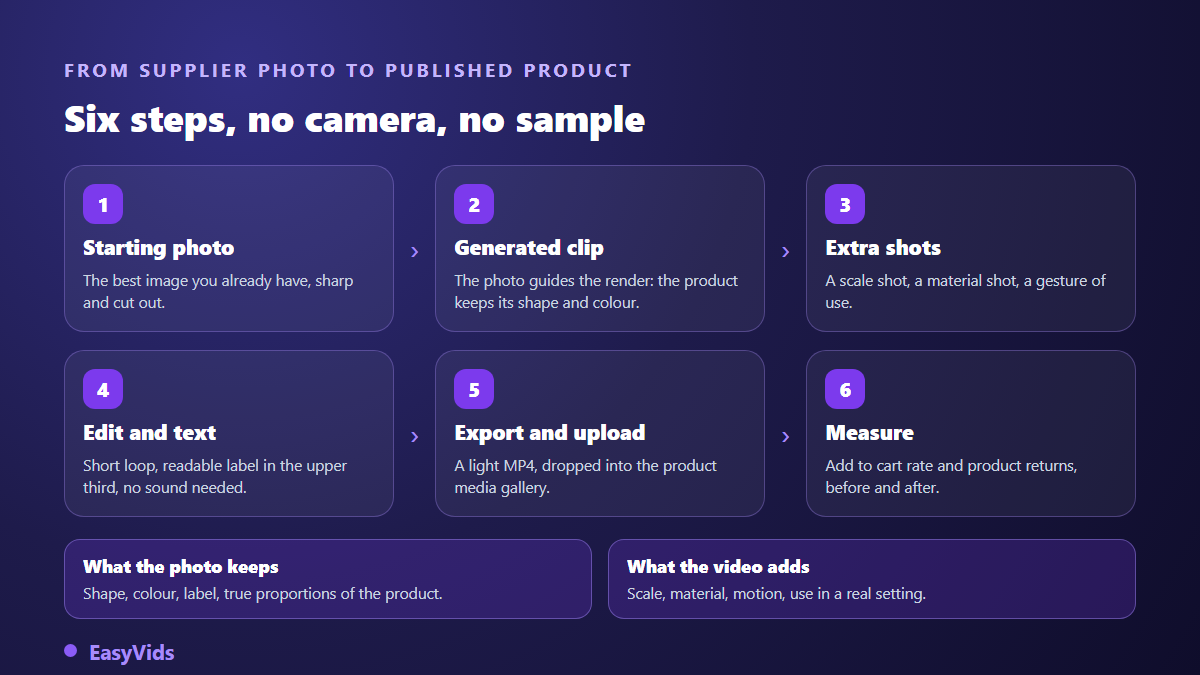
In practice, inside the EasyVids studio, you load your photo as a reference image, describe the movement you want in one sentence, and get a clip of a few seconds. Several reference images can be combined when the product must stay strictly identical from shot to shot. Aspect ratio is chosen before generation, square or vertical depending on the destination, and the online editor then assembles the shots, adds on screen text and exports an MP4 ready to drop into the gallery. Nothing to install: it all runs in the browser.
Two videos per SKU, not one
Stores that genuinely get something out of video produce two clips per SKU, and not the same clip twice. The first shows the product working and answers how does it work, which is the job of a product demonstration video. The second lets somebody other than you speak and answers does it actually work, covered by the structure of a video customer testimonial. The demonstration belongs in the gallery, the testimonial further down the page, near the reviews. They serve different moments of the same hesitation.
Alt text, and what search engines see
Shopify offers an alt text field on every media item, video included. Fill it in: it serves people browsing with a screen reader first, and it also gives search engines a usable description of what the clip shows. Write what is visible, not your keyword repeated. Google Search Central separately documents VideoObject markup and video sitemaps, which some themes and apps generate automatically. Check what your store already outputs before adding a technical layer you may not need.
Rolling video out across a whole catalogue
The right method is not to work through SKUs in catalogue order. Start with your ten best sellers, produce one gallery loop for each, then measure. Compare add to cart rate before and after on those ten pages, over a window long enough for the number to mean something. If the gap is clear, you know what video is worth in your store, and you scale on evidence rather than intuition. Plan sizing on the pricing page, and keep one constant template across the catalogue: same length, same rhythm, same text position. A store where every page moves the same way earns more trust than a set of brilliant, mismatched clips.
Frequently asked questions
Do I need a specific theme to show video on Shopify?
Recent themes render video natively in the product media gallery. Older themes, or heavily hand modified ones, do not always support it. The fastest test is to upload a video on a single product and open that page on a phone. If the thumbnail never appears, the theme is the problem, not the file.
How long should a product page video be?
Six to fifteen seconds, looping. The platform allows far more, up to ten minutes according to its help centre, but a product gallery is not a film player. Keep long formats for a dedicated page or a channel, and reserve the gallery for the loop that clears a doubt.
Does video really slow down a product page?
A heavy file placed first in the gallery does. A short loop exported at 1080p in second position does not, in any measurable way. Test your own page before and after with a speed measurement tool, on a mobile profile: that is the only figure that counts, because it accounts for your theme and your apps.
Can the same video work on the product page and in ads?
The raw footage, yes. The edit, no. A gallery clip opens on the product and plays on a loop. An ad has to stop a thumb within one second, so it opens on a problem or a reaction, and it goes out vertical. Reuse the same shots, cut them differently, and you cover both uses without paying for a second generation.
Do I have to disclose that a product video was AI generated?
Major social platforms ask you to flag realistic content generated or altered by artificial intelligence, and offer a dedicated setting at publishing time. For a product page the rule that matters is older and simpler: the video must not mislead the buyer about the real product. An animation that respects colour, size and finish raises no issue. A render that flatters the product beyond reality comes back to you as returns and disputes.
A Shopify product video is not judged on how beautiful it is, but on how much uncertainty it removes at the moment of the click. Start small: one SKU, one ten second loop, one honest measurement two weeks later. If the number moves, you hold a method you can apply to the whole catalogue without changing your team. To produce that first clip from a photo you already have, creating an account opens the full studio, generation, editing and export in one place.