You saw the promise: an avatar that speaks, a synthetic voice, a finished video in minutes, free. So you go looking for a Vidnoz review before handing over your email address, because experience says a video generator advertised as free rarely stays free all the way to the exported file. The real question is not whether the tool works. It is where the free tier stops, and what you are supposed to do once you hit that wall.
This is not a stopwatch benchmark full of numbers nobody can reproduce. It is something more useful: what the vendor puts forward, what a free tier almost always implies in this category, and the six checks that stop you from building a production workflow on ground that gives way at the first export. If you want to understand what this kind of tool actually assembles, our complete AI video generator guide walks the whole chain, from script to edit.
The short answer
Vidnoz is an online studio built around talking avatars: you type a text, you pick a face and a synthetic voice, and the tool renders a presenter video. Around that core the vendor lists satellite features on its own site, notably photo animation, a video translator, a face swap and a voice generator. The free tier is real, and it is enough to form an opinion. It also carries the four usual limits of the model: a watermark burned into exports, a quota that refills slowly, technical ceilings on duration and resolution, and commercial usage terms worth reading before you run an ad. If your need is a talking head, the tool fits. If your need is a story cut into scenes, you are shopping in the wrong family.
What Vidnoz actually is
The name covers several distinct products, which explains part of the contradiction between the reviews you read. On one side, an avatar video studio that runs in a browser. On the other, separate utilities presented on the same site: photo animation, face swapping, video translation with voice, image retouching. The vendor also sells a screen recording and video sharing tool aimed at sales teams, which has almost nothing to do with generative AI.
That spread has a practical consequence. An enthusiastic review may be about the talking photo module, a harsh one about the avatar studio, and both can be right at the same time. Identify the brick you care about before reading anything else. The rest is noise.
What free really means for a video generator
No generator renders video without compute, and compute costs money. A service that offers a free entry point funds it in one of three ways: it advertises through a watermark, it rations you, or it degrades the output enough to make the paid tier attractive. The three usually combine, and there is nothing dishonest about that as long as it is stated plainly.
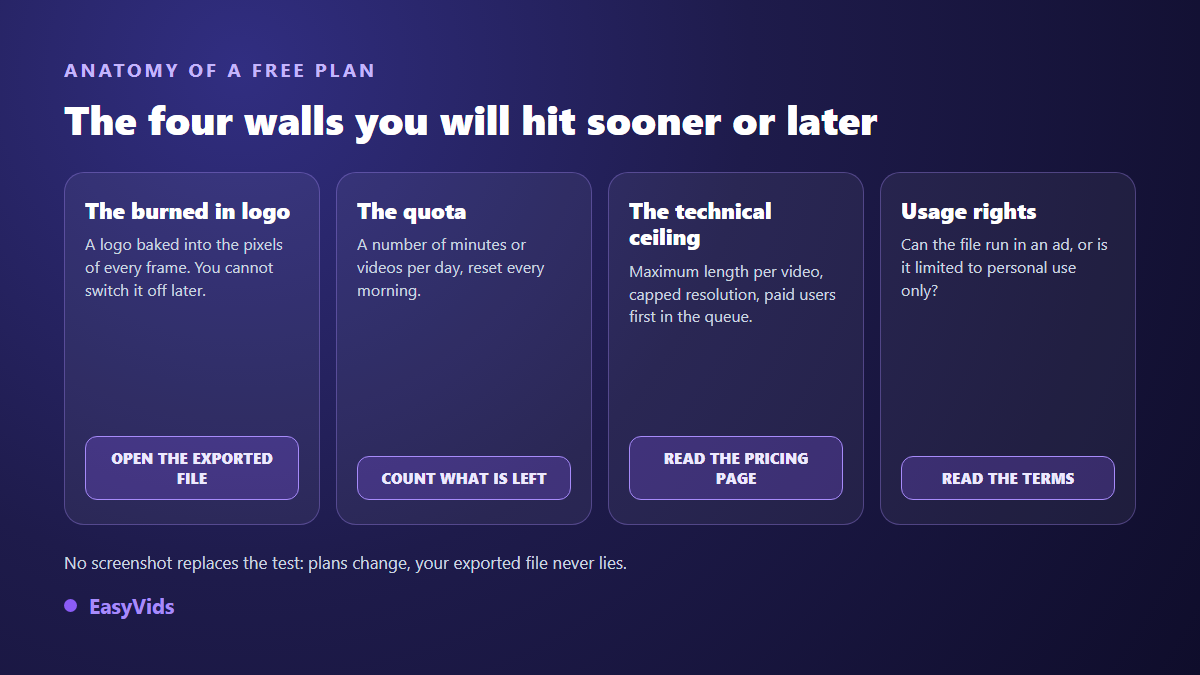
The trap is not the limit itself. It is when you discover it. A creator who learns after three weeks that twenty videos carry a mark they cannot remove has lost three weeks. Warned at the first export, the same creator would have decided in twenty minutes. Check these, in this order:
- The mark on the export, not on the preview: download the actual file before judging.
- The quota and how it refills: how many videos or minutes, and how fast they come back.
- Maximum duration on the free tier, often far shorter than on the paid plans.
- Real resolution, read in the file properties rather than in the marketing copy.
- The render queue: paying accounts go first, and you feel it at busy hours.
- Commercial usage rights, which decide whether that file can carry an ad at all.
The watermark decides almost everything
A burned in mark is not a layer you switch off later: it is written into the pixels of every frame. That is why cropping and automatic removal tools always damage something. On a vertical video the cropped corner nearly always holds something useful, a hand, a product, the end of an on screen line. We covered the mechanism and the honest ways out in our piece on exporting AI video without a watermark.
Beyond looks, the mark costs credibility. A brand video carrying another company's logo tells the viewer, without a word, that the production budget was zero. On an internal message or a draft sent to a client, that is harmless. On an ad, a sales page or a homepage video, it is a measurable handicap. Treat the watermark as a business decision by the vendor, never as a defect to work around.
Avatars: what they do well, what they do badly
A talking avatar is excellent at one job: carrying a text to camera without you having to film yourself. Internal training, how to guides, announcements, offer walkthroughs, report summaries. On those formats the result is clean and production takes minutes. The same avatar becomes a problem the moment the video needs anything other than a face: a product close up, an action beat, a changing set, a rising emotion.
The second caveat is realism. Micro expressions and hand gestures remain the weak point of every avatar generator, whichever vendor you pick. Viewers cannot always explain why, but they feel the mismatch. Two habits soften it: short shots, and a script written for the ear rather than the eye. If your project genuinely rests on a presenter, our guide to AI avatars and UGC videos collects the settings that matter.
Faces, voices and consent
Face swap and voice cloning raise a legal question before a technical one. In France, article 226-8 of the Code pénal sanctions publishing a montage made with a person's words or image without their consent when the edited nature is not obvious. Most European frameworks follow a similar logic through image rights and biometric data rules.
Turn that into a working rule: use a face or a voice only when you hold written permission from the person, or when the avatar comes from a catalogue whose rights the vendor guarantees. Check that point in the terms of any service you use. A video pulled after a complaint always costs more than the minute spent reading those terms.
Strengths and limits, plainly
An honest review is neither a tribute nor an execution. Here is what works in favour of this family of tools, and what works against it, whichever vendor you choose.
- Immediate onboarding: nothing to install, everything runs in the browser.
- A broad voice and language catalogue, which makes multilingual versions of one video genuinely practical.
- Clean results on the talking head format, with steady framing and acceptable lip sync on short takes.
- Against it: scene based storytelling is out of reach, because the tool thinks in presenters, not in shots.
- Against it: videos start looking alike, since everyone draws from the same catalogue of faces.
- Against it: free limits arrive quickly, watermark included, and cost climbs with the minutes you render.
Who it suits, and who it does not
The reliable way to decide is to start from the format you must publish every week, not from the flashiest demo on the homepage. Three profiles come up constantly, and only one is truly served by an avatar generator.
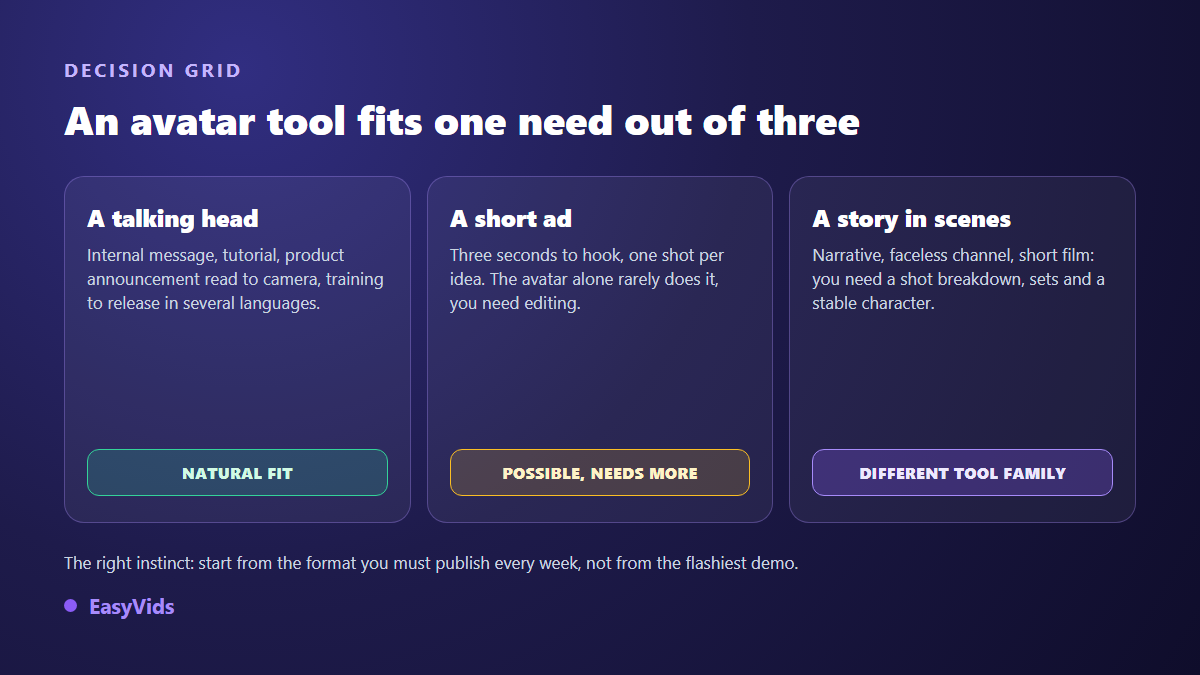
Ads deserve a caveat. An avatar can carry a spoken testimonial or a demo, but a creative that converts usually needs more: a product shot, on screen text, a tight cutting rhythm. The avatar becomes one brick among several rather than the whole video. On budget, our analysis of what an AI video really costs compares orders of magnitude between traditional and generated production.
Test any free generator in twenty minutes
This protocol works for Vidnoz and for every competitor. Six moves, and it beats a week of contradictory reviews.
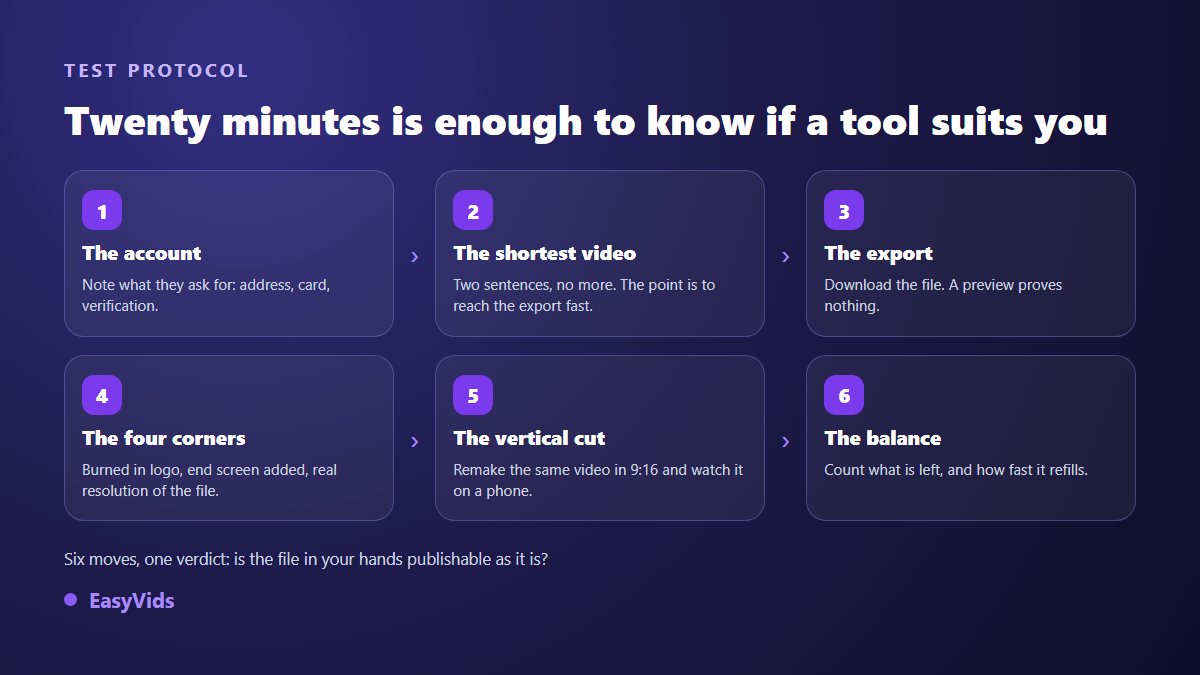
Two details carry the whole test. First, render the shortest possible video, two sentences will do, because the goal is to reach the export rather than to produce a masterpiece. Second, rebuild the same video in vertical format and watch it on a phone. That is where destructive crops, cut off text and badly placed marks reveal themselves, none of which show on a desktop screen.
When your need goes beyond a talking head
This is where many creators change tool category without noticing. As soon as your video tells a story, the decisive brick is no longer the avatar: it is the scene breakdown, one visual and one fragment of voice per shot. That is the logic behind the EasyVids studio, where script, visuals, voice over, music and editing live in a single chain, and where a single scene can be regenerated without restarting the whole render.
In practice, exports come out in 16:9, 9:16 or 1:1, up to 4K, with no burned in mark, and an editor lets you rework the cut shot by shot. Signing up opens a welcome credit once the email address is confirmed, which is enough to produce real test videos rather than crippled demos. Plan details live on the pricing page, and our comparison of AI tools for creators places each family of tools by use case.
Frequently asked questions
Is Vidnoz really free?
A free tier exists and it does render videos. It comes with the usual limits: a mark burned into exports, a refillable quota, and ceilings on duration and resolution. The exact terms move with each update, so the vendor's own plans page is what counts on the day you read it.
Can a watermark be removed from a generated video?
Not cleanly. The mark sits in the pixels, so it cannot be switched off afterwards. Cropping amputates the frame, and automatic removal leaves a blurred patch that shows during playback. The only reliable route is to regenerate the video with a tool that exports clean.
Are avatar videos allowed on YouTube?
Yes. YouTube monetisation rules do not target the use of AI as such, they target repetitive mass produced content with no original contribution. The platform also asks creators to disclose realistic synthetic content at upload. An original script, a considered voice and a deliberate edit stay well within the rules.
What is the difference between an avatar and a consistent character?
An avatar is a presenter reading a text to camera, always in the same framing. A consistent character is a stable visual identity you carry across different sets and situations, scene after scene. The first serves a message, the second serves a story.
Do I need a powerful computer for this?
No. Generation happens on remote servers and your device only displays the interface. A phone is enough to write, generate and publish. Only fine editing stays more comfortable on a larger screen.
The best generator is not the one with the most impressive demo, it is the one that produces the format you must publish every week, with no parasitic mark and no wall on the third attempt. Run the six step test on your shortlist, keep the tool whose exported file is publishable as it stands, and drop the rest. To compare on evidence, creating an EasyVids account opens the full studio and its welcome credits, with no bank card.