You have a topic, an episode outline, and nothing to record it with. No decent microphone, no quiet room, or no voice that survives forty minutes of talking. An AI voice for podcast production solves that from another angle than gear: you write the script, a synthesis engine reads it, and you get a clean audio file with no room noise, no retakes, no editing out the hesitations.
Beginners tend to hunt for the most impressive engine. The result depends far less on the engine than on what you feed it, and on how the episode is dressed around the narration. This guide walks the whole chain, from the first sentence to the published file. If speech synthesis is new to you, our complete guide to AI voice over covers the groundwork we do not repeat here.
What a synthetic voice actually changes
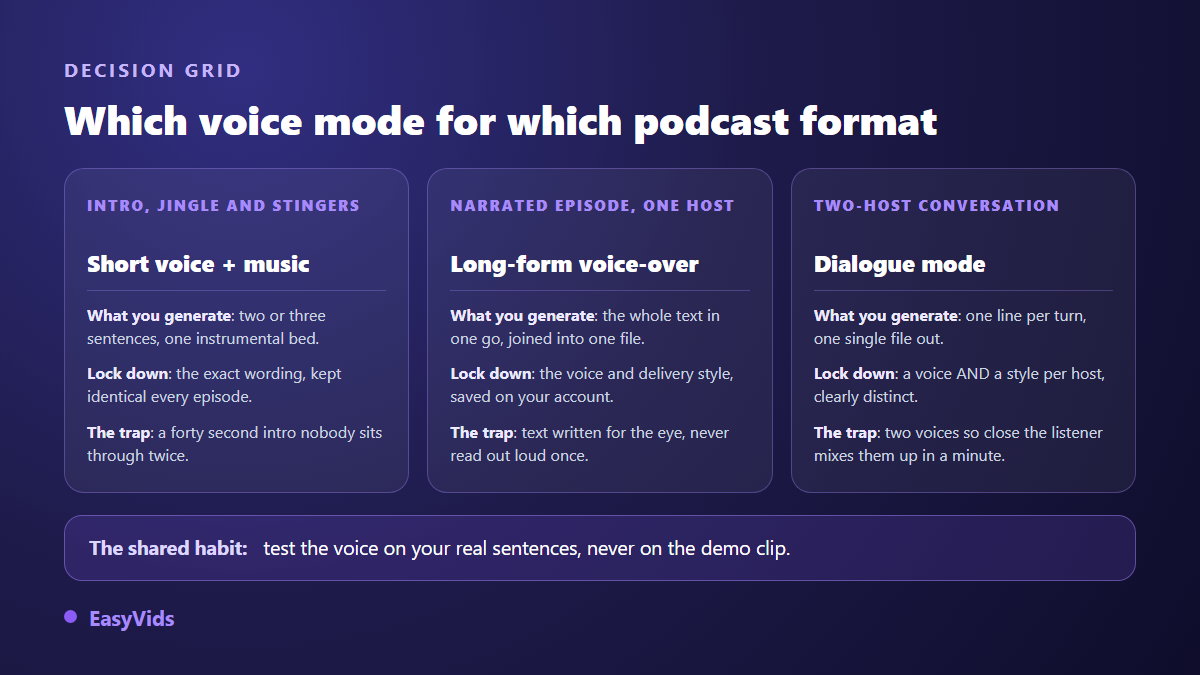
It removes the recording, not the writing. In practice you paste your script, pick a voice and a way of reading it, and get one audio file even for a long episode. Three uses cover nearly every need: the intro and stingers that return in every issue, a solo narrated episode, and a two host conversation. Each one is produced differently, and picking that lane first makes everything else simpler.
The chain of an episode, from topic to file
An episode is never one single action. Six steps follow one another, and each one shapes the next. None of them requires technical skill. The catch is that one rushed step is audible for the whole runtime, and it is almost always the second one.
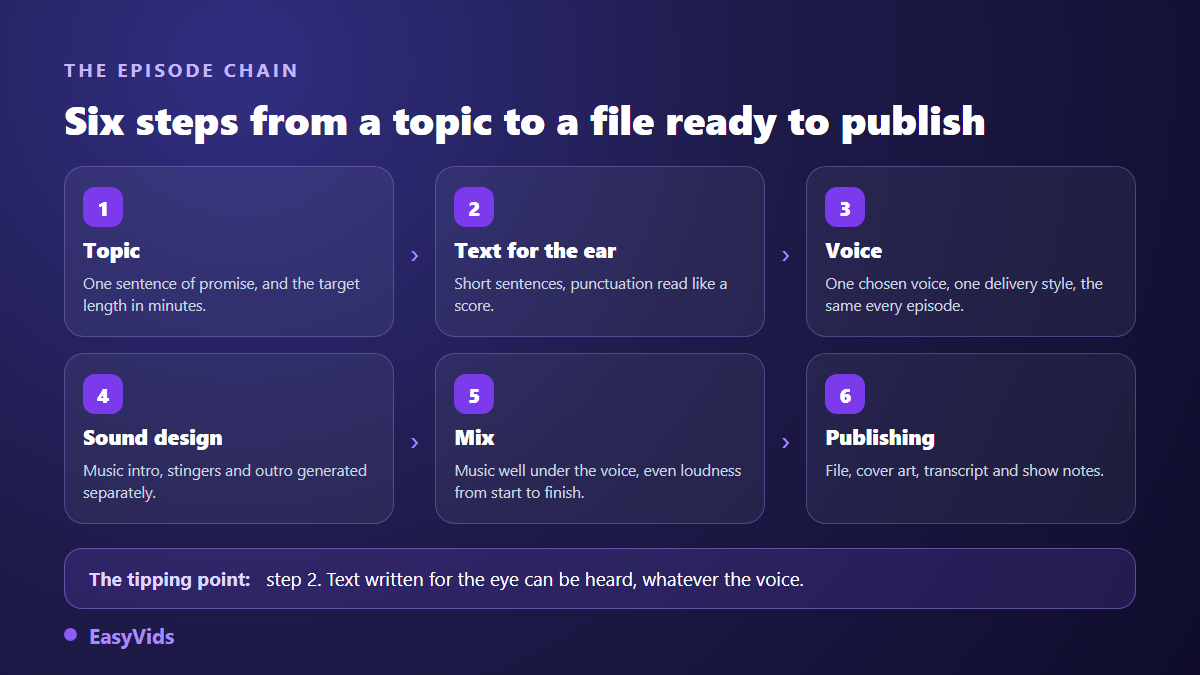
A good tool lets you redo any of these steps without restarting everything. Regenerating one segment, fixing one badly read sentence, swapping the intro without touching the body: that is what separates a toy from a weekly production tool. A podcast, by definition, comes back every week.
Writing for the ear is the step you cannot delegate
A script written to be read with the eyes is instantly audible when a machine reads it. Sentences run long, clauses pile up, written connectors sound false out loud. One rule saves most episodes: one idea per sentence, twenty words maximum, and generous punctuation. Engines read punctuation the way an actor reads a score, so a full stop buys a real breath and a comma buys an emphasis.
To size an episode, think in minutes rather than characters. Across our generations, one minute of voice runs about 150 words. A twenty minute episode therefore sits near 3,000 words, chapters included. That is the only way to avoid discovering, once the audio exists, that your short format runs forty minutes.
Pick one voice, then stop changing it
EasyVids offers several voice engines, shown as Model V1, V2 and V2.5. The first carries eighteen voices and accepts a reading style. The others bring narration voices. For a podcast, the criterion is not how a timbre sounds on a demo clip, but how it holds on your real sentences: always generate your own cold open before deciding.
Once chosen, keep it. Listeners recognise a show by ear within three seconds, and a new voice every week destroys that reflex. The studio helps on exactly this point: the reading style is saved as an account preference and applies on its own to your next voice overs, so you never start from a blank slate.
Reading style, the instruction that replaces voice direction
On the engine that supports it, you do not tune abstract sliders: you write a plain instruction such as read like a captivating storyteller, warm and steady, or read like a news anchor, serious and brisk. The same sentence changes colour entirely, without a single word of the script moving. Two instructions are usually enough for a show: one for the opening, slower and held, one for the body, closer to conversation.
A full episode in one generation
This is where most tools stop: they cap at a few thousand characters, so you split the episode by hand and glue the pieces back. Here a voice over accepts up to 100,000 characters at once, roughly a hundred minutes of speech. The text is split automatically at sentence boundaries into blocks of about 3,000 characters, generated four pieces at a time, then reassembled into a single file.
Nothing is required from you meanwhile: the job lives on the server, the page can be closed, and a progress counter shows how many pieces are done. If something interrupts it midway, the resume picks up from the pieces already produced instead of redoing everything. The finished file downloads directly and stays in your voice over history.
Two hosts without a second person
Conversation holds attention better than a monologue, but it needs two people free at the same time. Dialogue mode removes that constraint: you write the exchange one line per turn, in the form Name: what they say, you assign each character a voice and its own reading style, and you receive one single assembled audio file. An exchange can run up to sixty turns.
Two precautions matter. Pick genuinely contrasting voices, a deep timbre against a bright one, otherwise listeners confuse the speakers within a minute. And write a real dialogue: interruptions, follow up questions, uneven sentences. Two lectures taking polite turns is not a conversation, it is two monologues glued together.
Cloning your own voice to stay recognisable
A catalogue voice is available immediately, but it belongs to everyone. Cloning fixes that: from a short audio sample, a cloning service creates a voice that appears only in your account and is then used like any other. Quality depends mostly on how clean the sample is, and the amount of audio actually needed to clone a voice is shorter than most people assume.
The legal frame is not optional. Before every clone, reputable services ask for an explicit certification that you hold the right to use that voice. Cloning someone else without written consent exposes you, and cloning a public figure is banned almost everywhere. We covered the limits in our article on the legality of voice cloning, worth reading before you record a guest.
Sound design: jingle, stingers and mix
A bare episode without a second of music sounds like an audiobook demo. Sound design is built once and reused in every issue: a ten second instrumental intro, a one second stinger between chapters, an outro. The studio generates instrumental music on demand, and the online editor carries a library of transitions ready to drop in.
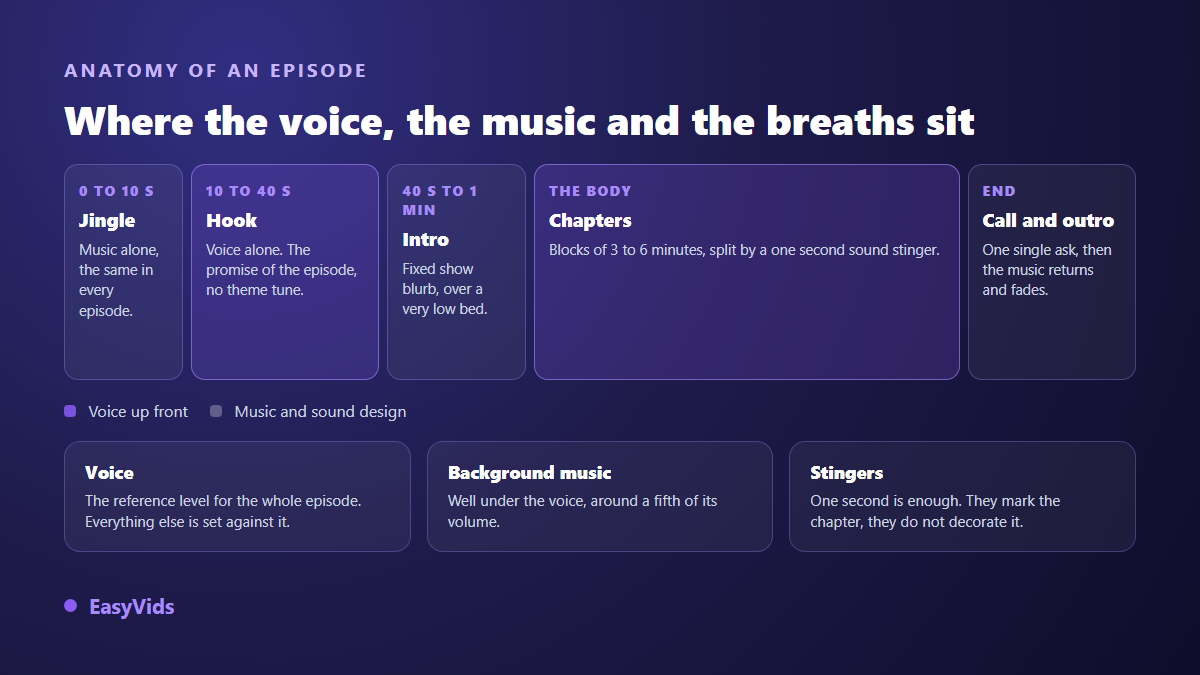
- Put the cold open before the theme: the first seconds decide whether people stay.
- Keep music well under the voice, around a fifth of its volume.
- Drop the music entirely where the information gets dense.
- A one second stinger is enough to mark a chapter.
- Reuse exactly the same jingle every episode, it is your signature.
- Close with one single request, never four stacked calls to action.
Publishing: file, artwork and show notes
A mono MP3 is more than enough for speech. On artwork, the Apple Podcasts specifications ask for a square image between 1,400 and 3,000 pixels per side, in JPEG or PNG: export at the largest size and let the platforms downscale. On loudness, Spotify documentation for podcasters states that episodes are normalised to around -14 LUFS on playback, which makes any attempt to sound louder than others pointless.
Show notes and transcripts come from the same studio. The online editor transcribes an audio file into timed captions, which you reuse to build a summary, chapter markers or an article page. That transcript is also the base of a video version for sharing platforms, and our guide to automatic captions explains how to clean the file before publishing.
What you owe your listeners
Transparency is no longer only a courtesy. The European regulation on artificial intelligence, in general application since 2 August 2026, requires under its article 50 that artificially generated or manipulated audio be disclosed, particularly when it imitates a real person. One line in the show notes, such as narration produced with a synthetic voice, costs a second and keeps you compliant. If you also publish a video version, the YouTube help centre asks creators to declare realistic content created or altered with AI tools at upload time.
The mistakes that make the AI audible
A poorly used synthetic voice gives itself away within a few sentences. The causes are almost always the same, and all of them are fixed in the script rather than in the settings.
- Forty word sentences the voice delivers without ever taking a breath.
- A perfectly even pace from start to finish, with no change of rhythm.
- Acronyms and figures left as digits, which the engine mispronounces.
- A different voice every episode, which kills any recognition.
- No silence at all: breathing is part of the story, not wasted time.
- Music sitting at the same level as the voice, exhausting on headphones.
Frequently asked questions
Can a fully AI narrated podcast be published on the main platforms?
Yes. No listening platform bans synthetic voice as such. What gets penalised is duplicated, misleading or mass produced content with no contribution. A carefully written episode on a subject you know sits well within the rules. Simply state in the notes that the narration uses a synthetic voice.
How long a script for a thirty minute episode?
About 4,500 words, based on 150 words per minute of speech. Add the fixed text of your theme and outro. All of it fits in a single generation, with no manual splitting.
How do I get two different voices in the same file?
Through dialogue mode: write the exchange one line per turn as Name: what they say, assign a voice and a reading style to each character, and the studio returns one assembled audio file. Choose clearly different timbres, otherwise listeners lose track of who is speaking.
Can I use my own voice without recording every episode?
Yes, and it is the most useful case of cloning for a podcaster. You record one clean sample, certify that the voice is yours, and the cloning service creates it inside your account. With a reputable service, it stays private, visible to you alone, and you can remove it from your list whenever you want.
Do I still need an audio editing suite?
Not to publish. The narration comes out already assembled, and the online editor is enough to place a jingle, a transition and an outro around it. A dedicated suite becomes useful only for fine dynamics work or archive inserts, which stays rare on a narrated format.
A podcast that lasts is not won on the voice, it is won on regularity: the same theme, the same voice, the same appointment. Speech synthesis gives you back exactly the time that recording and retakes used to eat, and moves it where it counts, into the writing. To produce your first intro and test a voice on your real sentences, create an account and open the EasyVids studio, which brings writing, voice, music and editing together in one place.