You wrote a decent script, picked a pleasant voice, and the result still sounds wrong. The pace is metronomic, every sentence lands the same way, and listeners drift off before the first paragraph ends. When an AI voice sounds robotic, the model is rarely at fault. The text is, along with its punctuation and the size of the blocks the engine has to read in one breath.
Every flaw here has a signature, and every signature points to one specific setting. A swallowed word, an ignored comma, a pitch that rises where it should fall: none of it is mysterious once you know what the machine actually reads. This article walks through the causes in the order they appear, with the fix for each. For the wider picture first, our complete guide to AI voice over sets the scene.
Why an AI voice sounds robotic, in short
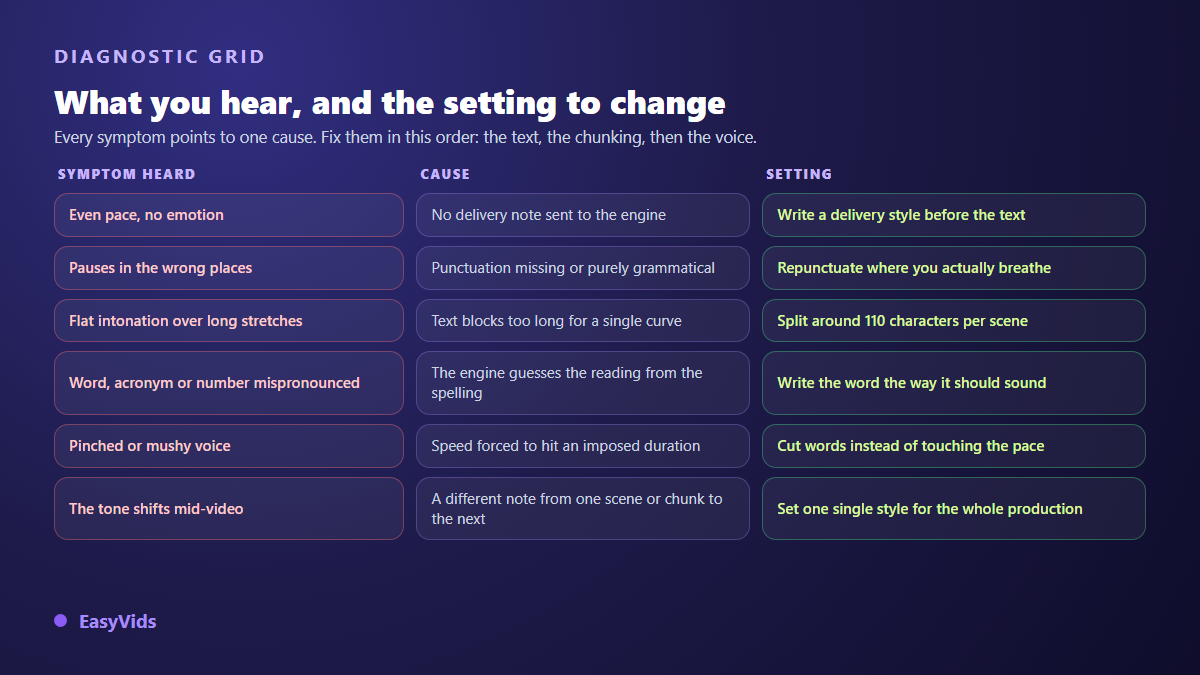
A synthetic voice builds prosody, the music of a sentence: the rises, the stresses, the silences. It infers that music from three signals and three only. The punctuation of your text, the length of the block it receives, and the delivery instruction you placed before the text. A script with no commas, served in ten line slabs, read with no instruction, will sound flat on any model, including the most premium one available. Fix those three things and the same voice becomes convincing.
The engine does not read words, it reads a score
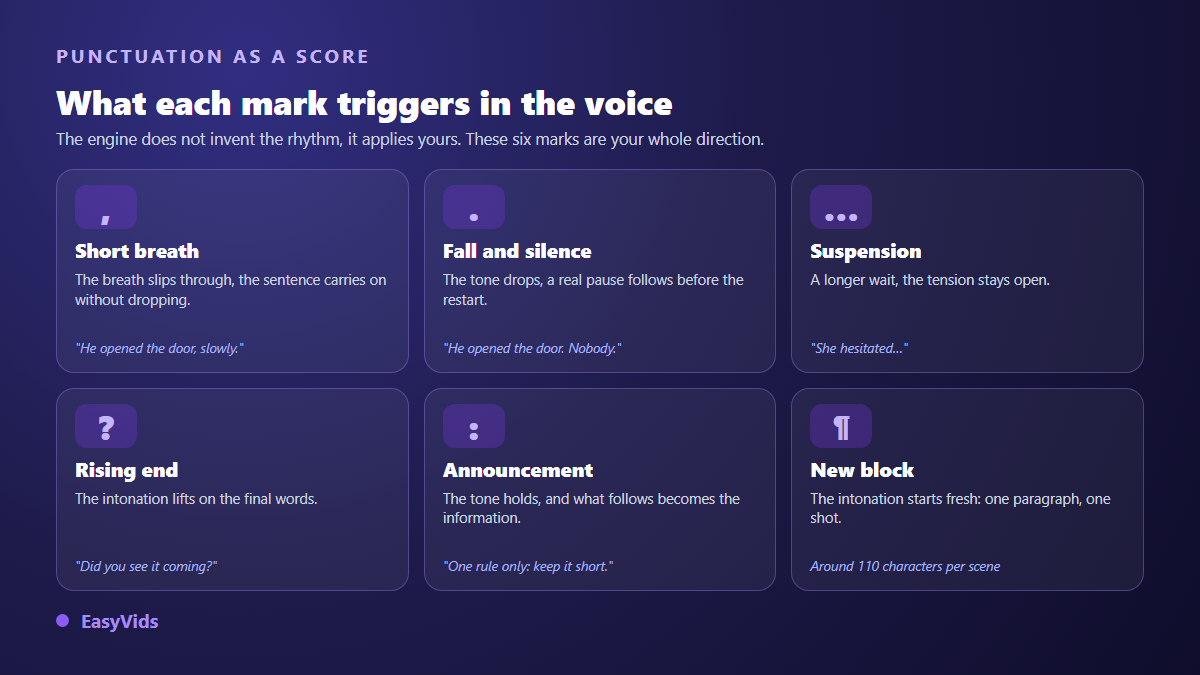
An actor works from a score, not from a string of words. Synthesis engines do the same, more literally. Your punctuation is their only stage direction: it decides where the breath falls, where the tone drops, where the sentence lifts. Punctuate sparingly and there is nothing left to interpret, so the machine picks the most neutral option available. That neutrality is exactly what listeners hear as a defect.
The idea is not new. The SSML standard, published by the W3C, has long formalised tags for pauses, emphasis and pronunciation aimed at speech engines. Most consumer studios do not expose them, and that is no great loss: ordinary punctuation covers the bulk of the need, as long as you treat it as stage direction rather than as grammar.
In practice, a comma sets a short breath, a full stop sets a fall and a real silence, an ellipsis a longer wait, a question mark a rising end, a colon an announcement. "He opened the door. Nobody." does not sound anything like "He opened the door and there was nobody there." Both sentences say the same thing. Only one of them is performed.
Cause one: a script written for the eye
Text meant for silent reading allows nested clauses, asides and stacked subordinates. The eye can double back when it gets lost. The ear cannot. On a forty word sentence the engine runs out of breath, flattens its pitch curve and delivers precisely what people complain about in synthetic voices.
The test takes one minute and costs nothing: read your script out loud, standing up, breathing only at full stops and commas. Every place where you run out of air is a place where the engine will get it wrong. Every sentence you have to read twice will be read badly.
Across our own productions this constraint applies from the writing stage. The internal rules of our writer enforce a read aloud test sentence by sentence, keep sentences short and concrete, and ban a set of devices that work on paper but turn into mechanical staccato when spoken: chained anaphora such as "Not a sound. Not a move.", verbless dramatic fragments, bare runs of numbers. Those turns of phrase, far more than the timbre, are what make a viewer say a script was generated.
- One idea per sentence, one conjugated verb per sentence.
- Cut any sentence you cannot read in a single breath.
- Turn parenthetical asides into standalone sentences.
- Remove runs of verbless fragments: they chop the read into pieces.
- Write the connectors out loud ("and", "but", "so"): the engine leans on them to link two ideas.
Cause two: blocks that are too long, and a pitch curve that flattens
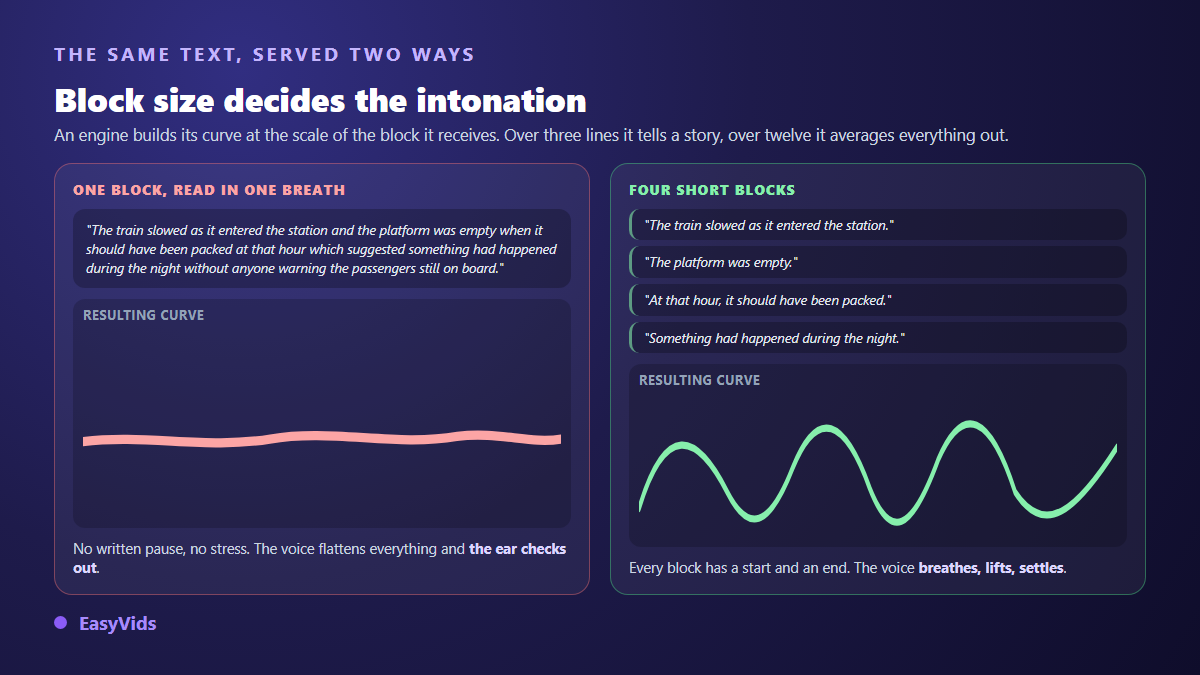
An engine builds intonation at the scale of the block it receives. Over three lines it shapes a progression, a beginning and an end. Over twelve, it averages everything out. That is why the same voice sounds alive in a twenty second spot and lifeless in a whole chapter generated in one go.
Across our productions the automatic split targets roughly 110 characters per scene. It cuts at sentence boundaries first, then at commas or colons when a sentence runs past the limit, and it merges fragments shorter than six words into their shortest neighbour. That last rule looks like plumbing: it prevents one word scenes, which engines read with a sentence ending intonation and which chop the narration apart. The value stays editable in the interface, under the maximum characters per scene field.
Long texts follow the same logic at a larger scale. Past a few thousand characters the voice is split into parts, generated in parallel, then reassembled. The delicate point sits exactly there: if the delivery instruction changes between parts, listeners hear the seam. So the instruction is decided once, on the full text, before the split. Inside a video the split has a second effect worth knowing: the real duration of each voice becomes the length of its shot in the edit, as our AI video generator guide explains.
Reading style: the instruction the engine obeys without speaking it
Some models accept a plain language instruction placed before the text: "Read like a captivating storyteller, in a warm and steady voice". The engine treats it as stage direction and never says it out loud. It is the single setting with the biggest effect for the least effort, and the one almost nobody fills in.
In our studio that field is called the reading style. It is available only on the model family that knows how to interpret it, shown as Model V1 in the voice picker. The other families ignore the field entirely, so filling it there changes nothing either way. Five examples ship with the interface, mostly as a starting point to rewrite.
- Read like a captivating storyteller, in a warm and steady voice.
- Read like a TV news anchor, serious and brisk.
- Read with enthusiasm, like a high energy announcement.
- Read in a soft, soothing voice, like a meditation.
- Read like a wildlife documentary narrator, deep and mysterious.
Three behaviours are worth knowing. The style can be saved once on your account and then applies to every compatible voice over without retyping. It is frozen when you launch the production, which prevents a preference change mid way from producing two different tones in the same film. And if a scene already carries its own instruction, that one wins: the scene text stays in charge.
Pace: slow down with punctuation, never with a slider
The usual reflex is to lower the reading speed when a voice feels rushed. The result is almost always worse: vowels stretch, consonants drag, and you get a muddy delivery instead of a measured narration. In the other direction, speeding up to squeeze a long script into a fixed duration produces the pinched timbre listeners immediately read as machine made.
The right unit is not speed, it is the amount of text. A minute of narration is roughly 150 words. If a scene overflows, remove words or split the scene. If it flies past, add a written breath rather than a global slowdown. A voice that seems to take its time is a voice with silences, not a slow voice.
Numbers, acronyms and lookalike words: the mistakes that give the machine away
An engine guesses pronunciation from spelling. Every guess is a chance to be wrong, and one slip is enough to remind viewers they are listening to software. The fix is mechanical: write what you want to hear, not what typography recommends.
- Numbers: spell them out, so a figure becomes "one thousand two hundred" and a share becomes "twenty per cent".
- Abbreviations: "Dr", "approx.", "etc." read badly. Write them in full.
- Acronyms: some are spelled letter by letter, others read as a word. Write the form you want.
- Lookalike words and homographs: rewrite the sentence rather than hoping the engine picks the right reading.
- Proper nouns and foreign words: spell them phonetically in the voice text only.
- All caps headings: some engines spell them out. Use ordinary sentence case.
These rewrites only apply to the text sent to the voice. Nothing forces you to carry them into the on screen captions, which keep normal spelling. That is usually better: a phonetic spelling on screen pulls the eye for the wrong reason.
Picking the right voice model for what you are telling
Model families do not serve the same purpose, and the best on paper is not always right for your scene. Three families sit side by side in our voice catalogue, under neutral names. Model V1 accepts reading styles and offers a wide palette of timbres, so it gives the most control over performance. Model V2.5 targets long form narration. Model V2 rounds out the catalogue with natural sounding voices in French and English.
Source language matters more than any general ranking. A voice designed for one language will read another with an accent and shaky liaisons whatever its intrinsic quality, and the blame lands on the technology when it belongs to the casting. Always check the language of a voice before judging the engine. Families are not billed at the same level either, which makes it sensible to draft with the most economical one and keep the finest for the published version: the detail sits on the pricing page.
What cloning fixes, and what it does not
Voice cloning changes the timbre, not the intention. A cloned voice reading badly punctuated text is still a robotic voice, now in your colour. That disappointment is common: people expect cloning to deliver naturalness when it delivers identity. The order of operations therefore never changes: text first, splitting second, timbre last.
Technically, a clean sample of a few dozen seconds is enough for current models, provided it was recorded in a dead room with no music or background noise, and contains varied sentences rather than one monotone read. On rights, the rule is short: cloning a voice requires that person's agreement. The European Union artificial intelligence regulation, adopted in 2024, sets transparency obligations for content generated or manipulated by AI, and according to the YouTube help centre the upload form asks creators to flag realistic content made with AI. We covered those limits in our article on the legality of voice cloning.
The final mix: breath, music and listening level
A perfectly tuned voice can still sound artificial once it sits inside a video, for reasons that have nothing to do with synthesis. Edits often butt scenes together with none of the small silence that naturally separates two ideas. Add a fraction of a second of silence between narrative shots and the ear reads that gap as a human breath.
Music plays the same role, as long as it stays well under the voice, around a fifth of its volume. A discreet bed masks the micro defects of synthesis and gives a continuity the voice alone does not have. Then listen on a phone speaker rather than headphones: that is how most of your audience will hear you.
Frequently asked questions
Why does my AI voice pause in the wrong places?
Because it follows your punctuation to the letter. A missing comma becomes a missing pause, a decorative comma becomes an unjustified silence. Read the sentence out loud and place commas where you actually breathe, not where grammar tolerates them.
Should I slow the voice down to make it sound natural?
No. A global slowdown stretches vowels and amplifies the mechanical effect. To create calm, add punctuation and cut long sentences. Naturalness comes from well placed silences, never from reading speed.
How do I fix a word that is always mispronounced?
Spell it phonetically in the text sent to the voice, and keep correct spelling in the captions. Foreign proper nouns, acronyms and numbers are almost always solved this way, and the fix costs one regeneration of that scene.
Does cloning my own voice remove the robotic effect?
It brings your timbre, not your intention. Badly punctuated text is still badly read, even in your voice. Sort out the writing and the splitting first, then let cloning put an identity on top of a read that already works.
Can I regenerate a single sentence without redoing the whole voice over?
Yes. Each scene carries its own voice over and regenerates on its own, with the same voice or a different one, without relaunching the whole production. That is what makes fine tuning practical: fix one sentence, listen again, move on.
A robotic AI voice is not a technical fate, it is a script that has not been prepared for the ear yet. Repunctuate, cut short, set a delivery instruction, test on a single scene: those four moves are enough to push a narration onto the believable side, whatever model sits behind it. To try them on your own text, create an account and run a first voice over in the EasyVids studio.